
Enterprise Reporting Software in 2026: Features & Use Cases

TL;DR: Enterprise reporting software in 2026 helps organizations deliver accurate, secure, and scalable reports across teams and systems. It reduces manual effort, ensures consistency, and supports regulatory and legal compliance with structured, repeatable reporting. This guide covers key features, benefits, and real-world use cases.
Introduction
In 2026, organizations are dealing with more data than ever before. They struggle with turning that data into reliable, consistent reports at scale.
Teams often face:
-
- Conflicting numbers across departments.
- Manual report creation that slows down decisions.
- Delays in accessing accurate, up-to-date insights.
These challenges make it difficult to maintain trust in data and act quickly. This is where enterprise reporting software becomes essential. Instead of relying on disconnected tools and manual workflows, businesses need a system that ensures standardized, secure, and repeatable reporting across the organization.
In this guide, you’ll learn:
-
- Why enterprise reporting software matters in 2026.
- Key features to evaluate.
- Practical use cases across industries.
- How solutions like Bold Reports® support enterprise reporting.
Let’s start by first defining enterprise reporting software.
What is enterprise reporting software?
Enterprise reporting is the standardized delivery of governed, repeatable reports across an organization for decision-making, compliance, and performance tracking.
Enterprise reporting software helps organizations create, manage, and deliver reports across departments, systems, and users.
It allows teams to:
-
- Access data from multiple sources.
- Generate operational and analytical reports.
- Share insights securely across the organization.
- Automate reporting workflows.
Unlike basic reporting tools, enterprise solutions are built for scale, security, and flexibility. Here’s why it matters in 2026.
Why enterprise reporting is needed in 2026
For organizations that depend on formal reporting, enterprise reporting software enables reliable delivery, compliance, and operational clarity. With the right reporting platform, you can:
-
- Ensure consistent and accurate reporting: Pixel‑perfect layouts ensure formatting stays intact across exports and recipients.
- Reduce manual reporting processes: Automated scheduling replaces repetitive report generation tasks.
- Support compliance and audits: Structured reports provide fixed, auditable output for regulatory and internal requirements.
- Improve collaboration with shared reports: Centralized reporting eliminates conflicting versions across teams.
- Maintain governance and control: Access permissions and versioning ensure reports remain accurate and approved.
- Scale reporting securely as usage grows: Enterprise platforms handle increasing report volume without disruption.
Enterprise reporting is the right fit when teams need governed, repeatable, audit-ready outputs for business-critical communication.
To understand how these benefits translate into real-world value, let’s explore some industry-specific use cases.
Industry use cases for enterprise reporting software
Enterprise reporting supports structured reporting needs across different departments by delivering pixel‑perfect, distributable reports.
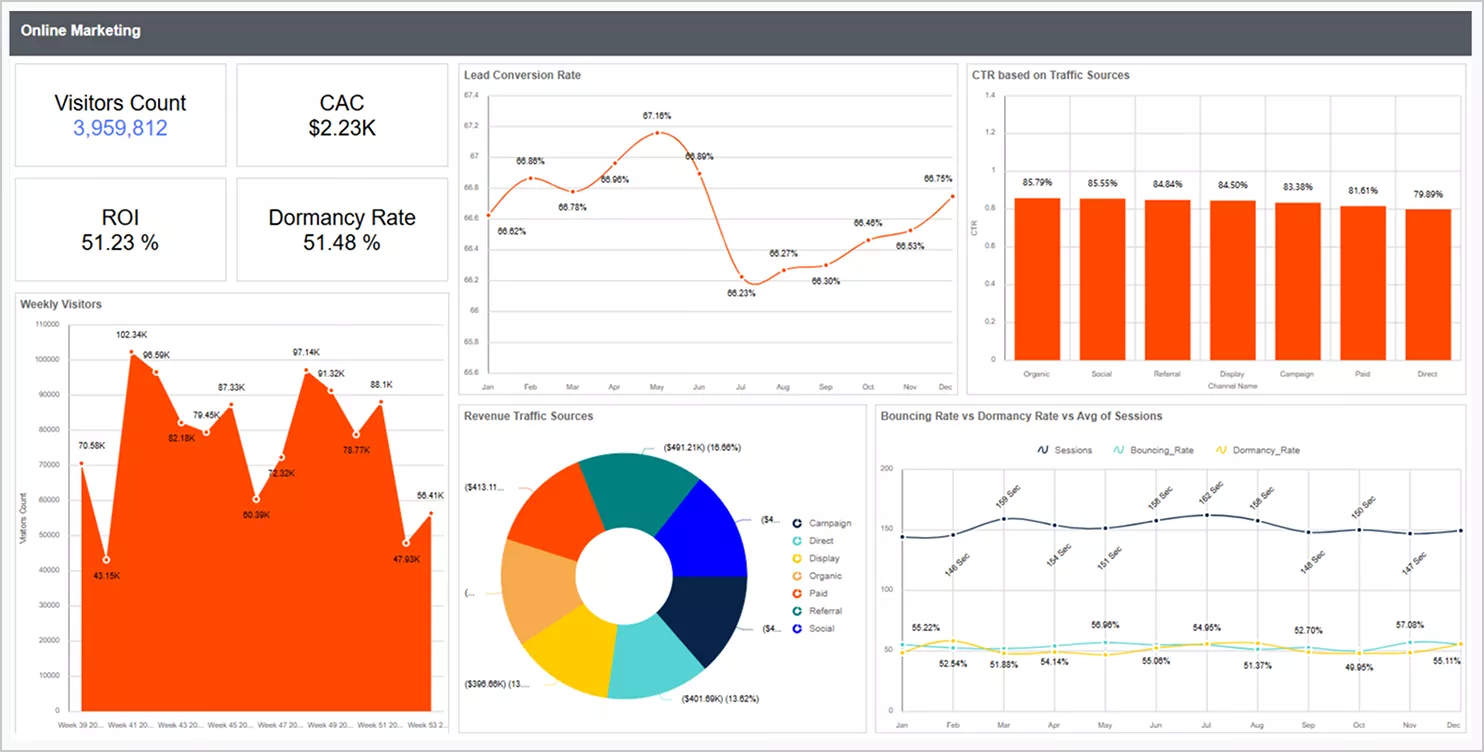
Marketing: Improving visibility into campaign performance
Marketing teams depend on reliable insights to evaluate how campaigns perform across channels and reporting periods. Formatting marketing data into structured reports provides a clear, consistent view of performance that can be reviewed and shared across teams and leadership.
With enterprise reporting, marketing teams can:
-
- Combine traffic, lead, and conversion data from multiple marketing channels into a unified report.
- Track performance metrics such as conversions, cost per lead, and return on investment across reporting periods.
- Generate consistent reports for leadership review, planning cycles, and performance assessments.
These reduce manual reporting effort, eliminate inconsistencies across teams, and support clearer visibility into marketing effectiveness through governed, repeatable reporting.
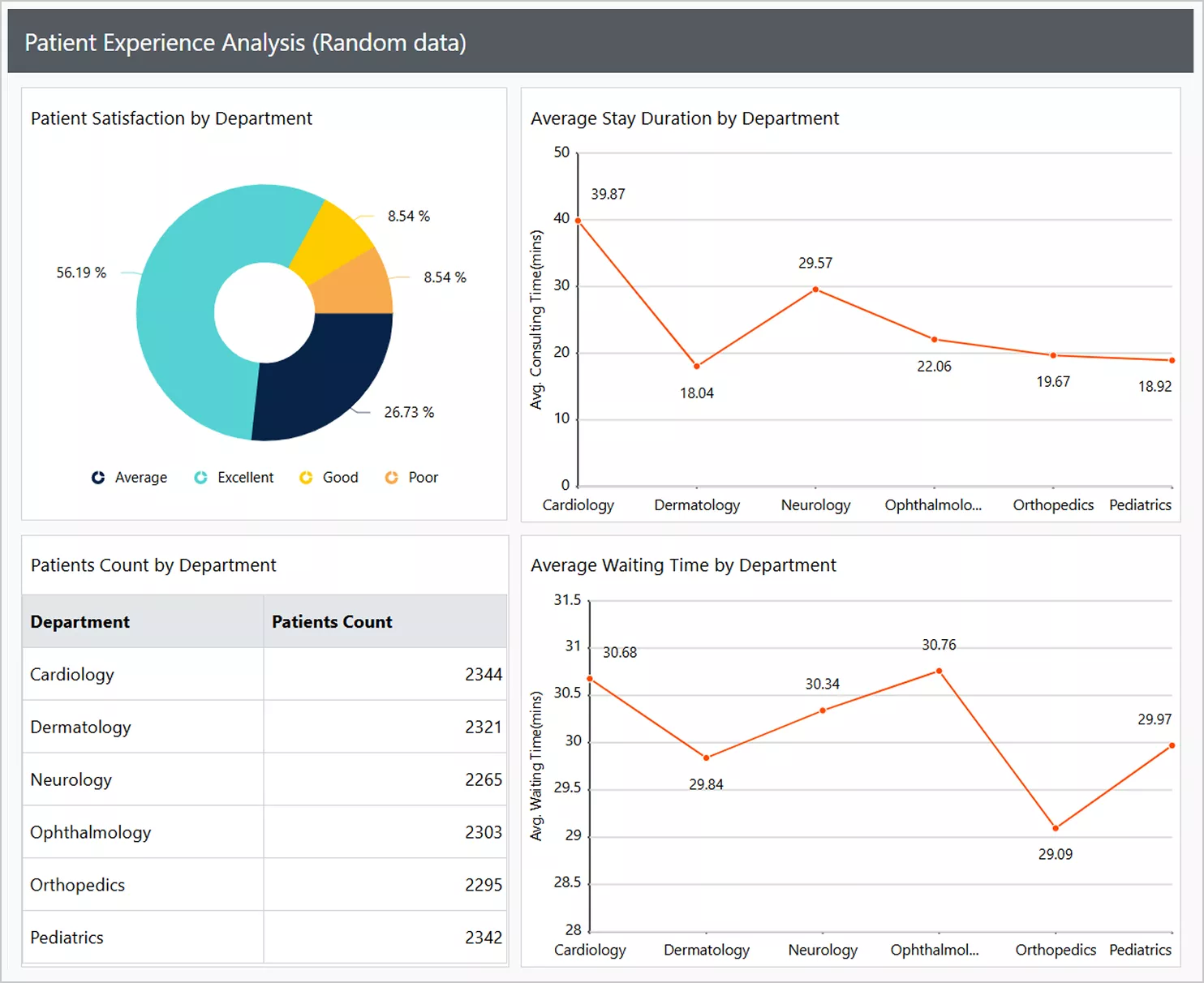
Healthcare: Improving patient experience and operational visibility
Healthcare operations depend on timely insights into patient experience and service efficiency. Bringing patient and operational data into structured reports provides a clearer view of performance across departments. With enterprise reporting, healthcare teams can:
-
- Combine data from surveys, electronic health records, and feedback systems into a unified report.
- Track patient satisfaction, waiting times, and stay duration across departments.
- Generate consistent reports for management review and compliance.
These minimize data silos, supports faster decisions-making, and improves operational visibility while maintaining compliance.
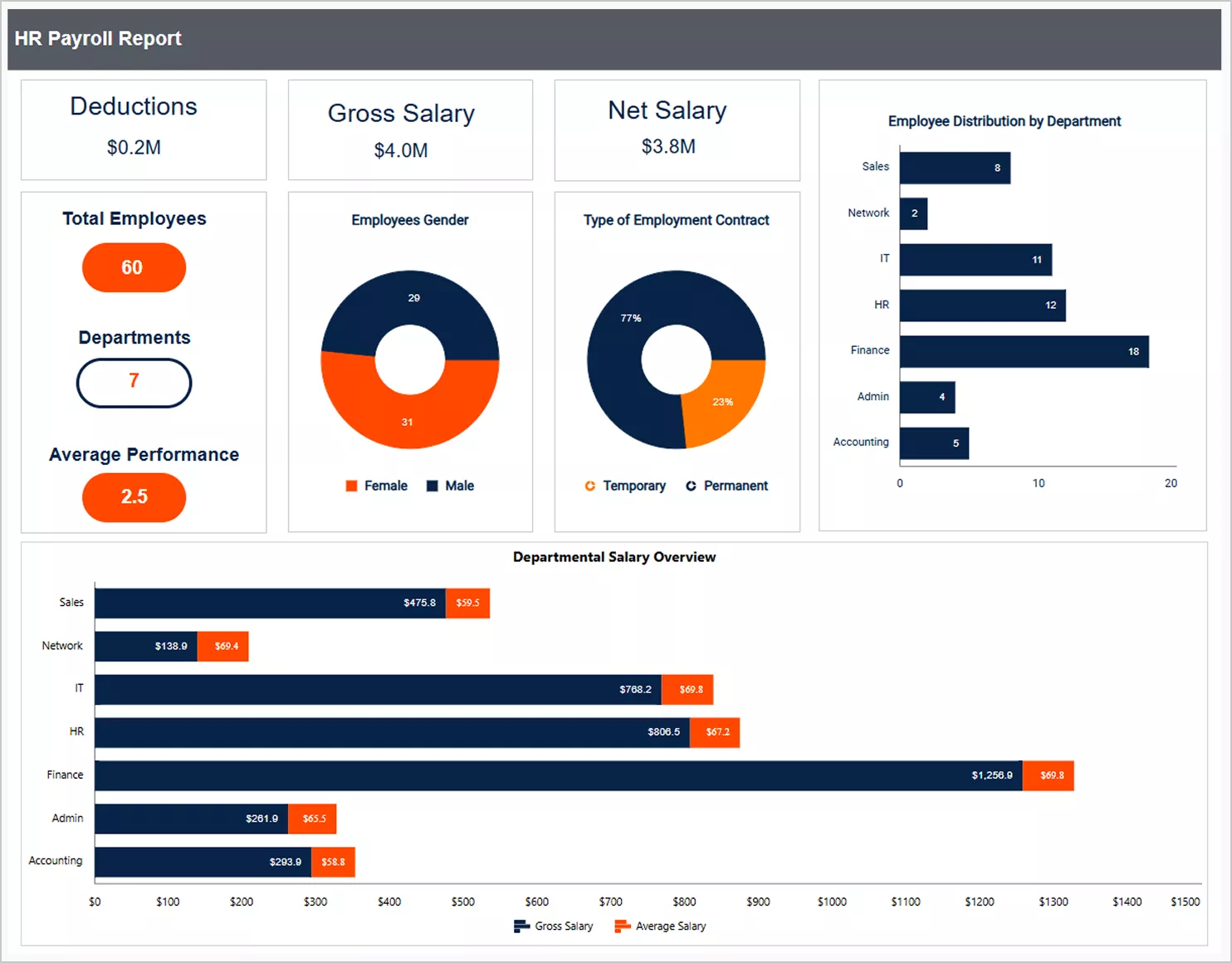
Human resources: Strengthening payroll accuracy and workforce reporting
Managing payroll and workforce data requires accuracy, consistency, and secure access. Structured reporting allows HR teams to review compensation and employee data in a clear, and repeatable format. With enterprise reporting, HR teams can:
-
- Present gross salary, deductions, and net salary in a single report.
- Review workforce details such as contract types, departments, and employee distribution.
- Produce consistent payroll reports for internal validation and audits.
These improve payroll accuracy, reduces manual effort, and strengthens confidentiality and compliance through consistent, controlled reporting.
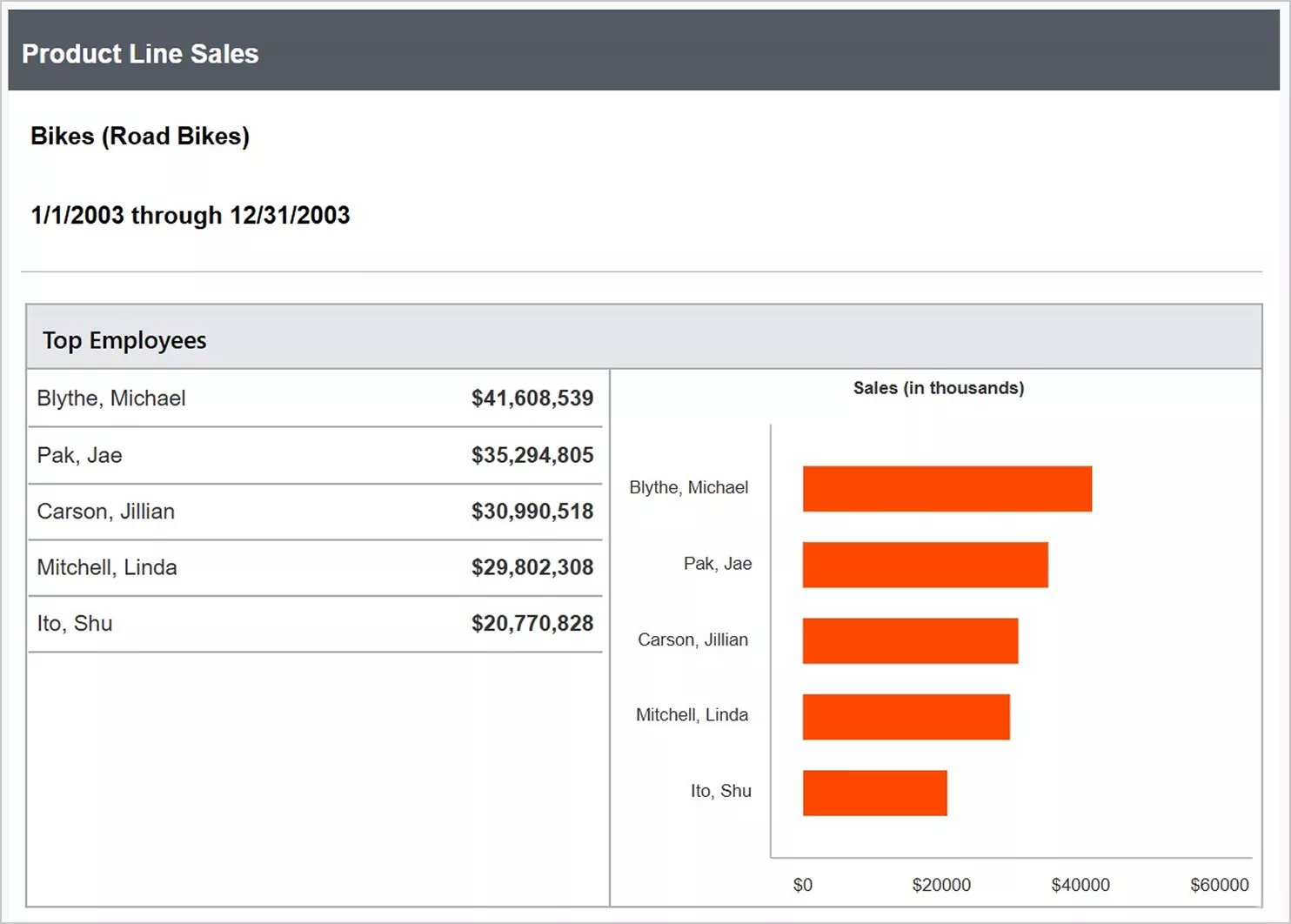
Sales: Increasing visibility into product performance
Sales performance analysis depends on having a clear and consistent view of revenue data. Structured reports bring together product, employee, and store-level insights in one place. With enterprise reporting, sales teams can:
-
- Track top-performing employees and stores through unified reports.
- Analyze product line performance using clear comparisons and summaries.
- Generate consistent reports for management and performance reviews.
These improve visibility into performance, speeds up decisions, and helps teams identify growth opportunities.
With these use cases in mind, let’s examine the essential features to prioritize when choosing a solution in 2026.
Key features to look for in enterprise reporting software in 2026
Choose enterprise reporting software that delivers standardized, secure, and scalable pixel‑perfect reports across teams and applications, without adding complexity to your workflow.
-
- Unified data integration: Look for a solution that connects seamlessly to relational databases, cloud data platforms, REST APIs, and third‑party business applications. Broad integration capabilities ensure all reporting data can be centralized, governed, and reused across the organization.
- Self-service report creation: Business users should be able to create, customize, and reuse reports with minimal reliance on IT teams. A strong self‑service experience accelerates decision‑making while reducing reporting backlogs and development overhead.
- Automated scheduling and distribution: Built‑in scheduling and automation are critical for enterprise workflows. The software should automatically generate and deliver reports on defined schedules, trigger report distribution based on events, and reduce manual, repetitive distribution tasks.
- Multi‑format export and sharing: Enterprise reporting tools must support exporting reports to PDF, Excel, Word, and HTML formats. This ensures reports can be easily shared, archived, embedded into workflows, or used for audits and regulatory submissions.
- Enterprise‑grade security and access control: Strong security features are non-negotiable. Look for role‑based access control, row‑ and column‑level data security, secure authentication methods, and audit trails to ensure sensitive information is protected across users and departments.
- Flexible deployment options: Modern enterprises require deployment freedom. The ideal solution supports cloud, on‑premises, and hybrid environments, so that organizations can align their reporting infrastructure with regulatory, performance, and data‑residency requirements.
- Scalability and performance at scale: The platform should handle large data volumes, concurrent users, and complex queries without performance degradation. Efficient rendering engines and scalable architectures are key to supporting enterprise‑wide adoption.
- Embedded reporting support: Enterprise reporting software should allow pixel‑perfect reports to be securely embedded directly into internal portals, enterprise systems, and customer‑facing applications. This enables users to view, filter, export, and schedule reports within their existing workflows, without switching tools.
- Compatibility with existing reports: Support for industry‑standard formats such as RDL (SSRS) allows organizations to reuse existing reports and significantly reduce migration effort when modernizing their reporting stack.
With these features in mind, the next step is understanding how to implement enterprise reporting effectively.
Best practices to implement enterprise reporting successfully
Implement enterprise reporting software with a structured approach to ensure consistency, security, scalability, and long‑term maintainability across the organization.
-
- Use standardized reporting formats such as RDL and RDLC to ensure reports are reusable, consistent, and easier to maintain across systems.
- Establish secure authentication and access control early to protect sensitive enterprise data and manage user permissions effectively.
- Separate development, staging, and production environments to reduce deployment risks and support controlled report updates.
- Centralize report management to maintain governance, version control, and consistency across teams and departments.
- Automate report generation and distribution where possible to reduce manual effort and ensure timely delivery of enterprise reports.
- Plan for embedded reporting so reports can be securely accessed within internal portals or enterprise applications.
- Choose flexible deployment options (on‑premises or cloud) to meet enterprise infrastructure, regulatory, and compliance requirements.
- Monitor system health regularly and apply updates to ensure reporting remains reliable and scalable as usage grows.
Now that implementation considerations are clear, the next logical question is: which solution meets these needs best?
Why Bold Reports is a strong choice for enterprise reporting
In 2026, enterprise reporting software is no longer just a back-office tool. It has become a critical part of how organizations operate, make decisions, and scale with confidence. The right reporting solution helps businesses turn data into actionable insights, improve decision-making speed, reduce manual effort, and scale reporting across teams and customers.
Bold Reports® supports these needs by helping organizations deliver reliable, scalable, and governed reporting experiences without building everything from scratch.
With Bold Reports, organizations can:
-
- Create pixel-perfect reports using RDL (SSRS-compatible).
- Integrate with multiple data sources across systems.
- Enable self-service reporting for business users.
- Automate report delivery and scheduling.
- Ensure secure, role-based access control.
- Deploy in the cloud or on-premises.
- Support embedded reporting within applications and portals.
Ready to standardize reporting across your organization in 2026? Start a free trial of Bold Reports or book a demo to see pixel-perfect, governed enterprise reporting in action.
To wrap things up, let’s address some common questions organizations have about enterprise reporting software.
Frequently asked questions
- 1.
What is enterprise reporting software?
Enterprise reporting software is used to design and distribute structured, paginated reports that maintain consistent formatting and are derived from data under the same governance policies.
- 2.
What types of reports are commonly generated with enterprise reporting software?
Financial statements, operational performance reports, compliance reports, and executive summaries.
- 3.
How do I embed Bold Reports into my application?
Bold Reports can be embedded within web applications or portals by using APIs and framework-specific SDKs.
- 4.
How do I share reports with my team or clients?
Enterprise reports can be shared through role-based access, scheduled exports, secure links, or embedded views inside applications.
- 5.
Do I need technical skills to use Bold Reports?
Business users can create reports using a visual report designer, while technical skills are required only for embedding or advanced integrations.
- 6.
What are the security features of Bold Reports?
Bold Reports supports role-based access control, authentication integration, and secure report distribution to protect data.






