







Trusted by leading companies
johnson-and-johnson-logo
schneider-electric-logo
bridgestone-logo
siemens-logo
verizon-logo
hp-logo
fidelity-investments
intel-logo
Overview

Everything a modern report designer should do

Every Bold Reports designer shares the same capabilities. The design experience stays consistent whether it's embedded in a React or Angular SPA, a Blazor or ASP.NET Core app, or a traditional ASP.NET MVC/Web Forms application.

Design-time experience

What report authors touch

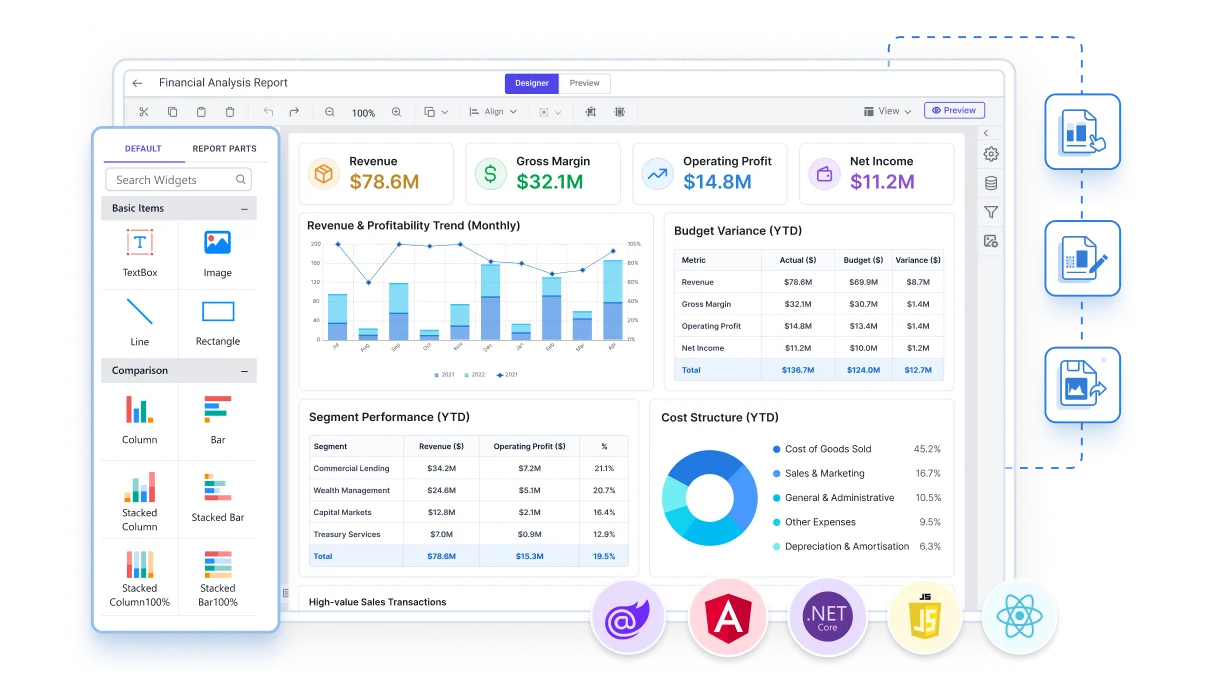
Bold Reports Web Report Designer lets business users and developers drag report items onto a design surface, connect data, and preview the layout, the design-time counterpart to the runtime Web Report Viewer.

Flexible deployment

Standalone or server-connected

Run the designer against locally stored reports, or connect it to Bold Reports Report Server or SSRS to share data sources, publish reports, and manage versions.

The Bigger Picture

Design Reports Natively in Your Stack

Bold Reports Web Report Designer is a component for JavaScript, React, Angular, ASP.NET Core, Blazor, ASP.NET MVC and ASP.NET Web Forms applications. Drop it into your existing codebase and point it at a data source, with no separate design tool and no rebuild of your application.

JavaScript Logo
JavaScript
JavaScript Logo
React Logo
React
React Logo
Angular Logo
Angular
Angular Logo
ASP NET Core
ASP.NET Core
ASP NET Core
Blazor Logo
Blazor
Blazor Logo
ASP NET MVC
ASP.NET MVC
ASP NET MVC
ASP Net Web Logo
ASP.NET Web
ASP Net Web Logo
Core Capabilities

What does Bold Reports Web Report Designer include for designing a report?

Bold Reports Web Report Designer provides the same design surface, data tools, and expression engine, whether the designer is embedded in your app or opened as the Standalone Report Designer, with built-in connectors for SQL Server, SQL Azure, Oracle, OLEDB, ODBC, XML, Web API, JSON and OData.

Connect to any data source Visual query builder
Rich report items & data visualization Interactive reports
Use Cases

What you can do with the report designer

The same design surface adapts to a range of reporting scenarios, from letting end users build their own reports to standardizing report creation across a team.

self-service-report-design
Let end users build their own reports

Give customers or internal teams a self-service way to design the exact report they need, instead of filing a request with IT.

invoice-and-statement-templates
Standardize invoice and statement layouts

Design reusable, pixel-perfect invoice, receipt, and statement templates that render identically on screen and in exported documents.

centralized-report-creation
Centralize report creation across teams

Give report authors one design tool with shared data sources, so sales, finance, and operations reports stay consistent.

ssrs-report-migration
Migrate existing SSRS report definitions

Open existing RDL report layouts directly in the designer and continue editing them, without recreating reports from scratch.

multi-tenant-report-templates
Build multi-tenant report templates

Design parameterized report templates once and reuse them across multiple clients or business units with different data scopes.

browser-based-report-design
Give non-developers a browser-based way to design reports

No local install, no Visual Studio project and business users design pixel-perfect reports directly in the browser, using the same drag-and-drop surface your developers use to embed reporting in your app.


The Bigger Picture

Report Designer is one part of the embedded reporting toolkit

Three embedded reporting components, Report Designer, Report Viewer, and Report Writer, work together to design, view, and export reports from a single platform.

Report Viewer Report Writer

Enterprise-Ready Compliance

Bold Reports helps you meet key security and compliance standards. All activity logs are safely stored, can’t be changed, and are easy to export when needed.

soc-2-type-ii-compliance
iso-27001-certified
gdpr-compliant
hipaa-compliant

Enterprise-Ready Compliance

Bold Reports helps you meet key security and compliance standards. All activity logs are safely stored, can’t be changed, and are easy to export when needed.

soc-2-type-ii-compliance
iso-27001-certified
gdpr-compliant
hipaa-compliant
Get the Details You Need

Frequently Asked Questions

A report designer is a tool for creating and editing report layouts, most often Microsoft SSRS RDL or RDLC files, using a drag-and-drop design surface, data connections, and expressions, before the finished report is opened at runtime in a viewer.

The designer is what business users and developers use to build and edit a report's layout, data, and parameters. The viewer is what end users interact with afterward to open, explore, and export the finished report.

The Bold Reports report designer supports JavaScript, Angular, React, Blazor, ASP.NET Core, ASP.NET MVC, and ASP.NET Web Forms, each with a native component, plus a standalone designer application.


Built-in support for Microsoft SQL Server, SQL Azure, Oracle, OLEDB, ODBC, Web API, OData, JSON, and XML, plus business objects like IList, DataSet, and DataTable, and custom data processing extensions for sources such as MySQL, SQLite, and PostgreSQL.

Text boxes, images, lines, rectangles, tables, lists, matrices (pivot tables), more than 20 chart types, sub-reports, barcodes, and other report items, the same visual vocabulary rendered later in the report viewer.

It runs smoothly on all modern browsers, including Chrome, Edge, Firefox, and Safari, using pure HTML5 for consistent performance across environments.

Yes. Bold Reports Web Report Designer is a browser-based RDL editor that works without Visual Studio. It opens existing SSRS RDL report layouts directly in the designer so authors continue editing them instead of recreating reports. Authors can also open RDLC reports, and save finished reports to Bold Reports Report Server in the Microsoft RDL standard.

RDL and RDLC are both report definition formats that Bold Reports Web Report Designer can edit. RDL reports are processed by a report server such as SSRS or Bold Reports Report Server, while RDLC reports are processed locally inside the host application, which supplies the data. The designer creates and edits both formats.

Bold Reports Web Report Designer includes more than 20 chart types for paginated reports. Authors can also add sparklines, data bars, gauges, indicators and maps to RDL and RDLC reports. Barcode, QR barcode and e-signature items are available as custom report items. These visualization items sit alongside tables and matrices in the same report layout.

In a drill-down report, users expand a group in place to see more detail, while a drill-through report opens a separate, linked report for the selected item. Bold Reports Web Report Designer supports both, along with hyperlinks, bookmarks, document maps, subreports and nested data regions. The interactive reports documentation describes these features.

Yes. The designer supports drill-down, drill-through, bookmarks, document maps, and nested data regions, so you can build reports that let end users explore detail without leaving the report.

Yes, through a built-in expression editor that supports constants, built-in fields, parameters, datasets, variables, operators, and common functions, along with sorting, filtering, grouping, and calculated fields for shaping data.

No. Reports are built with drag-and-drop report items and a visual query builder, so both technical and non-technical users can design paginated reports without writing code.

Reports can be saved to Bold Reports Report Server in the Microsoft RDL standard, or downloaded to your computer, so authorized users can access and view them once published.

Yes. Bold Reports Web Report Designer is a JavaScript-based component that embeds in React, Angular, Blazor, ASP.NET Core, ASP.NET MVC and ASP.NET Web Forms applications, so users design reports inside your own application interface. It runs in Chrome, Edge, Firefox and Safari and needs no separate design tool. The designer can also be opened as the Standalone Report Designer.

Yes. Bold Reports Web Report Designer has a native ASP.NET Core component and creates and edits RDLC as well as RDL reports. Developers can embed the designer in ASP.NET Core, ASP.NET MVC or ASP.NET Web Forms applications, and business users then design reports in the browser.

Enterprise teams commonly look for shared data sources, version management, reusable templates and approachable authoring. Bold Reports Web Report Designer connects to Bold Reports Report Server or SSRS to share data sources, publish reports and manage versions. It also supports parameterized templates reused across clients or business units, and a visual query builder for non-technical authors.

Yes. Bold Reports Web Report Designer provides a drag-and-drop design surface where authors place report items, connect data and preview the layout, with no coding required. Business users and developers use the same surface in the browser.

Yes, Bold Reports is free to try for 30 days, no credit card required.

Ready to let your users design their own reports?

Embed a report designer that feels like a native part of your application, fully branded and easy to use.