
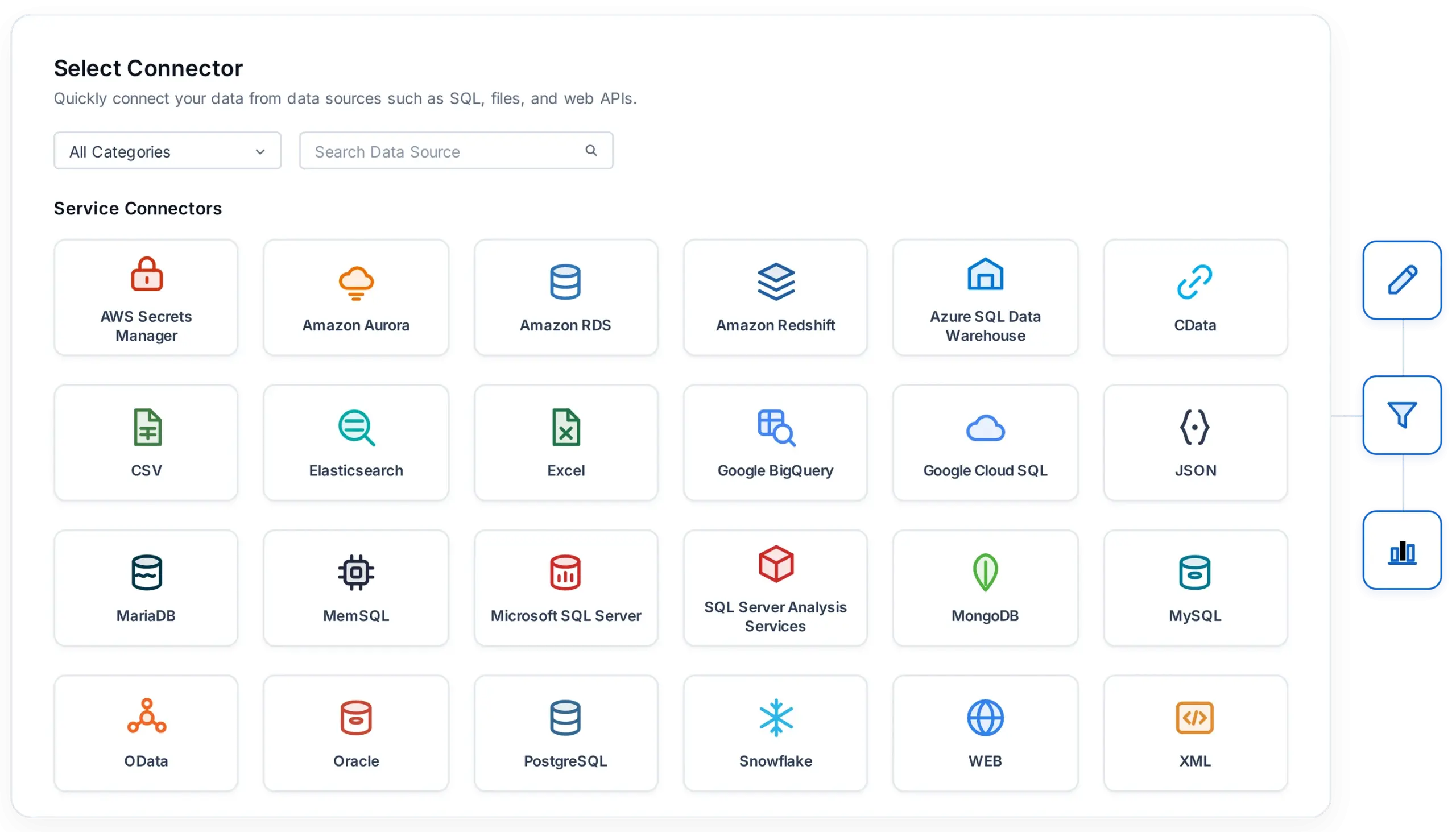







27 Connectors

Built-in connectors ready to use

Any Environment

Works across cloud and on-premises

Zero Code

Configure connections without coding

250+ Systems

Extend connectivity through CData

Trusted by leading companies

J&J

Schneider

Bridgestone

Siemens

Verizon

HP

Fidelity

Intel

How it works

Three steps, no code

From picking a source to a finished report, the whole setup happens inside the designer.

01

Pick a connector

Choose your data source from the report designer's connector list.

02

Enter connection details

Fill in the connection dialog, no custom code or drivers to install.

03

Build your report

Your data source is ready to bind to tables, charts, and other report items.

Get the Details You Need

Popular Connectors

A closer look at four of the most widely used connectors on this page.

CData

Access 250+ additional systems and applications through CData's extensive driver library.

XML

Report directly on structured XML data sources and feeds without conversion.

Snowflake

Cloud-native data platform for warehousing and analytics.

ODBC

Connect to any ODBC-compliant data source using a standard driver connection.

Why connect here

Connecting your data helps you

A consistent connection experience across every data source, built into the report designer.

Filter by Category

All Data Connectors

0 connectors

Relational Databases

Standard on-premises and self-managed SQL engines for transactional and operational reporting. Connect directly with native drivers, no middleware required.

Microsoft SQL Server

Connect to Microsoft's relational database engine for enterprise reporting.

MySQL
MySQL

Open-source relational database, widely used for web and business applications.

PostgreSQL
PostgreSQL

Open-source object-relational database with advanced SQL compliance.

Oracle
Oracle

Connect to Oracle Database for enterprise-grade relational reporting.

MariaDB
MariaDB

Open-source relational database, drop-in compatible with MySQL.

MemSQL
MemSQL

Distributed SQL database built for real-time analytics at scale.

Cloud Data Warehouses & Managed Databases

Managed and elastic data platforms across AWS, Azure, and Google Cloud. Scale storage and compute independently without managing infrastructure.

Azure SQL Data Warehouse

Microsoft's cloud-scale relational data warehouse.

Amazon RDS
Amazon RDS

Managed relational database service across multiple engines.

Amazon Aurora
Amazon Aurora

MySQL- and PostgreSQL-compatible cloud database built for high throughput.

Amazon Redshift
Amazon Redshift

Fully managed, petabyte-scale cloud data warehouse.

Google Cloud SQL
Google Cloud SQL

Fully managed relational database service on Google Cloud.

Google BigQuery
Google BigQuery

Serverless, highly scalable enterprise data warehouse

Snowflake
Snowflake

Cloud-native data platform for warehousing and analytics.

NoSQL & Search

Document stores and search/analytics engines for schema-flexible and log-heavy data. Report on unstructured and semi-structured records alongside relational sources.

MongoDB
MongoDB

Document-oriented NoSQL database for flexible, schema-less data.

Elastic Search
Elastic Search

Distributed search and analytics engine for log and text-heavy data.

AWS OpenSearch
AWS OpenSearch

Managed, open-source search and analytics suite.

Files & Flat Data

Upload or connect to structured file formats directly, no database required. Good for one-off reports or data exported from other systems.

CSV
CSV

Report directly on comma-separated value files.

Excel
Excel

Connect to Excel workbooks (XLS/XLSX) as a report data source.

JSON
JSON

Report on structured JSON data from files or endpoints.

XML
XML

Report on structured XML data sources.

APIs & Universal Connectivity

Standard protocols for connecting to virtually any source, cloud or on-premises. Built for systems without a dedicated Bold Reports connector.

Web API (REST)
Web API (REST)

Connect reports directly to REST API endpoints.

OData
OData

Query OData-compliant services as a report data source.

OLEDB
OLEDB

Connect to any OLE DB–compliant data source.

ODBC
ODBC

Connect to any ODBC-compliant data source.

CData
CData

Access 250+ additional systems through CData's driver library.

Analytics & Security

Analytical cubes and credential management services for governed enterprise reporting. Supports multidimensional models and secure connection handling.

Microsoft SQL Server Analysis Services (SSAS)

Connect to OLAP cubes and tabular models for multidimensional reporting.

AWS Secrets Manager
AWS Secrets Manager

Retrieve database credentials securely at connection time instead of storing them in plain text.

Shared: Not a data source type on its own. Shared data sources let you reuse an existing configured connection across multiple reports without reconfiguring it each time.

Get the Details You Need

Frequently Asked Questions

Bold Reports supports a wide range of data connectors, including major relational databases (SQL Server, MySQL, PostgreSQL, Oracle), cloud warehouses (Snowflake, BigQuery, Redshift), NoSQL sources (MongoDB, Elastic Search), and file/API formats (CSV, Excel, JSON, XML, REST, OData).

Yes, MongoDB is a supported data connector in Bold Reports Designer.

Every connector on this page links to a step-by-step guide in the Bold Reports documentation.

Yes. Amazon Redshift is a supported cloud data warehouse connector, alongside Azure SQL Data Warehouse, Google BigQuery, and Snowflake.

Yes. Bold Reports connects to Web API (REST) endpoints and OData-compliant services as standard data sources.

Yes. AWS Secrets Manager is a supported connector for retrieving database credentials securely at connection time instead of storing them in plain text.

Yes. Snowflake and Google BigQuery are both supported connectors with dedicated setup documentation.

Yes, Bold Reports supports shared data sources so a single configured connection can be reused across reports without reconfiguring it each time.

No. Standard connections to any of the supported sources are configured through the report designer’s connection dialogs, with no custom code required.

Yes. Bold Reports supports on-premises databases (SQL Server, MySQL, PostgreSQL, Oracle) and cloud sources (Amazon RDS, Google Cloud SQL, Snowflake) side by side.

Use the ODBC, OLEDB, or CData connectors to reach additional ODBC/OLE DB-compliant systems or the 250+ systems supported through CData’s driver library.

Ready to get started?

Ready to Modernize Reporting the Modern Way?

From migrating legacy reports to embedding reporting in applications, Bold Reports helps you move forward with confidence.

No credit card required.