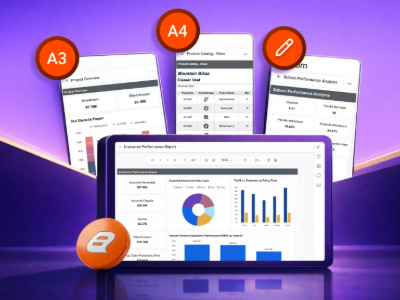







Business reporting simplified

ERP Reporting Solutions

Transform ledger, receivables, and purchasing data into pixel-perfect, paginated reports that help finance and operations teams make data-driven decisions. Bold Reports handles report formatting, scheduling, and exporting so your teams can focus on analysis and action. 

  • Compare revenue, cost, and margin at a glance.
  • Spot overdue receivables before they become write-offs.
  • Track purchase order activity and vendor commitments.
  • Send scheduled reports automatically to stakeholders.
Trusted by leading companies

J&J

Schneider

Bridgestone

Siemens

Verizon

HP

Fidelity

Intel

Key reporting advantages

Core benefits

Sales reporting helps teams prepare structured reporting for pipeline, performance, forecasting, and CRM workflows. Bold Reports supports pixel-perfect, export-ready, scheduled reporting for recurring revenue operations.

Standardized sales reporting

Prepare pixel-perfect sales reports for leadership reviews, pipeline discussions, and revenue analysis. This ensures consistent presentation and clarity across all sales reporting activities.

Consistent report distribution

Share export ready reports across sales and revenue teams to support recurring reporting cycles enabling collaboration, data access, and visibility into key performance insights for decision-making.

Scheduled revenues reporting

Deliver scheduled reports for forecast reviews, sales representative evaluations, and pipeline summaries. Automated delivery ensures timely visibility into sales performance and planning metrics.

Key modernization advantages

Core benefits

Streamline financial, receivables, and procurement reporting with consistent, automated, and data-driven insights that improve visibility, strengthen alignment, and support faster decisions. 

one-format-every-time

One format, every time

Deliver consistent, presentation-ready reports across finance, receivables, and procurement without manual formatting or last-minute adjustments. 

nothing-falls-through-the-crack

Nothing falls through the cracks

Automate report delivery on a recurring schedule to keep stakeholders informed and ensure critical updates are never missed. 

one-source-fewer-arguments

One source, fewer arguments

Keep teams aligned with shared reporting data, creating consistency across finance, collections, procurement, and leadership reviews. 

Built for sales teams

Who can use this

Finance, collections, procurement, and leadership all pull from the same ERP data, just through a different lens. Each team gets the view that matters to them without waiting on someone else to build it. 

finance-teams
Finance teams

Close the books faster with a standing P&L view of revenue, costs, and profitability.

collections-and-credit-control
Collections and credit control

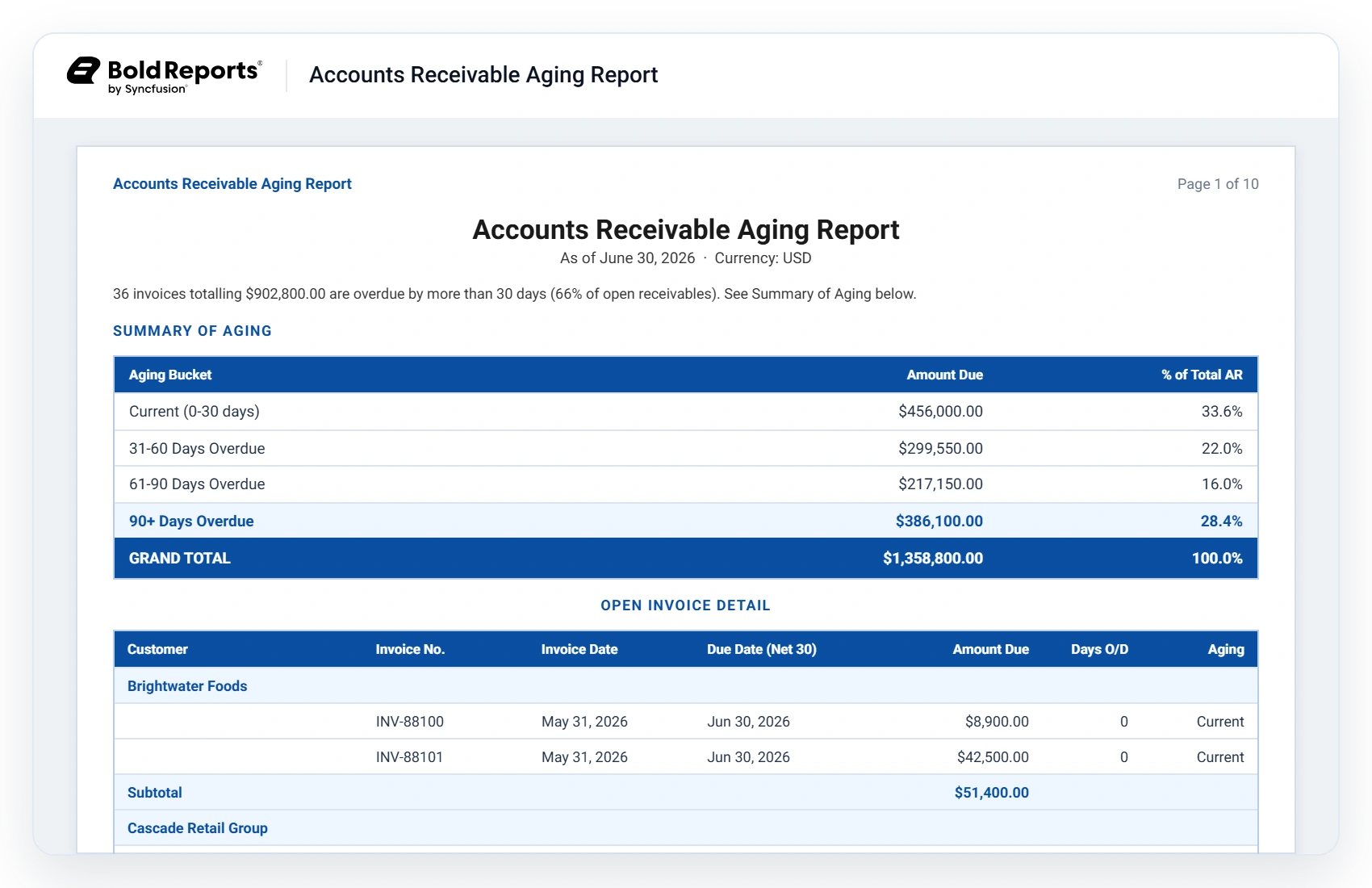
Identify aging invoices and prioritize collection efforts before receivables become high-risk.

procurement-teams
Procurement teams

Monitor vendor commitments, purchasing activity, and fulfillment progress across procurement operations.

controllers-and-executive-leadership
Controllers and executive leadership

Bring financial performance, receivables exposure, and procurement activity together for leadership reporting and strategic planning.

No credit card required.

Sales reporting use cases

Explore key use cases

Sales reporting supports pipeline reviews, rep evaluations, forecast preparation, and CRM oversight with structured outputs for recurring workflows. Bold Reports helps teams prepare export-ready reports for revenue decisions and team reviews.

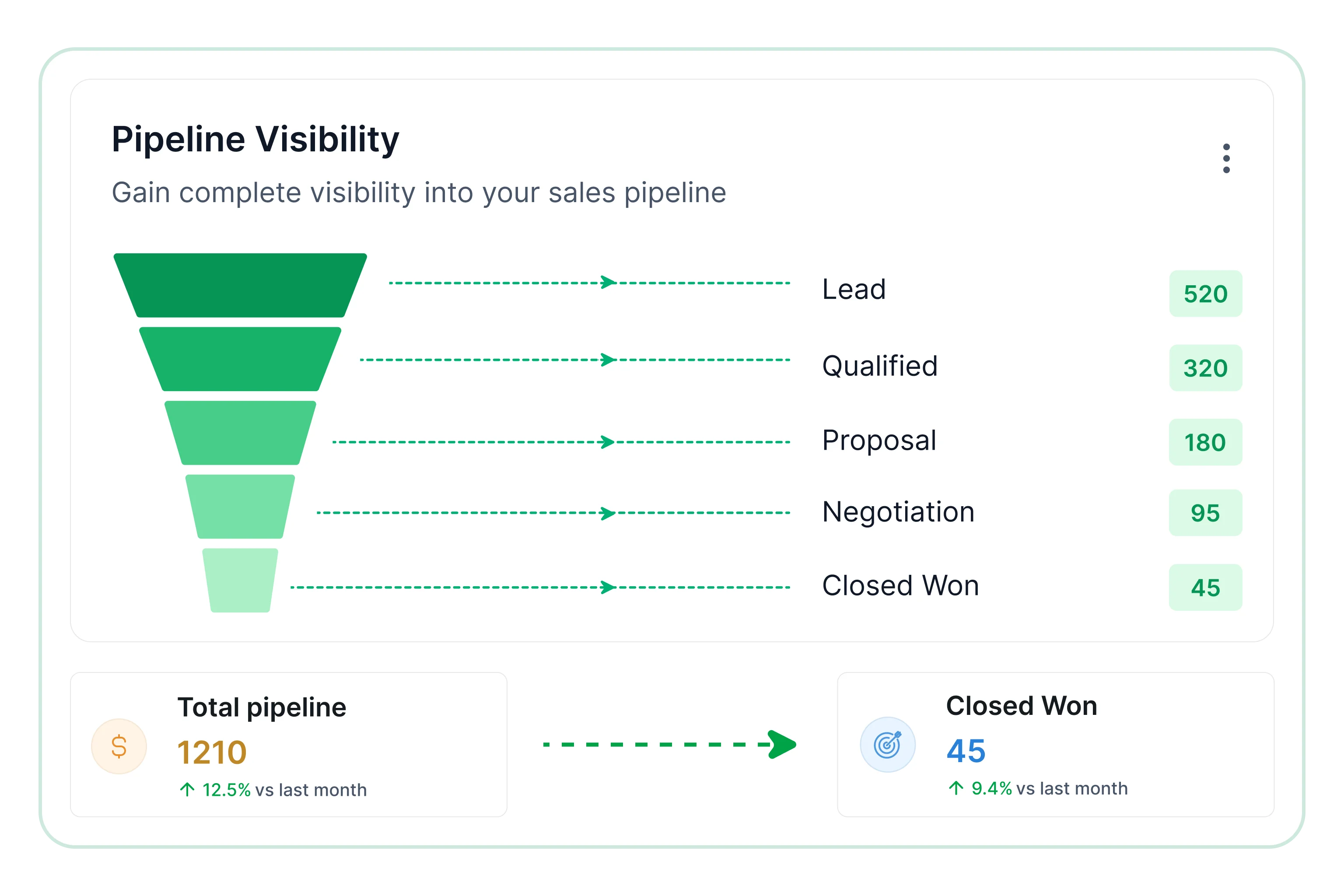
Pipeline visibility

Stage-based reporting for deal progression.

  • Compare deals across stages.
  • Review pipeline value by owner.
  • Assess movement by reporting period.
View Report
Pipeline visibility

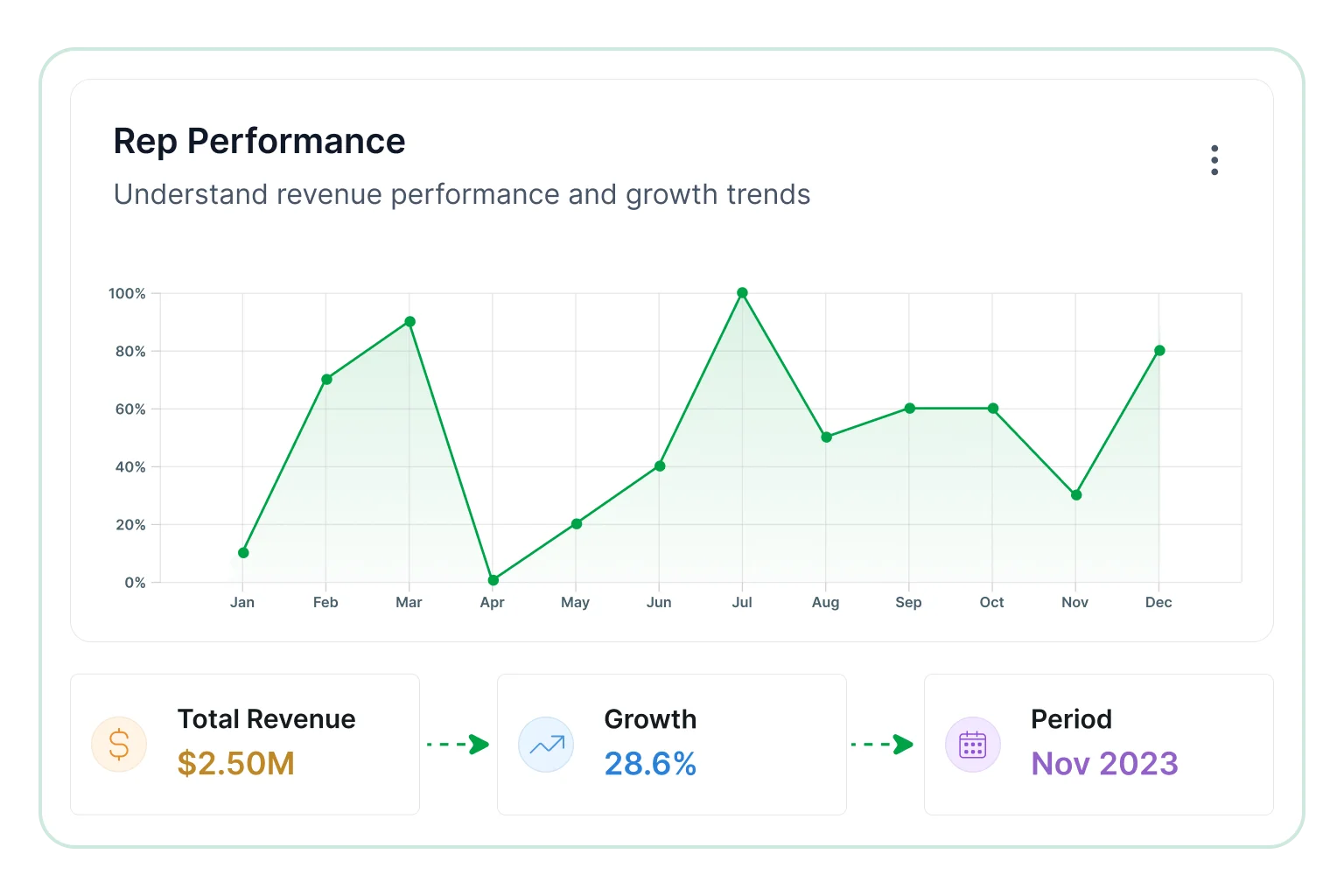
Reps performance

Rep reporting for team evaluation.

  • Compare quota attainment by rep.
  • Review win rates by team.
  • Assess output across reporting cycles.
View Report
Reps performance

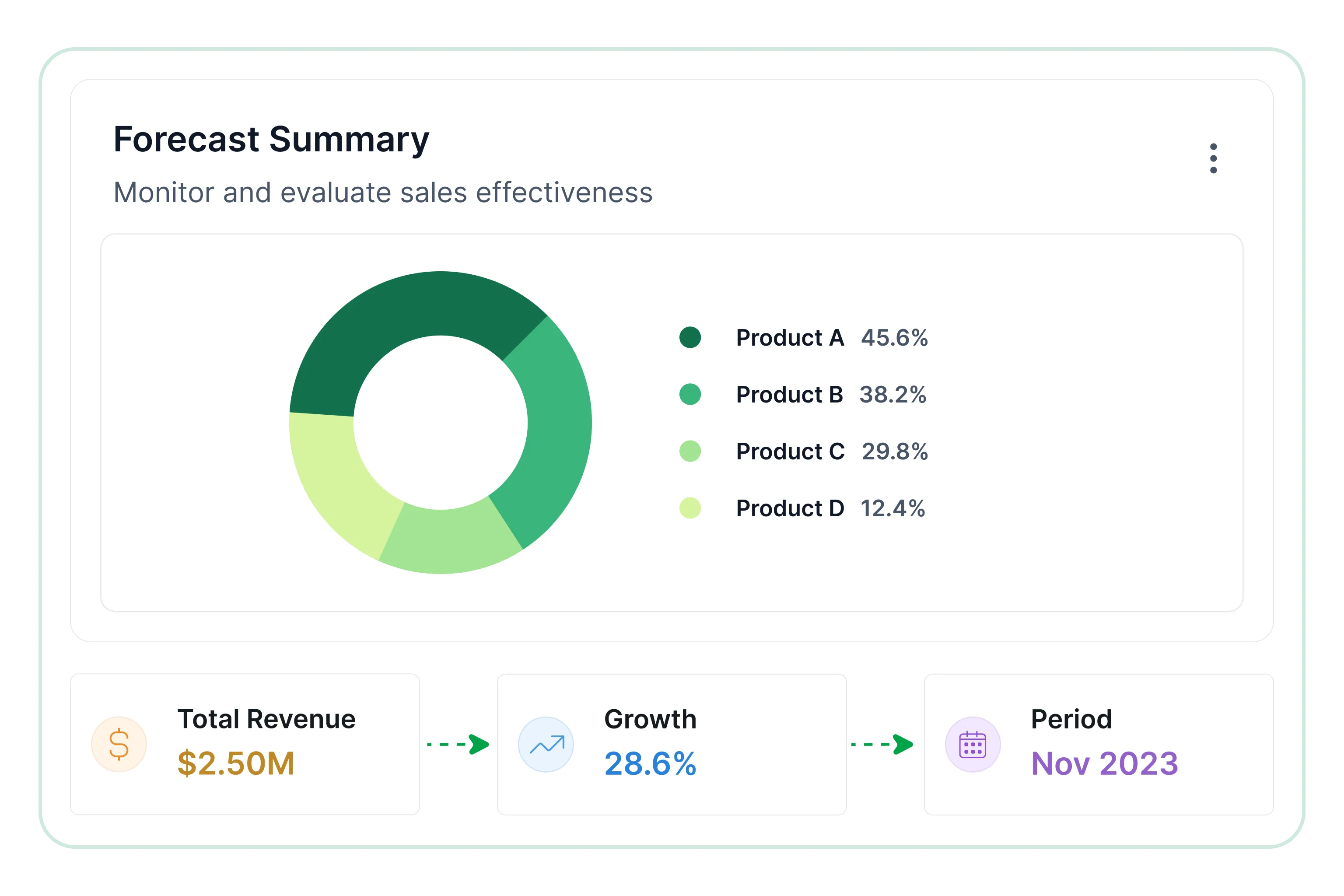
Forecast summary

Revenue reporting for forecast preparation.

  • Compare forecast against targets.
  • Review expected revenue by period.
  • Evaluate closing patterns by team.
View Report
Forecast summary

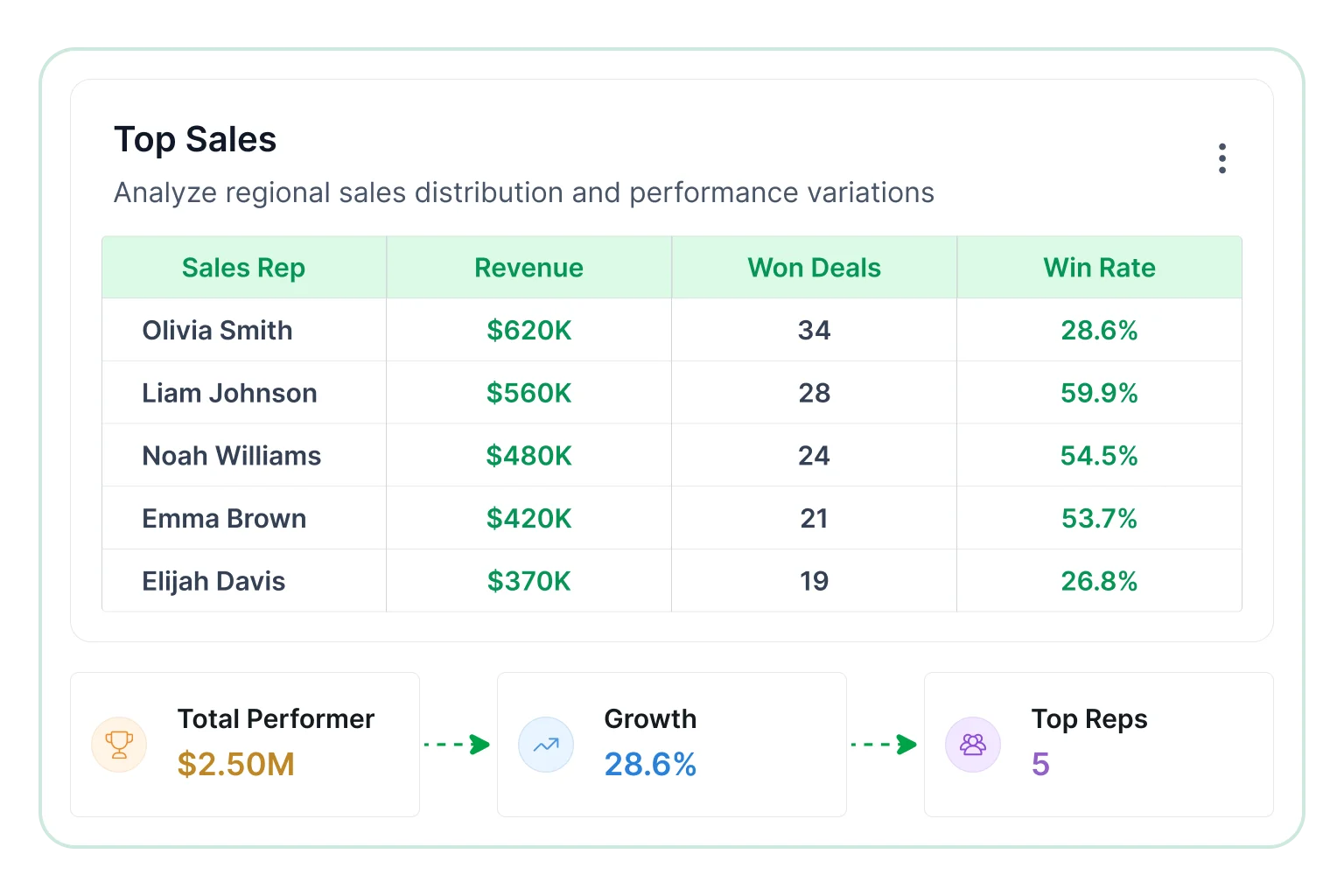
Top sales

Activity reporting for sales execution.

  • Review calls and meetings logged.
  • Compare follow-up volume by rep.
  • Assess CRM usage consistency.
View Report
Top sales
Core Reporting Capabilities

Explore key use cases

Sales reporting supports pipeline reviews, rep evaluations, forecast preparation, and CRM oversight with structured outputs for recurring workflows. Bold Reports helps teams prepare export-ready reports for revenue decisions and team reviews.

Click on the Edit Content button to edit/add the content.
Real-world reporting scenarios

Explore key use cases

Four ways teams use ERP reporting templates to support day-to-day operational and financial reporting. Each view pulls from the same underlying data, so what changes is the lens, not the numbers. 

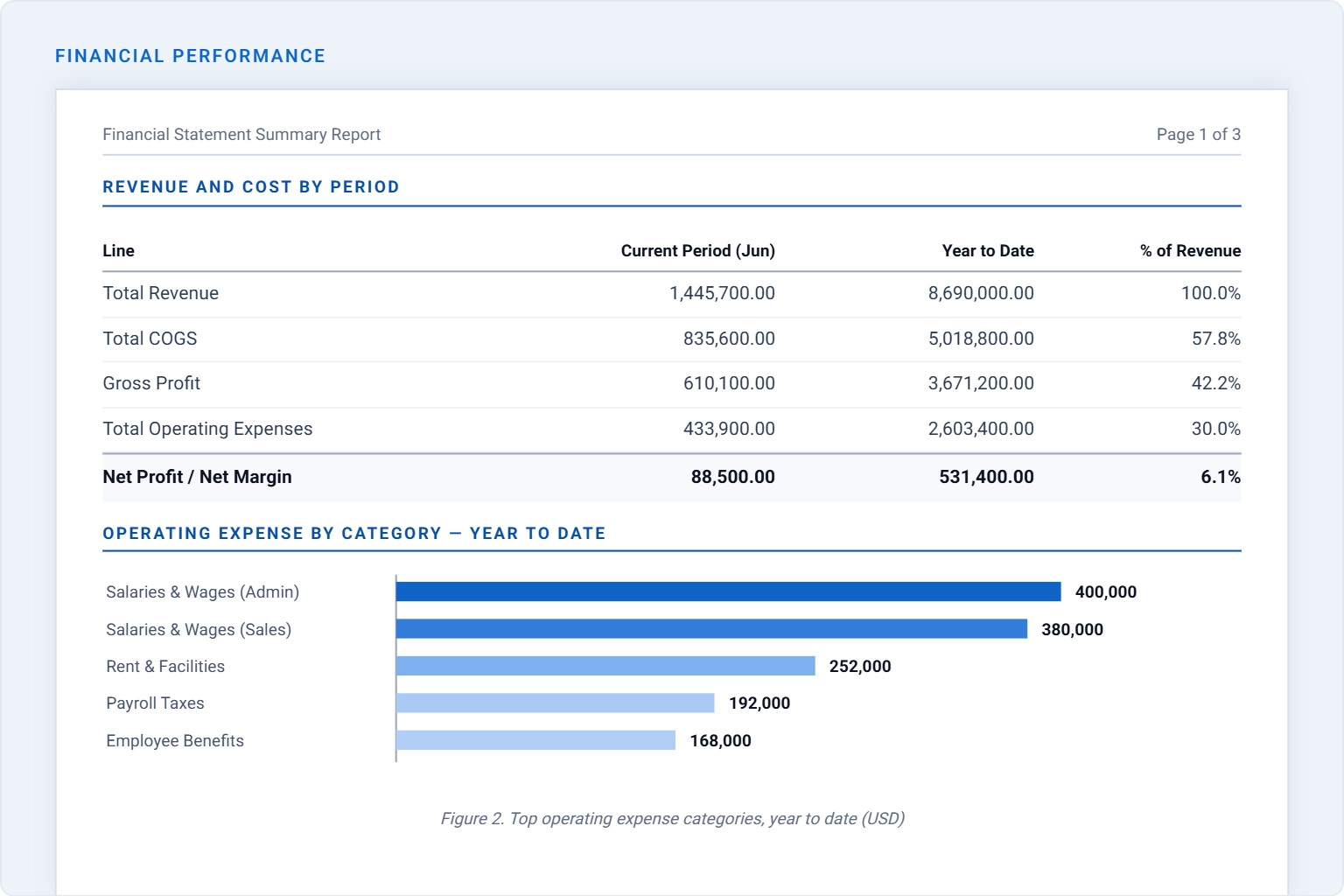
Financial performance

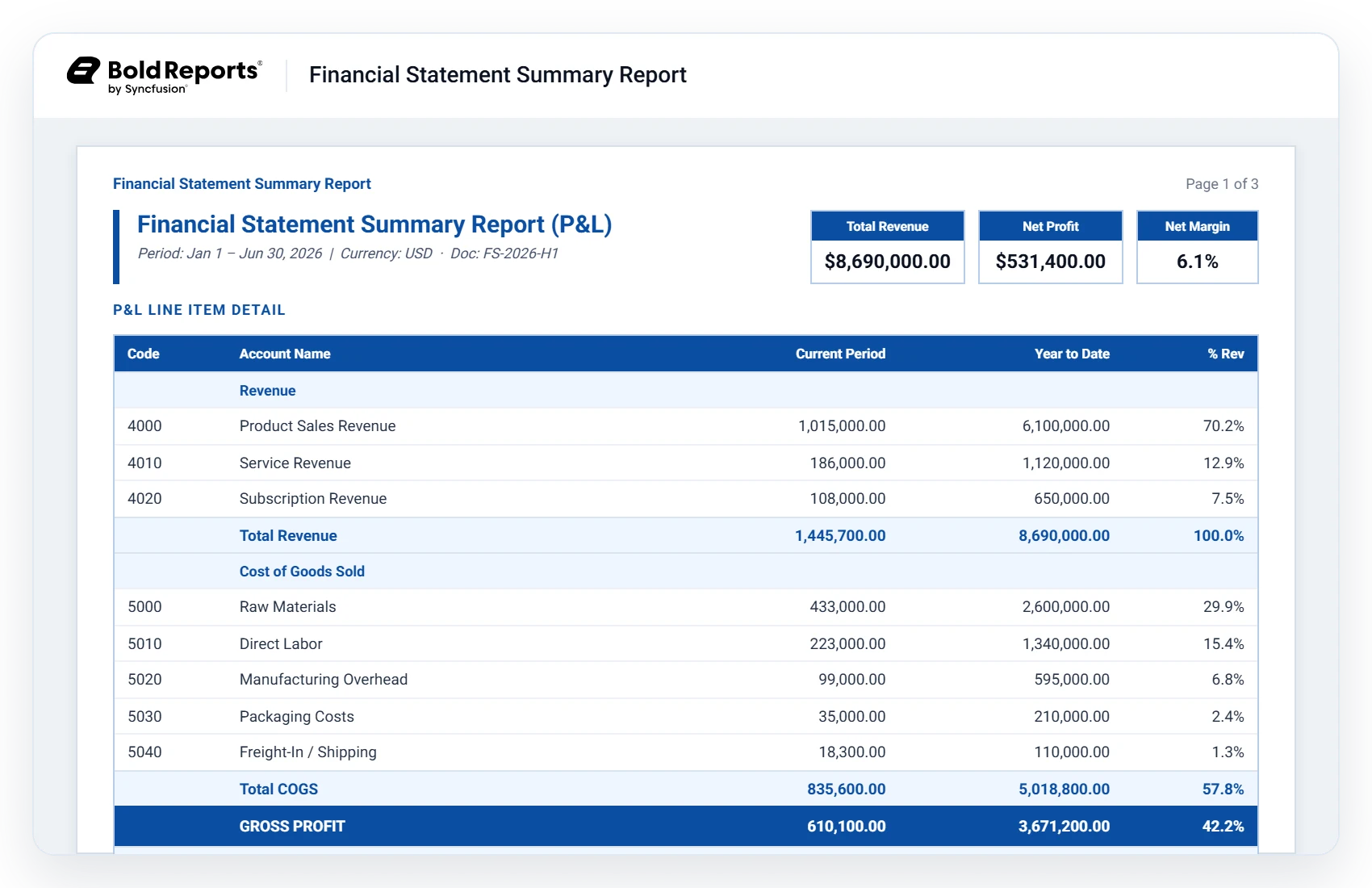
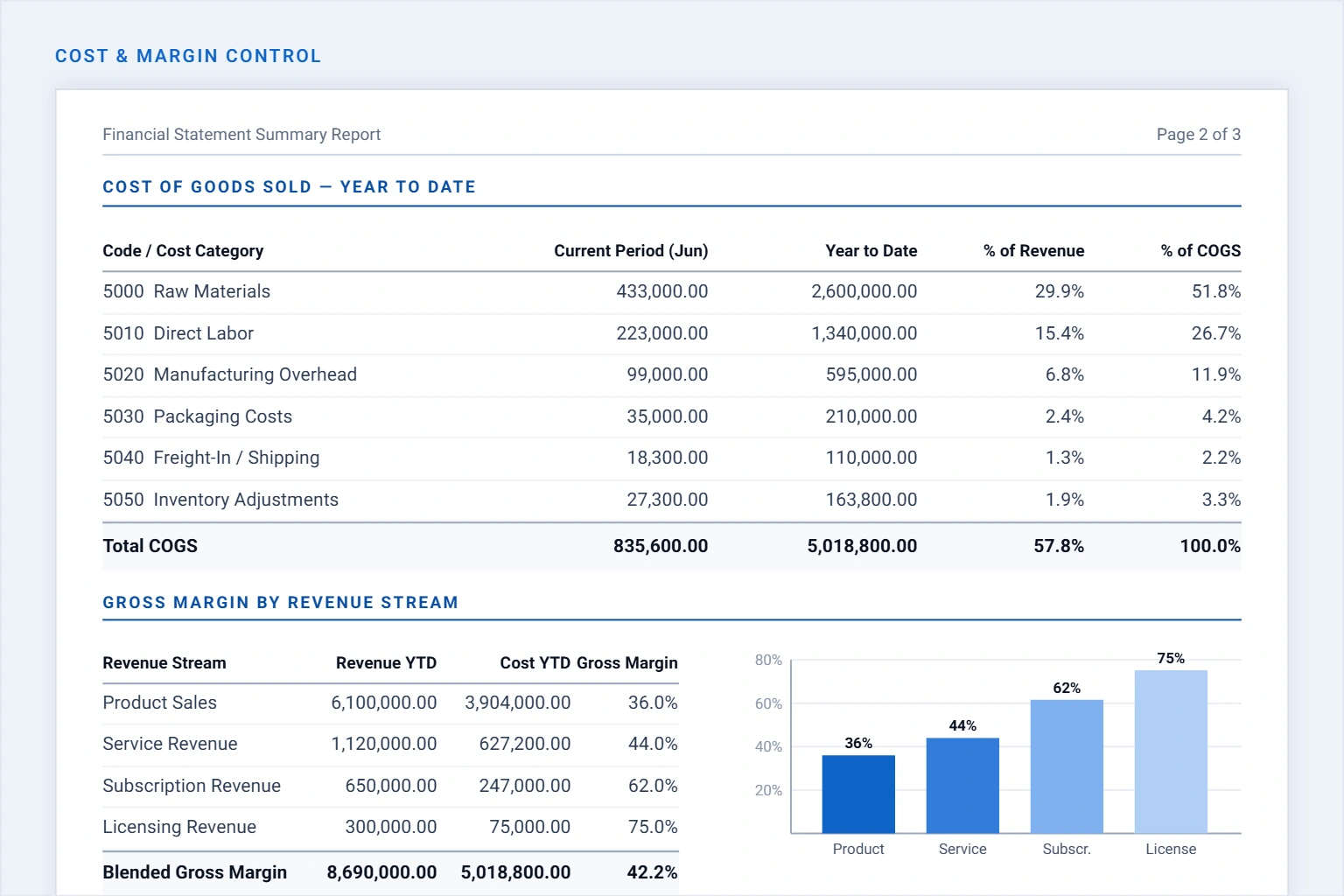
Analyze revenue, costs, expenses, and profitability through a consolidated financial view that supports trend evaluation and business planning.

  • Compare sales and direct costs across financial reporting cycles.
  • Measure gross and net margin trends to assess business health.
  • Examine operating expenditure across key spending categories.
Financial performance

Receivables & collections

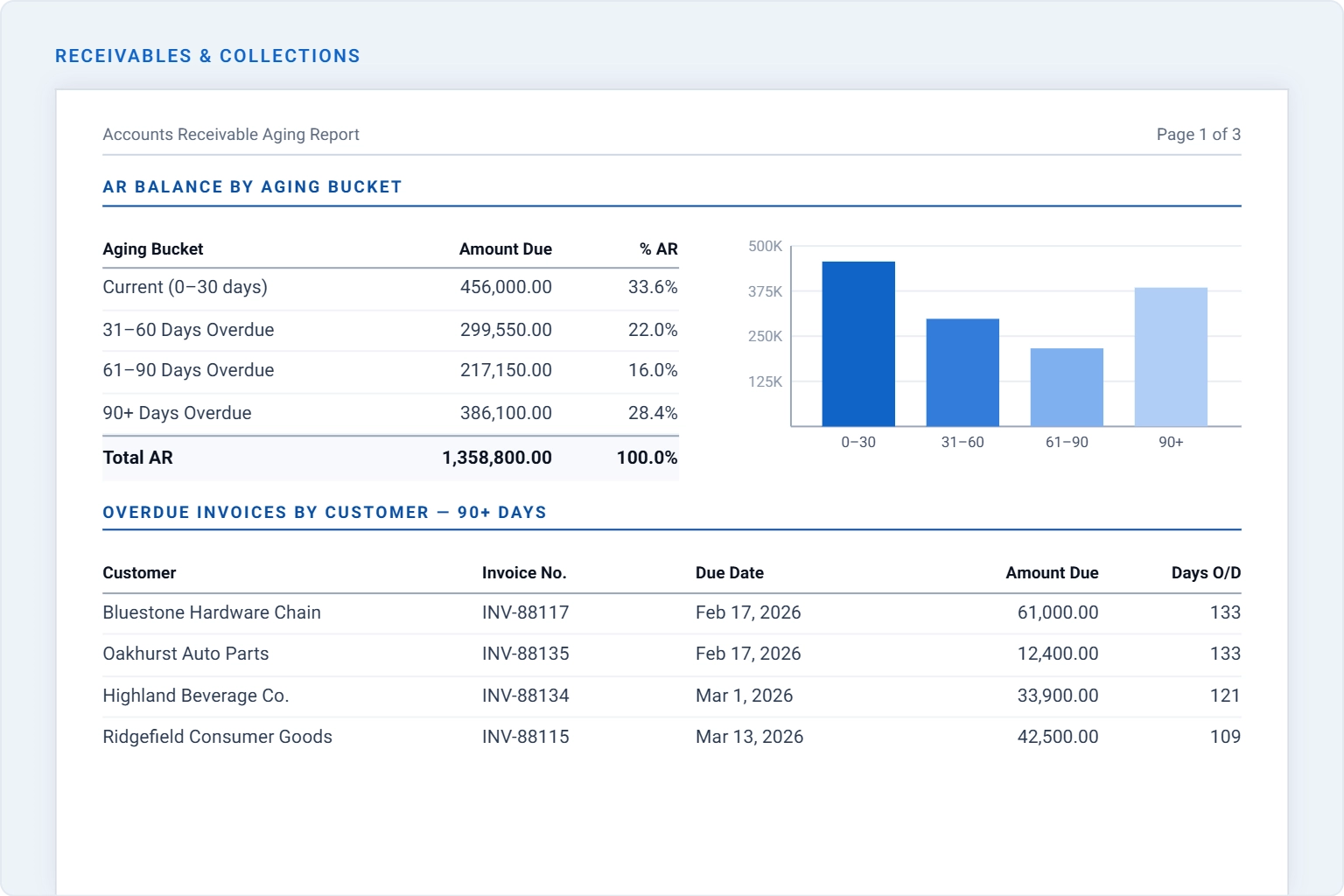
Monitor outstanding balances, overdue invoices, and customer payment behavior to improve collections effectiveness and reduce credit risk.

  • Group unpaid balances into aging categories for faster review.
  • Explore customer invoices requiring immediate follow-up actions.
  • Highlight balances nearing critical delinquency thresholds.
Receivables & collections

Procurement

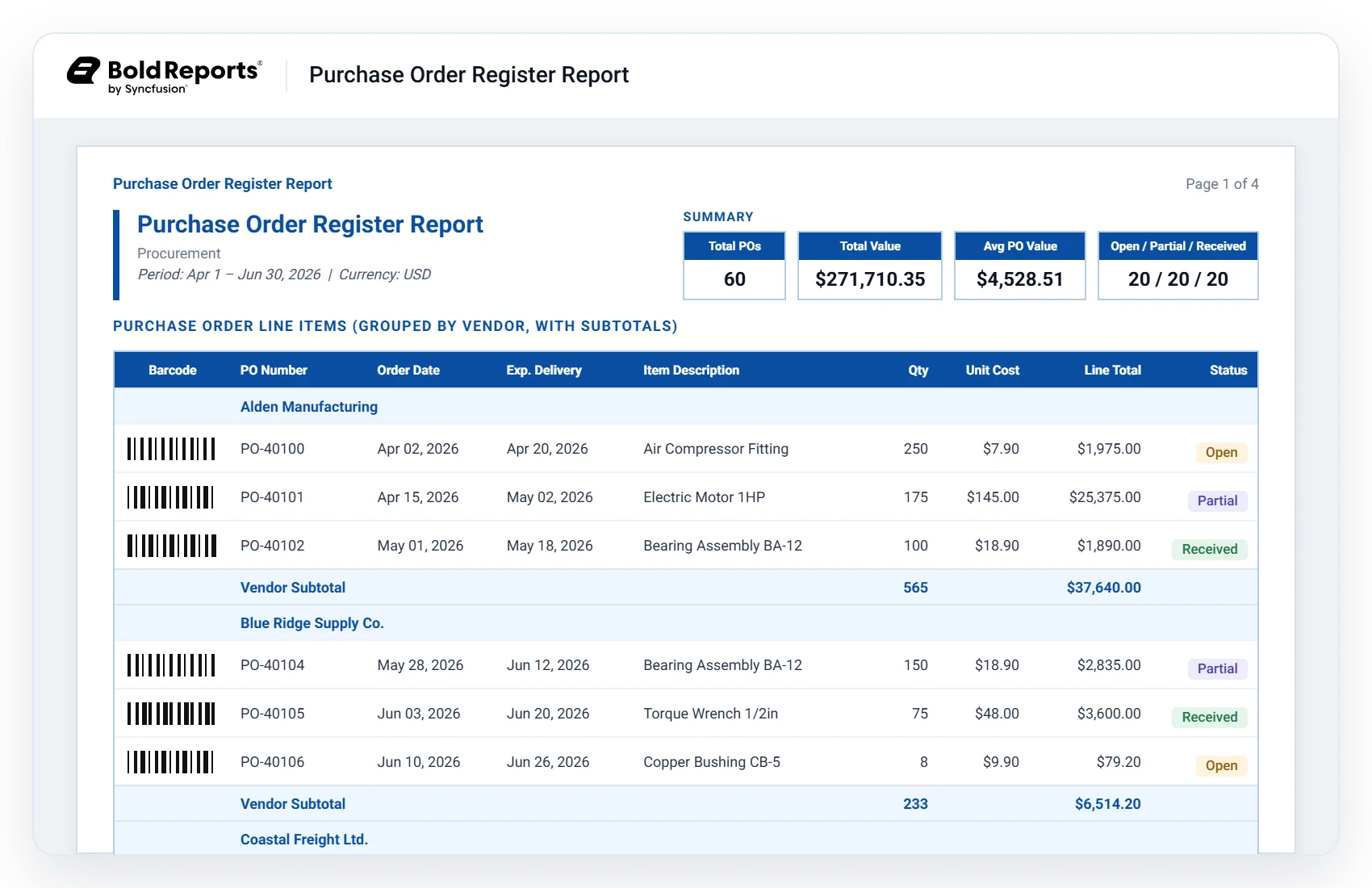
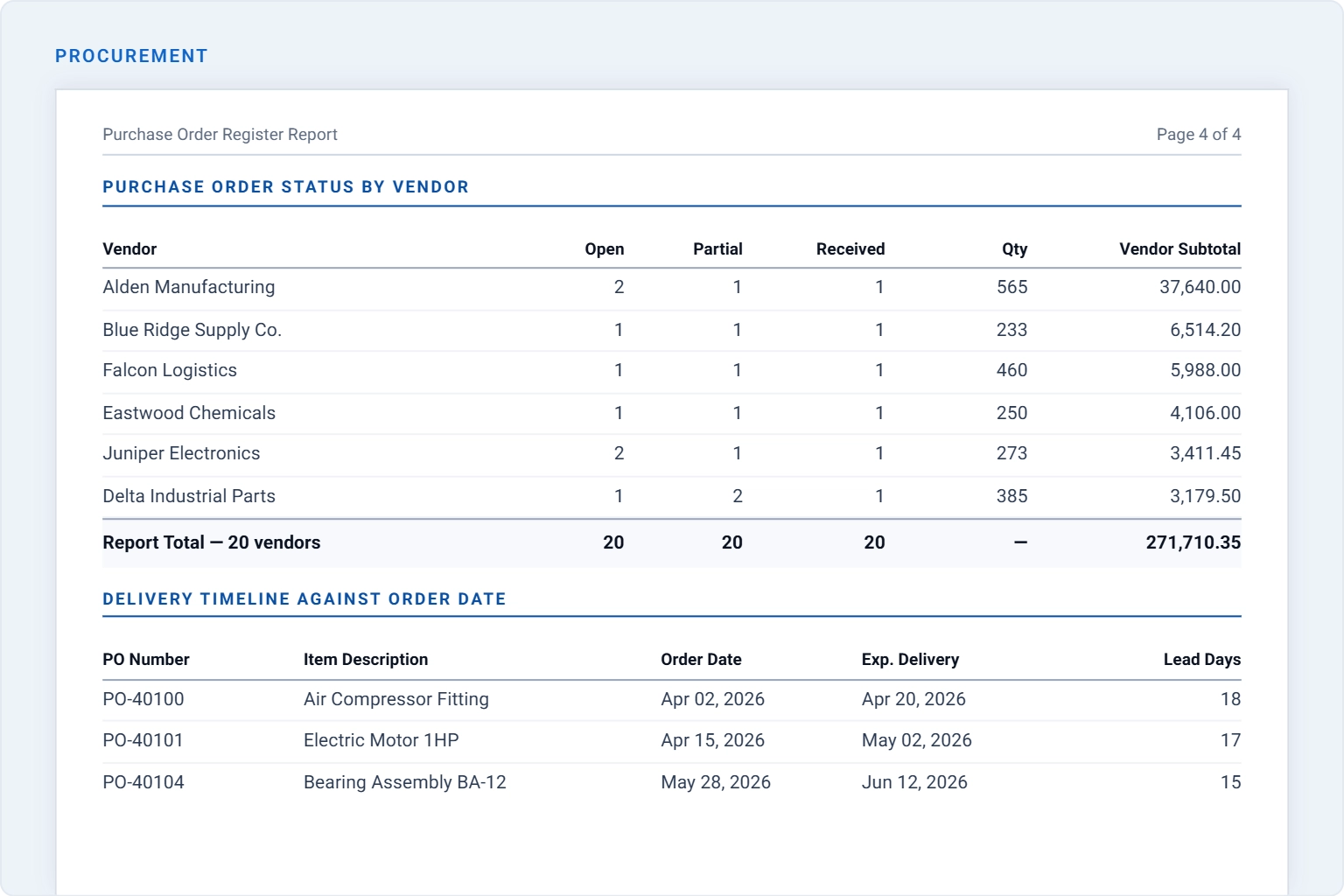
Gain insight into purchasing activity, supplier commitments, spending patterns, and fulfillment outcomes through centralized procurement reporting.

  • View purchase order progress across supplier relationships.
  • Assess purchasing activity by product type and spend area.
  • Measure supplier delivery performance against commitments.
Procurement

Executive & consolidated reporting

Combine financial, receivables, and procurement insights into a unified view that supports strategic planning and executive decision-making.

  • Align revenue insights with receivables and purchasing activity.
  • Assess cash position using aging balances and margin metrics.
  • Review supplier spending alongside overall business results.
Course evaluation
Reporting workflow explained

How it works

ERP reporting combines financial, receivables, and procurement data for recurring review, document preparation, and automated report distribution. 

01

Connect

Bring general ledger records, customer invoice data, and purchase order activity together for structured ERP reporting.

02

Review

Examine revenue, margin, aging receivables, and procurement spend through recurring reports.

03

Customize

Adjust filters, KPIs, layouts, and drill down paths to support finance, collections, and procurement reporting requirements.

04

Share

Distribute ERP reports through recurring delivery workflows for finance leads, collections teams, procurement managers, and executive leadership.

No credit card required.

Connectors

Data integrations

Connect to over 25+ data sources from files and databases to web services for flexible integration, transformation, and storage, all ready for reporting.

Templates

ERP report templates

 Explore complementary ERP report templates for financial analysis, receivables management, and procurement tracking to gain broader visibility across business operations. 

financial-statement-summary-template
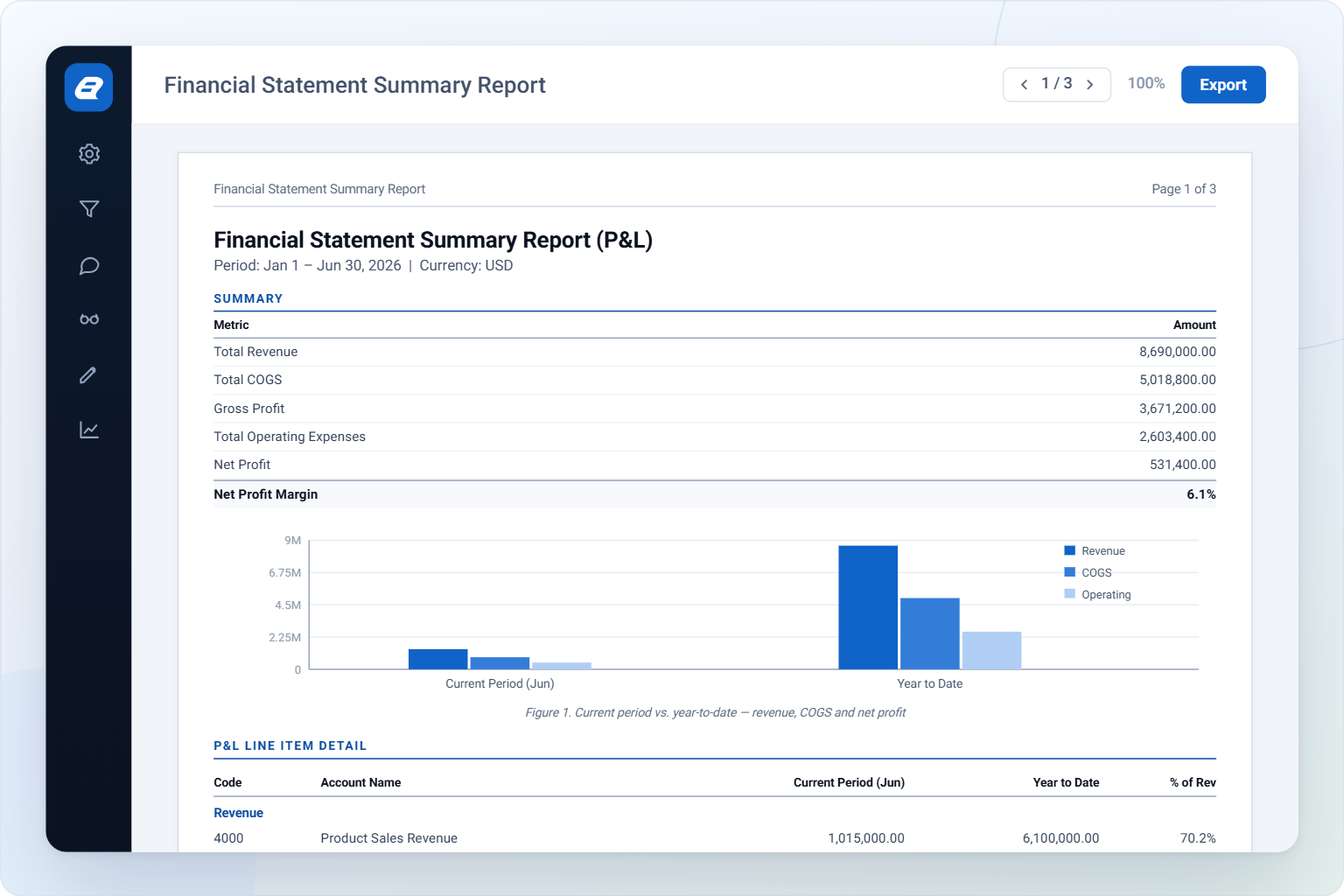
Financial Statement Summary Report

Evaluate financial performance across revenue, costs, and profitability. 

accounts-receivable-aging-template
Accounts Receivable Aging Report

Track outstanding invoices grouped by days past due. 

purchase-order-register-template
Purchase Order Register Report

Monitor purchase order activity and vendor spending across procurement.

Common questions answered

Frequently asked questions

Find answers to common questions about financial, receivables, and procurement reporting, including report capabilities, data visibility, scheduling, and exports 

It gives finance, collections, and procurement teams a structured way to review performance without exporting raw data into spreadsheets first. 

Yes — the Executive & consolidated view brings P&L, aging, and procurement figures together for a single leadership read.

Each report has its own set: account and category for the P&L, customer and aging bucket for receivables, vendor and status for purchase orders. 

Yes. Set a recurring delivery schedule and each report lands in the right inbox automatically — no manual export needed. 

Yes — the Purchase Order Register Report functions as dedicated purchase order tracking software, showing status, vendor, and line-item detail in one view. 

Revenue, COGS, net margin, total receivables, percent overdue, total PO value, and vendor spend are the ones teams check first. 

Production-ready reports made easy

Turn your data into production-ready reports instantly

Create pixel-perfect, print-ready reports with powerful exporting and zero complexity.

No credit card required.