Entra ID Embedded Reports: User Import vs. App-Managed
TL;DR:
Bold Reports supports two ways to secure embedded reports with Microsoft Entra ID. You can import users into Bold Reports and manage access through its built-in permission model, or keep user management entirely inside your application and pass identity through the embed token. Both models support Entra ID authentication, token-based embedding, custom attributes, and row-level security. The real decision is where users, groups, and resource-level permissions should live.
Introduction
Organizations using Microsoft Entra ID often want a seamless way to secure embedded reports while maintaining centralized identity management and access control.
When implementing embedded reporting with Bold Reports, one of the most common architectural decisions is determining where users, permissions, and reporting access should be managed. Should users be imported into Bold Reports and managed through its built-in permission model? Or should user management and authorization remain entirely within the application?
Both approaches support:
-
- Microsoft Entra ID authentication.
- Embedded reporting.
- Authentication token-based embedding.
- Custom attributes.
- Row-level security.
- Secure report access.
The primary difference lies in where users, groups, and resource-level permissions are maintained. This article explores both approaches and helps you determine which model best fits your reporting architecture.
Quick comparison
| Capability | User import | Application-managed access |
| Embedded reporting | Yes | Yes |
| Microsoft Entra ID authentication | Yes | Yes |
| Authentication token-based embedding | Yes | Yes |
| Custom attributes | Yes | Yes |
| Row-level security | Yes | Yes |
| User accounts stored in Bold Reports | Yes | No |
| User accounts managed by application | Optional | Yes |
| Groups managed in Bold Reports | Yes | No |
| Resource permissions managed in Bold Reports | Yes | No |
| Resource permissions managed by application | Optional | Yes |
| Direct SSO access to the Bold Reports portal | Yes | Typically not required |
| Self-service reporting portal | Yes | Optional |
| Multitenant SaaS support | Good | Excellent |
| Reuse of existing application RBAC | Limited | Excellent |
Understanding security in embedded reporting
Before comparing the two approaches, it helps to understand the two layers of security commonly used in embedded reporting.
Resource-level security
Resource-level security determines which reporting resources a user can access. This includes:
-
- Reports.
- Folders.
- Categories.
- Data sources.
- Shared resources.
- Administrative functions.
Resource-level security answers the question “Can this user access this report?”
Data-level security
Data-level security determines which records are visible once access to the report has already been granted. For example:
-
- A sales director may view data from all regions.
- A regional manager may view only their assigned region.
- A customer administrator may view data only for their own organization.
This is typically implemented using row-level security and custom attributes. Data-level security answers the question “Which data should this user be allowed to see?”
Option 1: Import Microsoft Entra ID users into Bold Reports
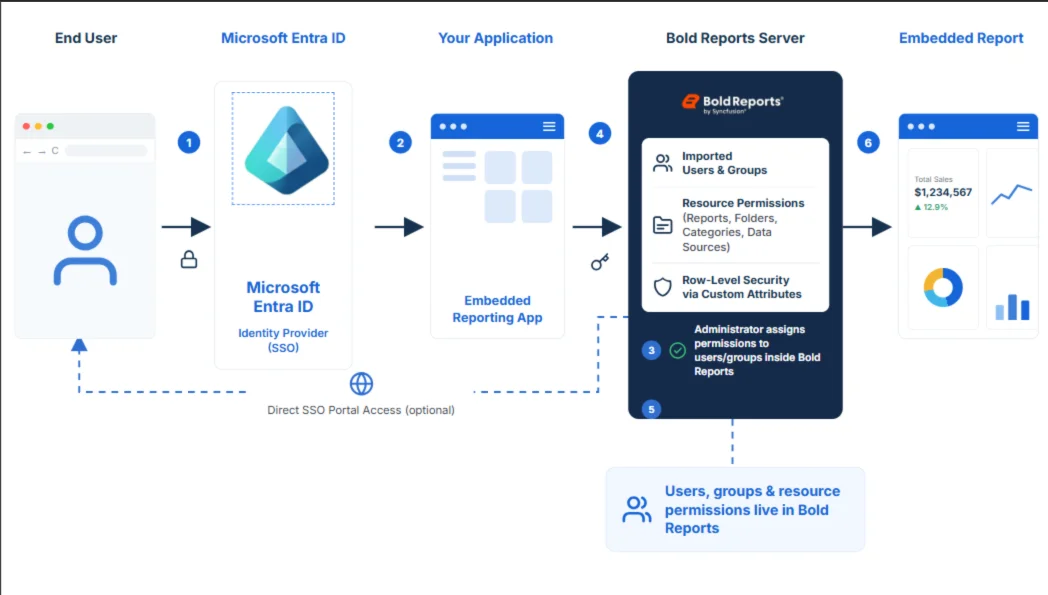
In this model, users are imported from Microsoft Entra ID into Bold Reports and authenticated through single sign-on (SSO). Once imported, users and groups become part of the Bold Reports security model and can be assigned permissions to reports, folders, categories, data sources, and other reporting resources.
A common misconception is that this approach is intended only for users who access the Bold Reports portal directly. This model fully supports embedded reporting through authentication token-based embedding, while also giving you the option of direct portal access.
How it works
- Users authenticate using Microsoft Entra ID.
- Users are imported into Bold Reports.
- Administrators assign permissions to users or groups.
- The application generates an authentication token for the authenticated user.
- Bold Reports evaluates the user’s permissions.
- Authorized reports are displayed within the application.
Benefits
Centralized user and permission management
Reporting administrators can manage security directly within Bold Reports without relying on custom application logic. Permissions for reports, folders, categories, and data sources are configured in a single location, and changes take effect immediately across all reporting experiences. This eliminates the need to maintain separate entitlement tables or build custom permission synchronization mechanisms within the application.
Unified security model
The same user identity can be used across embedded reports, reporting portals, and administrative experiences. When users are assigned to groups, their permissions are applied consistently across all reporting environments. This reduces the risk of permission inconsistencies between the application and the reporting platform while simplifying security audits through a single source of access control.
Built-in role-based access control
Bold Reports allows permissions to be assigned directly to users and groups, simplifying report access management. Entra ID groups imported into the platform can be used to manage permissions at scale. As organizational structures change or new teams are onboarded, administrators can update group memberships rather than manually adjusting permissions for individual users.
SSO for direct access
Organizations can provide users with direct access to the Bold Reports portal using their Microsoft Entra ID credentials. This enables report authors, analysts, and power users to design, schedule, and manage reports independently without requiring custom authoring functionality within the application. At the same time, end users can continue accessing reports exclusively through the embedded reporting experience.
Custom attributes and row-level security
Custom attributes can still be used even when users are imported into Bold Reports. Attributes such as department, region, territory, employee ID, customer ID, and tenant ID can be associated with users and used by the Bold Reports server when executing reports. This enables:
-
- Row-level security.
- Department-based filtering.
- Territory restrictions.
- Multi-tenant filtering.
- Personalized reporting experiences.
In this model, Bold Reports manages user identities and resource-level permissions, and custom attributes help determine data visibility.
Best fit for
Choose the user import approach when:
-
- Users require access to the Bold Reports portal.
- Reporting administrators manage permissions.
- Group-based access control is important.
- You want a single security model for both embedded and direct access scenarios.
- Reporting permissions should be managed within Bold Reports.
Option 2: Application-managed access
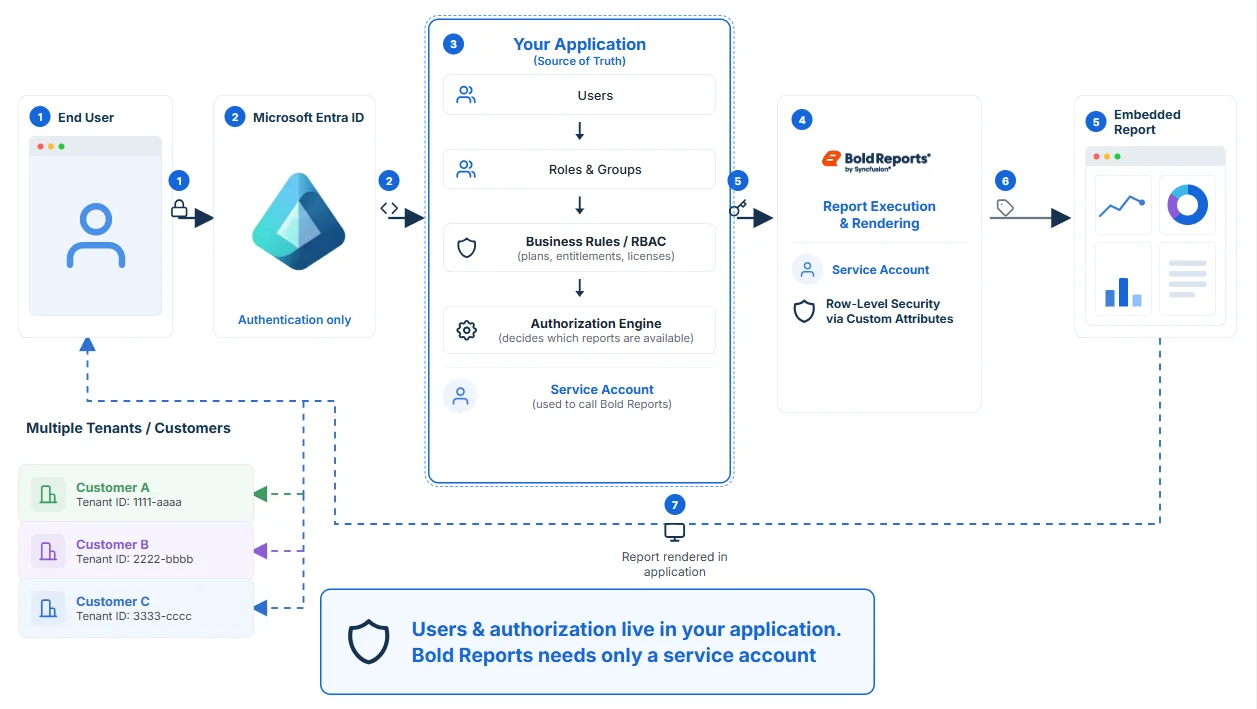
In this model, users are not imported into Bold Reports. Microsoft Entra ID authenticates users into the application, and the application remains responsible for user management, role management, and authorization decisions. Bold Reports focuses on report execution and rendering while the application becomes the source of truth for access control. This approach is commonly used in SaaS and customer-facing applications.
How it works
- Users authenticate to the application using Microsoft Entra ID.
- The application evaluates groups, roles, and business rules.
- The application determines which reports are available.
- A dedicated service account generates the embed token.
- User context is passed using custom attributes.
- Reports consume these attributes during execution.
- Reports are rendered within the application.
Custom attributes and row-level security
Custom attributes play a central role in this model because users do not exist as managed accounts within Bold Reports. Examples include user ID, role, department, region, customer ID, tenant ID, and subscription tier. These values may be included within the embed token and used by reports to implement:
-
- Row-level security.
- Tenant isolation.
- Customer-specific filtering.
- Personalized reporting experiences.
For example, the tenant ID can be passed by the application to ensure customers only see their own data, even when multiple customers use the same report definition.
Benefits
Single source of truth
The application remains the authoritative source for users, groups, roles, and permissions. Security reviews, access audits, and user offboarding continue to be managed through existing processes. This approach maintains a single identity lifecycle and permission model, eliminating the need to reconcile access controls between the application and the reporting platform.
Reuse existing authorization logic
Existing application security models, Entra ID group memberships, and business rules can be reused without duplication. Investments already made in authorization logic, such as fine-grained feature controls, plan-based entitlements, and organizational hierarchies, continue to govern reporting access. This avoids reimplementing security rules within the reporting layer and prevents the application and reporting systems from drifting out of sync.
Flexible business rules
Applications can enforce reporting access based on roles, subscription plans, product licenses, customer entitlements, and organizational policies. Since the application determines which reports are available to each user, capabilities such as plan-specific dashboards, add-on reporting packages, and time-bound access can be implemented through standard application logic. Reporting access automatically reflects those business rules.
Ideal for SaaS applications
This model is particularly effective for multitenant, customer-facing applications. It can support hundreds of thousands of customers without expanding the reporting server’s user directory or increasing administrative overhead. The reporting platform only needs a service account and the attributes required for authorization, while individual customer accounts remain managed by the application.
Best fit for
Choose the application-managed approach when:
-
- Reports are accessed exclusively through embedding.
- The application already manages users and permissions.
- Authorization involves complex business logic.
- You operate a multitenant SaaS platform.
- You want the application to remain the source of truth for access control.
Which approach should you choose?
| If you need… | Recommended approach |
| Direct access to the Bold Reports portal | User import |
| Built-in user and group management | User import |
| Permissions managed by reporting administrators | User import |
| Unified portal and embedded experience | User import |
| Existing application RBAC | Application-managed access |
| SaaS or multitenant architecture | Application-managed access |
| Application as the source of truth | Application-managed access |
| Complex business authorization rules | Application-managed access |
| Reports accessed only through embedding | Application-managed access |
Conclusion
Microsoft Entra ID provides a flexible foundation for securing embedded reporting solutions. Both approaches support Microsoft Entra ID authentication, embedded reporting, authentication token-based embedding, custom attributes, and row-level security. The primary difference is where users, groups, and resource-level permissions are managed.
The user import approach allows Bold Reports to manage reporting users, groups, and permissions, while supporting both embedded reporting and direct portal access through a unified security model. The application-managed access approach keeps all user and authorization logic within the application, making it particularly attractive for SaaS platforms and organizations that already have an established identity and access management strategy.
By understanding the strengths of each model, organizations can implement a secure, scalable reporting architecture that aligns with their business, operational, and security requirements.
Explore Bold Reports’ embedded reporting and security capabilities through the interactive demo samples. Questions? Post them in the comments, reach out via the contact page, or log in to submit a support question if you already have an account.
Bold Reports offers a 30-day free trial with no credit card required. Start your trial and see which security model fits your Microsoft Entra ID architecture.
Frequently asked questions
-
- 1.
What is the difference between user import and application-managed access in Bold Reports?
User import brings Microsoft Entra ID users into Bold Reports and manages their permissions through its built-in security model. Application-managed access keeps users inside your application instead. Bold Reports never stores their identities, and access is controlled entirely by your app.
- 2.
Can I use Microsoft Entra ID authentication without importing users into Bold Reports?
Yes. In the application-managed access model, users authenticate to your application using Microsoft Entra ID, and a dedicated service account generates the embed token on their behalf. Bold Reports only needs that one service account, not individual user accounts for every person who views a report.
- 3.
Does application-managed access support row-level security?
Yes. Custom attributes such as tenant ID, region, or department can be passed in the embed token and used by Bold Reports to filter report data, even though the individual user was never imported into Bold Reports.
- 4.
Which approach works best for multitenant SaaS applications?
Application-managed access is generally the better fit for multitenant SaaS. It lets the application remain the single source of truth for user identity and avoids syncing every customer’s users into Bold Reports as the customer base grows.
- 5.
Can an organization use both models at the same time?
Yes. The two models are not mutually exclusive. You can import users who need direct portal access into Bold Reports while handling other users, such as external customers who only see embedded reports, through application-managed access in the same deployment.
- 6.
Is Single sign-on required for application-managed access?
No. Because users are not imported into Bold Reports in this model, direct SSO to the Bold Reports portal is not required. Authentication happens at the application level, and Bold Reports only needs the service account credentials to generate embed tokens.
- 1.