
How to Implement Multitenant Reporting for SaaS Applications
TL;DR:
Multitenant reporting enables SaaS platforms to serve multiple customers from a single application while maintaining secure data isolation. Organizations adopting this approach report 30 to 50% lower infrastructure costs and faster onboarding, helping accelerate customer activation and revenue realization.
Introduction
As SaaS applications scale and serve more customers, balancing infrastructure efficiency, performance, and secure data isolation becomes increasingly complex. Many platforms struggle to deliver personalized experiences to each customer without increasing operational costs or system overhead. Multitenant reporting addresses this challenge by enabling multiple customers to share a single application instance while keeping their data isolated and secure.
This shared model allows SaaS teams to optimize resource usage, simplify maintenance, and accelerate scaling while delivering customized reporting experiences to each tenant. Instead of managing separate environments for every customer, organizations can centralize operations and ensure consistent performance across all users.
In this blog, we’ll explore what multitenant reporting is, how it works in SaaS environments, its benefits for reporting, and how Bold Reports® helps teams implement secure, scalable multitenant reporting solutions.
What is multitenant reporting?
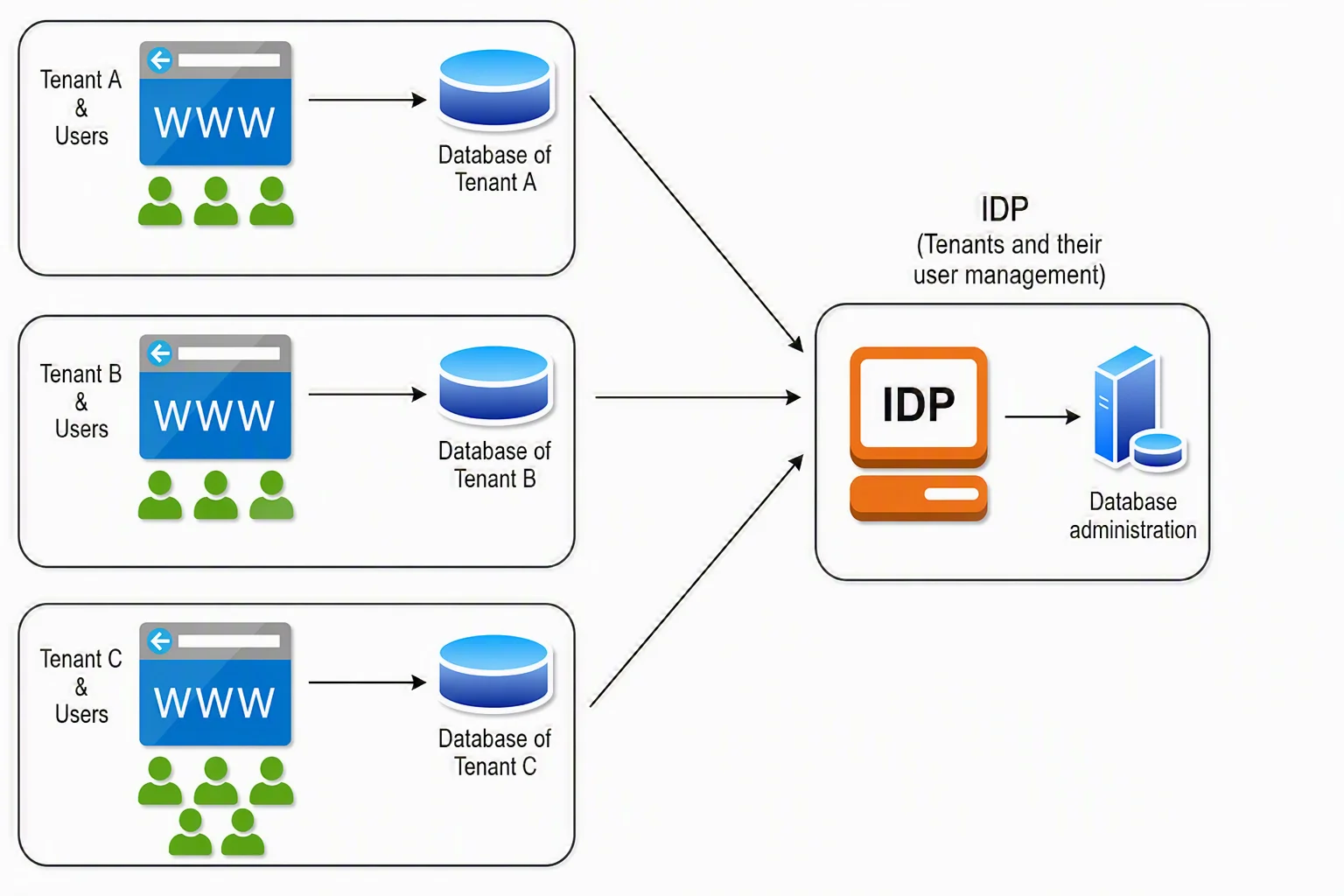
Multitenant reporting is a reporting architecture where a single reporting application or platform serves multiple customers (tenants) while keeping each tenant’s data isolated and secure. In this model, all tenants share the same application codebase and infrastructure like servers, storage, and compute resources. But their data, users and configurations are logically separated, ensuring privacy and security across all tenants.
How multitenant architecture works in SaaS applications
In multitenant architecture, a single application instance serves multiple customers, while ensuring each tenant’s data and configurations remain logically isolated. Multitenant architecture includes features like:
-
- A shared application layer: All tenants use the same application codebase and infrastructure. This reduces duplication and allows SaaS providers to manage one unified system instead of multiple deployments.
- Tenant identification: Every user request is tagged with a tenant ID, which tells the system which tenant the request belongs to. This ensures that users only access their own data and features.
- Data isolation mechanisms: Even though infrastructure is shared, data is securely separated using one of these models:
- Database-per-tenant (highest isolation)
- Schema-per-tenant
- Shared database with tenant identifiers (most scalable)
- Access control and security: Authentication and role-based access controls ensure that users can only view data within their own tenant environment, preventing cross-tenant access.
- Resource sharing and allocation: Compute, storage, and network resources are shared across tenants and dynamically allocated based on demand, improving efficiency and utilization.
- Centralized updates and maintenance: Updates, bug fixes, and new features are deployed once and applied across all tenants simultaneously, ensuring consistency and faster innovation.
Multitenant vs. single-tenant architecture: Key differences
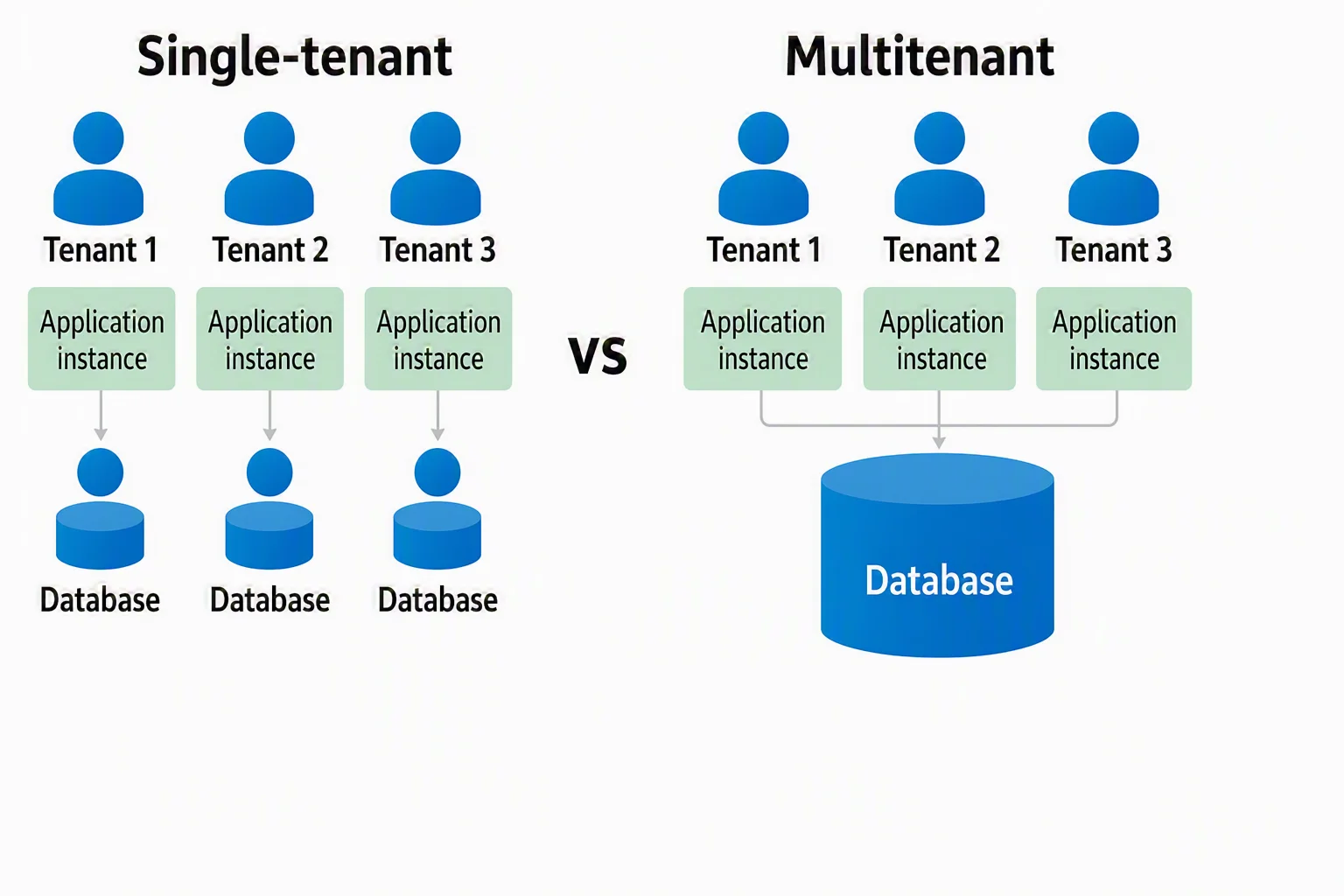
Choosing between multitenant architecture and single-tenant architecture directly impacts your SaaS platform’s cost, scalability, security, and performance.
| Aspect | Single-tenant architecture | Multitenant architecture |
| Data isolation | Separate environment and database for each tenant | Shared environment with logical data separation |
| Customization | Fully customizable per tenant | Configuration-based customization |
| Scalability | Requires new resources per tenant | Easily scales on shared infrastructure |
| Security | High due to full isolation | Strong with proper access controls |
| Cost | Higher due to dedicated resources | Lower through shared resources |
| Performance | Consistent and predictable | Depends on resource management |
| Maintenance | Managed separately per tenant | Centralized updates for all tenants |
| Resource utilization | May lead to unused capacity | Efficient, dynamically shared |
Choose multitenant architecture for scalability and cost efficiency, and single-tenant architecture for strict security and customization. For most SaaS reporting platforms, multitenancy is the preferred approach.
Benefits of multitenant architecture in SaaS reporting
-
- Reduced infrastructure costs: Multitenant architecture lowers costs by sharing resources across tenants, reducing duplication and operational overhead. It allows SaaS teams to scale efficiently without adding separate environments.
- Seamless scalability: SaaS platforms can scale effortlessly by adding new tenants without provisioning separate environments, making multitenant SaaS architecture ideal for rapid growth and global expansion.
- Faster feature deployment: With a shared system, updates and new reporting features are deployed once and are instantly available to all tenants, accelerating product innovation and time-to-market.
- Secure data isolation for reporting: Despite shared environments, multitenancy enforces strict logical data separation, ensuring each tenant’s dashboards and reports remain private and secure.
- Optimized reporting performance: Centralized query optimization, caching, and workload balancing improve reporting speed and consistency, especially for embedded reporting use cases.
- Enhanced customer experience: Multitenant reporting enables personalized dashboards and tenant-specific insights, which improves engagement, adoption, and overall SaaS product value.
Multitenant reporting use cases in sales
Sales operations often involve managing multiple stores, regions, and business units, requiring a scalable system to manage order data, track sales performance, and analyze revenue trends. Multitenant architecture enables businesses to centralize order management and monitor transactions across all entities from a single platform, eliminating the need for separate systems.
At a higher level, management can aggregate data across all tenants to gain a complete view of sales performance, revenue trends, and order efficiency, while ensuring each unit operates in a secure, isolated environment. With multitenancy in sales operations:
-
- Each store or business unit manages its own orders and data independently.
- The centralized platform enables real-time tracking of sales performance.
- Shared infrastructure reduces costs and simplifies maintenance.
- Secure architecture ensures data privacy and controlled access.
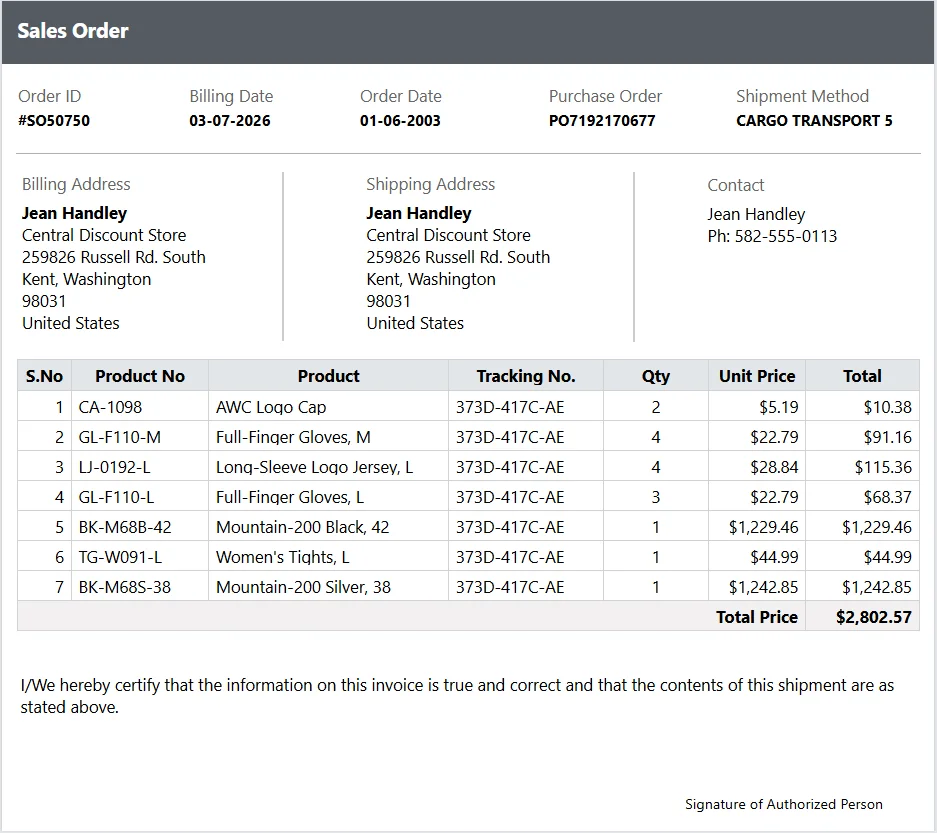
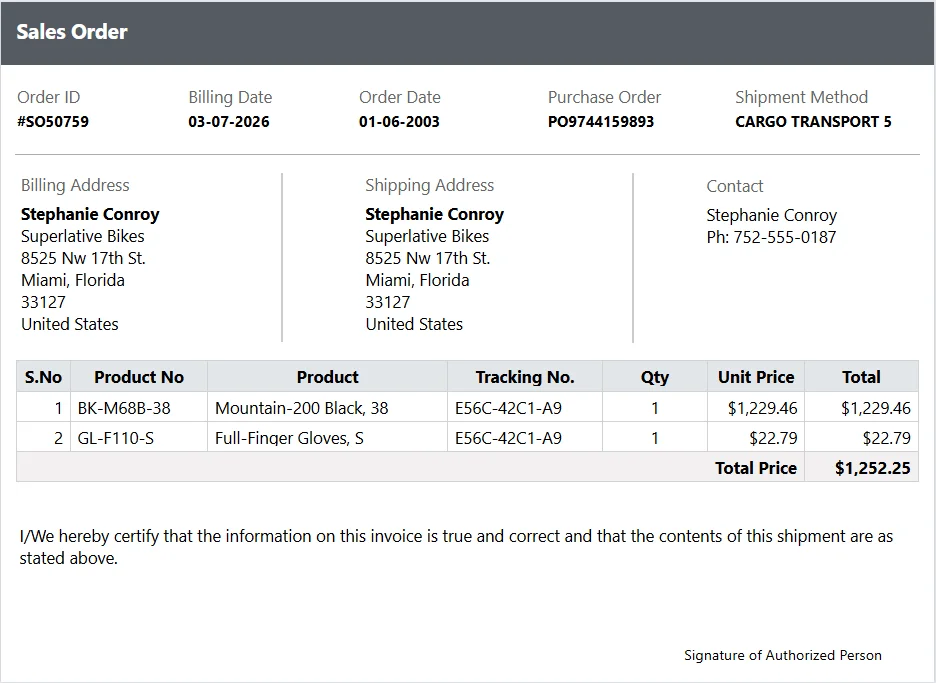
Our sales order report brings together key transactional data, including order ID, billing and shipping details, product information, quantities, and total revenue. This enables teams to track order activity and performance across different tenants in real time.
In the example of Tenant 1, the order ID is #SO50750, the purchase order is PO7192170677 and the total price is $2,802.57, as shown in the following figure.
For Tenant 2, the order ID is #SO50759, the purchase order is PO9744159893 and the total price is $1,252.25, as shown in the following figure.
Best practices for implementing multitenant architecture
Implementing multitenant architecture requires balancing scalability, security, and performance to deliver a consistent experience across all tenants. Focus on the following best practices:
- Choose the right data isolation strategy: Select an approach such as database-per-tenant, schema-per-tenant, or shared database based on your scalability, security, and cost requirements.
- Design tenant-aware systems: Ensure every request is mapped to a tenant using tenant IDs so that data access and operations remain properly isolated.
- Prioritize security: Implement role-based access control, encryption, and auditing to protect tenant data and maintain compliance.
- Optimize performance: Use caching, indexing, and query optimization to prevent performance issues in shared environments and ensure fast report generation.
- Enable flexible customization: Allow tenants to configure dashboards and reports without modifying the shared core application.
- Monitor tenant usage: Track resource usage across tenants to prevent bottlenecks and ensure consistent performance.
- Plan for scalability: Build your architecture to support growth, including high availability and multi-cloud readiness.
How to create multitenant sites in Bold Reports
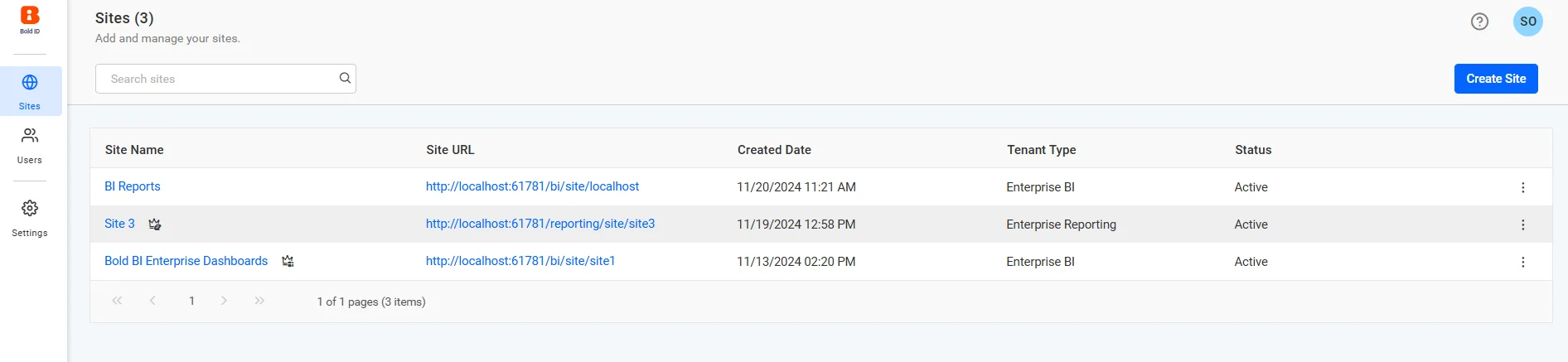
You can add a new tenant to the Bold Reports application by creating a new site from the site administration module. Follow these steps to create another tenant in Bold Reports.
- Log in to Bold Reports with administrator privileges and navigate to the Site Administration. This is where all tenant management is handled.
- Select Create Site.
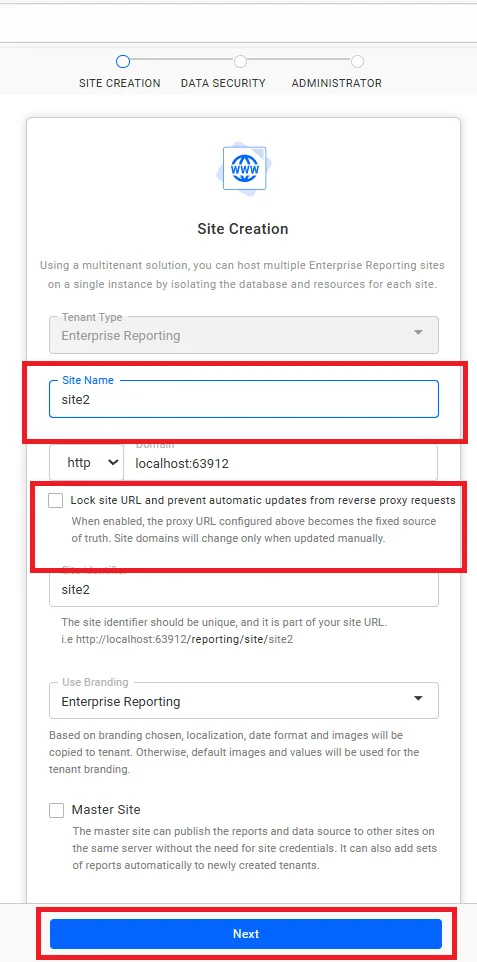
- On the Site Creation tab, enter the Tenant Type, Name, Domain, and Identifier. The identifier should be unique and a part of the site URL. Then click Next.
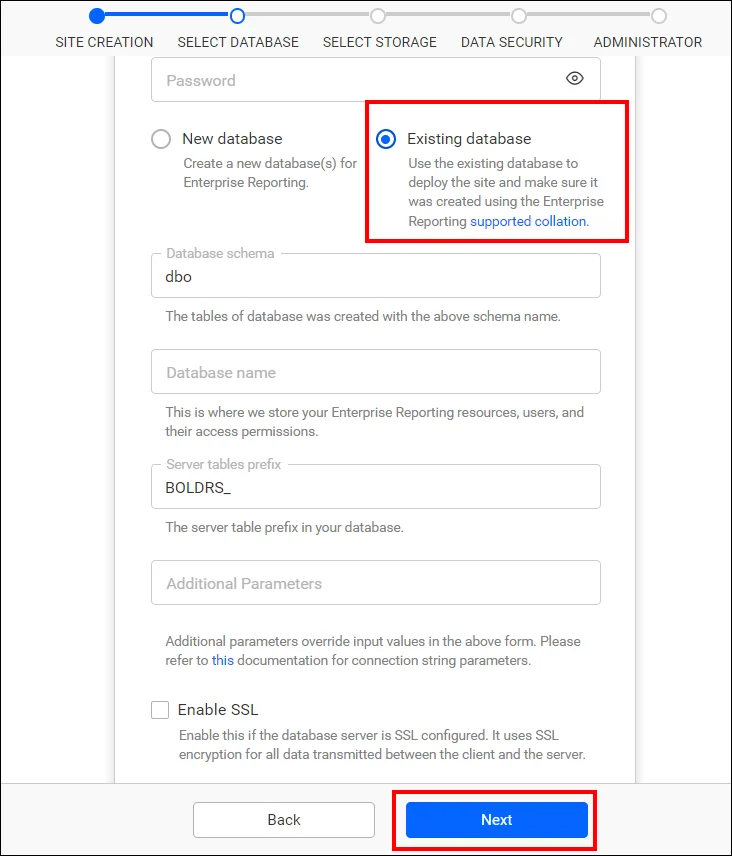
- In the Select Database dialog, select the Simple configuration tab, provide the required credentials, and click Next. This step helps you configure databases for the Bold Reports Report Server. The reports, users, and their access rights are stored in various SQL databases, including MSSQL, PostgreSQL, and MySQL. You can create a new database for Bold Reports using MSSQL.
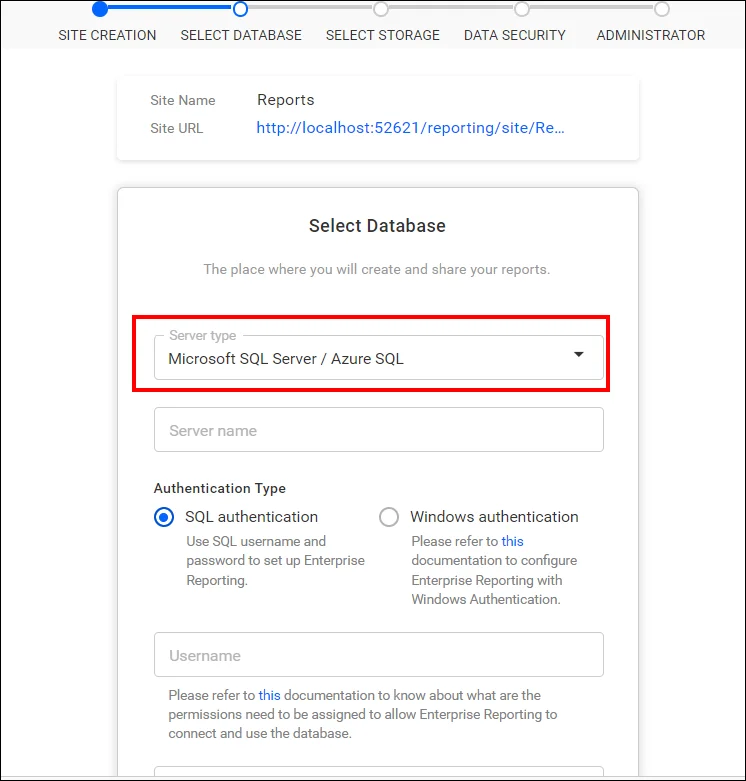
Additionally, you have the option to select an existing database to create a new site.
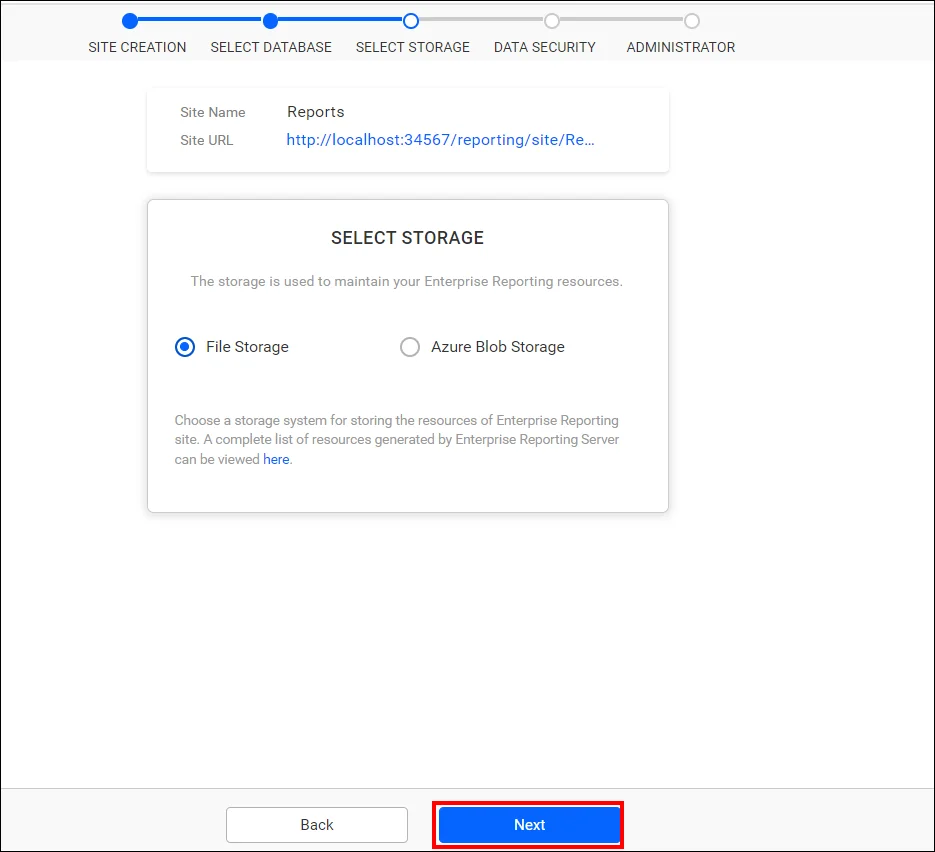
- In the Select Storage dialog, choose File Storage or Azure Blob Storage, to store the report, data source, and dataset in the Report Server.
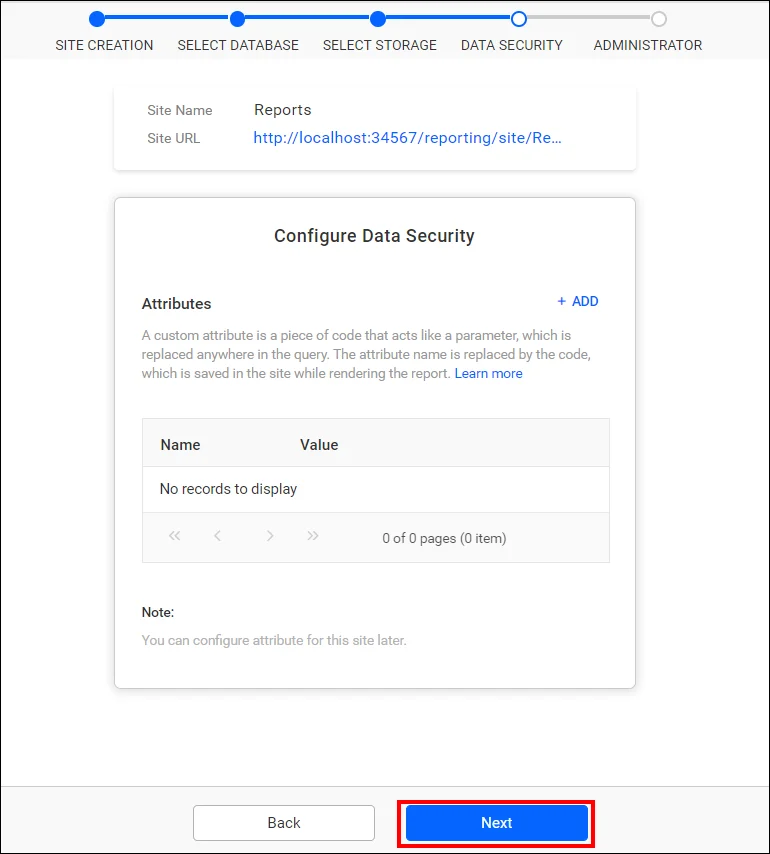
- Under Configure Data Security, enter the necessary details and click Next.
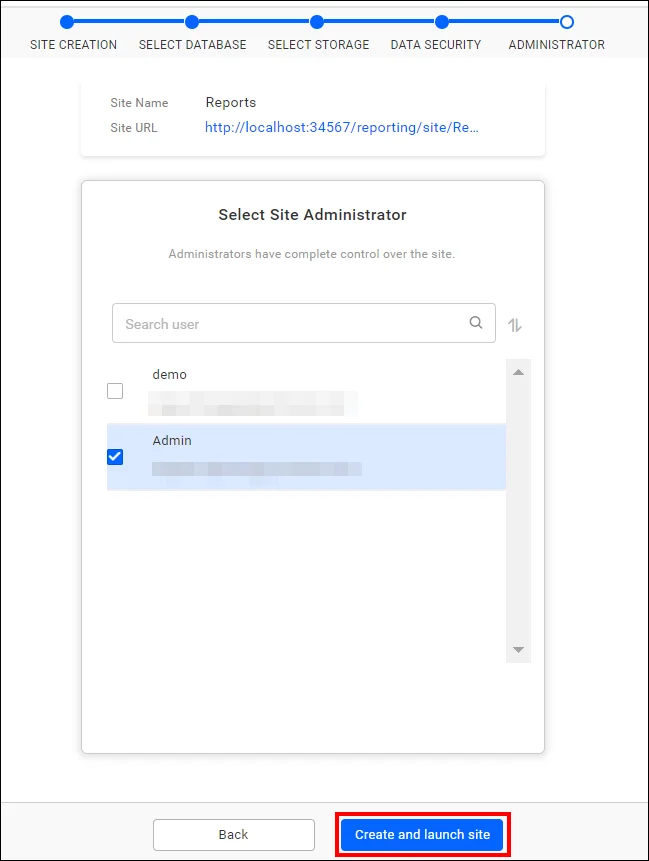
- In the Administrator section, select site administrator and then click Create and launch site.
The selected users will have permission to create reports, data sources, datasets, schedules, users, and groups, plus they can manage permissions for users and groups.
Site management in the Bold Reports multitenant environment
Managing multiple tenants efficiently is a critical requirement for SaaS platforms. Bold Reports’ multitenant reporting platform provides a powerful site management module that enables administrators to control, monitor, and configure tenant environments from a single interface. This ensures secure data isolation, flexible customization, and streamlined operations across all tenants. Key capabilities include:
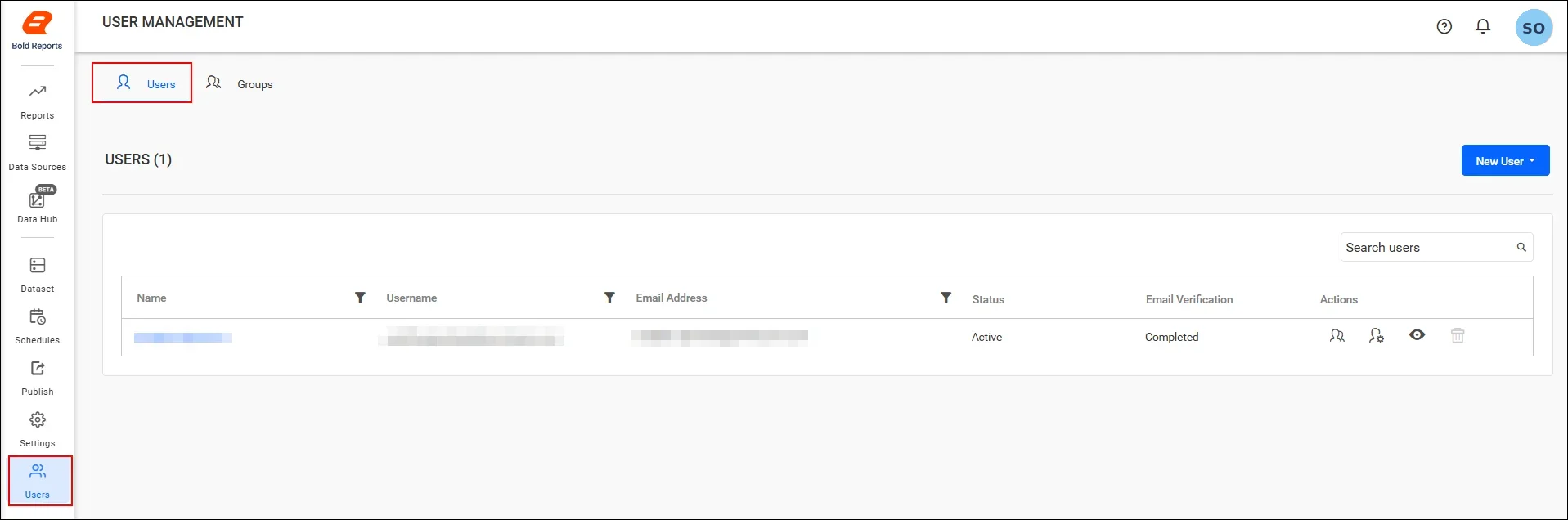
Managing users
Managing users in a multitenant environment means keeping each tenant’s users organized and access-controlled within their own site. Administrators can add or remove users, assign roles, and define permissions so that users access only the reports and dashboards relevant to their tenant. Effective user management helps maintain security, ensure proper role-based access control, and support smooth collaboration within each tenant.
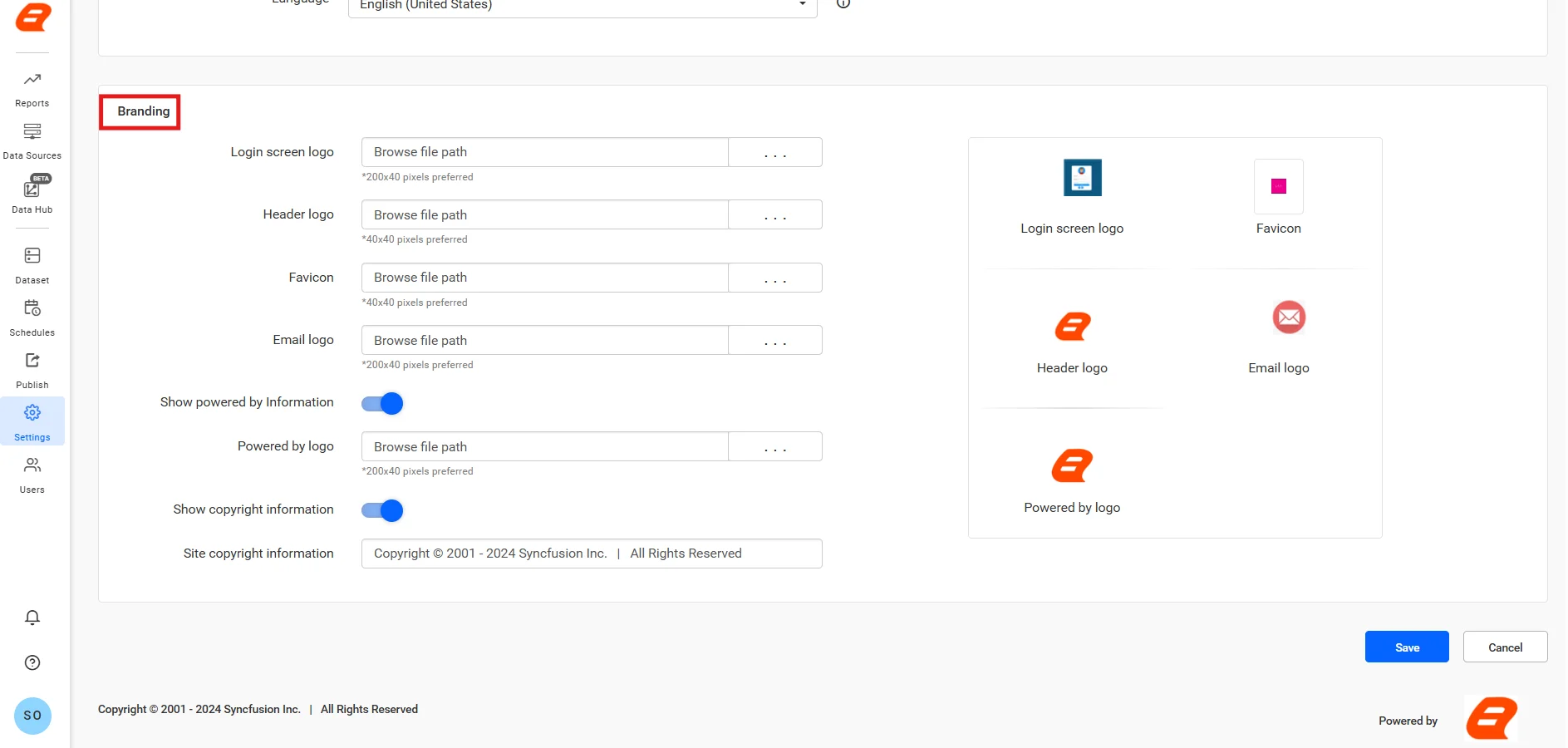
Branding
Branding allows each tenant to customize the look and feel of their reporting environment to match their organization’s identity. Administrators can update elements such as logos, themes, and UI settings, ensuring that every tenant experiences a personalized interface. This helps SaaS providers deliver a white-label experience while maintaining a shared platform.
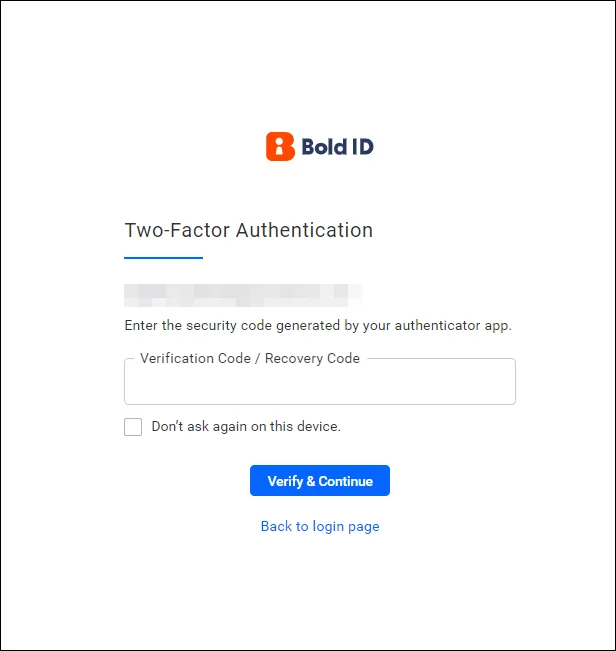
Two-factor authentication
Two-factor authentication (2FA) adds an extra layer of security by requiring users to verify their identity using an additional step beyond passwords. In a multitenant setup, this is especially important to protect sensitive data across tenants. Enabling 2FA helps prevent unauthorized access and strengthens overall platform security.
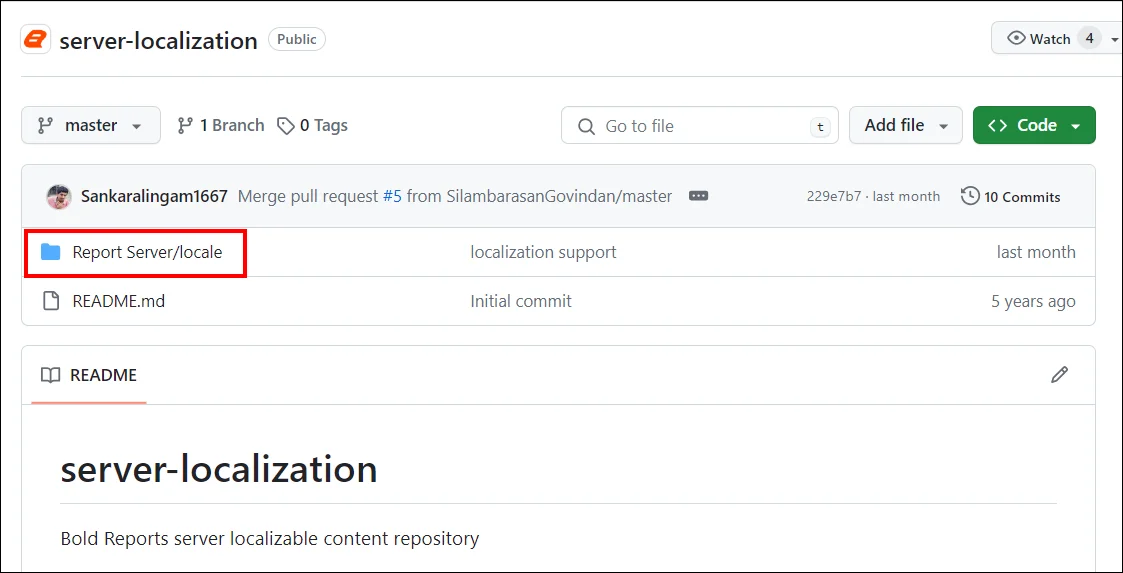
Localization
Localization ensures that each tenant can configure the platform according to their regional preferences. This includes setting language, time zones, and date formats to match user requirements. By supporting localization, Bold Reports improves usability and ensures a consistent experience for users across different regions.
Final thoughts
Scaling SaaS without multitenant architecture is like building for growth without a foundation. As customer demands increase, platforms that rely on isolated systems quickly become costly, complex, and difficult to maintain.
Multitenant architecture changes that. It enables SaaS applications to serve multiple customers through a single platform, reducing infrastructure costs, improving performance, and delivering secure, tenant-isolated reporting at scale.
From IT and government to insurance and education, organizations are using multitenancy to streamline operations, break down data silos, and deliver faster, more personalized insights. The real advantage comes from pairing the right architecture with tools designed for scalability, performance, and tenant-level customization.
Ready to scale multitenant reporting for your SaaS application? Start a 30-day free trial or request a demo to build and deliver secure, high-performance multitenant reporting from a single platform with Bold Reports.
Frequently asked questions
- 1.
What is SaaS architecture?
SaaS architecture is a cloud-based model where applications are delivered over the internet, with providers managing infrastructure and updates.
- 2.
What are the key benefits of multitenant architecture?
It reduces infrastructure costs, improves scalability, and enables centralized updates while supporting multiple customers in one system.
- 3.
How does multitenancy improve reporting?
It enables faster updates, centralized data processing, and personalized reports for each tenant within a shared system.
- 4.
Is multitenant architecture suitable for enterprise applications?
Yes, when built with strong security and data isolation, it supports enterprise scalability and compliance needs.
- 5.
How does multi-cloud architecture relate to multitenancy?
Multi-cloud architecture enhances multitenancy by improving availability, scalability, and resilience across different cloud providers.
- 6.
How is data isolation managed in multi-tenant systems?
It’s managed using techniques like separate databases, schemas, or tenant identifiers, along with access controls to ensure each tenant can only access their own data.






