
What’s New in v13.1.26 for Self-Service & Embedded Reporting

TL;DR: The Bold Reports® v13.1.26 release brings reverse proxy support, S3 storage integration, built-in email activity logs, improved scheduling capabilities, stronger Report Viewer rendering, enhanced export behavior, expanded localization, OAuth-based token validation, and key Designer and API improvements, helping teams deploy, manage, and deliver reports with greater flexibility, reliability, and control.
Great reporting tools don’t just deliver data; they adapt to your environment, scale with your needs, and simplify decision-making. We’re excited to announce the highlights of Bold Reports v13.1.26 release, bringing a set of enhancements designed to make your reporting experience more flexible, more transparent, and more powerful. From reverse proxy support and S3 storage integration to email activity logs, enhanced scheduling, and better export and localization support, this release is designed to help teams work more efficiently and deliver a smoother reporting experience.
Experience the latest features and improvements today! Try Bold Reports in our free cloud tier with zero setup or download this new release to get started.
Ready to explore? Let’s dive into these product updates in detail!
Report Server enhancements
Bold Reports v13.1.26 brings several Report Server improvements focused on visibility, automation, and operational reliability.
S3 storage support for scalable file management
Bold Reports now supports S3-compatible storage, giving you the flexibility to integrate with modern cloud environments while maintaining performance and reliability. Whether you’re running a SaaS platform or scaling enterprise reporting, this update helps you to quickly track, troubleshoot, and ensure reliable report delivery, reducing delays and improving operational transparency.
Stronger security with OAuth-based token access
With support for generating server authentication tokens via OAuth validation, Bold Reports integrates smoothly with modern identity providers. This ensures secure API access, simplified authentication workflows, and stronger control in embedded analytics.
Greater transparency with email activity logs
With the introduction of email activity logs, you can monitor all email-related actions directly within Bold Reports, no external tracking needed. This brings complete visibility into report scheduling and delivery, helping you quickly identify issues, reducing delays and improving operational transparency.
Smarter dynamic reporting with Cascading Parameters
We have added support for the cascading parameter API that allow reports to dynamically update dependent parameters based on user selections. Users can explore data more intuitively, enabling faster filtering, better usability, and more efficient decision-making.
Report Viewer improvements
The Report Viewer in v13.1.26 has been enhanced to deliver more accurate rendering, stronger exports, and a better localized experience.
Clearer and more organized printed reports
Printed reports are now automatically labeled with the report name as the document title, ensuring clarity and consistency. You can easily organize and identify documents, improving workflows in reporting-heavy environments.
Smarter Excel exports for faster analysis
We have added aggregation support in raw data Excel exports, you get structured and meaningful data instead of just raw entries. This allows business users to start analyzing immediately, saving time and reducing the need for manual data preparation.
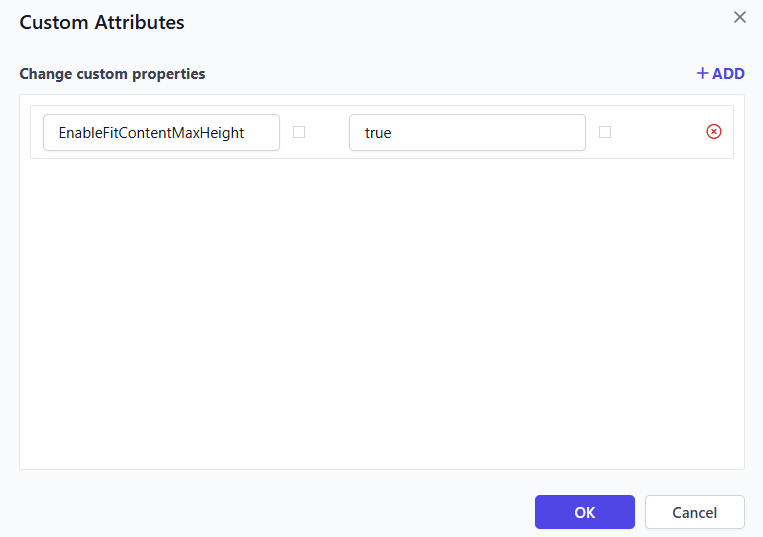
Better textbox rendering with EnableFitContentMaxHeight
A new custom property, EnableFitContentMaxHeight, has been introduced in Report Viewer Preview to resolve textbox overlapping issues when rendering cell content, ensuring improved layout consistency and readability.
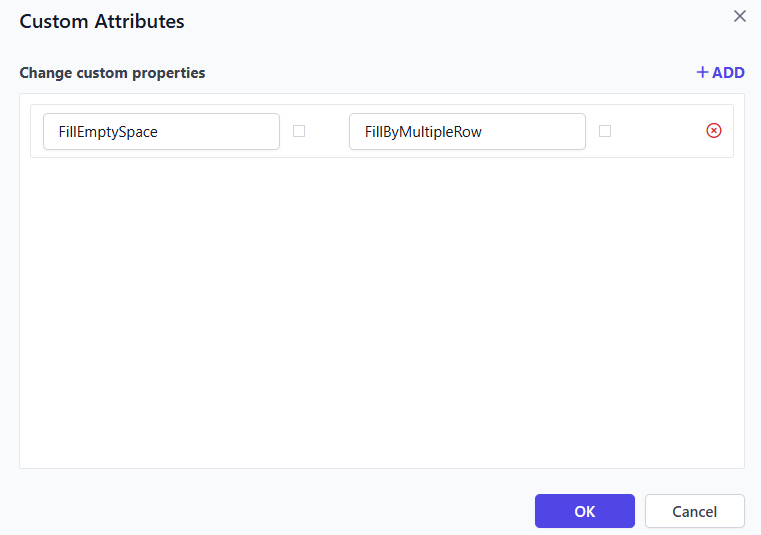
Better layout handling with FillEmptySpace
With the FillEmptySpace enhancement, unused areas in tables are automatically filled, resulting in a cleaner and more consistent layout. This ensures reports are presentation-ready, making them ideal for stakeholder sharing and customer-facing scenarios.
Expanded language support for global users
The Report Viewer now supports six additional languages, helping teams interact with reports in their preferred language.
-
- Estonian
- Greek
- Indonesian
- Thai
- Latvian
- Lithuanian
This improves user comfort, adoption, and collaboration across global teams.
Report Designer enhancements
Work seamlessly with PostgreSQL UUID data
You can now use UUID data type fields in PostgreSQL dataset query filters, making it easier to work with modern database schemas. Developers can build reports more efficiently without workarounds, ensuring better compatibility and cleaner data handling.
Track report changes in real-time
Introducing the new on ReportModified event, which triggers whenever any RDL object is updated. This allows teams to track changes, trigger custom workflows, and build smarter integrations, improving development efficiency and control.
Strengthen data security during report downloads
Sensitive information is now better protected. Username and password nodes are restricted from being serialized in RDL files during on-premises downloads. This enhances data security and compliance, ensuring sensitive credentials are not exposed.
IDP enhancement
Reverse proxy support for multi-domain routing
Bold Reports now supports reverse proxy-based domain routing, allowing requests to be handled based on the request domain, without relying on a single application URL. This enables cleaner deployment architectures, simplifies embedded reporting across products, and gives teams greater control over multi-tenant and multi-domain environments.
Accelerate cloud deployment with Azure app services
Deploying Bold Reports to the cloud is now faster and more streamlined. With support for automated deployment to Azure App Services, teams can reduce manual setup and quickly launch reporting environments. This helps organizations speed up time-to-production, reduce deployment complexity, and scale effortlessly in cloud environments.
Simplify rebranding for embedded
Customizing Bold Reports to match your product experience is now easier. Enhanced automated rebranding capabilities allow teams to apply branding changes more efficiently across deployments. This is especially valuable for SaaS providers, enabling consistent white-label experiences with minimal effort.
Modernized architecture with .NET 10 upgrade
Bold Reports has upgraded its UMS architecture to .NET 10, bringing improved performance and future-ready capabilities. Teams benefit from better performance, enhanced security, and long-term platform stability, ensuring a reliable reporting foundation.
Key bug fixes and quality improvements
Along with the major enhancements, Bold Reports v13.1.26 includes important fixes that improve stability, performance, and overall user experience.
-
- Performance and stability: Fixed random internal server errors during page loading and resolved broken image download loops to improve reliability.
- Security and authentication: Resolved OAuth and OpenID login issues in embedded scenarios and fixed inconsistencies in “Powered by” logo visibility.
- Bug fixes: Addressed multiple Designer and UI issues including custom attribute persistence, undo/redo behavior, tablix layout issues, branding and theme inconsistencies, email template issues, YAML connector problems, Site Settings issues in Bold Data Hub, and Linux UI flicker issues.
Real-world use cases enabled by Bold Reports v13.1.26
The enhancements in Bold Reports v13.1.26 are designed to solve everyday reporting challenges across deployment, automation, and report delivery. Here’s how these features translate into real impact.
Explore the Bold Reports v13.1.26 release
Bold Reports v13.1.26 brings meaningful upgrades across deployment, report delivery, rendering, scheduling, APIs, and reliability. Whether you are running enterprise reporting operations, embedding reporting into applications, or improving the day-to-day experience for report consumers, this release helps you do it with more confidence and less friction.
Ready to get started? Upgrade to Bold Reports® v13.1.26 and explore the latest enhancements designed to make reporting smarter, more flexible, and easier to manage. If you are new to Bold Reports, you can sign up for a free trial or request a personalized demo.
Want to explore more? Check out our release history to see what’s new in Bold Reports® or reach out to our support team for help tailoring it to your needs.






