
Version 15.1.10
Main releaseLatest
- 8New features
- 7Improvements
- 47Bug fixed
- 2Breaking changes
What’s New
Report Designer
Query Execution Policy
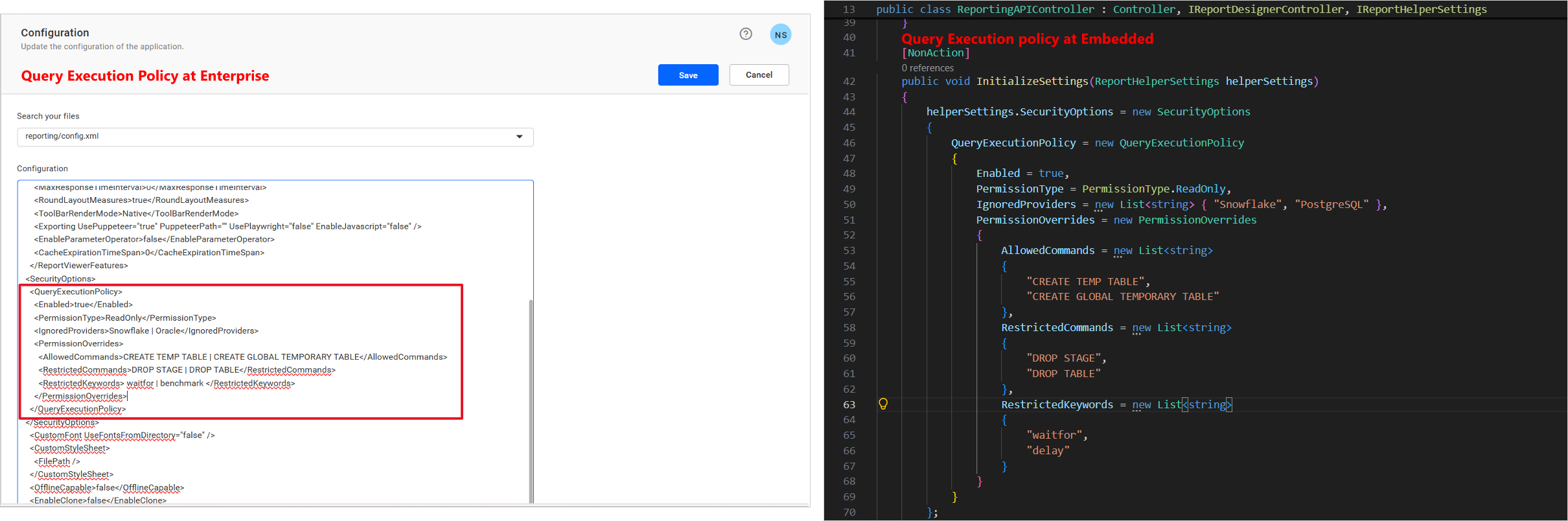
The Query Execution Policy introduces a centralized security layer that validates database queries before execution and helps prevent unauthorized or potentially harmful operations. The policy is designed to secure SQL-type queries only by enforcing configurable validation rules before query execution. It enables administrators to control query behavior through configurable rules while ensuring consistent protection across supported data sources.
Key Benefits
- Centralized policy-based configuration for query security management.
- Supports fine-grained control through configurable allowed and restricted SQL commands and keywords.
- Detects and blocks common SQL injection patterns and potentially dangerous database operations.
- Applies consistent security enforcement for tables, views, stored procedures, and custom SQL queries.
- Designed to restrict only SQL-type queries, ensuring controlled query execution without impacting non-SQL operations.
Supported Data Connectors
The Query Execution Policy is supported for the following data connectors:
- SQL Server
- MySQL
- Oracle
- PostgreSQL
- SSAS
- Snowflake
- Google BigQuery
- ODBC
- OLE DB
Report Viewer
JValue Token Handling in the Web API Data Provider
The Web API data provider now handles JValue tokens, so JSON responses that return scalar values are read correctly into report datasets.
Chart Localization by Report Language
Charts are now localized based on the report language, so axis labels, number formats, and dates follow the language configured for the report.
FillEmptySpace for Tables in PDF Export
Table items now support FillEmptySpace during PDF export, filling the remaining page space after a table with rows for a consistent printed layout.
Smarter Labels for Stacked Bar Charts
The smart label feature for stacked bar charts was improved to reduce overlapping and missing data labels.
IDP
Known-Domain.json Configuration API
Introduced API support for retrieving and updating Known-Domain.json configuration values, so domain settings can be managed programmatically instead of editing the file by hand.
UMS Site Settings API
Added API support for retrieving and updating UMS site settings, letting deployment scripts and integrations read and change site configuration directly.
AI
AI-Powered Conversational Analytics
Users can now ask questions about their reports and datasets in natural language and get answers through a conversational interface, making it faster to explore report data without building new queries.
Deployment
Upgrade Center (Beta)
Introduced the Bold Reports Upgrade Center in Beta for supported Kubernetes deployments. The Upgrade Center provides a guided experience for performing version upgrades, validation, monitoring, and rollback directly from the Bold Reports application.
With this feature, users can:
- Discover available releases and review version information within Bold Reports.
- Validate application readiness before the upgrade and verify functionality after the upgrade using automated tests.
- Back up impacted database tables before deployment images are updated.
- Track each upgrade stage with live progress, health checks, detailed logs, and validation reports.
- Apply standard releases or custom patches provided by Bold Reports Support.
- Recover using automatic or manual rollback to the previous version within the supported period.
- Automatically clean up temporary validation resources after the workflow completes.
Important: Upgrade Center is currently available in Beta for supported Kubernetes deployments only. Oracle Database configurations are not supported. Before upgrading, create and verify a complete database backup. Upgrade Center backs up only the tables affected by the selected release for rollback purposes and does not replace your organization’s regular backup or disaster recovery process.
Improvements
Bold Data Hub
Additional opt_fields in the Asana DataHub Connector
#841305 – Enhanced the Asana DataHub Connector to support custom opt_fields parameters in API requests. Users can retrieve additional task, project, and related entity attributes directly from Asana, providing greater flexibility in data extraction and richer datasets for reporting and analysis within DataHub.
Pagination in the DataHub Destination Tab
Enhanced the DataHub Destination tab with pagination controls, so destination entries are browsed page by page instead of loading all records at once. This reduces page load time and makes destination configurations easier to locate and manage in environments with a large number of records.
TCPS Support for Oracle Connector, Oracle Data Store, and IMDB
Added TCPS (TCP with TLS encryption) support for the Oracle Connector to connect to Oracle databases over an encrypted connection.
Added TCPS support for the Oracle Data Store to work with Oracle environments configured for secure connectivity.
Added TCPS support for IMDB to connect to Oracle environments that require TCPS-based communication.
IDP
Oracle TCPS for the Metadata Database
Added support for secure Oracle TCPS connectivity for the metadata database.
Optional SSL Certificate Validation for OpenID
Added support for disabling SSL certificate validation in the OpenID authentication settings, useful for identity providers running with internal or self-signed certificates.
Application Performance and Reliability
Improved application performance and reliability by optimizing database and cache operations across authentication, session validation, and configuration workflows.
Deployment
Enhanced Windows Installer Experience
Improved the Windows installer experience by introducing pre-validation checks before launching the application. The installer now identifies issues such as permission errors, insufficient disk space, and service startup failures, preventing application launch until the issues are resolved.
Bug Fixes
Report Designer
- #876886 – Fixed an issue that occurred when opening reports with a background image set for the report area in the designer.
- Fixed security vulnerabilities to improve application security.
Bold Data Hub
- #872401 – Resolved an issue where nested JSON objects were not separated into distinct entries correctly during processing.
- #872401 – Resolved an issue where table creation failed when processing JSON files containing a large number of columns.
- #872401 – Resolved an issue where JSON fields with identical names that differ only in letter casing were not handled correctly.
- #858978 – Enhanced pipeline deletion permissions to allow Admin users to delete pipelines created by any user.
- #851690 – Resolved an issue where date and time labels were inconsistent in the ETL pipeline schedule history.
- #854354 – Resolved an issue where the “Job is Running” status was not displayed during scheduled pipeline executions.
- #852153 – Added validation and a clear error message for excessively long CSV file names used in a template.
- #855886 – Resolved an issue that caused PostgreSQL pipeline connections to fail when the password contained double quotes.
- #852153 – Resolved an issue where incorrect Python script names were displayed during pipeline execution when multiple Python script files were used.
- #853520 – Resolved an issue where the DataHub Schedules page incorrectly displayed jobs as Running when the ETL service was stopped or unexpectedly interrupted.
- #853527 – Improved the Schedule Status toggle label and placement to better reflect the schedule creation state.
- #853528 – Improved the Scheduler dialog header and primary action button labels.
- Resolved an issue where transformation did not work in Azure Blob Storage.
- Resolved an issue where the CSV, JSON, and YAML connectors did not work in Azure Blob Storage.
- Improved dashboard rendering performance by 4 seconds when DataHub-based data sources are used in a dashboard.
- Resolved an issue where SSL certificate verification failed while connecting the Web connector in DataHub.
- Resolved an issue where the YAML connector failed with a 403 Forbidden error when using Amazon S3 Storage in a Docker environment.
- Restricted switching to another window while the schedule dialog is open.
- Resolved an issue where deleted tables continued to appear in the destination header for pipelines with Extract Engine support.
- Resolved an issue where the template did not load immediately when DataHub was opened for the first time.
- Resolved an issue where toast messages remained visible longer than expected by adding a close button.
- Resolved an issue that prevented creating a transform table with the same name as the extracted table.
- Resolved an issue where a disabled transform table continued to appear in the destination.
- Resolved issues with filesystem connectors and data transformation when using OCI Storage in Docker and Kubernetes environments.
- Resolved an issue where clicking the area between the Add (+) and Collapse/Expand icons displayed an empty pipeline screen.
- Resolved an issue where the pagination UI in Bold Data Hub Windows builds differed from previous versions.
- Resolved an issue where the Data Extract Engine failed to process data from OCI, Amazon S3, and Azure Blob Storage when using the CSV and JSON connectors.
- Resolved an issue with Google BigQuery credential file path handling by correctly resolving the file location based on the configured storage type.
- Resolved an issue where the Transform Table was not displayed in Bold BI when multiple files were added using the Extract Engine.
- Resolved an issue where changes made in Site Settings were not reflected after saving in Azure ARM deployments.
- Resolved an issue where the default “Bold Data Store” value was not displayed in the Data Store Name dropdown on the Settings page.
- Resolved an issue where pipeline execution failed while creating an Elasticsearch data source through the Data Hub Extract Engine.
- Resolved an issue where the Data Hub Extract Engine connection failed for File System connectors in Kubernetes (K8s) environments.
- Resolved an issue where Excel files uploaded through Data Hub using multi-file upload were not displayed in the Data Source Designer.
- Resolved an issue where the Source Database column was missing for SQL pipelines when the Query property was used.
- Resolved an issue where DuckDB-generated DLT system columns, such as dlt_load_id, appeared inconsistently in the Transform tab and caused automation test case failures.
- Resolved an issue where the Create Pipeline API incorrectly returned “pipeline already exists” for newly created tenants because ETL pipeline data associated with deleted tenants was not removed.
- Resolved an issue where CSV pipeline creation through the Create Pipeline API failed with the error “ETL pipeline operation failed.”
- Added a validation toast message that notifies users when a log refresh operation is triggered.
- Resolved an issue where connectors did not work when using the DataHub Extract Engine with MySQL configured as the IMDB.
- Resolved an issue where dropping tables in DataHub failed on MySQL sites using the DataHub Extract Engine.
- Resolved a data extraction failure when using the MSSQL connector with a query in a pipeline.
IDP
- Fixed an issue with OpenID authentication sign-out for the Cognito provider where users were redirected to an invalid URL after logout. Users are now signed out successfully and redirected to the configured logout or login page as expected.
- Fixed an issue that prevented the Reset Database option in the Admin Utility from working in deployments without a Persistent Volume (PV).
- #98375 – Fixed an issue where whitespace-only values were allowed in the password field when adding a user.
Breaking Changes
Report Server
Starting with the next release, planned for November 2026, REST API versions v1.0 through v4.0 will be deprecated and no longer supported. All existing integrations and API requests must be migrated to v5.0, which will be the only supported REST API version going forward. We recommend updating your applications and integrations to use v5.0 before upgrading to avoid service disruption.
Deployment
Docker Hub Registry for Container Images
Unified Container Image Registry – Starting with Bold Reports v15.1, both single-container and multi-container images will be served from Docker Hub to maintain a consistent container image distribution workflow. Previously, single-container images were hosted on Docker Hub, while multi-container images were hosted on Google Artifact Registry. To streamline image distribution and maintain uniformity, both image types will now be available through Docker Hub.
| Old (Google Artifact) | New (Docker Hub) |
|---|---|
| us-docker.pkg.dev/boldreports/multi-container/bold-identity:x.y.z | syncfusion/bold-identity:x.y.z |
| us-docker.pkg.dev/boldreports/multi-container/bold-idp-api:x.y.z | syncfusion/bold-idp-api:x.y.z |
| us-docker.pkg.dev/boldreports/multi-container/bold-ums:x.y.z | syncfusion/bold-ums:x.y.z |
| us-docker.pkg.dev/boldreports/multi-container/boldreports-designer:x.y.z | syncfusion/boldreports-designer:x.y.z |
| us-docker.pkg.dev/boldreports/multi-container/boldreports-server:x.y.z | syncfusion/boldreports-server:x.y.z |
| us-docker.pkg.dev/boldreports/multi-container/boldreports-server-api:x.y.z | syncfusion/boldreports-server-api:x.y.z |
| us-docker.pkg.dev/boldreports/multi-container/boldreports-server-jobs:x.y.z | syncfusion/boldreports-server-jobs:x.y.z |
| us-docker.pkg.dev/boldreports/multi-container/boldreports-viewer:x.y.z | syncfusion/boldreports-viewer:x.y.z |
| us-docker.pkg.dev/boldreports/multi-container/bold-etl:x.y.z | syncfusion/bold-etl:x.y.z |
| NA | syncfusion/boldreports-ai:x.y.z |
| NA | syncfusion/boldreports-mcp-server:x.y.z |
Action Required:
- Update container image repository names to the appropriate Docker Hub repositories.
- Complete this update before upgrading to v15.1.