Added support for aggregate functions in the ReportItems expression.
Added an option to hide the Show Details link in the error banner.
Bug Fixes
Report Viewer
Resolved a console error that occurred when invoking the toast dialog in Classic mode.
Resolved an issue with the NOT operator when used between expressions.
Version 13.1.40
Weekly release
1Improvements
1Bug fixed
Improvements
Report Viewer
Added support for rendering smart labels in column charts.
Bug Fixes
Report Designer
Resolved an issue where (Null) values in report parameters were lost when saving a report.
Version 13.1.39
Weekly release
2Improvements
Improvements
Report Viewer
Resolved an issue where parameters disappeared after the toolbar was refreshed.
Resolved an error that occurred while previewing a column chart with formatted data labels.
Version 13.1.38
Weekly release
4Improvements
Improvements
Report Viewer
Added a custom property to resolve the report header issue during printing.
Resolved the issue where the enableComplexScript custom property was not working in PDF export.
Fixed the background image rendering issue when StorageSettings is configured in the controller.
Added support for overlapping body items in print layout using a custom property.
Version 13.1.37
Weekly release
1Improvements
Improvements
Report Viewer
Added support for EvaluationMode=”Constant” in the Report Viewer.
Version 13.1.36
Weekly release
2Improvements
Improvements
Report Viewer
Improved support for maximum values in charts, aligned with SSRS standards.
Resolved an issue where unwanted space was rendered when left indentation was applied to list items.
Version 13.1.35
Weekly release
4Improvements
Improvements
Report Viewer
Resolved an issue where report items were not splitting across multiple pages even when Keep Together was set to False.
Resolved an overlapping issue between text boxes.
Resolved a Tablix width issue where applying indentation to rows caused incorrect alignment.
Report Designer
Introduced Thai (th-TH) localization support in the Report Designer for improved regional usability.
Version 13.1.34
Weekly release
4Improvements
Improvements
Report Viewer
Added support for list styles in PDF and PPT exports.
Resolved an issue where the Tablix report items collection returned incorrect data after refreshing the report in the Report Viewer.
Resolved an issue where datetime parameter values were not converted according to the user’s timezone.
Resolved an issue where drill-through parameters were not assigned properly from the main report when the GetParameterWithValues method was configured.
Version 13.1.33
Weekly release
3Improvements
Improvements
Report Viewer
Improved the performance of nested JSON structures in the WebAPI data connector.
Resolved the float parameter issue that persisted in the Linux environment.
Added a custom property to hide the tooltip header.
Version 13.1.32
Weekly release
2Improvements
Improvements
Report Viewer
Resolved an issue in parameter evaluation where hidden optional parameters were processed without enforcing required values for dependent visible parameters when OPTIONALGROUPPARAMETERS was enabled.
Resolved the Content Security Policy issue in the parameter tooltip component.
Version 13.1.31
Weekly release
1Improvements
Improvements
Report Viewer
Improved data label rendering for the 100% stacked column chart.
Version 13.1.30
Weekly release
1Improvements
Improvements
Report Viewer
Added support to display an error message along with a custom message when executing a command.
Version 13.1.29
Weekly release
9Improvements
Improvements
Report Viewer
Resolved a bullet issue in the Report Viewer textbox.
Fixed an issue where connection string errors were displayed only in the UI and were not passed to the custom logger.
Improved the error message displayed during query execution.
Resolved a date formatting issue when retrieving dates from PostgreSQL.
Fixed an error that occurred when rapidly clicking navigation controls.
Improved HTML entity rendering in the Report Viewer.
Fixed an issue where the EnableFitContentMaxHeight custom property was not working correctly.
Resolved an object reference error when the external image size was set to AutoSize.
Fixed an issue where the image logo in a subreport did not render correctly during page navigation.
Version 13.1.28
Weekly release
5Improvements
Improvements
Report Viewer
Improved multi-stripline support in chart items in the EJ2 Viewer.
Added support for a custom property to hide the Select All option based on the parameter name.
Resolved a serialization issue with list levels in the paragraph DOM.
Fixed a NullReferenceException (NRE) in the tablix report item within table groups when the miscellaneousFieldVal value is null.
Resolved a connection issue that occurred when configuring the server URL over HTTPS.
Version 13.1.27
Weekly release
5Improvements
Improvements
Report Viewer
Resolved the time inconsistency issue when using the date parameter.
Fixed an issue where values were not displayed when the same field was used in both row and column groups with the Count function in the field expression.
Resolved the 3D chart slant issue when using the custom property.
Fixed the issue with Turkish locale handling in parameter serialization in the Report Viewer.
Resolved an issue where the total page number was not updating correctly in the WPF application.
Version 13.1.26
Main release
10New features
28Improvements
14Bug fixed
1Breaking change
What’s New
Report Server
S3 Storage Support
Bold Reports can now be configured with Amazon S3 storage in the same way as the existing file and blob storage backends, so teams already standardized on S3 can keep report definitions, exports, and assets in their own bucket without introducing a second storage platform.
OAuth-Validated Server Auth Tokens
A server auth token can now be obtained by validating a user’s OAuth token, so embedded applications can reuse the identity they already hold instead of managing a separate credential.
Extended Cascading Parameter API
The Cascading parameter API was extended to return the cascading sub parameters of main parameters, giving embedders full visibility into a parameter’s dependent values through the API.
Report Viewer
Report Name as Print Document Title
The Print window now assigns the report name as the document title, replacing what was previously a blank title, so the printed document is easier to identify from the print dialog or saved PDF.
Aggregation in Raw Data Excel Export
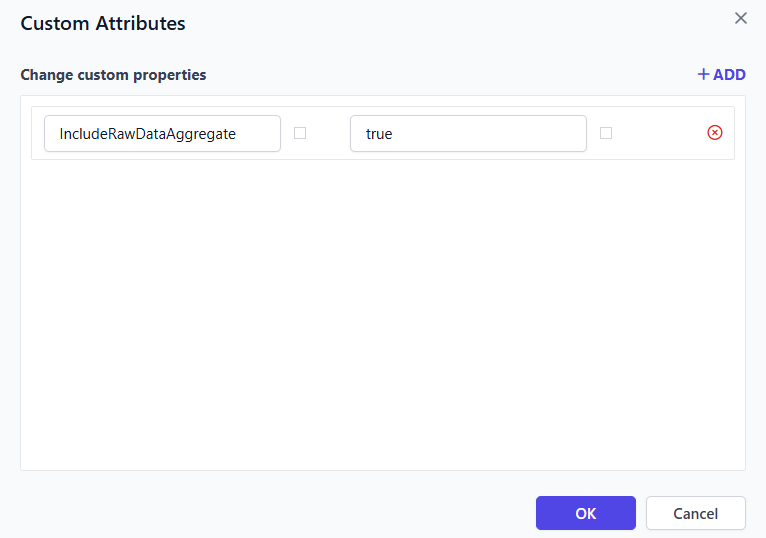
Aggregation is now supported for dataset fields in raw data Excel export, so exported raw data can include summary values instead of only the unaggregated rows.
Six New Viewer Locales
The Report Viewer gained six new locales, Estonian, Greek, Indonesian, Thai, Latvian, and Lithuanian, extending the viewer’s language coverage for teams working in those regions.
FillEmptySpace Custom Property
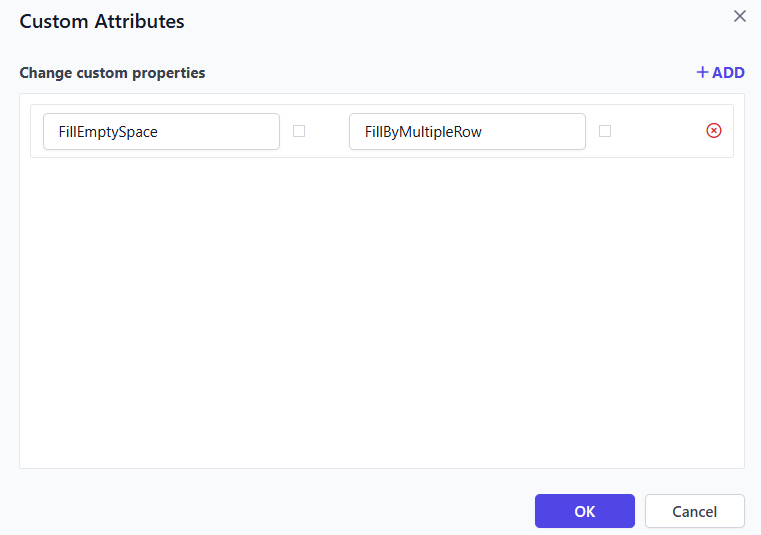
The new FillEmptySpace custom property fills empty space after table items using table rows, so layouts with variable-length tables no longer leave an awkward gap at the bottom of the page.
IDP and Deployment
Reverse Proxy Domain-Based Routing
Reverse proxy support now routes the application based on the request domain, eliminating the need to use the application URL across the entire Bold Reports operation.
Kubernetes deployments can now use the Traefik load balancer as a modern, supported alternative to NGINX Ingress.
Improvements
Report Designer
PostgreSQL UUID Filter Support
Dataset query filters now accept UUID data type fields in PostgreSQL. Identity and foreign-key columns stored as UUIDs can be filtered directly in the dataset, without casting them to text in the query first. This removes a common workaround where authors had to wrap a UUID column in a cast expression just to build a working filter, so filter conditions on ID-based fields are now as straightforward to set up as on any other column type.
Track Report Changes in Real Time
Introducing the new on ReportModified event, which triggers whenever any RDL object is updated, letting host applications track changes, trigger custom workflows, and build smarter integrations for improved development efficiency and control.
Serialization of Username and Password nodes in the RDL is now restricted during on-premises download, keeping data source credentials out of downloaded definitions.
Additional Security Hardening
Additional application security improvements were made for a smoother and safer experience.
Report Server
Expression-Based Schedule Parameters
Schedules can now use expression selection alongside parameter selection when they are created, so a schedule’s parameter value can be tied to a dynamic expression instead of always being fixed at creation time.
The report server architecture was upgraded to .NET 10, keeping the server aligned with Microsoft’s current long-term support runtime for better performance and security.
Hebrew Locale Support
Bold Reports now supports the Hebrew locale in the Report Server interface, extending the platform’s language coverage with a right-to-left locale.
Skip Emails for Schedules with No Data
Added support for skipping emails from the report server when a scheduled report contains no data, so recipients no longer receive empty or near-empty report emails on runs that had nothing to report.
Improved Export API Error Messages
Error messages for the export report API were made clearer, making failures easier to diagnose from the API response alone.
A health check option was added to Report Server for deployment and uptime monitoring, so orchestration tools and load balancers can probe server health directly.
Schedule Parameter Validation
Provided support to validate report parameters for the add and update schedule APIs, so parameter values passed to these APIs are checked against the report’s actual parameters.
Dynamic Scheduling Intervals
Scheduling intervals can now be set dynamically in the report server, instead of relying only on fixed preset intervals.
Startup, Default, and Upgrade-Case Error Logs
Fixed startup and default error logs in the report server so they capture accurate information, and added upgrade-case specific error logs, making it easier to diagnose why a failed upgrade didn’t complete.
JWT-Authenticated Embedding
Embedded iframe scenarios are now supported using JWT authentication, giving host applications a standards-based token option instead of relying solely on the platform’s own auth scheme.
Hideable Profile, Help, and Notification UI
The profile, help link, and notification options in the header can now be hidden using custom_ui_reports json nodes, letting embedders present a leaner, more branded chrome.
Set Username via Add User API
The add user API now supports setting a username directly instead of deriving it from other fields. This gives integrators explicit control over the username value when provisioning accounts programmatically.
Export File Name via Schedule API
The export file name for a scheduled report can now be set through the add and update schedule APIs, instead of always falling back to a default generated name.
Report Viewer
EnableFitContentMaxHeight Custom Property
A new Report Viewer Preview custom property, EnableFitContentMaxHeight, resolves textbox overlapping that could occur when cell content is rendered at its natural size.
Flexible Pyramid Chart Labels
The Pyramid chart preview now allows flexible label rendering adjustments, giving report authors more control over how category labels display around the pyramid shape.
HTML export and printed reports now support custom fonts, so documents render with the precise font styling defined in the report instead of falling back to a default typeface.
Faster WebAPI DataTable Generation
DataTable generation for the WebAPI data connector is faster, reducing the wait when a report backed by a Web API source is previewed or refreshed.
Writer Cancellation Events
Report processing cancellation events are now supported in the Writer component, letting host applications abort a long-running export instead of waiting for it to finish or time out.
Bold Data Hub
Python 3.13 Upgrade
Bold Data Hub moved from Python 3.11 to 3.13, bringing newer language features and performance improvements to pipeline execution.
IDP
Azure App Service Deployment Automation
Automated deployment of Azure App Services is now supported, along with improvements to automated rebranding in Bold Reports deployments, reducing the manual setup needed for cloud rollouts.
UMS Upgraded to .NET 10
The user management service (ums) architecture was upgraded to .NET 10, keeping identity and user management aligned with the platform’s current runtime.
Consistent Logging Conventions
The logging mechanism now uses a standardized PascalCase variable naming convention across services, making logs easier to read and correlate when diagnosing an issue that spans multiple services.
Bug Fixes
Report Designer
Fixed an issue where custom attribute values were not retained when saved as empty, later updated, and reopened.
Fixed an issue that prevented undo and redo operations when a Tablix cell contained multiple textboxes.
Fixed an issue where the Tablix gripper collapsed when a report item was placed inside a rectangle within merged Tablix cells.
Fixed an issue where report preview and publish actions failed for depth Tablix reports.
Bold Data Hub
Resolved the YAML Connector not working issue.
Fixed the Site Settings page not working in Bold Data Hub.
Fixed an issue where the Pipeline Delete icon flickered in a Linux environment.
IDP
Fixed an issue where AI logo updates were not applied after calling the branding logo API.
Fixed an issue where API-based theme uploads were not reflected on the Bold Reports Server.
Resolved issues in Email Template view, edit, and create functions.
Resolved internal server error and page not found issues during concurrent access under high-load scenarios.
Resolved issues with OAuth and OpenID login from external applications in embedded scenarios.
Fixed an issue causing a broken image download loop when the logo file failed to download.
Ensured the Powered by logo is hidden across all pages when disabled by the user.
Breaking Changes
Report Designer
Renamed the reportModified event to reportAction. The updated name better reflects the range of designer actions it covers.
Important Notes
Deployment
The Alpine and Ubuntu (focal) Docker image variants are deprecated. A single Docker image variant is now provided for both evaluation and production deployments, and image tags no longer expose the base OS version.
Supported tags going forward are latest, <product-version> (for example, 13.1.26), and <product-version>-eval. Migrate away from the Alpine and Ubuntu (focal) variants.