
Crystal Reports Migration vs. Rebuild: Choose the Right Path
TL;DR:
Crystal Reports support deadlines are pushing organizations to modernize. Crystal Reports 2020 mainstream maintenance ends December 31, 2026, and Crystal Reports 2025 ends December 31, 2027. Teams typically choose between assisted migration, which is faster and preserves existing reports, and manual rebuild, which takes more effort but enables deeper modernization. There is no true one-click migration tool. For most organizations, the best strategy is to migrate reports that still deliver value, rebuild those that need redesign, and retire unused reports.
Introduction
For decades, SAP Crystal Reports has been the backbone of operational, financial, and customer-facing reporting, powering everything from invoices and statements to compliance documents and internal production reports. Many organizations still rely on large libraries of .rpt files that encode years of business logic, formatting standards, and stakeholder expectations.
But Crystal Reports modernization is no longer a “someday” initiative. With end-of-support milestones approaching and broader shifts toward cloud adoption, embedded reporting, and modern development frameworks, teams are being forced to make a practical decision: do you migrate existing reports to a modern platform, manually rebuild them, or retire what no one uses?
This matter is urgent. Crystal Reports 2020 mainstream maintenance ends on December 31, 2026, while Crystal Reports 2025 reaches the same milestone on December 31, 2027. For organizations managing hundreds of reports, waiting until support deadlines are near leaves little time for inventory assessment, business validation, user acceptance testing, and phased deployment. The question is no longer whether reporting systems should be modernized, but how to do it with the least risk and effort.
This guide breaks down the real differences between assisted migration and manual rebuild, explains why there’s no true one-click conversion, and gives you a report-by-report framework to choose the fastest, lowest-risk path from Crystal Reports without rewriting everything unnecessarily.
The deadline that’s forcing the decision
For decades, Crystal Reports has powered operational, financial, and customer-facing reporting across industries. The reason so many teams are re-evaluating it now isn’t because of a trend—it’s the calendar.
SAP’s maintenance and support milestones for each version makes it clear that the runway is shorter than it looks once you factor in inventory, validation, stakeholder review, and phased rollout:
-
- Crystal Reports 2016: Mainstream maintenance ended December 2022. End of support was December 31, 2024. This version is now unsupported.
- Crystal Reports 2020: Mainstream maintenance ends December 31, 2026.
- Crystal Reports 2025: Mainstream maintenance ends December 31, 2027. Verify SAP’s current policy for support beyond this date.
- Crystal Reports for Enterprise (CR4E): Removed from SAP BusinessObjects BI 2025.
After mainstream maintenance ends, organizations typically lose access to security updates, bug fixes, and compatibility improvements. While existing .rpt files may continue to run, resolving future issues becomes increasingly difficult.
Always confirm support dates for your version against SAP’s lifecycle documentation, as roadmaps and policies can change.
For most organizations, these support milestones mean planning must begin now. However, end-of-support is only part of the story. Many teams are already modernizing reporting for broader business and technology reasons.
Why organizations are migrating from Crystal Reports
Support deadlines are the forcing function, but they’re not the only driver. Many organizations are also modernizing the rest of their application stack: infrastructure, identity providers, security frameworks, and data platforms. Reporting becomes one of the last remaining legacy dependencies.
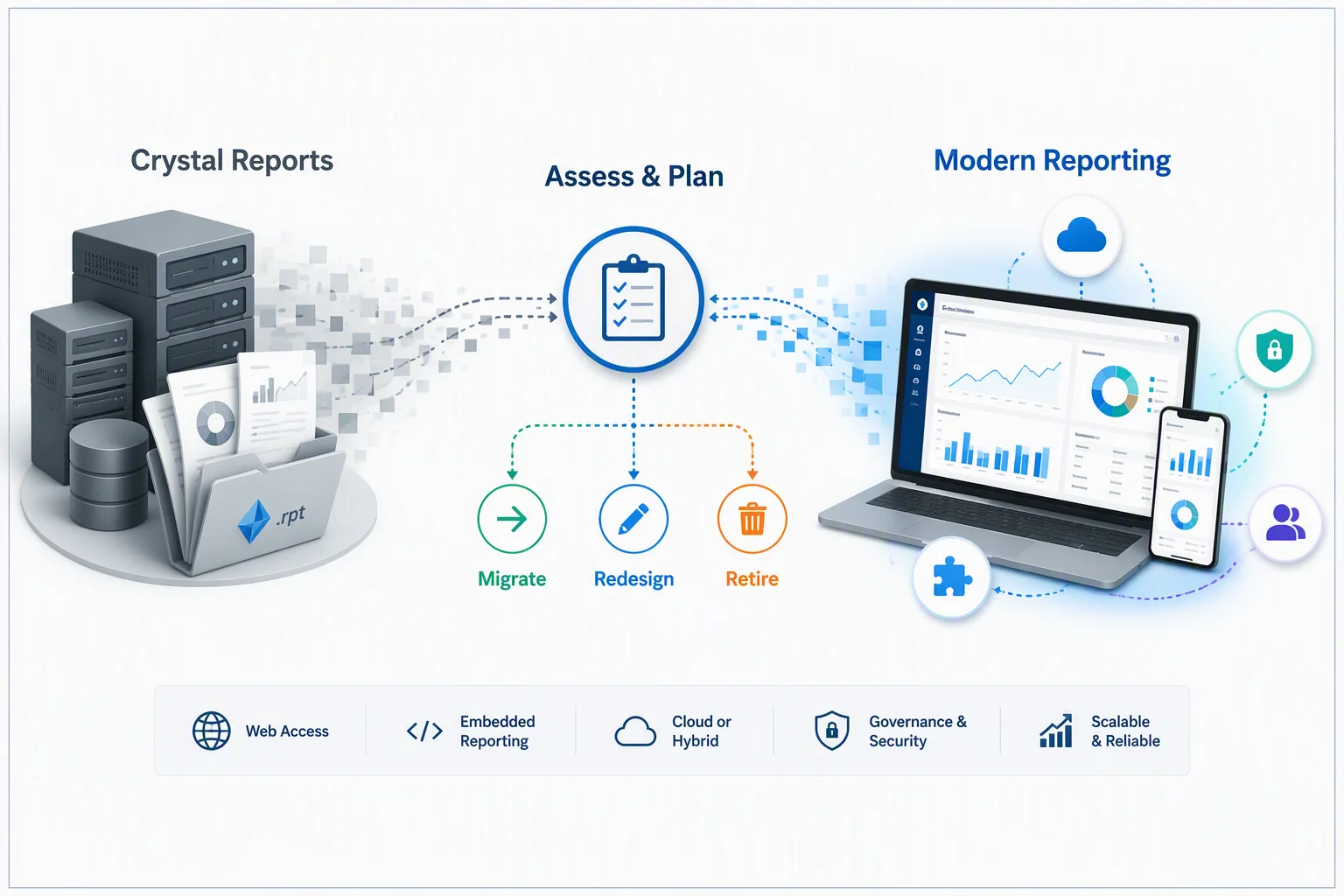
Common goals of reporting modernization include:
-
- Web access so users aren’t tied to desktop tooling or legacy viewers.
- Embedding reporting inside modern applications and reducing runtime dependencies.
- Cloud or hybrid deployment options.
- Centralized governance for security, permissions, and distribution.
- Simpler administration and better standardization across teams.
At the same time, most organizations don’t want to re-create years of reporting work if they don’t have to. That’s why the migration-versus-rebuild choice matters: some reports can move with minimal change, while others need a redesign or should be retired entirely.
Migration vs. rebuild: The honest difference
There’s a persistent myth worth clearing up first: There is no button that reads your .rpt files and produces a fully configured modern reporting environment on the other side.
Crystal Reports’s own architecture, pixel-perfect document requirements, and licensing constraints mean migration tools accelerate and assist the move; they don’t fully automate it. Some tools offer an import path that carries over layouts, formulas, and parameters as a starting point, but a human still validates and finishes the work.
With that framing, here’s the real distinction:
-
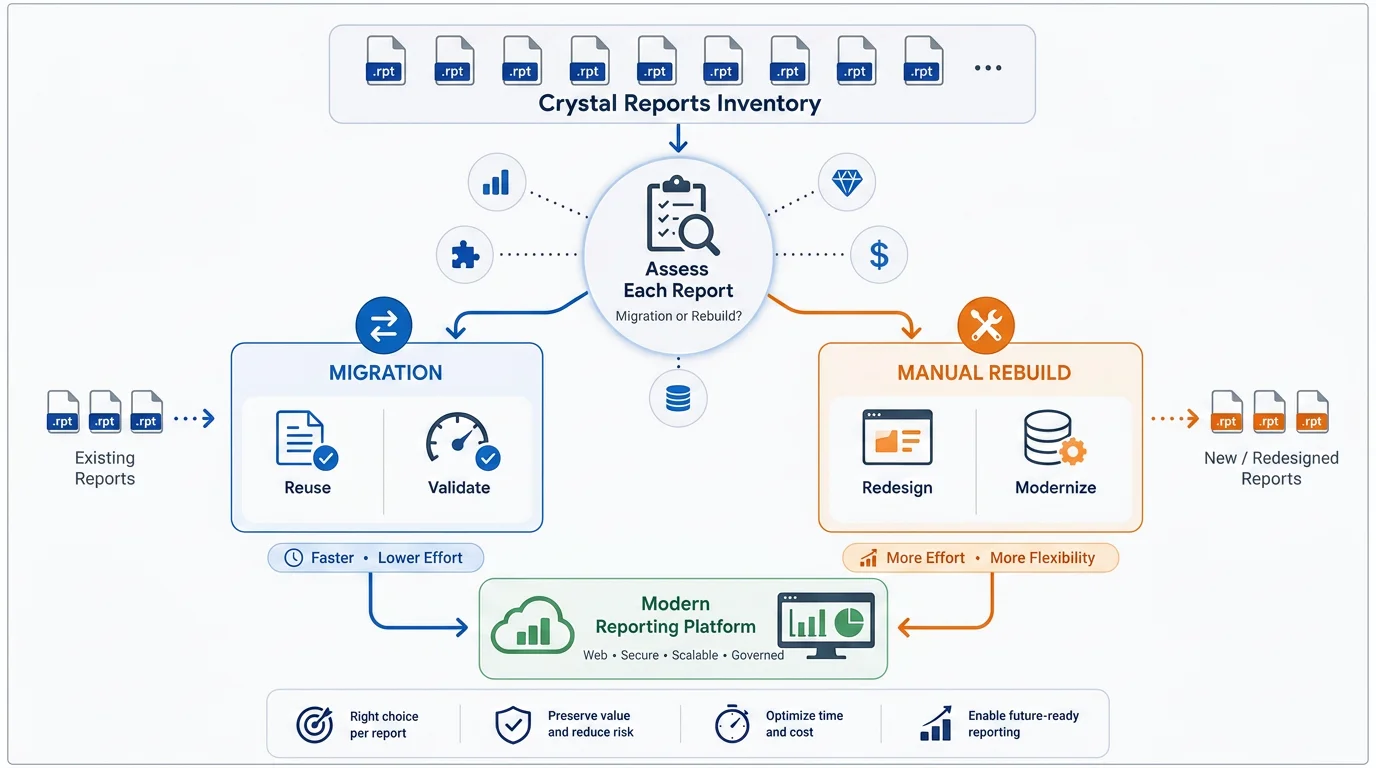
- Migration: Reuses as much of the existing report, layout, formulas, parameters, and business logic as the migration tool allows and then validates the output against the original. This is the fastest path and preserves continuity.
- Manual rebuild: Re-creates each report from scratch, using the old report as a functional spec. It’s slower and more expensive, but it’s your chance to fix the data model, improve performance, and redesign the report for how people use reports today.
| Decision factor | Migration | Manual rebuild |
| Speed | Faster because existing reports are used as a starting point. | Slower because each report is re-created individually. |
| Effort | Lower for redevelopment, but more shifts to validation. | Higher across the board. |
| Business logic | Much of it carries over, and then gets verified. | Re-created and validated from scratch. |
| Primary validation | Output/parity testing against the original. | Both functionality and re-created logic. |
| Large number of reports | Scales well across hundreds of reports. | Effort grows roughly linearly with report volume. |
| Redesign freedom | Limited because you are preserving, not reinventing. | Full: new layouts, data models, and interactivity. |
Neither is better. The right choice is made per report against your modernization goals.
Start with an inventory, not a migration
The most common and expensive mistake is treating this as a purely technical exercise and trying to move everything at once. Before touching a single report, catalog what you have.
For each report, capture:
-
- The owner or stakeholder who can confirm that the new report is correct.
- Usage frequency, whether the report is run daily, monthly, or not at all.
- Business purpose, such as invoicing, compliance, operational reporting, or analytics.
- Data sources and dependencies.
- Complexity signals, including subreports, formulas, parameters, exports, and custom business logic.
This inventory step is usually revealing. Teams often discover that a small fraction of reports accounts for most real usage, while most have not been run in months.
Those reports that haven’t been run in months? You don’t migrate them. You don’t rebuild them. You retire them. Cutting dead weight is the cheapest transition speed-up available.
How report complexity drives the choice
The more logic embedded in a report, the more it costs to modernize, regardless of which path you choose. Complexity tends to increase when reports include:
-
- Extensive formulas and calculated fields.
- Multiple subreports and linked datasets.
- Conditional formatting and custom business rules.
- Complex parameters and cascading filter logic.
- Advanced grouping, sorting, and aggregations.
- Financial, compliance, or other regulated reporting requirements.
The best way to evaluate a report is to consider both complexity and business value.
| Lean toward migration when | Lean toward rebuilding when |
| The report already meets business needs. | The report needs a meaningful redesign. |
| Existing logic should be preserved as is. | New requirements must be introduced. |
| Continuity is the priority. | The data model or reporting standards are changing. |
| You are moving large numbers of similar operational reports. | Users need self-service or interactive reporting experiences. |
| The report is a pixel-perfect invoice, statement, or compliance document. | Performance and maintainability are ongoing challenges. |
Pixel-perfect operational reports such as invoices, statements, and compliance documents are typically strong migration candidates because calculations and formatting must remain consistent. Reports that users would benefit from as dashboards or self-service experiences are often better suited for rebuilding and, in some cases, retirement.
Example
Consider a typical mid-sized deployment of about 300 Crystal Reports. After a two-week audit, a realistic split often looks like this:
-
- 40% retired: Reports no one has run in the last several months. Zero migration cost.
- 45% migrated: Invoices, statements, and operational reports that still work well and simply need a supported modern home. Assisted migration plus parity testing.
- 15% rebuilt: High-value reports that users have quietly outgrown and that are better rebuilt as modern paginated reports or dashboards.
That triage is what turns an intimidating “migrate 300 reports” project into a manageable one. It is also where timelines come from. Teams that manually rebuild hundreds of reports often find projects stretching toward a year, while assisted migration of the reports worth keeping, combined with aggressive retirement of unused reports, can significantly reduce project scope and effort.
The exact percentages will vary by organization, but the overall pattern remains consistent: most of the savings come from not migrating reports you no longer need.
Concerned about the future of your Crystal Reports environment? This Crystal Reports end of life page outlines key lifecycle deadlines, potential risks after the end of maintenance, and the options available for upgrading or migrating to a modern reporting platform.
Cost, timeline, and resourcing: What drives the project
Licensing is the smallest line item. Here’s what drives cost and schedule:
-
- Volume: Larger inventories mean more planning, validation, and coordination, which is why retirement pays off.
- Complexity: Heavily customized reports need more analysis and testing on either path.
- Validation rigor: Business-critical and regulated reports demand side-by-side output validation, not just a visual check.
- Available expertise: Access to report authors and business owners who can confirm what is correct is often the real bottleneck, not developers.
- Goal: A continuity-focused migration takes far less effort than a redesign-led rebuild.
Set expectations early, in phases, tied to your end-of-life date. Working backward from December 2026 for CR 2020 shops leaves less runway than most teams assume once you account for validation and user acceptance.
Validation and risk: Where migrations quietly go wrong
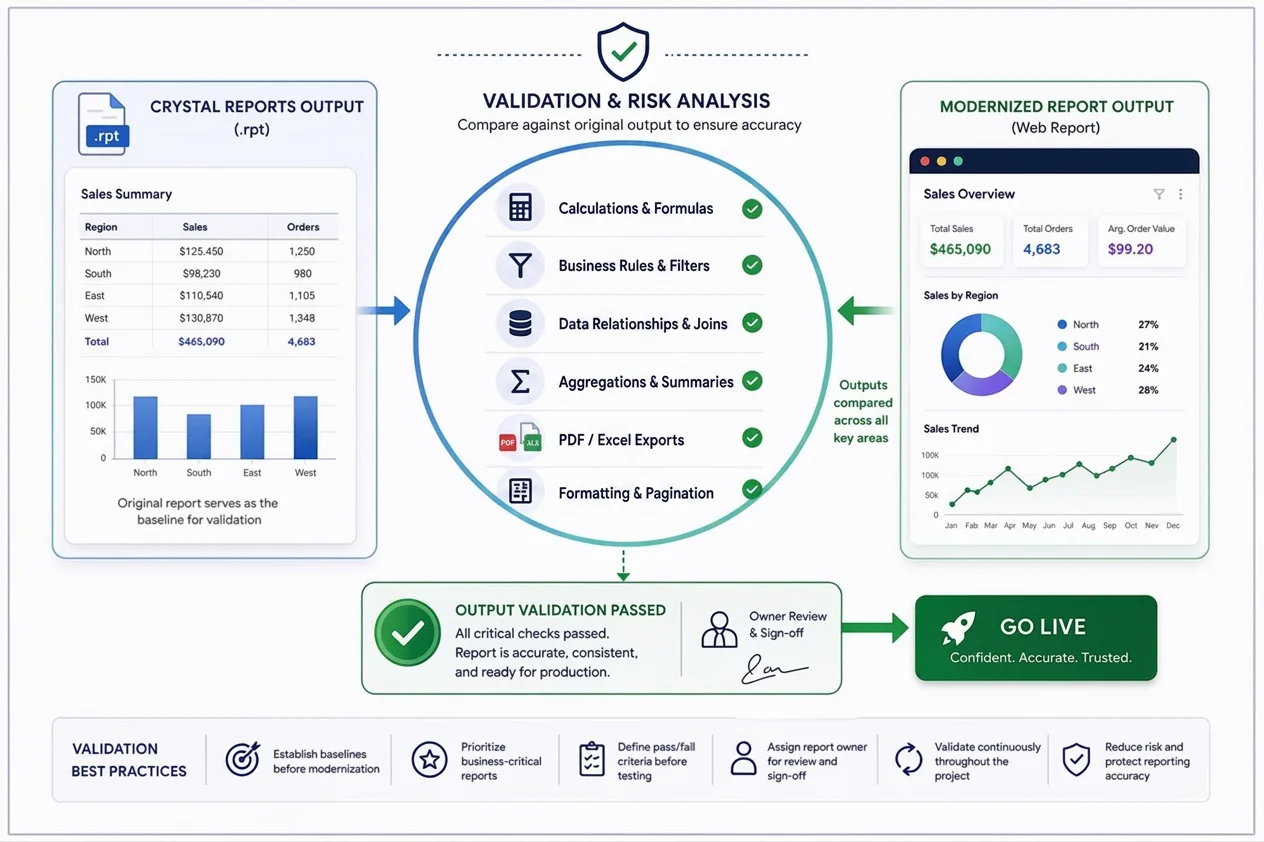
Whether you migrate or rebuild, validation is what protects the business. The biggest risk is business logic drift: formulas, calculations, filters, joins, or aggregations that quietly produce different results after modernization even though the report appears correct. Financial, compliance, and other business-critical reports are particularly sensitive to these issues.
Validate against the original Crystal Reports output, not just a visual comparison:
-
- Calculations and formulas: Do totals, subtotals, derived fields, rounding rules, and null-value handling match the original report?
- Business rules and filters: Does report behavior remain consistent across parameter combinations, default values, blank inputs, and date boundaries?
- Data relationships and aggregations: Are joins, grouping, summarization, and duplicate-record handling producing the expected results?
- Formatting and exports: Review PDF and Excel exports carefully. Pagination, alignment, headers, footers, and number formatting are common areas where differences emerge.
Common issues caught during testing include calculation discrepancies, missing filters or parameters, aggregation mismatches, formatting and pagination differences, and data that fails to reconcile between old and new reports.
Reduce risk by establishing report baselines before modernization, prioritizing business-critical reports, defining pass/fail criteria before testing begins, assigning a report owner for review and sign-off, and validating continuously throughout the project rather than waiting until the end.
By validating against original report outputs and following a structured testing process, organizations can significantly reduce migration risk while preserving reporting accuracy throughout modernization.
How Bold Reports fits a Crystal Reports migration
If your goal is to move the reports worth keeping, especially the pixel-perfect, operational kind Crystal Reports is known for, Bold Reports is designed to be a practical Crystal Reports alternative for modern delivery and management.
What that looks like in practice:
-
- Structured, assisted migration path: Move reporting assets into a modern environment while preserving layouts, parameters, and business logic where applicable. Plan for validation, there’s no true one-click migration.
- Modern, paginated reporting: Pixel-perfect output that maps well to invoices, statements, and operational documents.
- Web-based access: Deliver reports through a browser for easier access across teams.
- Embedded reporting: APIs and SDKs to integrate reports directly into applications and reduce legacy runtime dependencies.
- Flexible deployment: Cloud, on-premises, and hybrid options to match infrastructure and compliance needs.
- Centralized management and governance: Security, permissions, and administration in one place.
Whether you’re planning a phased move ahead of support deadlines or a broader modernization initiative, Bold Reports can help you modernize report delivery while preserving the value of existing reporting investments.
Final thoughts
The migration-versus-rebuild conversation often assumes that organizations must choose a single approach for every report. The most successful Crystal Reports modernization projects take a more practical path.
They migrate the reports that still provide value, rebuild the reports that need modernization, and retire the reports that no longer serve a business purpose. This approach reduces project risk, shortens transition timelines, and avoids unnecessary redevelopment effort.
With Crystal Reports 2020 mainstream maintenance ending in December 2026, organizations still have time to plan a thoughtful modernization strategy. The teams that begin with a report inventory today will have far more flexibility than those that wait until support deadlines are close. By understanding which reports should be migrated, rebuilt, or retired, organizations can modernize reporting at a pace that aligns with both business priorities and technical requirements.
For teams evaluating a Crystal Reports alternative or replacement, solutions like Bold Reports can help simplify the transition by providing a modern reporting platform while preserving the value of existing reporting investments. Whether you’re planning a phased migration or a broader reporting transformation, exploring a 30-day free trial or scheduling a personalized demo can help you determine the best path forward for your reporting environment.
Frequently asked questions
- 1.
When does Crystal Reports reach end of life?
SAP publishes maintenance and support milestones by version. Crystal Reports 2016 support already ended (December 31, 2024). Crystal Reports 2020 mainstream maintenance ends December 31, 2026, and Crystal Reports 2025 mainstream maintenance ends December 31, 2027. Confirm your exact dates in SAP’s lifecycle documentation.
- 2.
What’s the difference between Crystal Reports migration and a manual rebuild?
Migration reuses existing reports’ layouts, formulas, parameters as a starting point on a new platform, and then validates the output for parity. A manual rebuild re-creates each report from scratch, enabling redesign and data-model modernization. Migration is faster and preserves continuity; rebuilding offers more flexibility at higher effort.
- 3.
Is there a tool that migrates Crystal Reports automatically?
Not fully. There is no universally reliable one-click converter that turns .rpt files into finished modern reports without validation and manual work. Treat migration as an assisted process: tooling can accelerate the transfer of structures and logic, but humans still validate and complete each report.
- 4.
Which approach is faster?
Assisted migration is usually faster for reports that still meet requirements because it builds on existing assets. Rebuilding is slower because each report is re-created and tested. The biggest speed-up is often retiring unused reports first.
- 5.
Is migration suitable for large report inventories?
Yes. Assisted migration typically scales better across hundreds or thousands of reports than rebuilding everything. But always start with an inventory; large environments often contain many inactive reports that should be retired.
- 6.
When is a manual rebuild the better option?
When a report needs a true redesign: new requirements, changed data models, performance fixes, a shift to dashboards and self-service reporting, or standardization across teams. Rebuild what users have outgrown; migrate what still works.
- 7.
What’s the biggest risk during a Crystal Reports migration?
Business-logic drift: formulas, calculations, filters, or aggregations producing different results after modernization, especially in financial and compliance reports. Validate output using the same source data and pay special attention to export fidelity.
- 8.
Can organizations combine migration and rebuilding approaches?
Yes, and most should. The proven strategy is a triage: migrate reports that still deliver value, rebuild the few needing redesign, and retire the rest. This balances speed, cost, and modernization outcomes better than a single-path approach.






