
Free Crystal Reports Alternatives: 8 Open-Source Tools

TL;DR:
There are several free and open-source Crystal Reports alternatives worth considering, including JasperReports, Eclipse BIRT, Pentaho, SSRS, FastReport, Metabase, Apache Superset, and Power BI Free. Some focus on pixel-perfect, paginated reporting for invoices and financial documents, while others specialize in dashboards and self-service analytics. The best option depends on your reporting requirements. Beyond licensing costs, evaluate factors such as implementation effort, maintenance, licensing restrictions, scalability, scheduling, governance, and support before choosing a replacement.
Introduction
Many organizations begin their search for a Crystal Reports alternative by looking for a lower-cost reporting solution. Free and open-source tools can provide core reporting capabilities, connect to a wide range of data sources, and eliminate upfront licensing expenses.
However, replacing Crystal Reports is rarely just about reducing costs. As reporting programs mature, organizations often need capabilities such as report automation, embedded reporting, customer-facing delivery, centralized administration, security controls, and scalable deployment.
The real challenge is not finding a tool that can create reports today but determining whether it can continue to support evolving business requirements over time.
This guide examines the most widely used free Crystal Reports alternatives, highlights their strengths and limitations, and explains when a free reporting tool is sufficient and when a more comprehensive reporting platform may be the better long-term choice.
Why teams are looking for a free Crystal Reports alternative right now
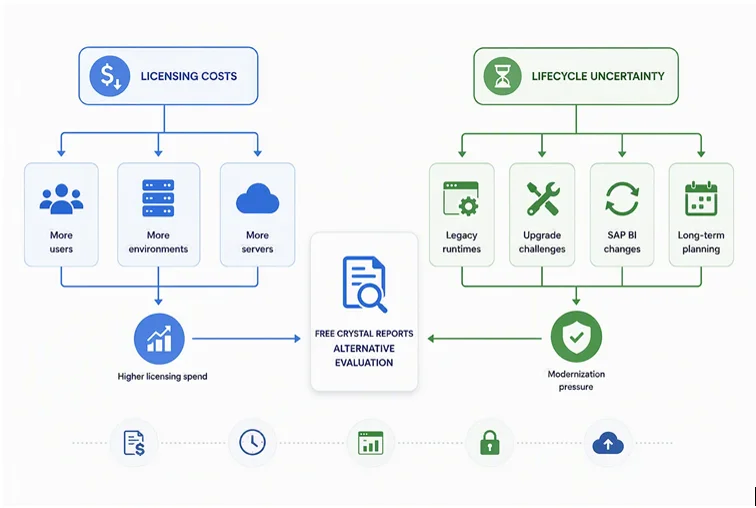
Two factors are driving organizations to explore free SAP Crystal Reports alternatives: licensing costs and lifecycle uncertainty.
| Licensing costs | Lifecycle uncertainty |
| Licensing expenses can increase as users, environments, and servers are added. | Legacy applications often depend on aging runtimes and 32-bit components. |
| Smaller teams may struggle to justify the investment. | Upgrades, cloud migrations, and infrastructure changes can become more complex. |
| Organizations are looking for lower-cost ways to meet reporting needs. | Changes across SAP BI releases can create uncertainty for long-term planning. |
-
- On the cost side: Crystal Reports licensing expenses can grow quickly as organizations add users, environments, and servers. For smaller teams, the investment can be difficult to justify when free reporting tools can meet many core reporting requirements.
- On the lifecycle side: Modernization initiatives are prompting organizations to reassess legacy Crystal Reports environments. SAP Crystal Reports 2016 reached its end of support on December 31, 2024, SAP Crystal Reports 2020 is scheduled to reach end of mainstream maintenance on December 31, 2026, and SAP Crystal Reports 2025 is currently supported through December 31, 2027.
The result is a common question: What’s the best free Crystal Reports alternative? The answer depends on whether you need pixel-perfect operational reports, embedded reporting, dashboards, or self-service analytics.
First, understand what “free” means
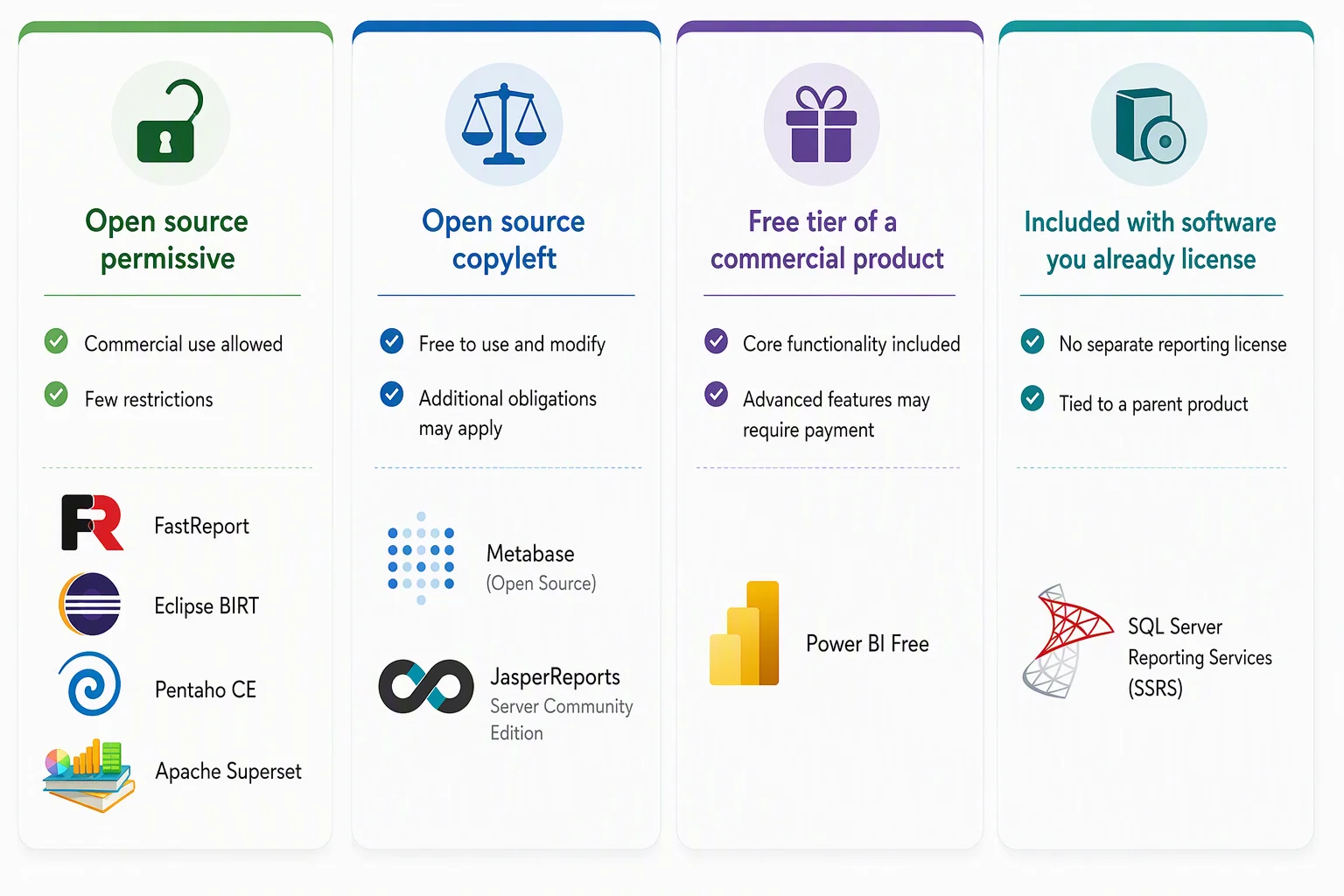
Not everything labeled free is free in the same way, and the distinction matters for anything customer-facing. It could mean many different things, like:
-
- Open source permissive: Like MIT, Apache 2.0, and EPL, these options are free to use, modify, and distribute including inside commercial products with few restrictions. Examples include FastReport, BIRT, Pentaho CE, and Apache Superset.
- Open source copyleft: These options are free to use, but embedding the tool in a product, commercial distribution, or SaaS deployment may create additional licensing obligations. Examples include Metabase Open Source and JasperReports Server Community Edition. Review licensing terms carefully before embedding.
- Free tier of a commercial product: No license fee is required for core functionality, but sharing, collaboration, administration, and advanced features often require a paid plan. Power BI Free is a common example.
- Included with software you already license: No separate reporting license is required, but the reporting tool is tied to a parent product. For example, SQL Server Reporting Services is included with SQL Server, depending on the edition and licensing model.
Keep this in mind as you read: a tool that is free for internal reporting is not necessarily free for customer-facing applications.
Free Crystal Reports alternatives compared
The market offers dozens of reporting tools, but only a handful are commonly evaluated as free Crystal Reports alternatives. The table below compares the most relevant options based on licensing, reporting capabilities, embedded reporting support, and ideal use cases.
| Tool | License or cost | Pixel-perfect reporting | Embedded reporting | Best for | Key limitation |
| JasperReports Community Edition | LGPL library, Server Community Edition under AGPL | Yes | Yes, with development effort | Java environments that require highly formatted reports | Learning curve and AGPL considerations |
| Eclipse BIRT | EPL or Apache 2.0 | Yes | Yes | Eclipse and Java applications | Aging ecosystem |
| Pentaho Report Designer (CE) | Apache 2.0 or LGPL | Yes | Partial | Operational reporting and modernization projects | Advanced capabilities often require commercial products |
| SSRS | Included with SQL Server | Yes | Yes | Microsoft-based reporting environments | SQL Server dependency |
| FastReport Open Source | MIT | Yes | Yes | .NET and .NET Core applications | Fewer features than commercial editions |
| Metabase Open Source | AGPL | No | Limited | Self-service analytics and dashboards | Advanced security and administration require paid plans |
| Apache Superset | Apache 2.0 | No | Yes | SQL-based analytics and dashboards | Technical setup required |
| Power BI Free | Free commercial tier | No | Limited | Analytics and self-service reporting | Sharing requires paid licensing |
The distinction that trips up most Crystal Reports migrants
Crystal Reports is fundamentally a paginated, pixel-perfect tool. It exists to produce documents where layout is exact and repeatable such as invoices, financial statements, regulatory filings, account summaries, shipping labels, and more.
Many popular alternatives are dashboard and analytics tools. Metabase, Apache Superset, Tableau, and Power BI are excellent at interactive exploration and visualization, but they are not built to render a tightly formatted three-page invoice the same way every time. Teams that pick a dashboard tool to replace paginated reporting almost always discover the gap late, mid-migration.
Before you compare features, you should answer one question: are you replacing documents, or are you replacing analysis?
-
- Replacing documents: JasperReports, BIRT, Pentaho, SSRS, FastReport.
- Replacing analysis or dashboards: Metabase, Apache Superset, Power BI Free.
- Doing both: You’ll likely end up running two tools or evaluating a platform that does both.
Eight tools in detail
1. JasperReports Community Edition
JasperReports Community Edition is one of the most widely adopted open-source reporting engines and remains one of the closest functional alternatives to Crystal Reports. It supports pixel-perfect report generation, grouped and banded layouts, subreports, master detail reporting, and multiple export formats including PDF, Excel, HTML, and CSV.
Watch for: Jaspersoft Studio can be less intuitive than Crystal Reports for complex report design projects. The Community Edition server is also licensed under AGPL, which should be reviewed carefully before any customer-facing deployment.
Best for: Java environments with dedicated development resources.
2. Eclipse BIRT
BIRT is an open-source reporting platform developed within the Eclipse ecosystem and is frequently used for embedded and operational reporting in Java applications. The platform provides flexible report design capabilities, strong Java integration, and support for embedded reporting scenarios under a permissive licensing model.
Watch for: Although still widely used, the ecosystem is more mature than rapidly evolving. The platform also tends to be developer oriented rather than business user friendly.
Best for: Eclipse-based projects, Java applications, and embedded reporting initiatives.
3. Pentaho Report Designer Community Edition
Pentaho Report Designer combines open-source roots with broad reporting capabilities and support for highly formatted business documents. Organizations often evaluate Pentaho during reporting modernization projects because it offers flexible design options and supports multiple export formats.
Watch for: Many of the administration, scheduling, and enterprise scale capabilities organizations eventually require are available through Pentaho’s commercial offerings rather than the community edition.
Best for: Operational reporting environments and modernization initiatives.
4. SQL Server Reporting Services (SSRS)
For organizations already invested in Microsoft technologies, SSRS is often one of the most practical alternatives to Crystal Reports. Included with SQL Server, SSRS supports paginated RDL reports, report scheduling, report distribution, and tight integration with the Microsoft ecosystem.
Watch for: SSRS remains largely developer driven and assumes SQL Server infrastructure. Many Crystal Reports migrations to SSRS feel more evolutionary than transformational because the reporting model remains similar.
Best for: SQL Server environments that require operational reporting and report distribution without purchasing additional reporting software.
5. FastReport Open Source
FastReport Open Source is an MIT-licensed reporting library built specifically for .NET and .NET Core applications. Its ability to generate pixel-perfect reports and integrate directly into applications makes it a common choice for organizations replacing Crystal Reports runtime dependencies.
Watch for: The open-source edition provides core reporting functionality, but some advanced export formats and design capabilities are reserved for commercial editions.
Best for: .NET and .NET Core applications requiring embedded reporting.
6. Metabase Open-Source Edition
Metabase takes a different approach from traditional reporting tools, focusing primarily on self-service analytics and dashboard creation. Its intuitive interface, visual query builder, and self-hosted deployment model have made it popular among data teams and growing organizations.
Watch for: Metabase is designed for analytics rather than operational reporting. Features such as row-level security, single sign on, and certain embedding capabilities require paid plans. The open-source edition is licensed under AGPL.
Best for: Organizations seeking user-friendly analytics and dashboarding capabilities.
7. Apache Superset
Apache Superset is an open-source analytics platform designed for SQL-based data exploration and dashboard creation. Backed by an active community and released under the Apache 2.0 license, it offers significant flexibility for organizations building modern analytics environments.
Watch for: Superset expects technical users and requires more setup and administration than many commercial analytics products. It is not intended for paginated operational reporting.
Best for: Data teams building interactive dashboards on top of data warehouses and analytical data platforms.
8. Power BI Free
Power BI Free is Microsoft’s entry level business intelligence offering and is frequently evaluated alongside Crystal Reports alternatives. The platform delivers strong dashboarding, visualization, and analytics capabilities while integrating seamlessly with the broader Microsoft ecosystem.
Watch for: Power BI is not a direct replacement for Crystal Reports. Its strengths lie in analytics and dashboards rather than highly formatted operational reporting. Collaboration and sharing capabilities also require paid licensing.
Best for: Organizations focused on self-service reporting, analytics, and business intelligence.
While the eight tools covered above represent the most evaluated free Crystal Reports alternatives, a few niche solutions may also be worth considering for specific reporting requirements, like:
-
- ReportBurster for report distribution, scheduling, and report bursting scenarios.
- Seal Report for lightweight, self-hosted reporting environments.
- SharpDevelop Reports for organizations maintaining legacy open-source reporting projects.
These tools serve more specialized use cases and may be worth evaluating if your reporting requirements fall outside the mainstream options covered in this guide.
What free reporting tools commonly lack
Free tools generate reports well. The gaps tend to appear once reporting grows past “create a report” and into “run reporting as an operation,” with needs like:
-
- Consistent pixel-perfect output at scale: Maintaining exact formatting across a large, growing library of invoices and statements gets harder without dedicated tooling.
- Turnkey embedded reporting: Most free tools can be embedded, but security, white labeling, and multitenant customization usually mean meaningful development and maintenance.
- Reporting operations: Scheduling, automated delivery, user management, governance controls, and centralized administration are frequently thin or absent.
- Support and reliability: Community support suits smaller projects; business-critical reporting often needs guaranteed response times, vendor accountability, and long-term stability.
When a free reporting tool is the right call
Free and open-source tools are a genuinely good fit when:
-
- Reporting requirements are relatively simple and stable.
- Reports are mainly for internal use.
- Volumes are manageable.
- You have in-house technical expertise to set up and maintain the tool.
- Embedded reporting, automated delivery, and heavy governance aren’t in the picture.
If that describes you, a free tool can carry your reporting for a long time. The key question is whether your requirements will stay simple as you grow.
Signs you’ve outgrown a free reporting tool
The hard part isn’t choosing a free tool; it’s recognizing when your needs have quietly moved past it. Common signals include:
-
- Customer-facing reporting: Reports are delivered directly to customers through apps or portals, making consistency and uptime business-critical.
- Automated delivery: Manual generation, export, and email distribution have become a time sink.
- Embedded requirements: Reports need to live inside your product as part of the user experience.
- Compliance and governance: Auditing, permissions, and regulatory needs demand real control.
- Growth across departments: A small reporting effort now serves multiple teams and processes.
- Dependence on support: Reporting matters enough that you need predictable, reliable help.
When several of these apply, the job shifts from creating reports to managing reporting at scale and that’s where free tools tend to run out of room.
Where an enterprise reporting platform fits
At that point, many teams move from a report generation tool to a reporting platform that handles the full lifecycle in one place:
-
- Report design
- Distribution and scheduling
- Embedded reporting
- Administration and governance
- Scalability and centralized management
This is the gap Bold Reports® is built for. It combines pixel-perfect reporting, embedded reporting for web and application use, automated scheduling and distribution, centralized management and governance, and flexible on-premises or cloud deployment, with commercial support behind it.
For organizations that started on a free tool and hit the ceiling on automation, embedding, or governance, it’s designed to be the next step rather than another migration down the road.
The point isn’t that free tools are the wrong starting choice. For many teams, they’re the right one. It’s that the best decision accounts for where your reporting is heading, not just where it is today. For organizations evaluating their next step beyond Crystal Reports, migrating to a modern reporting platform can help support web-based reporting, cloud initiatives, and long-term scalability. Explore the Crystal Reports migration solution to understand the migration process and modernization options.
Final thoughts
Choosing a free Crystal Reports alternative often starts as a cost decision, but long-term success depends on selecting a solution that aligns with how your organization uses reporting.
For organizations with straightforward reporting needs, free and open-source tools such as JasperReports, BIRT, Pentaho, SSRS, FastReport, Metabase, Apache Superset, and Power BI Free can provide significant value. The key is understanding whether your priority is pixel-perfect reporting, dashboards and analytics, or a combination of both.
As reporting requirements expand, the focus often shifts beyond report creation to automation, embedded reporting, governance, administration, and scalability. At that stage, many organizations move from using a reporting tool to adopting a reporting platform that supports the entire reporting lifecycle.
The goal is not to avoid free reporting tools. For many teams, they are the right starting point. The goal is to choose a solution that can support both your current requirements and the direction your reporting needs are headed.
Ready to evaluate a scalable alternative? Explore Bold Reports with a 30-day free trial or request a personalized demo to see how it supports pixel-perfect, embedded, and automated reporting from a single reporting platform.
Frequently asked questions
-
- 1.
What is the best free Crystal Reports alternative?
It depends on the job. For pixel-perfect paginated documents, JasperReports (Java) or FastReport (.NET) are the closest matches, and SSRS is often the most genuinely free option for SQL Server shops. For dashboards and self-service analytics, Metabase, Apache Superset, or Power BI Free are stronger fits.
- 2.
Which free alternatives produce pixel-perfect, paginated reports like Crystal Reports?
JasperReports, Eclipse BIRT, Pentaho Report Designer, SSRS, and FastReport all produce paginated, tightly formatted output. Metabase, Apache Superset, and Power BI Free are dashboard first and are not designed for exact layout documents.
- 3.
Is there a truly free alternative for .NET applications
Yes. FastReport Open Source (MIT licensed) is built to embed in .NET and .NET Core apps, making it a common first choice for teams replacing the Crystal Reports runtime. SSRS is also free if you already license SQL Server.
- 4.
Does “open source” mean it’s free to use in a commercial product?
Not always. Permissive licenses (MIT, Apache 2.0, EPL) are generally fine to embed and distribute. Copyleft licenses like AGPL, which cover Metabase’s open-source edition and JasperReports Server Community Edition, can require you to open source your own code or buy a commercial license when embedding or offering SaaS. Review the license before any customer-facing use.
- 5.
Are free Crystal Reports alternatives suitable for enterprise reporting?
They can cover many scenarios, but enterprise environments often need scheduling, governance, embedded reporting, centralized administration, and dedicated support, capabilities that free editions frequently lack or require significant development to build.
- 6.
What’s the difference between a reporting tool and a reporting platform?
A reporting tool focuses on creating and generating reports. A platform adds scheduling, delivery, administration, governance, embedded reporting, user management, and scalability, the operations around reporting, not just the reports themselves.
- 7.
What should we evaluate before migrating off Crystal Reports?
Report complexity and inventory, distribution and automation needs, embedded reporting requirements, governance and compliance controls, deployment preferences (on premises vs. cloud), and expected growth. Weigh long term needs, not just the upfront license cost.
- 1.






