Resolved the hideexportlist custom property issue in Angular.
Fixed the textbox visibility issue when EnableVirtualEvaluation was true and ExcelLayoutOption was IgnoreCellMerge.
Fixed an issue where an expression was not parsed properly when a static value was used in a filter expression.
Resolved the ‘key not found’ exception in the WPF platform when using Print layout.
Fixed an issue with nested lookupset when SQL and WebAPI datasets were used together in a lookupset function.
Version 11.1.20
Weekly release
1Improvements
Improvements
Report Viewer
Added support for the print option in the mobile layout.
Version 11.1.19
Weekly release
9Improvements
Improvements
Report Designer
Resolved an inconsistency in the merge cell option between Tablix group and non-group columns.
Resolved inconsistencies in color selection for the Indicator Status property.
Ensured available and default values in report parameters linked to query parameters are retained when refreshing shared datasets.
Report Viewer
Fixed an issue where the default value of a multi-value parameter was not set properly when configured via the client API.
Resolved the ParentReportItem tag being added even when set to None in the Indicator report item.
Fixed the DateAdd function to correctly handle the quarter interval.
Provided custom property support for hiding specific legend items.
Resolved a Content Security Policy issue in the right-side toolbar.
Improved the performance and reliability of RDLC raw data export.
Version 11.1.18
Weekly release
4Improvements
Improvements
Report Viewer
Provided PDF/A4 conformance support for PDF exports.
Resolved an issue where optional groups did not function correctly in newly edited reports.
Resolved an issue where the legend reverse property did not work correctly for stacked column charts, aligning behavior with SSRS standards.
Fixed a bug where tooltips were incorrectly displayed for data points without values in chart preview when enableCrossAxisTooltip was enabled.
Version 11.1.17
Weekly release
4Improvements
Improvements
Report Designer
Resolved a UI collapse issue when merging cells in Tablix report items.
Report Viewer
Fixed an issue where page break functionality did not work when configured using expressions in Tablix group items.
Resolved an issue where the DateTime parameter change event was not triggered properly in the EJ2 viewer.
Resolved an issue where spacing was removed when no data was present and a no-row message was configured for the Tablix.
Version 11.1.16
Weekly release
1Improvements
Improvements
Report Viewer
Handled null values for background images in report items.
Version 11.1.14
Weekly release
8Improvements
Improvements
Report Designer
Provided an API ‘enableReportPart’ to let users view and publish report items as reusable report parts.
Provided an API ‘enableParameterOperator’ to show the option to enable operators in report parameters.
The database list now loads correctly even when the ‘Save Password’ checkbox in the SQL connector is unchecked.
Report Viewer
Resolved the ‘Page Key Not Found’ exception during navigation in the WPF platform.
Implemented custom property support to manage selected values in dropdown lists.
Downgraded .NET 8.0 framework-dependent package versions for compatibility.
Added support for exporting raw data in the RDLC Report Viewer.
Fixed an issue where available values for DateTime parameters were not loading in cascading scenarios.
Version 11.1.13
Weekly release
11Improvements
Improvements
Report Designer
#753089 – Fixed an issue where the context menu disappeared when the cursor was moved rapidly.
Report Viewer
Resolved an issue with sorting dataset fields based on dependent dataset fields.
Added API support for ExcelLayoutOption in Excel export.
Implemented center alignment support for the Image report item in both preview and export modes.
Fixed an issue where Tablix column content was truncated in preview when a left indent was applied to the cell.
Ensured the TOP clause specified in the dataset query takes precedence over the fetch limit in report preview.
Addressed overlapping and font rendering issues in HTML report export.
Fixed an issue where reports using code modules failed when file storage settings were enabled.
Handled DBNull values passed through format functions to prevent a Hash error.
Resolved an issue where barcodes were not rendered in the WPF Viewer.
Resolved an error that occurred when multiple click actions were performed on page navigation.
Version 11.1.12
Weekly release
1Improvements
Improvements
Report Viewer
Resolved Content Security Policy violations that caused an EvalError during initialization of the Bold Reports viewer (DropDownList/toolbar).
Version 11.1.11
Weekly release
9Improvements
Improvements
Report Designer
Resolved the issue preventing the Undo function from restoring initial border settings in Tablix report items.
Report Viewer
Provided support for background images when using a database image for rectangle report items.
Resolved an issue where percentage formatting did not work when using variable expressions.
Fixed chart rendering issues during export and viewing when border radius and background color are applied.
Resolved an issue where the code module did not work in a scalable environment with file storage.
Resolved an issue with Word options not being properly passed from the controller when file storage is enabled.
Ensured custom export item values are correctly passed in the ExportItemClick event.
Ensured proper disposal of print data when using a custom printer.
Upgraded the dependent npm packages.
Version 11.1.10
Main release
17New features
28Improvements
18Bug fixed
1Breaking change
What’s New
Report Server
Azure Entra ID Access Tokens
Bold Reports access tokens can now be generated via Microsoft Azure Entra ID authentication, giving organizations already standardized on Entra ID a way to issue tokens through their existing identity provider instead of managing a separate credential system. Access tokens now inherit the same conditional access policies and audit trail Entra ID already enforces.
Bulk Report Download and Upload
Enabled bulk report download and upload functionality, so multiple reports can be exported from or imported into a site in a single operation instead of one at a time. This speeds up migrating or backing up large report libraries spread across many categories.
File Upload Capability with API Support
Introduced file upload capability along with corresponding API support, letting files be uploaded to the server both through the UI and programmatically. This lets integrating applications push files as part of automated workflows, such as provisioning scripts or scheduled pipelines, without manual uploads.
Report Designer
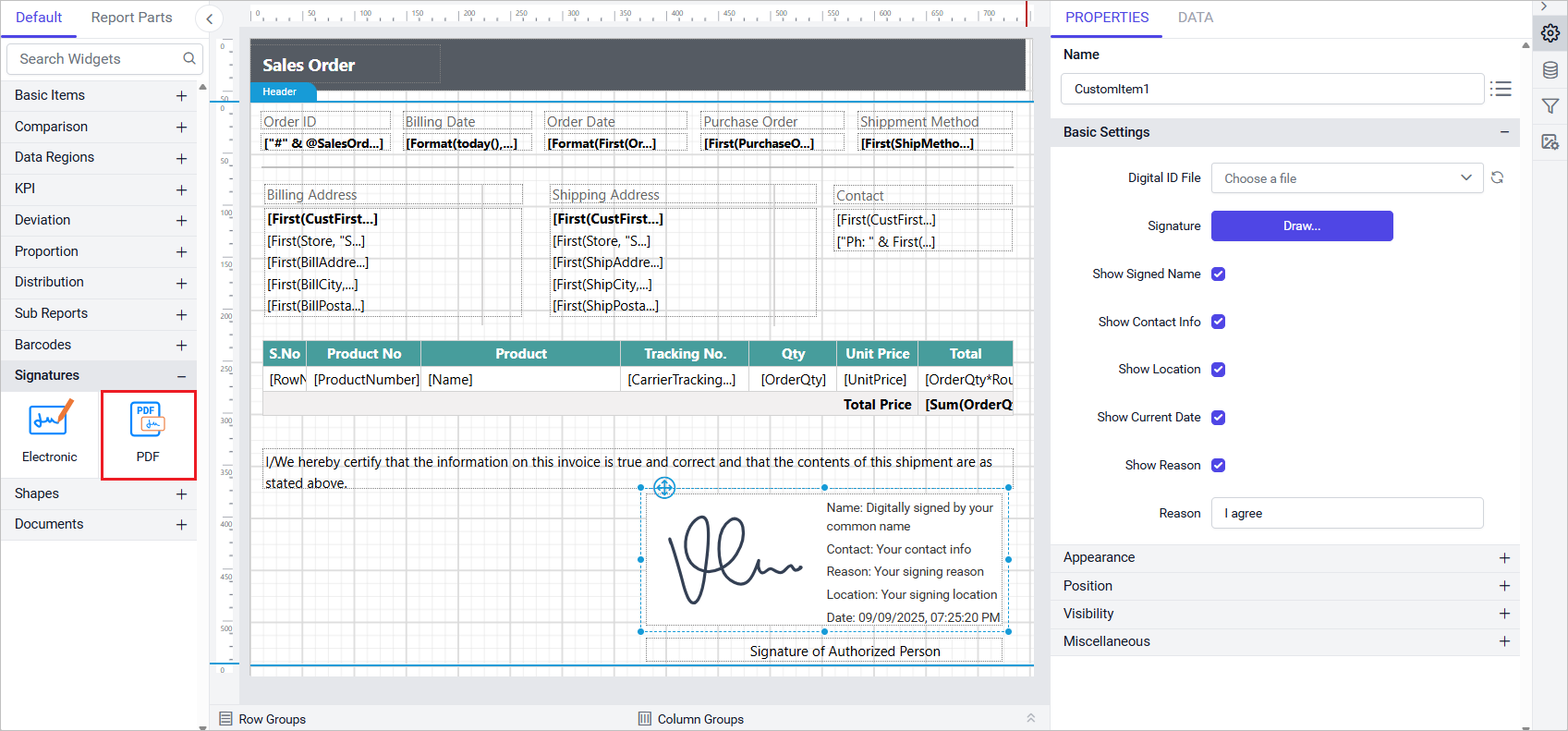
PDF Signature Report Item
The PDF Signature custom report item enables secure embedding of signature metadata within PDF reports, in both the Report Designer and Report Viewer. After uploading a PFX certificate to the server (protected by a password), authors can draw a signature directly in the designer or preview, and configure which signer details, name, contact information, location, signing reason, and current date, are shown, either extracted from the certificate or customized.
The signature field itself is visible during design and preview, but its metadata renders only in the final exported PDF, keeping the design surface uncluttered while ensuring secure, compliant output. A configurable Reason field defaults to “I agree” and can be changed to suit business or legal requirements.
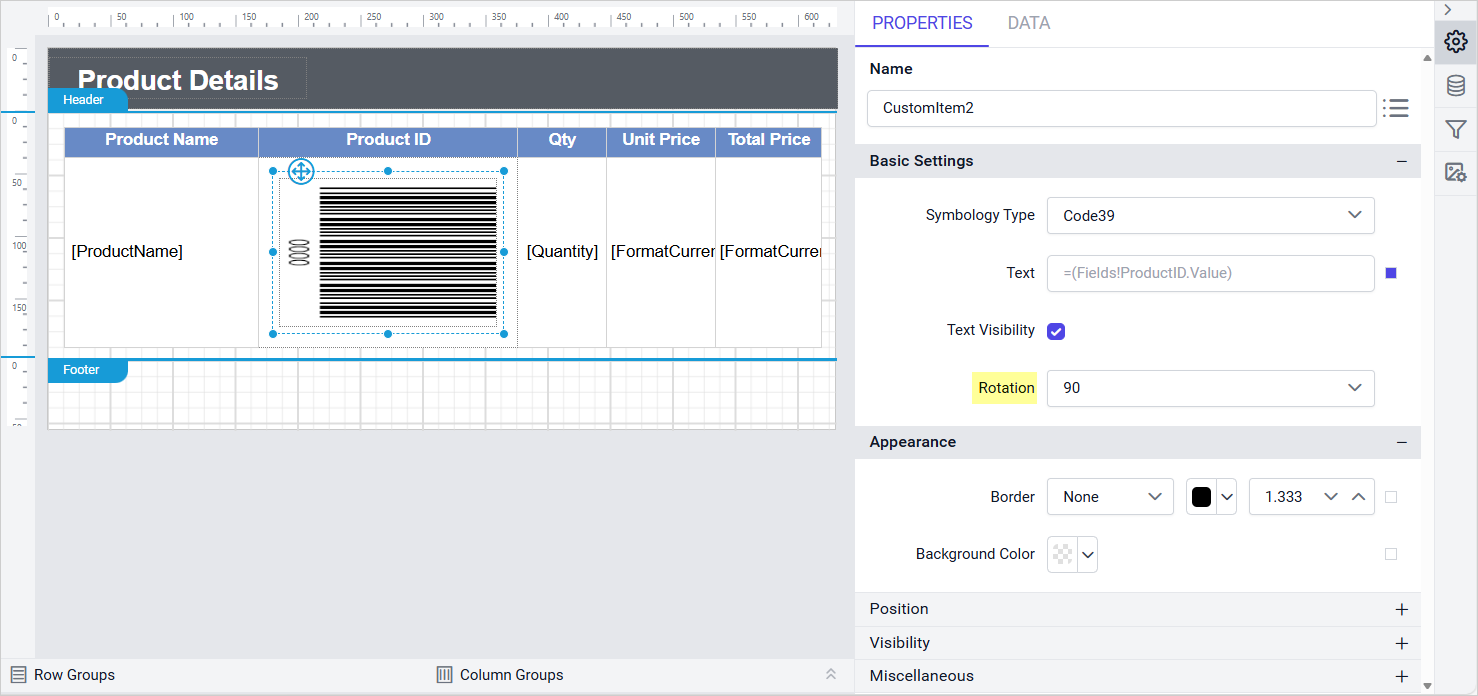
Added a Rotation property for Barcode custom report items, so a barcode can be rotated to fit a label layout or align with the surrounding report content instead of always rendering horizontally. This is useful for shipping labels, badges, and other constrained layouts where a horizontal barcode would otherwise overlap adjacent content.
Added a File Upload option for registering custom styles on the report server, letting each tenant in a multi-tenant deployment upload and manage its own style JSON file independently, instead of sharing one custom style location across all tenants. The uploaded style key can then be selected from the Custom Style property in the Report Designer.
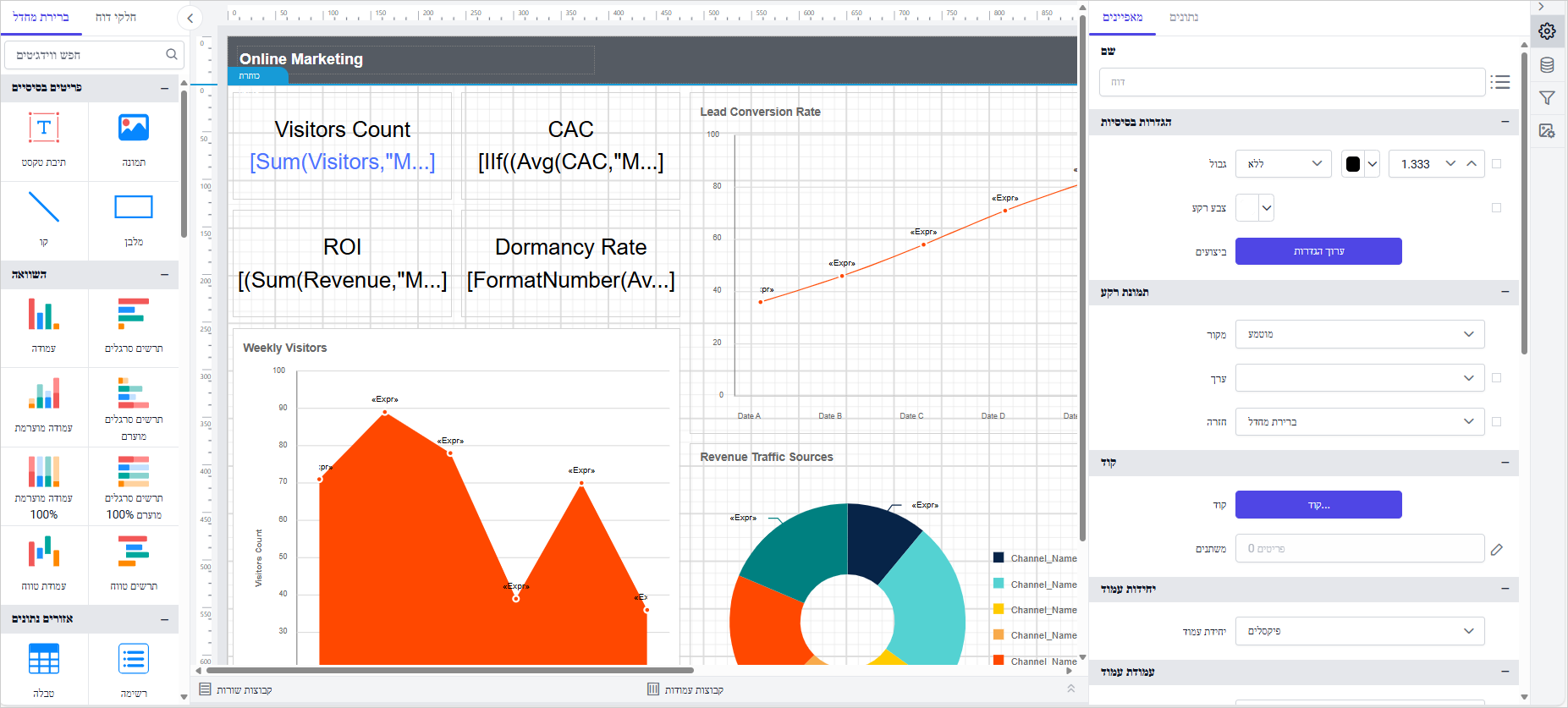
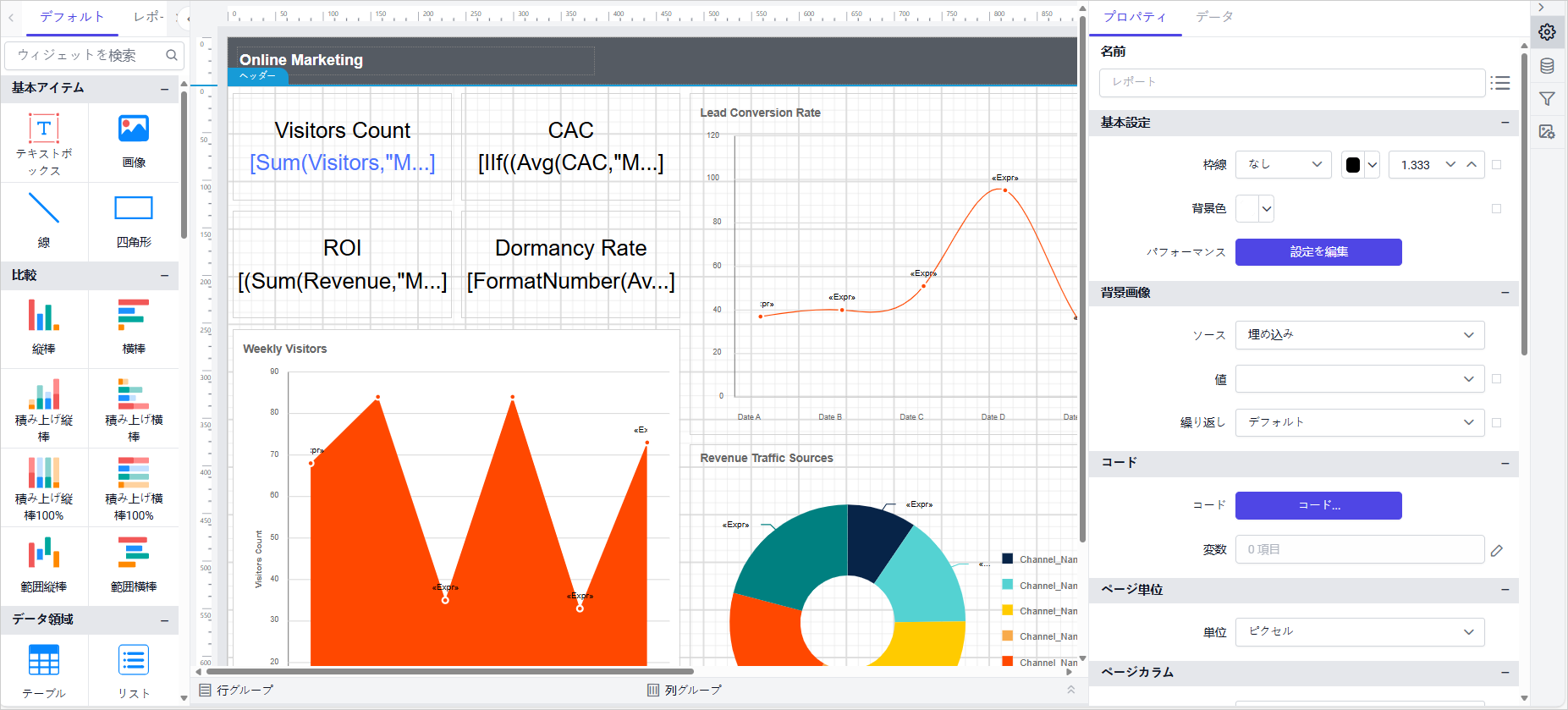
Added support for Hebrew (he-IL), Japanese (ja-JP), Portuguese (pt-PT), Russian (ru-RU), Simplified Chinese (zh-Hans), and Traditional Chinese (zh-Hant), extending the designer’s language coverage so the interface, including menus, dialogs, and messages, can display natively in each of these six languages instead of falling back to English.
Report Viewer
PDF Digital Signatures and a New Large-Dataset Processing Engine
PDF digital signatures in report exports enable secure, authenticated document output for regulatory and audit requirements, and a new processing engine optimizes chart and table rendering for large datasets using server-side aggregation and grouping, reducing service load and improving memory efficiency.
Server-Hosted Document Preview and ARGB Colors
The viewer can now preview HTML and PDF documents uploaded to the report server, and ARGB color values are now supported, enabling transparent styling of report elements.
IDP
Embed Secret Support
Bold Reports now provides Embed Secret support for generating access tokens, so instead of exposing a full service authorization token, applications can generate a scoped embed token from a secret, keeping embedded report sessions authenticated without sharing broader credentials.
Improvements
Report Server
Custom Fonts from File Directory
Added support for loading custom fonts from the file directory.
Reports can now use fonts that aren’t installed system-wide, as long as the font files are placed in the configured directory.
Access Tokens via UMS Embed Secret
Enabled generating the Bold Reports access token by validating the UMS embed secret.
This gives another supported path to authenticate embedded sessions alongside the existing token-generation options.
Expressions in Scheduled Email Templates
Expressions can now be added to a scheduled email template; when the email is sent, each expression is replaced with its evaluated value, such as a date expression resolving to the current date.
Update User Email and Username via API
Added support to update user email and username through the API.
This enables account maintenance to be automated or performed from external systems without going through the UI.
Cleaner Report URLs
Introduced support to remove the GUID identifier from report URLs, producing shorter, more readable links for shared and embedded reports that are easier to read, share, and recognize than the previous GUID-qualified format.
Email Templates for Schedule APIs
Added email template support for the Add and Update Schedule API.
Custom templates can now be assigned at the same time a schedule is created or changed, rather than as a separate step.
Local, FTP/SFTP, and S3 Delivery in Schedule APIs
Extended the schedule APIs with local export, FTP/SFTP, and S3 bucket delivery options, covering the same delivery destinations already available through the UI, so schedules with any of these delivery targets can now be fully configured programmatically end to end.
Publish Reports to Internal and External Sites
Added API support for publishing reports to internal and external sites.
This automates a task that previously required manually publishing reports through the interface.
Custom Schedule Options via Custom UI JSON
Schedule options can now be customized through the Custom UI JSON of the scheduled email template, such as hiding the login, header, and footer options.
Report Designer
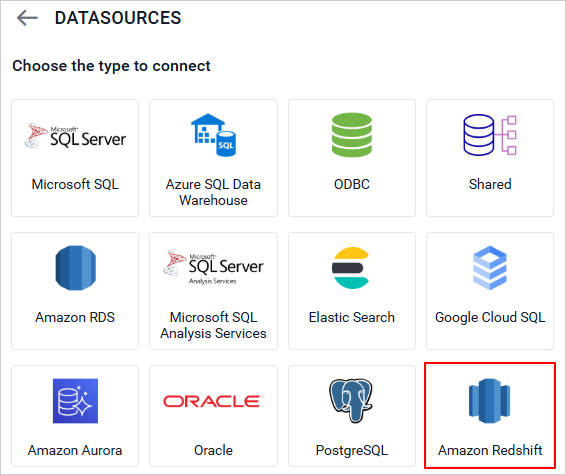
Amazon Redshift Spectrum Support
Enhanced the Amazon Redshift data connector with Spectrum support, so reports can now query data held in external tables stored in Amazon S3 through Redshift Spectrum, alongside data in standard Redshift tables, without first loading or duplicating that data into Redshift itself. This lets teams report against large datasets already living in a data lake using the same connector and query experience they use for native Redshift tables.
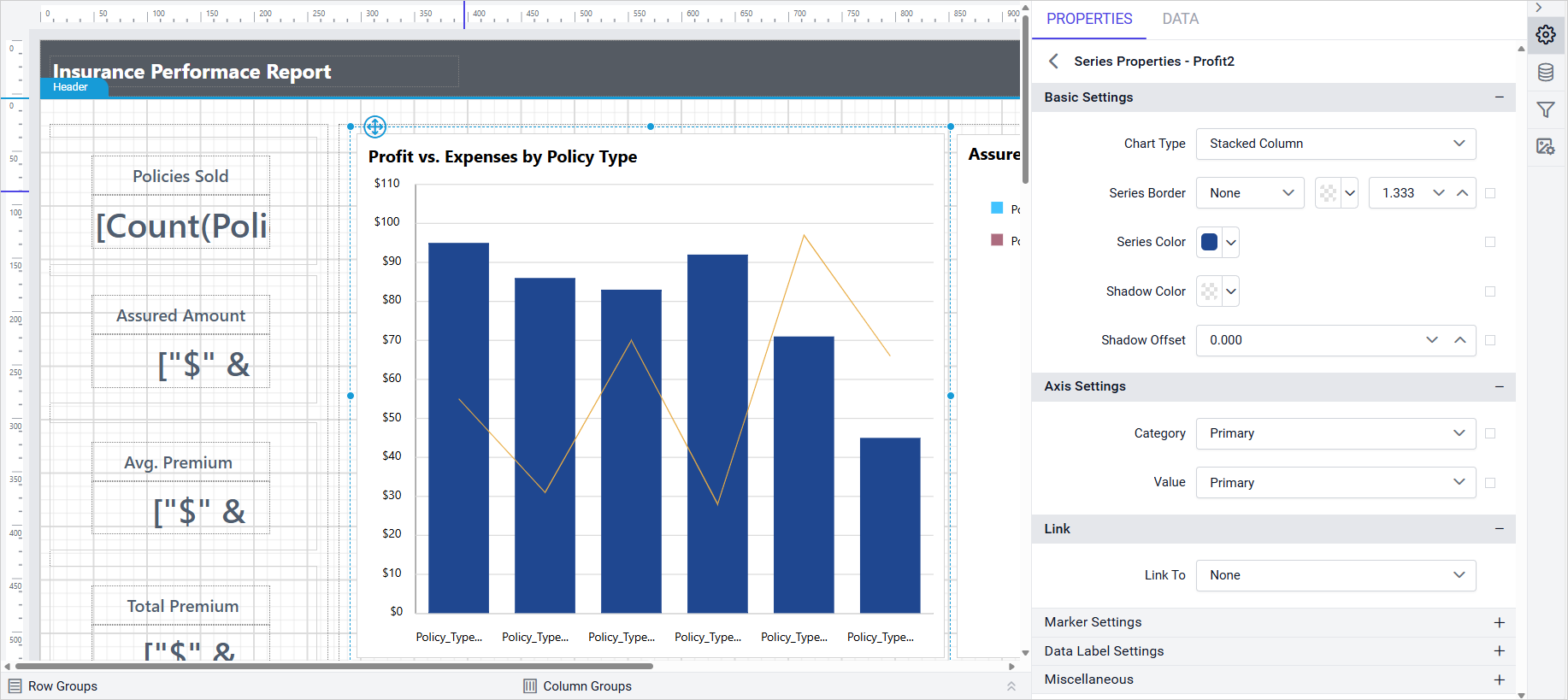
Improved stacked chart series types so they can now be combined with other chart types within the same visualization, rather than being restricted to a chart made entirely of stacked series. This enables mixed chart layouts, such as a stacked column series paired with a line series, or a stacked bar paired with a scatter series, so a single chart can show a cumulative breakdown alongside a trend line or comparison metric.
Enabled a transparency setting in the color picker used throughout the Report Designer, so a fill or border color can now include an alpha channel instead of always being rendered fully opaque. This gives authors finer visual control when layering colors, such as shading a region behind existing content, tinting an overlay, or softening a highlight, without that color fully obscuring what sits underneath it.
Searchable Combo Box Controls
Enabled a search option for combo box controls across the designer’s property panels, letting authors type to filter a long list of values down to matching entries instead of scrolling through every option one at a time. This speeds up configuration on properties backed by large lists, such as font families, data field pickers, and other long dropdowns.
Report Viewer
Hidden Parent Group Columns Excluded from CSV
Hidden parent group columns are now excluded from CSV exports, so the exported file matches what’s visible in the rendered report rather than leaking a hidden grouping structure into the data that downstream tools or spreadsheets then have to account for.
Column and Bar Chart Corner Radius
Added support to customize the corner radius on column charts and bar charts, giving report authors more control over chart appearance, from crisp sharp-edged bars that match a technical or financial theme, to softly rounded bars for a friendlier, more modern visual style.
Locale-Correct Currency in Report Writer
Report Writer now displays currency in the correct format based on the report’s language settings, so currency symbols, decimal separators, and thousands separators follow the report’s configured locale instead of always falling back to a fixed default format regardless of the audience viewing it.
Toolbar Icon Visibility with Error Messages
Improved toolbar icon visibility in the preview when error messages are displayed.
Toolbar icons remain clearly visible instead of being obscured or misrendered alongside an error banner.
Custom Chart Color Palette
Provided support to customize the chart color palette using a custom style.
Chart series colors can now follow a brand-specific palette instead of the built-in default set.
ToggleIconColor Custom Property
Introduced the ToggleIconColor custom property for the Tablix toggle icon, letting the expand and collapse icon’s color be customized to match a report’s overall color theme instead of always rendering in a fixed default color.
ShapeWidth Custom Property
Provided the ShapeWidth custom property to adjust the chart legend shape width.
This gives finer control over how legend markers are sized relative to their labels.
Skip Blank Pages in PPT and PDF Export
Added ExcludePPTBlankPage and ExcludePDFBlankPage custom properties to skip blank page rendering in those export formats, so unnecessary empty pages, often produced by layout spillover, no longer appear in exported PowerPoint and PDF files.
Toggle Tablix Group Visibility from Outside Text Box
Provided support to toggle Tablix group item visibility using a textbox located outside the Tablix region.
This lets a single control drive show/hide behavior for a Tablix group without embedding the toggle inside the Tablix itself.
Sub-Report Table Page Break Handling
Improved page break handling in the main report when configured in a sub-report’s table.
Page breaks defined inside a sub-report’s table now apply correctly within the context of the parent report.
Side Panel for Classic Toolbar in v2 Viewer
Added side panel support for classic toolbar custom items in the v2 viewer, so custom toolbar items originally built for the classic toolbar can now also surface in the v2 viewer’s side panel, easing migration for teams moving between toolbar versions.
UserBasedFilterType Username Expression
Retrieve the username using the expression =User!UserID by configuring the UserBasedFilterType tag on Enterprise server.
This gives reports a built-in way to reference the current user without a separate parameter or lookup.
Bold Data Hub
Snowflake, OneDrive, and Redshift Connectors
Added support for Snowflake, OneDrive, and Redshift connectors, expanding the range of sources Bold Data Hub pipelines can pull data from to cover a cloud data warehouse, a cloud file storage service, and a managed analytics database in one release.
Google Ads Incremental Refresh
Provided incremental refresh support for Google Ads.
This avoids a full data reload on every run, pulling only what has changed since the last refresh.
Anonymous S3 Access
Added support for anonymous S3 access, allowing Bold Data Hub to connect to public S3 buckets that don’t require credentials, so publicly hosted datasets can be pulled into a pipeline without configuring an access key.
Bug Fixes
Report Designer
Fixed CSP violation failures caused by ‘unsafe-eval’.
Fixed security vulnerabilities to improve application safety and compliance.
Fixed issue to hide the hyperlink in the performance settings tooltip.
Fixed table drag-and-drop issue in Query Designer when designer ID contains special characters.
Fixed issue where clicking parent item with submenu triggers the first item by default.
Fixed issue with reading custom-styles file from preconfigured location for Azure applications.
Bold Data Hub
Fixed missing validation for the Postgres connector.
Fixed Excel not connecting with multiple sheets.
Fixed JSON objects not being extracted correctly.
Fixed Blob datatype not supported in SQL Datastore.
Fixed the MySQL connector not working with require_secure_transport.
#733082 – Fixed S3 copy not accepting anonymous buckets.
IDP
#707105 – Addressed a deployment failure in Oracle database server caused by recent table structure changes.
#734790 – Fixed an issue where default login settings were not saved in site authentication settings.
#732356 – Fixed an issue where the admin utility did not function correctly despite returning a proper response.
#739751 – Resolved a deployment issue with MSSQL shared databases when using an existing database.
#737480 – Fixed an issue where uploaded fonts were not reflected on the page after being updated in Look and Feel settings.
Fixed an issue where the Reset Password email was not sent from the User Management System.
Breaking Changes
Report Viewer
The return type of GetItemDefinition overrides in projects inheriting from BoldReports.ServerProcessor.ReportingServer changed from byte[] to ItemDefinition, giving access to extended file metadata (version, extension, password, byte content). Existing implementations may need updates for the new return type.