Management Reports: Build, Embed & Export in Your App
TL;DR:
Management reports help organizations monitor performance, track KPIs, evaluate operational efficiency, and make informed business decisions. When embedded in applications, management reporting lets users access real-time reports and insights directly in the platform, improving productivity, accelerating decision-making, and creating a better user experience.
Introduction
Organizations rely on management reports to track performance, monitor KPIs, and make informed business decisions. Whether analyzing sales trends, operational efficiency, project progress, or resource utilization, management reports transform business data into actionable insights.
As modern applications become the primary workspace for business users, reporting is no longer a nice-to-have feature. Users expect direct access to management reports, performance summaries, and operational insights without leaving the software they use every day.
Embedded reporting has become an expected feature in modern business applications. Users want access to management reports and operational insights directly within the software they use for daily work.
When reporting is not built into an application, organizations often face manual reporting processes, fragmented workflows, inconsistent data, and delayed decision-making. Embedding management reports directly into an application helps overcome these challenges by providing real-time insights through a centralized and user-friendly reporting experience.
In this guide, you’ll learn how to build, embed, and export management reports in your application, explore reporting challenges and best practices, and discover how Bold Reports helps development teams deliver secure, scalable, and user-friendly reporting experiences.
What is a management report?
A management report is a report managers, department heads, and business leaders use to monitor performance, evaluate progress, track key performance indicators (KPIs), and support day-to-day and strategic decision-making.
Management reports consolidate organizational data into a single view, enabling stakeholders to track KPIs, monitor performance, identify trends, and make informed decisions.
Management reporting vs. financial reporting
Management reporting and financial reporting both use organizational data, but they serve different purposes and audiences.
| Area | Management Reporting | Financial Reporting |
| Audience | Managers, team leaders, executives | Investors, auditors, regulators |
| Purpose | Support operational and strategic decisions | Meet financial reporting and compliance requirements |
| Frequency | Daily, weekly, monthly, or on demand | Quarterly and annually |
| Content | Operational metrics, performance indicators, departmental results | Revenue, expenses, cash flow, balance sheet data |
| Format | Flexible and customized | Standardized according to accounting standards |
Management reports help organizations monitor performance, identify trends, and support internal decision-making. Financial reports focus on financial accuracy, compliance, and communication with external stakeholders.
Why organizations are adopting embedded management reporting
Embedded management reporting enables organizations to deliver management reports directly within their applications. The table below highlights the operational and business benefits of this approach.
| Benefit | Business Value |
| Improved User Experience | Access management reports and performance summaries directly within the application, reducing context switching. |
| Faster Decision-Making | Provide real-time access to business information so managers can respond quickly to changing conditions. |
| Reduced Manual Reporting | Automate report generation and distribution to reduce administrative effort and save time. |
| Higher Application Value | Combine operational workflows and reporting capabilities in a single platform. |
| Better Data Consistency | Generate reports directly from application data to improve accuracy and reliability. |
| Scalable Reporting | Support growing reporting requirements without increasing manual processes or reporting overhead. |
Organizations increasingly embed management reporting to provide self-service access to business reports, improve operational visibility, and deliver timely information without relying on external reporting tools.
Management reporting software: What to look for
Most management reporting software can generate reports and visualize data. However, when evaluating a reporting solution, organizations should look beyond basic functionality and focus on capabilities that improve reporting efficiency, accessibility, and scalability.
Key features to look for include:
-
- Automated scheduling and delivery: Generate and distribute reports automatically without manual intervention.
- Direct data integration: Connect to databases, ERP systems, CRM platforms, and other business applications to keep reports accurate and up to date.
- Self-service reporting: Enable business users to create, customize, and run reports without relying on developers or IT teams.
- Role-based access control: Restrict report access based on user roles to protect sensitive business data.
- Flexible export options: Support exports to PDF, Excel, Word, and CSV to meet reporting, sharing, and compliance requirements.
- Embedded reporting: Integrate reports directly into applications so users can access insights without switching between tools.
Organizations should prioritize management reporting software that combines these capabilities in a single platform. Solutions such as Bold Reports help teams build, embed, schedule, and export management reports while reducing development effort and simplifying report management.
Types of management reports and examples
Management reporting requirements vary across organizations, departments, and business functions. Depending on the audience and business objectives, organizations use different report types to monitor performance, analyze trends, and support decision-making.
The following management report examples illustrate how different departments and industries use reporting to monitor performance, analyze trends, and support decision-making.
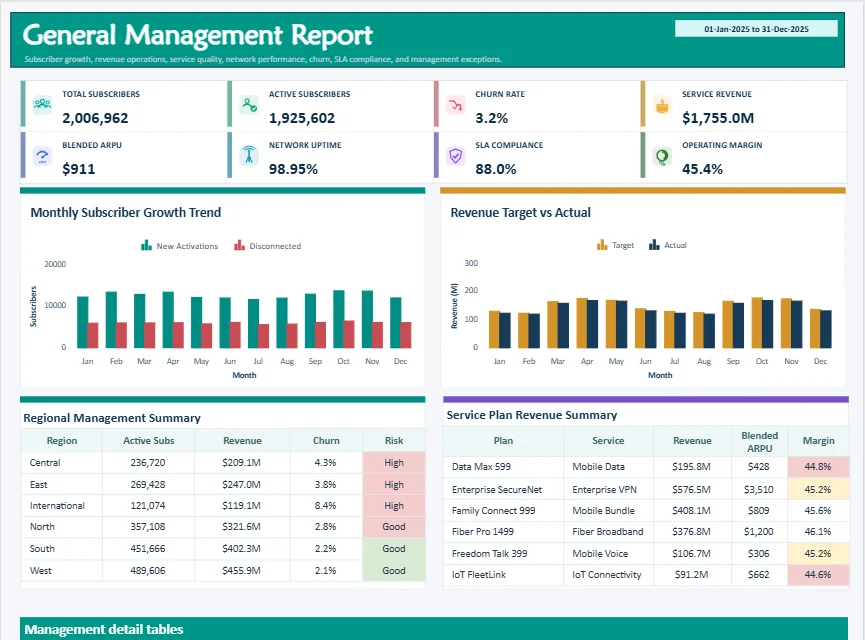
1. General management reports
In telecommunications organizations, general management reports provide a consolidated view of operational and business performance. These reports often combine customer, service, revenue, and network-related metrics to help leadership teams monitor organizational health in one place.
These reports typically include:
-
- Customer growth and churn metrics
- Average revenue per user (ARPU)
- Service availability and network performance indicators
Managers and executives use these reports to evaluate business performance and identify areas that require attention.
2. Sales performance reports
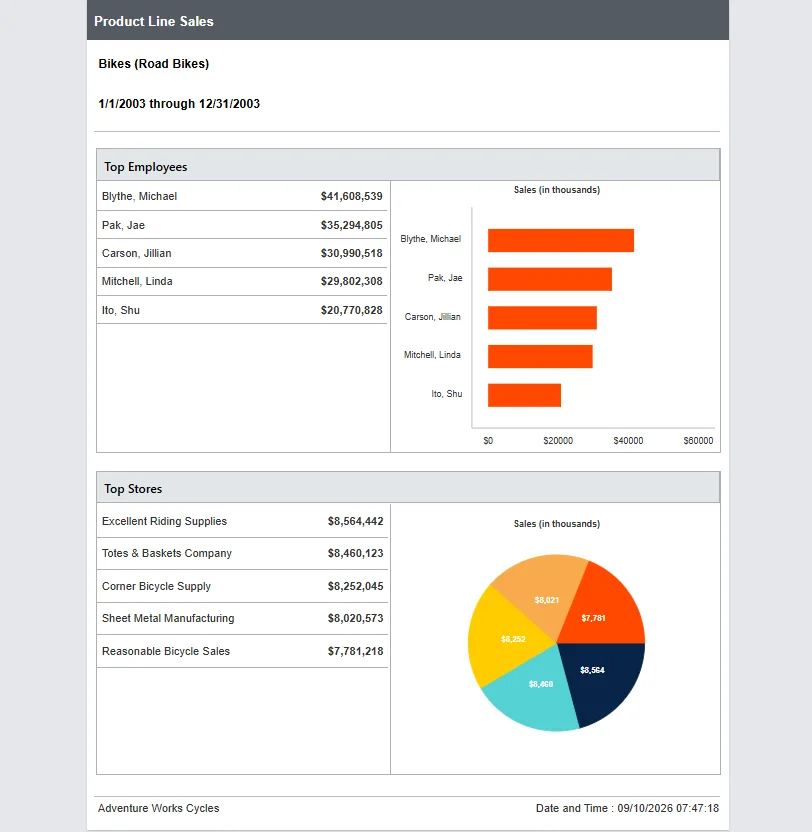
Sales performance reports focus on revenue generation and sales effectiveness across products, teams, and territories.
These reports typically include:
-
- Sales revenue
- Pipeline performance
- Sales target achievement
Sales managers use these reports to track performance, improve forecasting, and identify growth opportunities.
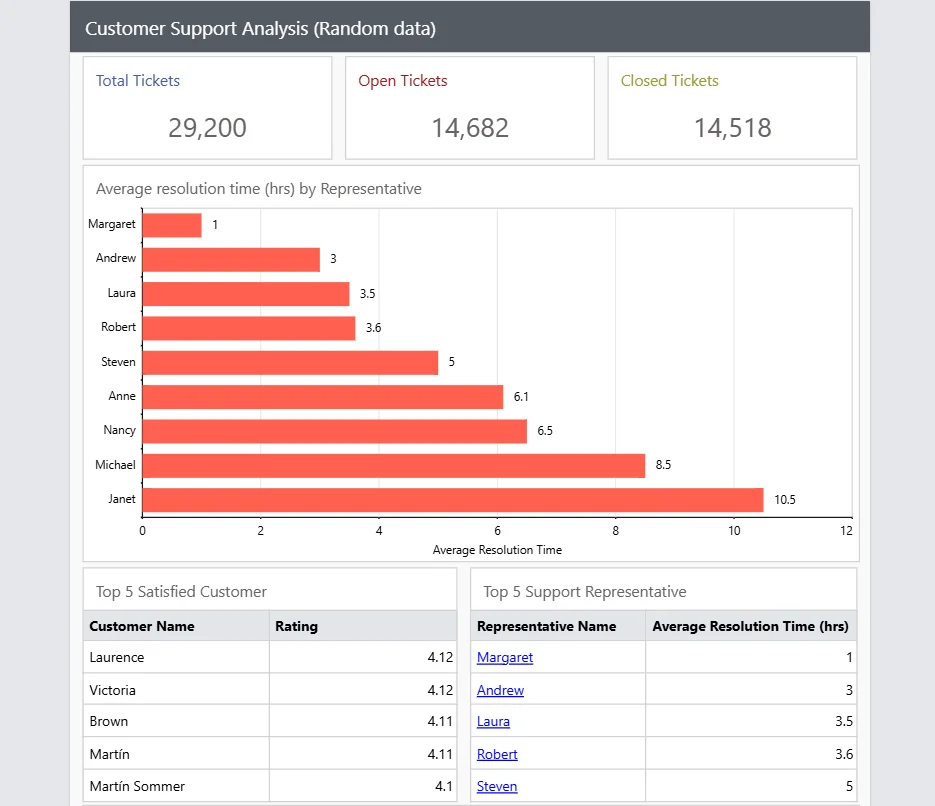
3. Customer support reports
Customer support reports help organizations monitor service quality and support team effectiveness.
These reports typically include:
-
- Ticket volume
- Resolution rates
- Response times
Support managers use these reports to identify service bottlenecks, improve response efficiency, and increase customer satisfaction.
4. Website visitor reports
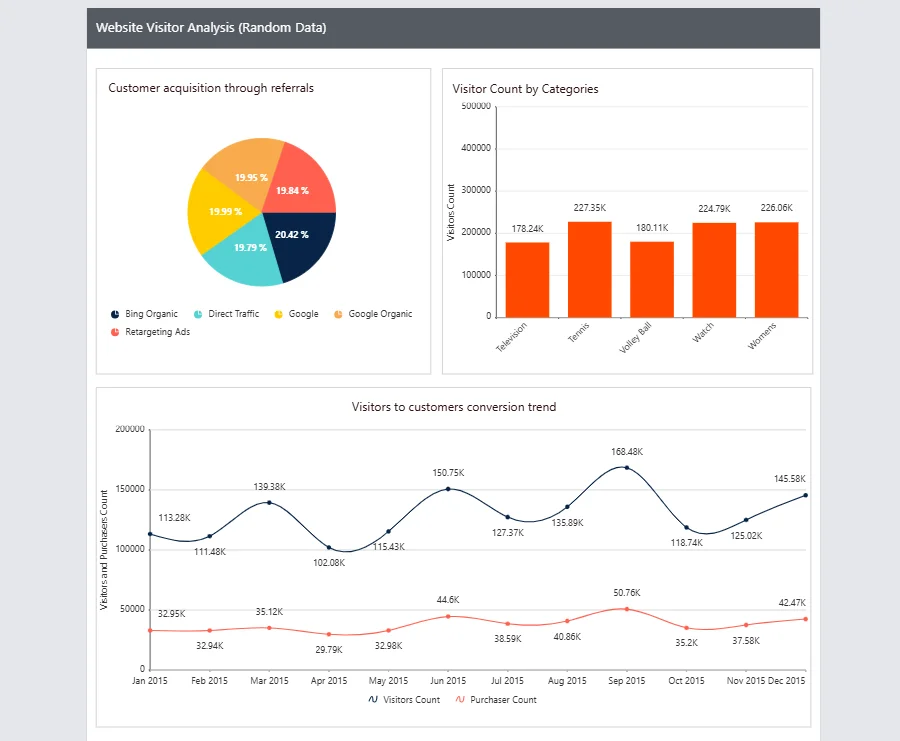
Website visitor reports provide insights into how users interact with websites, applications, and digital channels.
These reports typically include:
-
- Website traffic trends
- Visitor engagement metrics
- Conversion performance
Marketing and business teams use these reports to evaluate digital performance and optimize customer acquisition efforts.
5. HR payroll reports
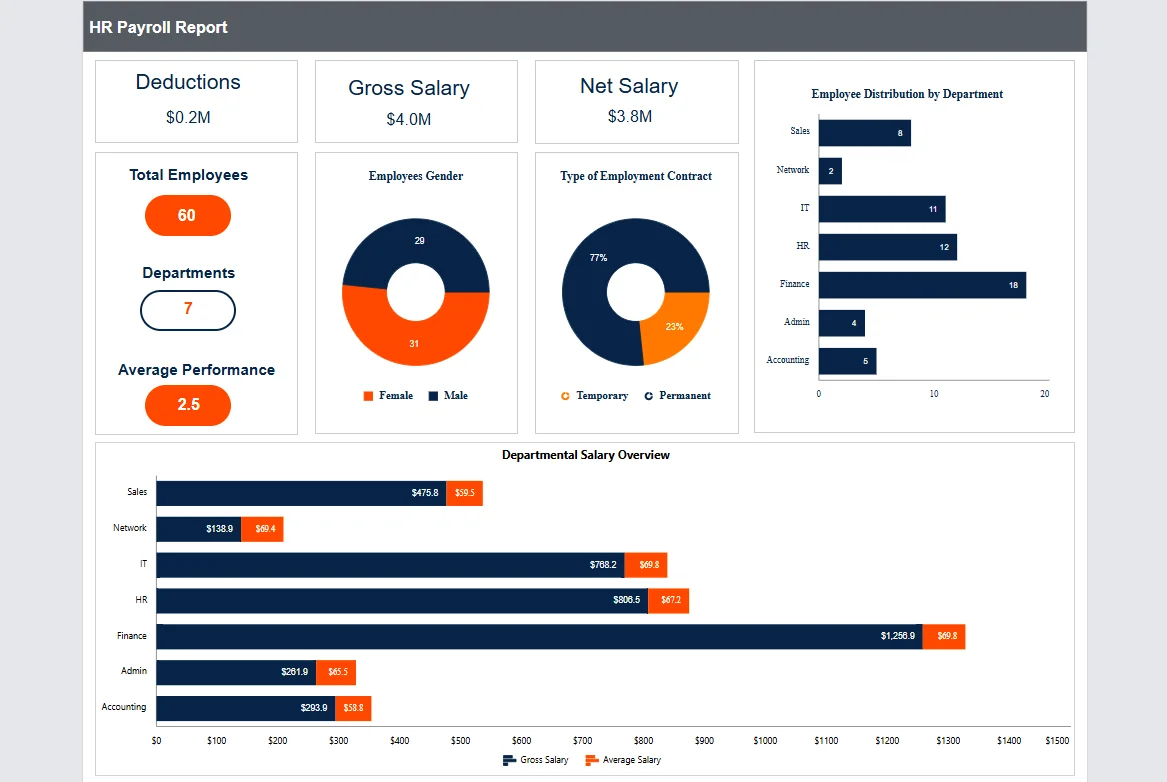
HR payroll reports provide visibility into workforce-related data, helping organizations manage employee information and payroll operations more effectively.
These reports typically include:
-
- Payroll expenses
- Workforce utilization
- Employee performance metrics
HR teams use these reports to support workforce planning, budgeting, and performance management initiatives.
6. Patient experience reports
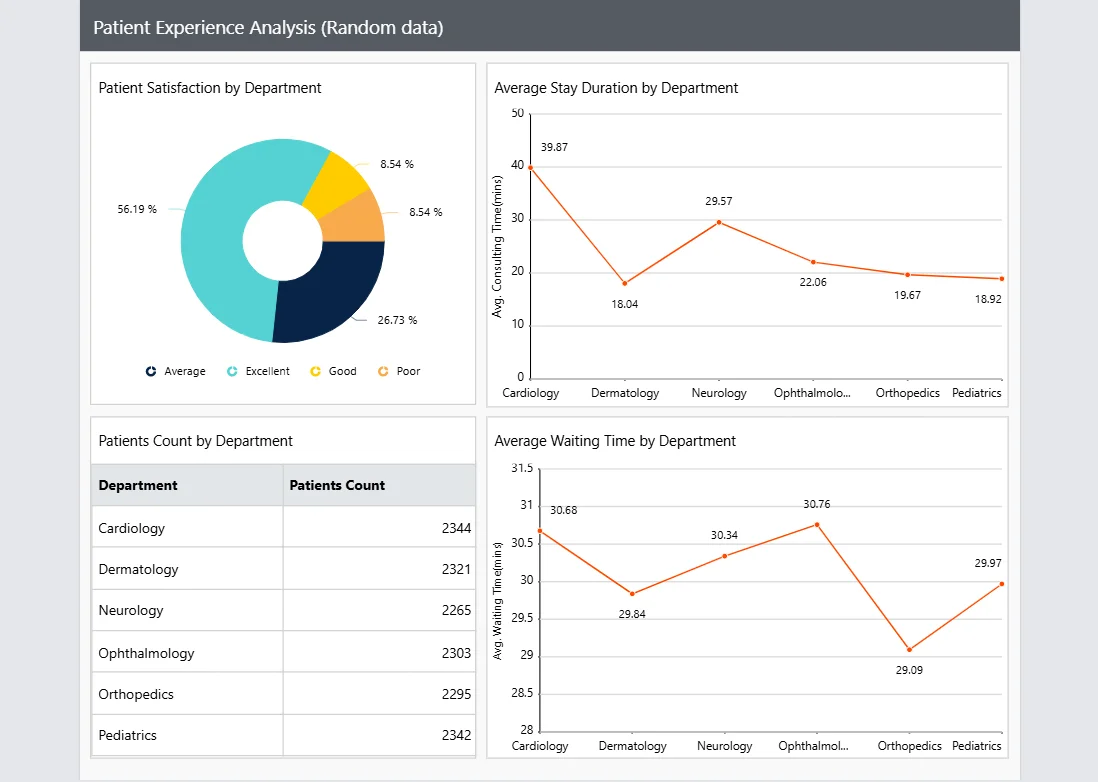
Patient experience reports help healthcare organizations measure service quality and monitor patient satisfaction throughout the care journey.
These reports typically include:
-
- Patient satisfaction scores
- Service quality indicators
- Patient feedback trends
Healthcare managers use these reports to identify improvement opportunities and help improve patient outcomes.
Common challenges of management reporting and how to solve them
Even the best-designed management reports can lose effectiveness when common reporting challenges are overlooked. Addressing these issues helps ensure reports remain accurate, actionable, and valuable to decision-makers.
1. Tracking too many metrics
Too many KPIs can make a management report difficult to read and distract attention from what matters most. Focus on the metrics that directly support business goals and decision-making.
2. Reporting numbers without context
A metric alone rarely tells the full story. Compare results against targets, benchmarks, or previous reporting periods so stakeholders can understand performance immediately.
3. Only looking at short-term results
Short reporting periods can hide broader business trends and lead to inaccurate conclusions. Include historical data and trend analysis to provide a more complete view of performance.
4. Relying on manual reporting
Manual spreadsheets and reporting processes take time and increase the risk of errors. Automating report generation and delivery helps improve accuracy while reducing reporting effort.
5. Using inaccurate or incomplete data
Management reports are only as reliable as the data behind them. Connecting reports directly to trusted data sources helps ensure information remains accurate and up to date.
6. Limited access to business insights
When reports are stored across multiple systems, users may struggle to find the information they need. Embedding management reports directly into applications provides easy access to real-time insights.
Organizations that address these challenges improve reporting accuracy and gain more reliable information for decision-making.
Why developers choose embedded reporting instead of building reporting from scratch
Building management reports into an application requires more than creating report layouts. Teams must support report viewing, exporting, scheduling, security, data integration, and ongoing maintenance.
Developers often choose embedded reporting because it provides:
-
- Faster time to market: Deliver management reporting features without spending months building reporting infrastructure.
- Built-in functionality: Access interactive reports, drill-down capabilities, scheduling, and multiple export formats out of the box.
- Enterprise-grade security: Protect sensitive business data with role-based access control and secure report access.
- Lower maintenance overhead: Reduce the effort required for updates, bug fixes, and performance optimization.
- More focus on product innovation: Spend less time building reporting features and more time improving core application functionality.
Real-world implementations highlight these benefits. In a G2 review, Michael D., an SSRS Developer, shared the following experience after embedding Bold Reports into a custom software application:
“When the Bold Reports embedded application was incorporated, the overall look, performance, and functionality just skyrocketed. Our client base has reflected very positively on its ease of use and overall look/performance.”
The reviewer also noted:
“The scheduler is another heavily used feature that we’ve also integrated into our custom software.”
Bold Reports helps development teams deliver enterprise-grade reporting capabilities with less development effort and ongoing maintenance.
8 steps to build management reports into your application
The following steps outline how to build, embed, and deliver management reports that help users monitor performance, track KPIs, and make informed business decisions.
Step 1: Define reporting requirements
Start by identifying the reports, metrics, and insights your users need. Before development begins, determine reporting frequency, user roles, security requirements, and export needs.
Step 2: Centralize business data
Effective management reports depend on reliable data. Consolidating data from databases, ERP systems, CRM platforms, and other business applications helps create a single source of truth and improves reporting accuracy.
Step 3: Create reusable report templates
Instead of building every report from scratch, create reusable management report templates that standardize report design, improve consistency, and reduce development effort across departments and business functions.
Step 4: Embed reports into the application
Embed management reports directly into your application, so users can access business insights without switching between systems. This creates a consistent reporting experience and improves report adoption.
Step 5: Enable security, governance, and access control
Management reports often contain sensitive business information. Implement role-based permissions, secure data access, and governance controls to ensure reports remain protected and accessible only to authorized users.
Step 6: Automate report delivery and exports
Allow users to schedule report generation and export reports in formats such as PDF, Excel, Word, and CSV. Automated delivery helps ensure stakeholders receive timely information without relying on manual processes.
Step 7: Deliver real-time business insights
Modern users expect more than static reports. Interactive management reports enable users to monitor KPIs, analyze trends, filter data, and make decisions using the latest available information.
Step 8: Continuously monitor and improve reports
Reporting requirements evolve over time. Regularly review report usage, gather user feedback, update KPIs, and refine report layouts to ensure reports remain relevant, accurate, and aligned with business goals.
These steps help organizations build scalable management reporting solutions that increase visibility, support informed decision-making, and make reporting easier for users.
Management reporting best practices
Following management reporting best practices helps organizations create reports that are relevant, actionable, and aligned with business goals.
- Match reports to the audience: Build reports around the decisions users need to make.
- Focus on key KPIs: Highlight the metrics that matter most and avoid information overload.
- Align reporting frequency with business needs: Deliver reports when users need them, not more or less often.
- Automate recurring reports: Schedule report generation, delivery, and exports to save time and improve consistency.
- Review reports regularly: Update metrics and layouts as business goals and reporting needs evolve.
Automating management reports
Automating management reports helps organizations reduce manual effort, improve reporting consistency, and ensure stakeholders have access to timely business information.
Key benefits include:
-
- Automated report delivery: Schedule reports to generate and distribute automatically.
- Reduced manual effort: Eliminate repetitive report preparation and distribution tasks.
- Improved reporting consistency: Ensure reports follow standardized formats and schedules.
- Faster access to information: Give decision-makers timely access to current business data.
- Better reporting scalability: Support growing reporting requirements without increasing administrative overhead.
How Bold Reports simplifies management reporting
Building, embedding, and scaling management reports within an application can require significant development effort and ongoing maintenance. Bold Reports simplifies management reporting with enterprise-ready capabilities designed for modern business applications.
-
- Enterprise reporting: Deliver management reports across departments, teams, and business units from a centralized reporting platform.
- Modernize existing SSRS reports: Reuse and migrate existing RDL reports without rebuilding them, accelerating implementation and preserving reporting investments.
- Pixel-perfect reporting: Create highly formatted management reports that maintain consistent layouts across viewing, printing, and export formats.
- Flexible deployment options: Deploy in the cloud, on-premises, on Windows or Linux servers, or through Docker and Kubernetes to match your infrastructure requirements.
- Multi-tenant reporting: Deliver secure and isolated reporting experiences for multiple customers, departments, or business units from a single platform.
- White-label reporting: Customize report branding and user experiences to align with your application’s look and feel.
Final thoughts
Management reports deliver the greatest value when they are embedded directly into the applications users rely on every day. Instead of switching between multiple tools or relying on manual reporting processes, organizations can provide immediate access to KPIs, performance metrics, and business insights within a single reporting experience.
Organizations that integrate management reports into their applications gain faster access to business information, improve reporting efficiency, and increase visibility into performance metrics.
Users gain access to the information they need without disrupting their workflows, resulting in better adoption and a more efficient user experience.
With Bold Reports, development teams can build, embed, schedule, and export management reports without the complexity of developing reporting infrastructure from scratch. Bold Reports helps organizations modernize legacy reporting systems, deliver branded reporting experiences, support multi-tenant applications, and scale reporting across different deployment environments while maintaining the flexibility required for enterprise reporting initiatives.
Ready to build management reporting into your application? Start a 30-day free trial or schedule a personalized demo to see how Bold Reports can help you deliver powerful reporting experiences with less development effort and faster time to market.
Frequently asked questions
- 1.
What is a management report?
A management report helps managers and business leaders monitor performance, track KPIs, analyze trends, and support business decision-making.
- 2.
What should a management report template include?
A management report template typically includes KPI summaries, performance metrics, charts, tables, trend analysis, and executive summaries. Organizations often customize templates based on reporting goals, industry requirements, and target audiences while maintaining a consistent reporting structure.
- 3.
What are the most common types of management reports?
Common examples include general management reports, sales performance reports, customer support reports, website visitor reports, HR payroll reports, and patient experience reports.
- 4.
What features should organizations look for in management reporting software?
Organizations should look for embedded reporting, automated scheduling, data source connectivity, self-service reporting, role-based access control, and flexible export options.
- 5.
What are the benefits of embedded management reporting?
Embedded management reporting allows users to access reports and business insights directly within their applications. This improves user experience, reduces manual effort, increases business visibility, and supports faster decision-making.
- 6.
Can management reports be automated?
Yes. Modern reporting solutions can automate report generation, scheduling, distribution, and exports, helping organizations reduce manual effort and ensure stakeholders receive timely information.
- 7.
How do developers add management reporting to applications?
Developers can either build reporting capabilities from scratch or use an embedded reporting platform. Embedded reporting solutions help reduce development effort by providing built-in report design, viewing, scheduling, security, and export capabilities.