
The Most Popular Reporting Databases You Should Know in 2026
TL;DR
In 2026, choosing the right reporting database is critical for delivering fast, reliable, and scalable reports. Popular options like SQL Server, PostgreSQL, MySQL, Snowflake, BigQuery, and Redshift stand out for their performance, flexibility, and cloud support; each is suited to different reporting needs, from traditional systems to modern, high-volume data environments. Bold Reports complements these databases by enabling real-time reporting and unified access to multiple data sources.
Introduction
Reporting has become a core function in modern applications, but not all databases are built to handle reporting workloads efficiently. Unlike transactional systems, reporting databases must process large volumes of data, support complex queries, and deliver consistent performance without slowing down operations.
As we , organizations are rethinking how they store and access data for reporting, focusing on solutions that offer:
-
- Fast query performance for large and complex datasets.
- Scalability to handle growing data volumes.
- Seamless integration with reporting tools and dashboards.
- Support for cloud and hybrid environments.
- Reliability for mission-critical business reporting.
Today’s reporting ecosystem includes a mix of traditional relational databases like SQL Server, PostgreSQL, and MySQL, alongside modern cloud-native platforms such as Snowflake, Google BigQuery, and Amazon Redshift. Each of these databases brings unique strengths, making them suitable for different reporting scenarios.
In this blog, we’ll explore the most popular reporting databases in 2026, highlight their key capabilities, and help you identify the right choice for building efficient, scalable, and high-performance reporting solutions.
What is a reporting database?
A reporting database is a system specifically optimized to retrieve, aggregate, and process large volumes of data efficiently. It is designed to handle complex queries efficiently without affecting operational systems, making it essential for reliable and scalable data reporting.
Unlike operational databases that handle thousands of transactions, reporting databases are designed to:
-
- Run complex queries across large datasets.
- Store historical data.
- Deliver fast reading performance.
- Support dashboards and reporting tools.
Most organizations use a separate reporting database to ensure smooth performance without impacting transactional systems.
Why reporting databases matter more than ever
Reporting databases have become a critical foundation for organizations striving to make faster, smarter, and more reliable decisions. As data volumes grow and real-time insights become a competitive necessity, separating reporting workloads from transactional systems is no longer a luxury but a strategic requirement.
1. Explosive growth of data
Organizations are generating and collecting vast amounts of data from multiple sources, including applications, Internet of Things devices, customer interactions, and cloud platforms. Processing and analyzing this data directly on transactional databases can significantly degrade performance. Reporting databases are designed to handle large-scale read operations efficiently, ensuring that analytics workloads do not interfere with core business operations.
2. Improved performance and system stability
Transactional databases like online transaction processing (OLTP) systems are optimized for fast inserts, updates, and deletes, not complex queries. Running heavy reporting queries on these systems can slow down critical processes such as order processing or customer transactions.
A dedicated reporting database solves this problem by:
-
- Offloading analytical queries from production systems.
- Enabling optimized indexing and query patterns for reporting.
- Maintaining system stability during peak usage.
This separation ensures both operational efficiency and uninterrupted analytics.
3. Real-time and near teal-time insights
Modern businesses demand real-time decision-making. Reporting databases, especially when paired with replication or streaming technologies, enable near real-time data availability without compromising transactional performance.
This allows decision-makers to:
-
- Monitor KPIs instantly.
- Respond quickly to market changes.
- Identify trends and anomalies as they happen.
In industries like finance, e-commerce, and logistics, this capability is a major competitive advantage.
4. Enhanced data modeling for analytics
Reporting databases are often structured differently from transactional systems. While OLTP databases are normalized for efficiency, reporting databases can adopt denormalized or dimensional models like star or snowflake schemas to simplify queries and improve performance.
Benefits include:
-
- Faster query execution.
- Easier report development.
- Better support for BI tools and dashboards.
This makes reporting databases ideal for powering modern reporting platforms like Bold Reports®.
5. Scalability and flexibility
As organizations scale, their reporting needs evolve. Reporting databases can be designed with scalability in mind, leveraging cloud infrastructure, data warehousing solutions, or distributed systems.
This ensures:
-
- Seamless handling of increasing data volumes.
- Flexible integration with new data sources.
- Support for advanced analytics, including AI and machine learning.
6. Better governance and data quality
A reporting database often serves as a curated layer of data where cleansing, transformation, and validation processes are applied. This creates a single source of truth for reporting and analytics.
Key advantages include:
-
- Consistent and reliable metrics.
- Controlled data access and security.
- Reduced risk of conflicting reports.
Understanding reporting database architectures
Before selecting a database, you must understand the underlying architecture.
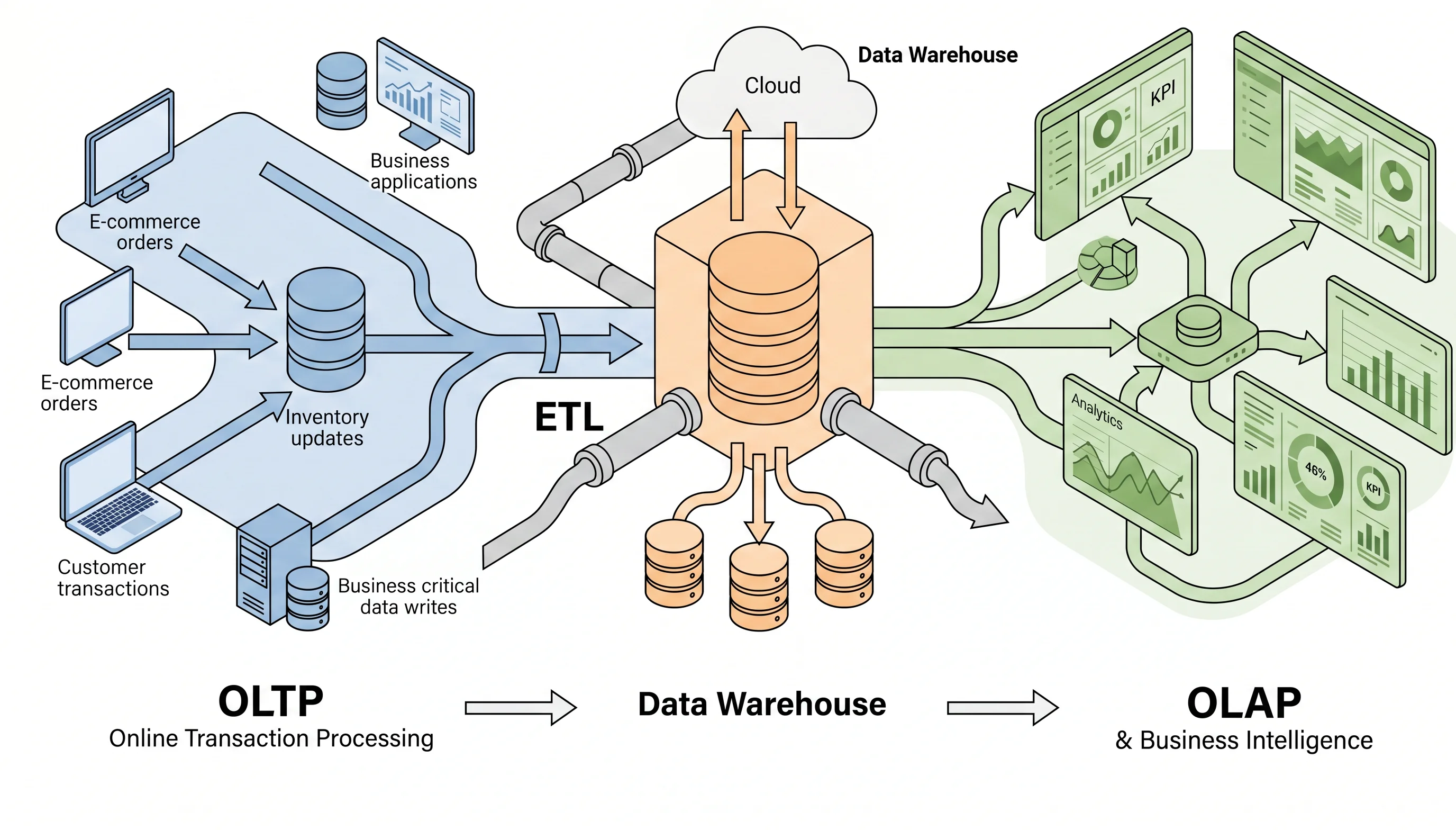
OLTP
OLTP databases are designed for real-time operations such as processing orders, updating inventory, and managing customer interactions. They prioritize fast inserts and updates, plus data integrity through ACID compliance. However, they aren’t optimized for large-scale reporting queries.
Online analytical processing (OLAP)
OLAP systems are built for analytics and reporting, not transactions. They support complex queries, aggregations, and multidimensional analysis. OLAP solutions allow users to view data from multiple perspectives—sales by region, time, and product category, for example.
Data warehouses
A data warehouse acts as a central repository for reporting and analytics. It consolidates data from multiple sources, stores historical data, and enables fast querying for BI tools. Modern reporting systems rely heavily on data warehouses as the single source of truth.
Most commonly used reporting databases
Selecting the right database is a critical factor in building a robust reporting system. Different databases offer varying strengths in terms of performance, scalability, cost, and compatibility with reporting tools. Below are some of the most used databases in modern reporting environments, along with both their advantages and practical limitations to ensure a balanced, experience-driven perspective.
1. Microsoft SQL Server
Microsoft SQL Server is one of the most widely used databases for enterprise reporting. It integrates seamlessly with tools like Power BI and SQL Server Reporting Services, making it a popular choice for organizations already within the Microsoft ecosystem.
Key advantages
-
- Strong performance for structured, transactional data
- Built-in analytics and reporting services
- Robust security features
- Excellent integration with .NET-based applications
Limitations
-
- High licensing costs, especially for enterprise editions
- Requires significant system resources for large workloads
- Less flexible in non-Microsoft environments
2. MySQL
MySQL is an open-source relational database known for its simplicity, reliability, and widespread adoption in web applications.
Key advantages
-
- Cost-effective and open source
- Easy to set up and manage
- Strong community support
- Suitable for small- to medium-scale reporting needs
Limitations
-
- Limited advanced analytics and reporting capabilities compared to enterprise databases
- Performance can degrade with very large datasets or complex queries
- Fewer built-in tools for enterprise-grade BI compared to SQL Server or Oracle
3. PostgreSQL
PostgreSQL is a powerful open-source database that emphasizes standards compliance and extensibility, making it ideal for complex reporting scenarios.
Key advantages
-
- Advanced querying capabilities
- Support for JSON and unstructured data
- High data integrity and reliability
- Extensibility through custom functions and extensions
Limitations
-
- Steeper learning curve for beginners
- Performance tuning requires experienced database administrators
- Not as tightly integrated with mainstream BI tools as some commercial databases
4. Oracle
Oracle is a high-performance, enterprise-grade database widely used by large organizations with mission-critical reporting requirements.
Key advantages
-
- Exceptional scalability and performance
- Advanced data warehousing capabilities
- Strong security and compliance features
- Suitable for large-scale BI and analytics
Limitations
-
- Very high licensing and maintenance costs
- Complex setup and administration.
- Requires specialized expertise, increasing operational overhead
5. SQLite
SQLite is a lightweight, file-based database commonly used in embedded applications and mobile reporting scenarios.
Key advantages
-
- Zero-configuration setup
- Minimal resource consumption
- Ideal for local or offline reporting
- Easy portability
Limitations
-
- Not suitable for multi-user or concurrent environments
- Limited scalability for large datasets
- Lacks advanced features needed for enterprise reporting
6. MariaDB
MariaDB is a fork of MySQL that’s designed to offer enhanced performance and additional features while maintaining compatibility.
Key advantages
-
- Improved performance over MySQL in many cases
- Open source with active development
- Drop-in replacement for MySQL
- Strong scalability for growing applications
Limitations
-
- Smaller ecosystem compared to MySQL
- Varied enterprise-grade support, depending on provider
- Compatibility differences can arise in some edge cases
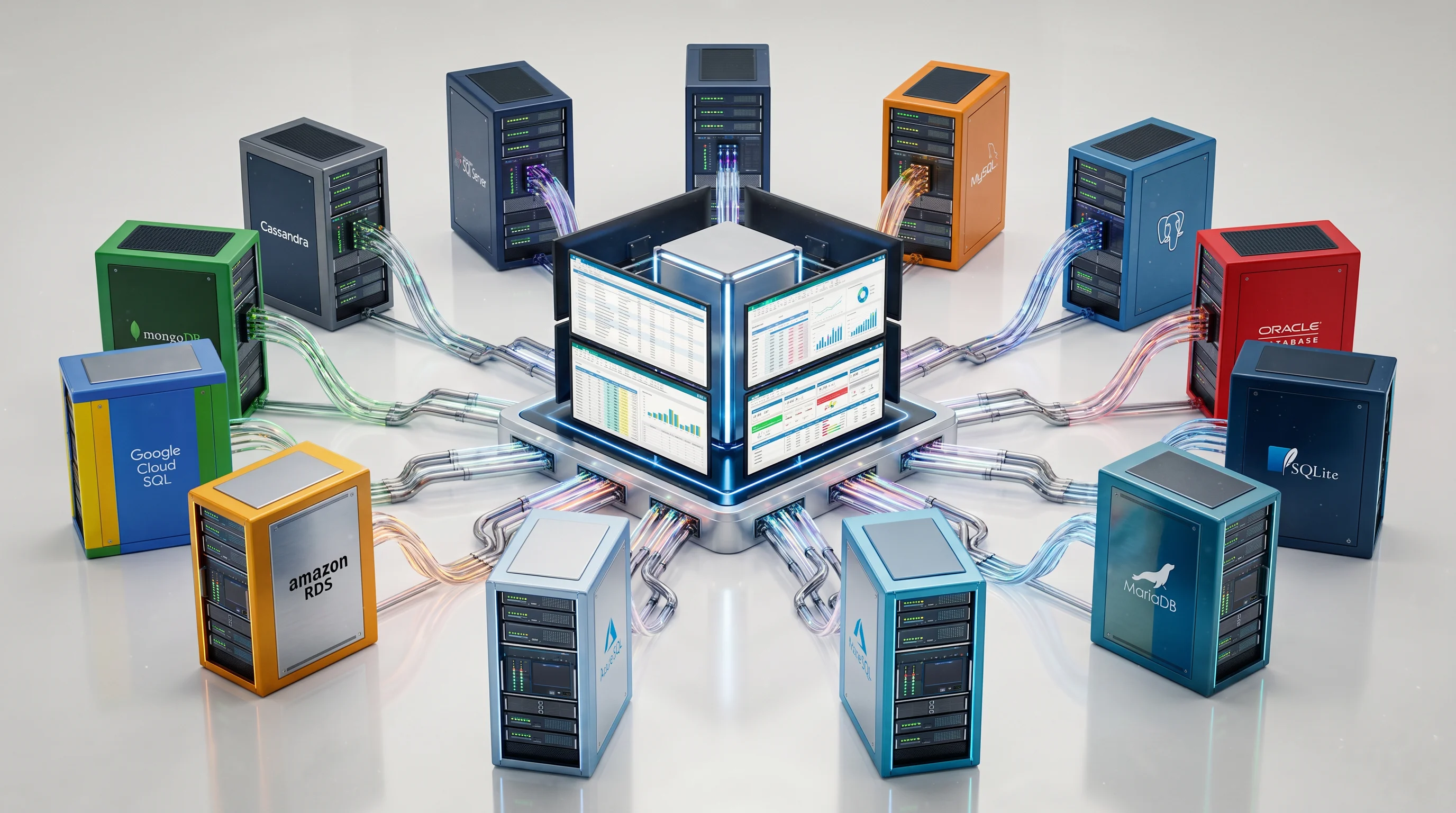
7. Cloud-based databases (Azure SQL, Amazon RDS, Google Cloud SQL)
Cloud-managed databases are increasingly popular for modern reporting architectures due to their scalability and minimal maintenance.
Key advantages
-
- On-demand scalability
- Automated backups and updates
- High availability and disaster recovery
- Seamless integration with cloud analytics tools
Limitations
-
- Increased ongoing operational costs over time
- Potential vendor lock-in, depending on the platform
- Varied performance based on network latency and configuration.
8. NoSQL databases (MongoDB, Cassandra)
While traditional reporting relies on relational databases, NoSQL databases are gaining traction for handling large volumes of unstructured or semi-structured data.
Key advantages
-
- Flexible schema design
- High scalability for big data
- Fast read and write performance
- Suitable for real-time analytics
Limitations
-
- Limited support for complex joins and relational queries
- Not ideal for structured, transactional reporting
- Varied data consistency, depending on configuration
Reporting database performance showdown: Key features at a glance
Selecting the right reporting database depends heavily on how it performs, scales, and supports modern reporting features. The table below gives a quick, practical comparison to help you evaluate the best fit for your needs.
| Database | Query performance | Scalability | Advanced features | Real-time capability | Best fit |
| SQL Server | High | High | Built-in BI tools | Moderate | Enterprise reporting |
| MySQL | Moderate | Moderate | Basic analytics | Moderate | Small- to mid-level workloads |
| PostgreSQL | High | High | Advanced SQL, extensibility | Moderate | Complex analytics |
| Oracle | Very high | Very high | Enterprise analytics | High | Large-scale BI |
| SQLite | Low to moderate | Low | Minimal features | Low | Local reporting |
| MariaDB | Moderate to high | High | Optimized engines | Moderate | Web-scale reporting |
| Cloud DBs | High | Very high | Managed automation | High | Cloud-native systems |
| NoSQL | Very high | Extremely high | Flexible schema | Very high | Real-time, big data |
In summary, use this comparison as a quick decision guide. Prioritize performance for heavy reporting, scalability for growth, and features for flexibility in modern reporting.
Key challenges in reporting databases
Despite their importance, reporting databases come with several challenges that can affect performance, accuracy, and scalability like:
-
- Data volume and performance: Large datasets and complex queries can slow down report generation without proper indexing and optimization.
- Data integration complexity: Combining data from multiple systems can lead to inconsistencies, integration errors, and increased development effort.
- Real-time data processing: Supporting near-real-time reporting is difficult, especially for traditional databases not designed for continuous data updates.
- Scalability limitations: As data and users grow, databases may struggle to scale efficiently without proper architecture or infrastructure planning.
- Data quality and consistency: Inaccurate, duplicate, or outdated data can lead to unreliable reports and poor decision-making.
- Security and compliance: Protecting sensitive data while meeting regulatory requirements adds complexity to database management.
- Maintenance and optimization: Ongoing tuning, monitoring, and indexing are required to sustain performance, often needing specialized expertise.
Overcoming these challenges requires a combination of the right database choice, proper design, and continuous optimization to ensure reliable and high-performing reporting systems.
How to choose the right reporting database
Choosing the right reporting database requires balancing performance, scalability, cost, and feature requirements. To guide your decision, use key factors like:
-
- Reporting requirements: Identify whether you need simple dashboards, complex analytics, or real-time reporting, as this determines the type of database to prioritize.
- Data volume and growth: Consider current data size and future growth—large and expanding datasets require databases with strong scalability capabilities.
- Query complexity: If your reports involve complex joins, aggregations, or transformations, choose databases with advanced query support like PostgreSQL or SQL Server.
- Performance needs: High-performance environments, such as enterprise BI systems, demand databases optimized for fast query execution and indexing.
- Real-time capabilities: For live dashboards or streaming data, prioritize databases that support real-time or near-real-time processing.
- Integration with reporting tools: Ensure the database integrates smoothly with your reporting solution, whether that’s Bold Reports, Power BI, or another BI tool.
- Cost and licensing: Evaluate both upfront and long-term costs, including licensing, infrastructure, and maintenance, especially for enterprise or cloud databases.
- Ease of maintenance: Consider the level of expertise required for setup, tuning, and ongoing management. Simpler systems reduce operational overhead.
- Security and compliance: Choose databases that support strong security features such as encryption, role-based access, and compliance standards.
In summary, the best reporting database is not the most powerful one, but the one that aligns closely with your reporting goals, data complexity, and long-term scalability needs.
Solving modern reporting database challenges with Bold Reports
Bold Reports helps organizations overcome common limitations in reporting databases, such as slow performance, disconnected data sources, and scalability issues, by providing a unified and efficient reporting layer.
Core capabilities for reporting databases
-
- Real-time data access: Query live reporting databases to eliminate delays and ensure up-to-date insights.
- Integration of multiple databases: Seamlessly combine data across multiple reporting databases into a single report.
- Optimized reporting performance: Handle large datasets and complex queries efficiently.
Supported data sources
-
- SQL databases such as SQL Server, MySQL, and PostgreSQL
- NoSQL data sources for large-scale and semi-structured data
- APIs and cloud platforms for distributed database environments
Bold Reports removes the complexity of managing separate systems by enabling seamless access to multiple reporting databases, reducing data silos and improving reporting efficiency.
Bold Reports transforms reporting databases into a connected, high-performance, and scalable reporting system for modern data needs.
Final thoughts
Choosing the right reporting database in 2026 isn’t just about popularity; it’s about aligning your data strategy with performance, scalability, and reporting needs. From traditional systems like SQL Server and PostgreSQL to modern cloud platforms and NoSQL databases, each option serves a specific purpose in the reporting ecosystem.
The key is to evaluate your data volume, query complexity, real-time requirements, and integration needs before making a decision. In many cases, a hybrid approach that combines multiple reporting databases delivers the best results.
With the right setup and tools like Bold Reports, organizations can turn reporting databases into high-performance, scalable systems that drive faster insights and smarter decision-making. Start your free 30-day trial or book a personalized demo today.
Frequently asked questions
-
- 1.
What is a reporting database?
A reporting database is one that is optimized for reading and analyzing large datasets efficiently. It supports complex queries without affecting transactional system performance.
- 2.
Which database is best for reporting in 2026?
The best choice depends on your use case, such as SQL Server for enterprise or cloud databases for scalability. Each database offers unique strengths based on performance, scale, and reporting needs.
- 3.
Why separate reporting and transactional databases?
Separation improves performance and prevents reporting queries from slowing down operations. It ensures stability for both transactional and analytical workloads.
- 4.
Are cloud databases better for reporting?
Cloud databases offer scalability, automation, and high availability for modern reporting needs. They are ideal for growing and distributed data environments.
- 5.
Can multiple reporting databases be used together?
Yes, many organizations use multiple databases to combine different data types. This approach enables more flexible and comprehensive reporting.
- 6.
What are common reporting database challenges?
Challenges include performance issues, data integration complexity, and scalability limits. Maintaining data quality and security is also critical.
- 7.
How does Bold Reports help with reporting databases?
Bold Reports enables real-time access and the integration of multiple databases. It simplifies reporting across different data sources with better performance.
- 1.






