Operational Reporting: Definition, Examples, and Tools

 15 mins
TL;DR
Operational reporting uses real-time or near-real-time business data to monitor daily operations and support faster decision-making. By transforming operational data into actionable reports, organizations can improve visibility, reduce risks, and optimize business performance.
Introduction
Every day, business applications generate large volumes of operational data, from customer transactions and support requests to inventory updates and production activities. However, data alone provides little value unless it can be transformed into timely, actionable insights. Organizations, software vendors, and SaaS providers need visibility into operational performance to identify issues quickly, improve efficiency, and support informed decision-making.
Operational reporting helps bridge this gap by converting operational data into structured, actionable reports that provide visibility into business performance. Whether embedded within applications, delivered automatically to stakeholders, or accessed on demand, operational reports enable teams to monitor key metrics, track processes, and respond faster to changing business conditions. By delivering timely operational insights, organizations can reduce risks, optimize workflows, and improve overall business performance.
In this guide, you’ll learn what operational reporting is, its key benefits, and how to choose the right operational reporting software for your organization.
What is operational reporting?
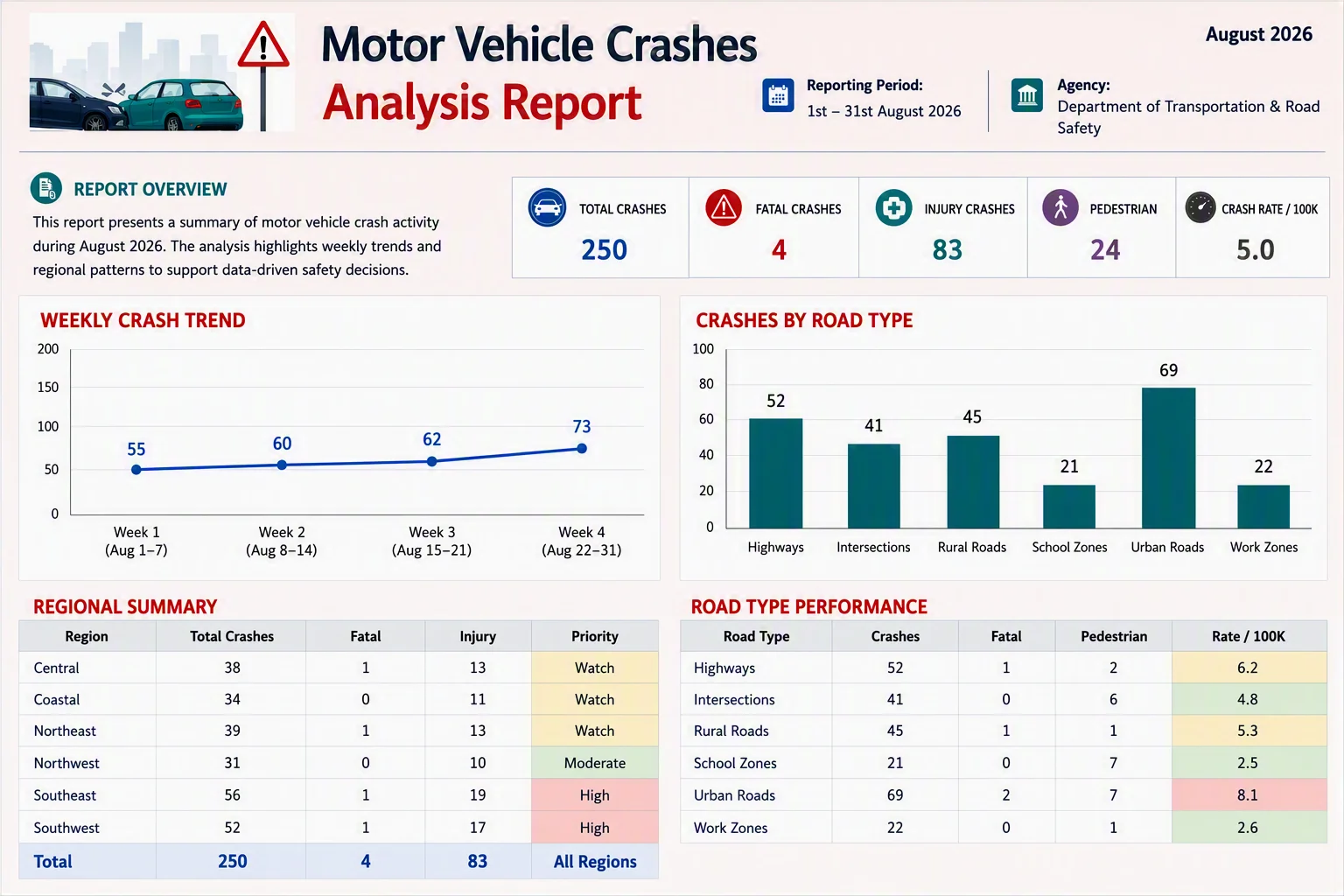
Operational reporting is the process of collecting, analyzing, and presenting real-time or near-real-time business data to monitor daily operations and support immediate decision-making. It helps organizations track sales, inventory, production, customer service, financial activities, and other operations through reports that provide visibility into current business performance.
Unlike analytical reporting, which focuses on historical trends and long-term planning, operational reporting focuses on current performance and day-to-day execution.
Benefits of real-time operational visibility
Operational reporting plays a critical role in helping organizations monitor daily operations and respond to issues before they become costly problems. Without timely operational visibility, businesses may experience delays, inefficiencies, and outages that impact productivity and revenue.
Reduces downtime cost
Downtime can significantly disrupt business operations and impact productivity. Real-time reports help teams identify issues faster, enabling quicker resolution and minimizing operational disruptions.
Enables faster issue detection and resolution
Operational reports provide up-to-date visibility into business processes, systems, and performance metrics. This allows teams to spot anomalies early and address problems before they escalate into costly disruptions.
Improves operational efficiency
By monitoring day-to-day activities, organizations can identify bottlenecks, resource constraints, and process inefficiencies. Operational reporting helps managers take corrective actions quickly and maintain smooth operations.
Supports better decision-making
Access to current operational data enables managers and executives to make informed decisions based on real-world conditions rather than assumptions. This leads to faster and more effective responses to changing business needs.
Drives investment in reporting technologies
The growing demand for operational visibility is reflected in the expansion of the business intelligence market. According to Grand View Research, the global business intelligence software market was valued at $40.1 billion in 2025 and is projected to reach $81.5 billion by 2033.
Strengthens business performance and reliability
Continuous operational monitoring helps organizations maintain service quality, improve customer experiences, and minimize risks. With timely insights, teams can proactively manage performance and ensure business continuity.
Operational reporting vs. analytical reporting
The following table highlights the key differences between operational reporting and analytical reporting.
| Aspect | Operational reporting | Analytical reporting |
| Purpose | Monitors day-to-day business operations and supports immediate action. | Analyzes historical data to provide insight into trends and patterns. |
| Key question | What is happening right now? | Why did it happen, and what may happen next? |
| Data type | Current or near-real-time data. | Historical, aggregated, and trend-based data. |
| Primary users | Frontline employees, supervisors, and operational managers. | Executives, analysts, and business leaders. |
| Focus | Operational efficiency and process monitoring. | Strategic planning and performance analysis. |
| Examples | Daily sales reports, inventory status reports, support ticket reports, production reports. | Sales trend analysis, revenue forecasting, customer behavior analysis, profitability reports. |
| Output | Standardized operational reports. | Trend analysis, forecasts, and interactive analytics reports. |
Types of operational reports
Operational reports can be categorized based on how data is delivered and the actions they support. Each report type serves a specific purpose, from monitoring live business activities to identifying critical issues that require immediate attention.
Real-time reports
Real-time reports provide live or near-real-time data, allowing teams to monitor operations as they happen. These reports are essential when response delays can negatively impact business performance. Common examples include system monitoring reports, order tracking reports, customer support queues, and inventory monitoring reports.
Periodic reports
Periodic reports are generated on a fixed schedule, such as daily, weekly, or monthly. They provide a snapshot of operational performance over a specific period and help teams track key metrics, monitor progress, and identify short-term trends. Examples include daily sales reports, weekly inventory summaries, and monthly production reports.
Ad hoc reports
Ad hoc reports are created on demand to answer specific business questions or investigate unexpected issues. Unlike scheduled reports, they are generated only when needed and help decision-makers quickly access relevant information. Examples include analyzing delayed shipments, investigating customer complaints, or reviewing sales performance in a particular region.
Exception reports
Exception reports focus on unusual events, threshold breaches, or performance issues that require immediate attention. Instead of displaying all operational data, these reports highlight only the items that fall outside expected conditions. Examples include low inventory alerts, failed transactions, SLA violations, and equipment downtime notifications.
Examples of operational reporting by department
Operational reporting is used across different business functions to monitor daily activities, track performance, and support timely decision-making. These operational reports are commonly delivered through ERP systems, CRM platforms, customer portals, and business applications, enabling users to access timely operational insights within their everyday workflows.
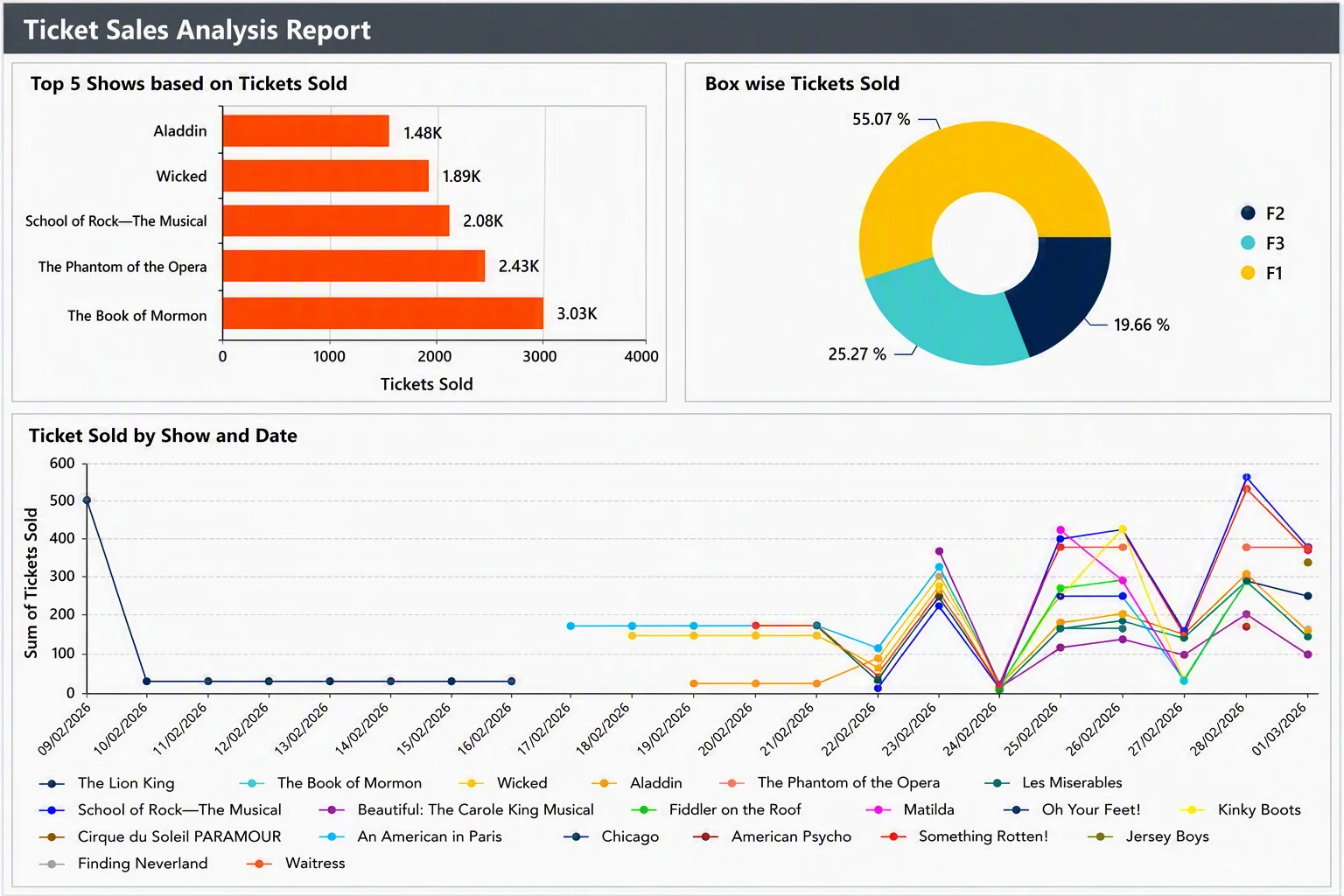
Sales
Sales and CRM platforms increasingly need operational reporting built into the product itself. Customers expect to view daily revenue, sales by region, conversion rates, and rep performance without leaving the application they already use. Embedded reporting helps customers identify opportunities and address performance gaps in real-time.
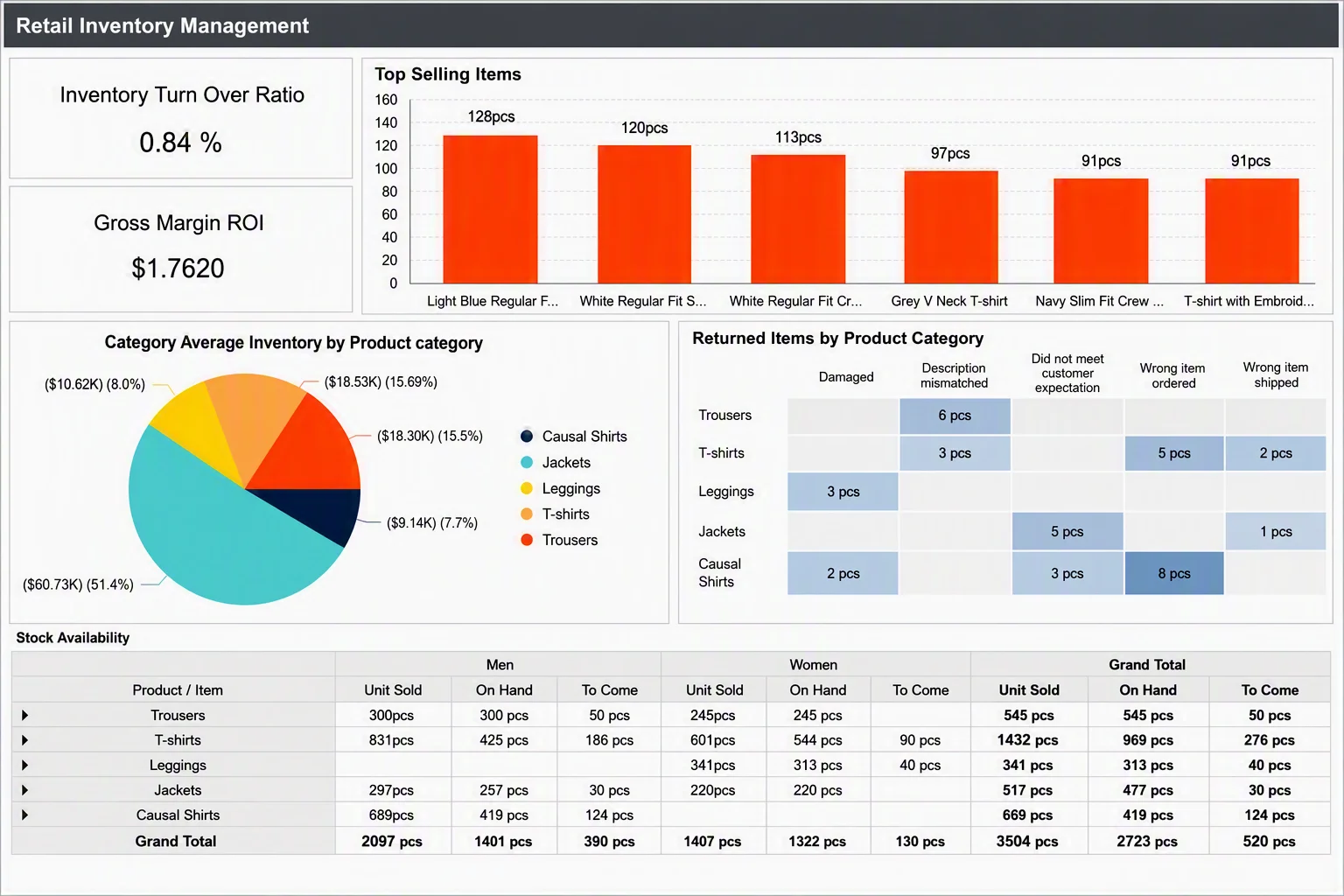
Inventory and supply chain
ERP, warehouse management, and supply chain platforms often need to expose operational reporting directly within the product. Embedded reports provide visibility into inventory management, reorder points, incoming shipments, and warehouse operations, helping customers prevent stockouts, reduce excess inventory, and maintain supply chain performance without switching systems.
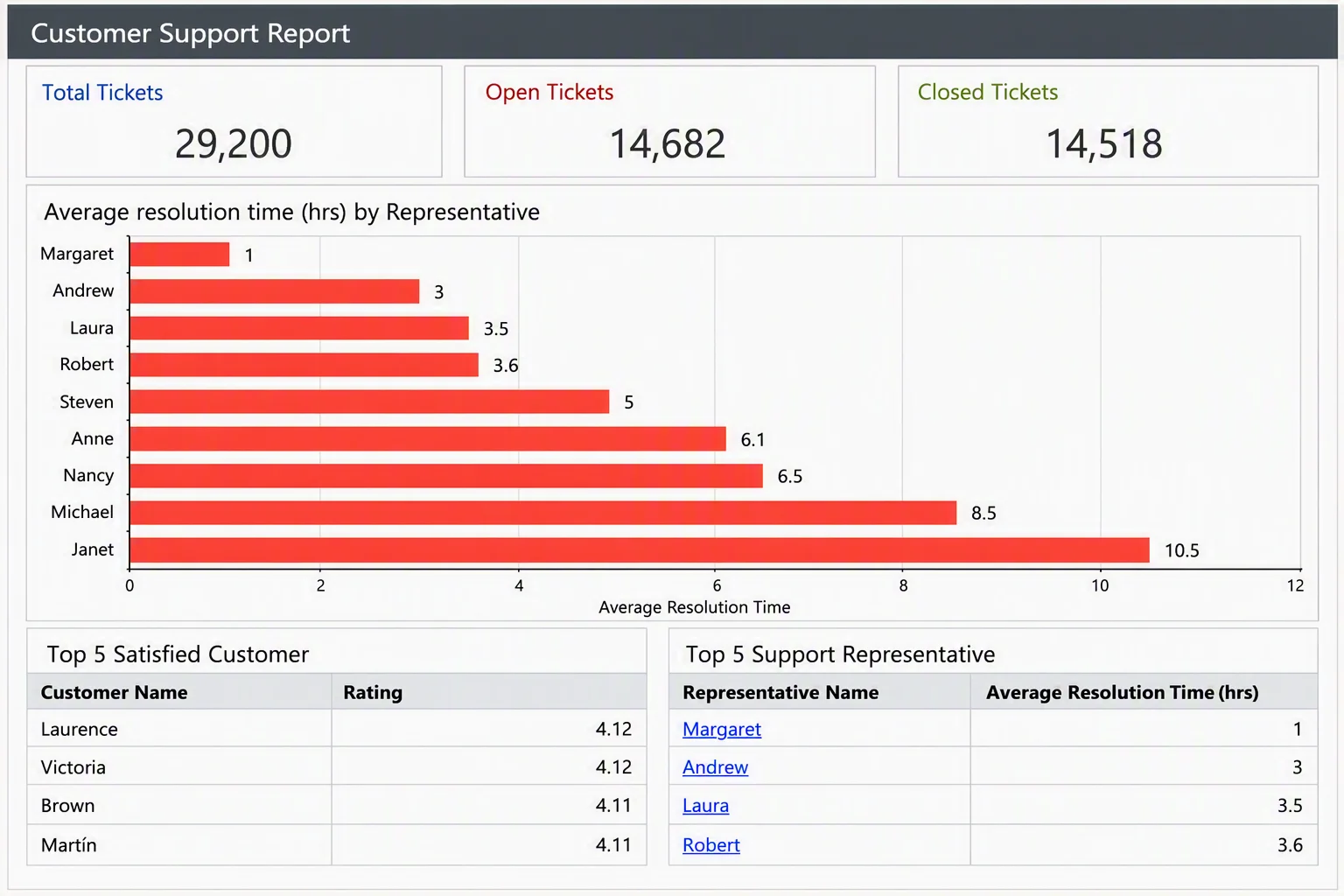
Customer service
Help desk and customer service platforms need operational reporting that customers can access without leaving the product. Embedded reports provide visibility into open tickets, response times, resolution rates, and agent workloads, helping support managers improve service quality and resolve issues faster without relying on external reporting tools.
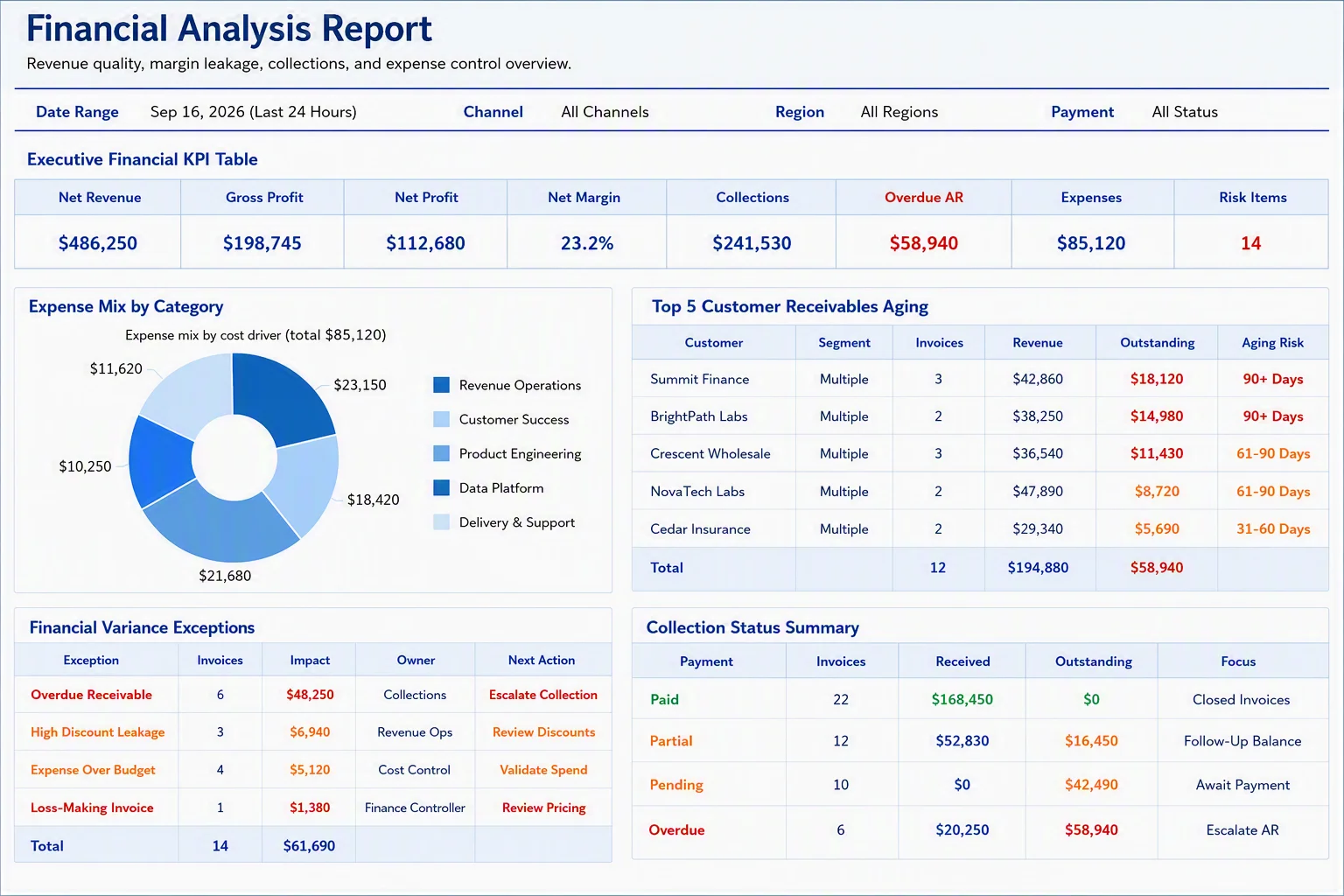
Finance
Finance departments use operational reports to track cash flow, daily transactions, accounts receivable, and payment processing activities. These reports help identify discrepancies early and support accurate financial management. ERP and financial management applications commonly provide operational reporting for monitoring transaction activity and day-to-day financial performance.
Manufacturing and operations
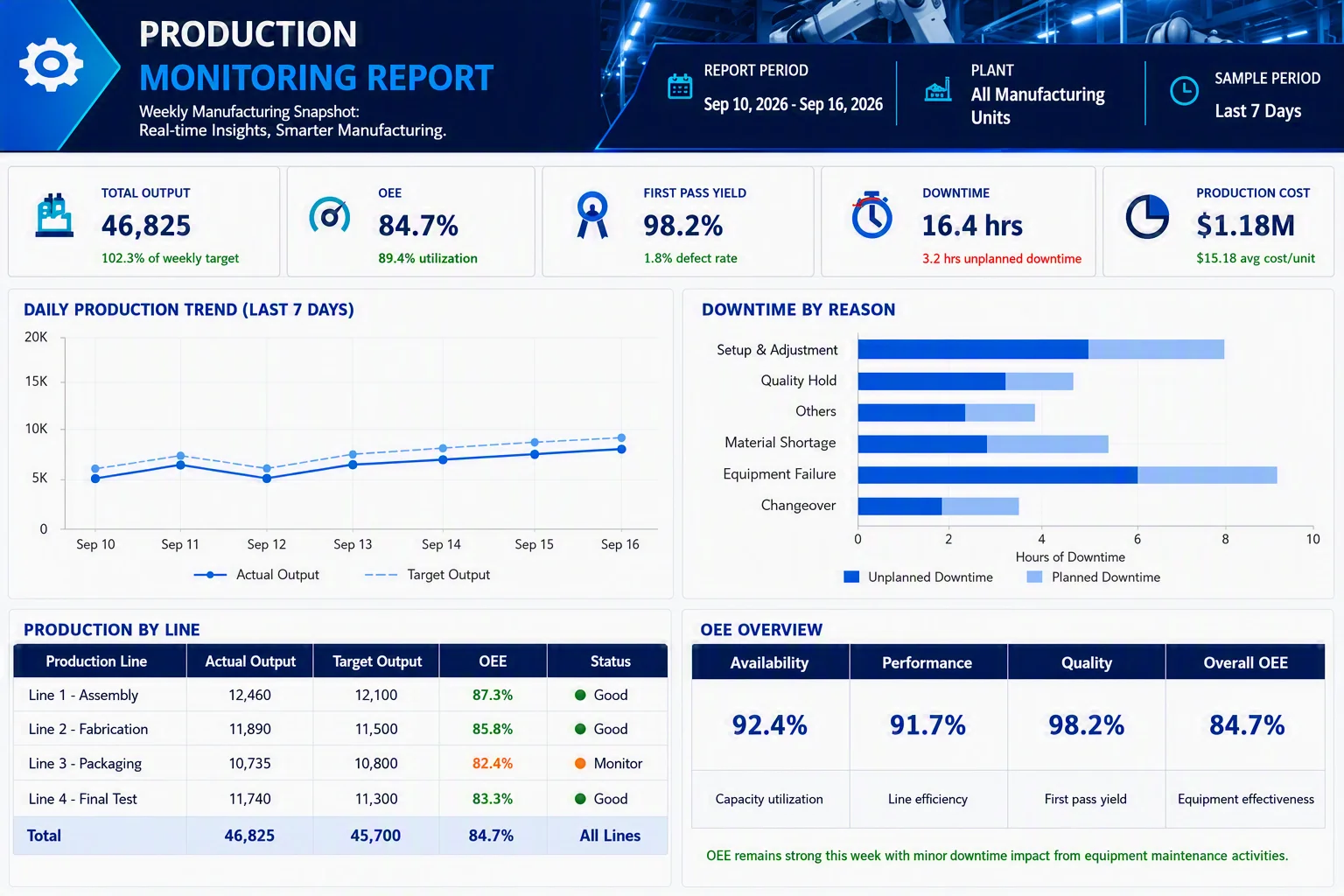
Manufacturing teams use operational reports to monitor production output, machine utilization, downtime, and defect rates. By tracking these metrics, organizations can identify bottlenecks, improve efficiency, and maintain production targets.
Manufacturing and operations management systems commonly use operational reporting to monitor production output, equipment performance, and quality control metrics.
Best practices for building effective reports
To get the most value from operational reporting, organizations should follow these best practices, which improve report accuracy, usability, and decision-making effectiveness:
Match report frequency to decision speed
Not every metric requires real-time monitoring, and refreshing every report every few seconds can add unnecessary cost and complexity. When embedding reporting into applications, make refresh intervals configurable, using real-time updates for critical metrics and hourly or daily updates where appropriate. This ensures reports align with how quickly users need to make decisions.
Focus on actionable metrics
Include KPIs that help users act immediately, not just metrics that look interesting. When designing embedded operational reports, prioritize metrics tied to specific decisions or workflows, and move less critical information to secondary views to keep reports focused and easy to use.
Automate data collection and delivery
Automated reporting reduces manual effort, minimizes errors, and ensures stakeholders always have access to the latest information. For a product team, this includes scheduling report generation and delivery within the application rather than requiring customers to request exports manually.
Use alerts and exception reporting
Set thresholds and alerts for critical metrics such as low inventory levels, service delays, or system outages. Integrating alerts directly into the application helps users identify and respond to issues quickly without relying on separate monitoring or support processes.
Ensure data accuracy and consistency
Operational decisions depend on reliable data, so organizations should regularly validate data sources and maintain a single source of truth. In multitenant applications, it is important to ensure each customer can access only their own data, maintaining both accuracy and data isolation.
Deliver reports where users work
Operational reports are most effective when accessible within the applications employees and customers already use. For organizations building customer-facing software, embedded reporting enables users to access operational insights directly within business workflows, improving adoption, reducing context switching, and accelerating decision-making.
6 best operational reporting tools and software
Modern operational reporting software helps organizations automate report generation, connect to multiple data sources, and deliver operational reports in real-time.
1. Bold Reports
Bold Reports is an operational reporting software that helps organizations create, automate, manage, and embed pixel-perfect operational reports. It supports both real-time and automated reporting, allowing businesses to monitor day-to-day operations, track performance metrics, and deliver timely insights to stakeholders.
With features such as automated report distribution, interactive parameters, and embedded reporting, teams can securely access and share operational data across web, desktop, and mobile applications. By connecting to databases, APIs, cloud services, and enterprise systems, Bold Reports enables organizations to turn raw operational data into accurate, actionable insights for faster decision-making.
Best for: Organizations and SaaS providers that need operational reporting, report automation, and embedded reporting from a single platform.
Key strengths:
-
- Pixel-perfect operational reports.
- Embedded reporting for business applications.
- Automated report scheduling and distribution.
- Support for SQL, REST APIs, cloud services, and business applications.
- Role-based security and multitenant support.
Limitations: Advanced report customization and embedding scenarios may require developer involvement.
2. Jaspersoft
Jaspersoft is an enterprise reporting platform that enables organizations to create, schedule, and distribute operational reports. It supports pixel-perfect reporting, ad hoc reporting, and embedded analytics, making it suitable for organizations that require flexible reporting across multiple data sources.
Best for: Enterprises and software vendors looking for a customizable reporting solution with embedded reporting capabilities.
Key strengths:
-
- Pixel-perfect report design.
- Extensive data source connectivity.
- Report scheduling and distribution.
- Open-source foundation.
- Embedded reporting and analytics.
Limitations: Steeper learning curve for report development and administration.
3. SAP Crystal Reports
SAP Crystal Reports is a long-established reporting solution that helps organizations create highly formatted operational, financial, and compliance reports. It is widely used for generating detailed business documents from multiple data sources.
Best for: Organizations that require highly formatted and document-centric operational reports.
Key strengths:
-
- Rich report formatting capabilities.
- Support for complex report layouts.
- Multiple export formats.
- Strong enterprise adoption.
Limitations: Limited support for modern embedded reporting and large-scale web application reporting scenarios. Also, SAP is ending mainstream maintenance for Crystal Reports 2020 on December 31, 2026 and Crystal Reports 2025 in December 2027.
4. SQL Server Reporting Services (SSRS)
SSRS is Microsoft’s server-based reporting platform for creating, managing, and delivering operational reports. It allows organizations to generate parameterized reports, automate report delivery, and distribute reports across the enterprise.
Best for: Organizations heavily invested in Microsoft SQL Server environments.
Key strengths:
-
- Strong integration with SQL Server.
- Scheduled and subscription-based reporting.
- Enterprise-scale deployment.
- No additional licensing cost for many SQL Server users.
Limitations: Legacy reporting platform best suited for Microsoft SQL Server environments and traditional enterprise reporting needs.
5. Telerik Reporting
Telerik Reporting is a .NET reporting platform that enables developers to build operational reports and embed them into business applications. It offers interactive reporting features and report designers for enterprise applications.
Best for: .NET development teams building reporting into custom business applications.
Key strengths:
-
- Strong .NET integration.
- Embedded reporting support.
- Interactive, pixel-perfect reports.
- Comprehensive report designer.
Limitations: Primarily designed for .NET applications, making it less suitable for non-.NET technology stacks.
6. ActiveReports
ActiveReports is a reporting and document-generation platform that enables organizations to create operational, financial, and regulatory reports. It supports report embedding and advanced document generation for business applications.
Best for: Organizations requiring reporting and document generation within custom applications.
Key strengths:
-
- Powerful document and report generation.
- Embedded reporting capabilities.
- Flexible report design options.
- Developer-friendly architecture.
Limitations: Advanced customization and deployment scenarios may require technical expertise.
Common operational reporting challenges
Addressing these issues is essential for delivering accurate, timely, and actionable reports
Data silos
Operational data is often stored across multiple systems, including ERP, CRM, finance, inventory, and customer service platforms. Combining data from these sources can be difficult, leading to fragmented reports and incomplete insights.
Poor data quality
Inaccurate, incomplete, or duplicate data can undermine the reliability of operational reports. Organizations must maintain high data quality standards to ensure reports support informed decision-making.
Reporting delays
Many businesses still rely on manual data collection and report generation processes. These delays can result in outdated information, preventing teams from responding quickly to operational issues.
Lack of real-time visibility
Without real-time or near real-time reporting, organizations may struggle to detect bottlenecks, service disruptions, inventory shortages, or system issues before they affect business performance.
Scalability challenges
As organizations grow, reporting volumes, users, and data sources increase. Legacy reporting systems and spreadsheets often become difficult to maintain, impacting reporting efficiency and performance.
Security and access control
Operational reports frequently contain sensitive business information. Organizations must implement role-based access controls and security measures to ensure the right users can access the right data while maintaining compliance.
Embedding and integration complexity
SaaS providers often need to integrate operational reporting into existing applications while maintaining security, scalability, and performance. Ensuring reports work seamlessly across different user roles, tenants, and data sources can introduce additional development and maintenance challenges.
How to choose the right reporting software
When evaluating operational reporting software, consider the following factors:
- Data connectivity: Choose an operational reporting tool that integrates with databases, ERP systems, CRM platforms, cloud applications, and APIs. Poor connectivity can create data silos and lead to inaccurate reports.
- Report automation: Look for operational reporting software that automates report generation, scheduling, and distribution. Without report automation, reporting becomes time-consuming and prone to errors.
- Real-time reporting: Select a platform that supports real-time operational reporting when timely decisions are critical. Limited visibility can delay issue detection and response.
- Scalability: A scalable operational reporting solution should handle growing data volumes, users, and reporting demands without affecting performance. An unscalable tool can slow reporting and increase maintenance costs.
- Security and access control: Ensure the platform offers role-based permissions, authentication, and data access controls. Weak security can expose sensitive operational data and increase compliance risks.
- Embedded reporting capabilities: If users need access to operational reports within applications or portals, prioritize tools with embedded reporting capabilities. Without embedded reporting, users may need to switch between systems, reducing productivity and adoption.
Conclusion
Operational reporting is a critical capability for organizations that need real-time visibility into daily operations, performance metrics, and business processes. By transforming operational data into actionable insights, operational reports help teams identify issues faster, improve efficiency, reduce downtime, and make confident, data-driven decisions.
As businesses become increasingly data-driven, investing in the right operational reporting strategy and software is essential for maintaining operational excellence. The most effective operational reporting solutions combine real-time reporting, report automation, and seamless data connectivity to deliver timely insights where they are needed most.
Ready to improve your operational reporting? Bold Reports helps organizations create, automate, manage, and embed pixel-perfect operational reports using data from databases, APIs, cloud applications, and enterprise systems. Book a free demo or start a 30-day free trial to see how Bold Reports can support your operational reporting needs.
Frequently asked questions
-
- 1.
What data sources can operational reporting connect to?
Operational reporting tools can connect to databases, ERP systems, CRM platforms, cloud applications, and APIs to provide a unified view of business operations.
- 2.
What KPIs should be included in operational reports?
Common KPIs include sales revenue, inventory levels, response times, production output, downtime, cash flow, and order fulfillment rates.
- 3.
Can operational reports be embedded into applications?
Yes. Embedded reporting allows organizations to display operational reports directly within business applications, portals, and websites.
- 4.
What is the difference between operational reporting and dashboard reporting?
Operational reports provide detailed, structured information, while dashboards offer a high-level view of key metrics and KPIs.
- 5.
Is operational reporting suitable for small businesses?
Yes. Businesses of all sizes can use operational reporting to monitor performance, improve efficiency, and make faster decisions.
- 6.
Which industries benefit most from operational reporting?
Operational reporting is widely used in manufacturing, healthcare, retail, logistics, finance, and customer service industries where real-time visibility is critical.
- 7.
How often should operational reports be updated?
Reports should be updated as often as needed for decision-making, ranging from real-time or near-real-time updates to hourly, daily, or weekly refreshes. The ideal frequency depends on the operational process being monitored.
- 1.