Automated Reporting: Benefits, Use Cases, and Best Practices
TL;DR
Manual reporting is time-consuming, error-prone, and difficult to scale. Automated reporting streamlines report generation, scheduling, and delivery by automatically collecting, processing, and distributing reports on scheduled intervals or predefined triggers. Organizations use report automation to eliminate repetitive reporting tasks and improve consistency. For example, HeiTech Padu Bhd centralized reporting with Bold Reports and reduced report development time by 85%, enabling faster report delivery and improved billing accuracy.
Introduction
How much time does your team spend creating reports instead of acting on the insights they contain? Many organizations still rely on manual reporting processes that involve exporting data from multiple systems, updating spreadsheets, creating visualizations, generating PDFs, and distributing reports by email. While these methods may work for small-scale reporting needs, they quickly become difficult to manage as data volumes, users, and reporting demands grow.
Manual report generation not only consumes valuable time but also increases the risk of errors, inconsistencies, and outdated information. As businesses become more data-driven, stakeholders expect timely access to accurate insights, making traditional reporting workflows increasingly inefficient.
This is where automated reporting makes a difference. By automatically collecting, processing, and distributing data, automated reporting eliminates repetitive tasks, improves accuracy, and ensures decision-makers always have access to the latest information. More importantly, it helps organizations focus on analyzing data and driving business outcomes rather than spending hours compiling reports.
In this guide, we’ll explore what automated reporting is, its key benefits, common use cases, implementation best practices, and how Bold Reports helps organizations automate report generation, streamline report delivery, and scale reporting across the enterprise.
What is automated reporting?
Automated reporting is the process of automatically generating and delivering reports from connected data sources with minimal or no manual intervention.
Instead of manually collecting data, updating spreadsheets, and distributing reports, automated reporting software retrieves data, generates reports, and delivers them at scheduled intervals or predefined triggers, ensuring stakeholders receive timely and consistent information.
The hidden costs of manual reporting
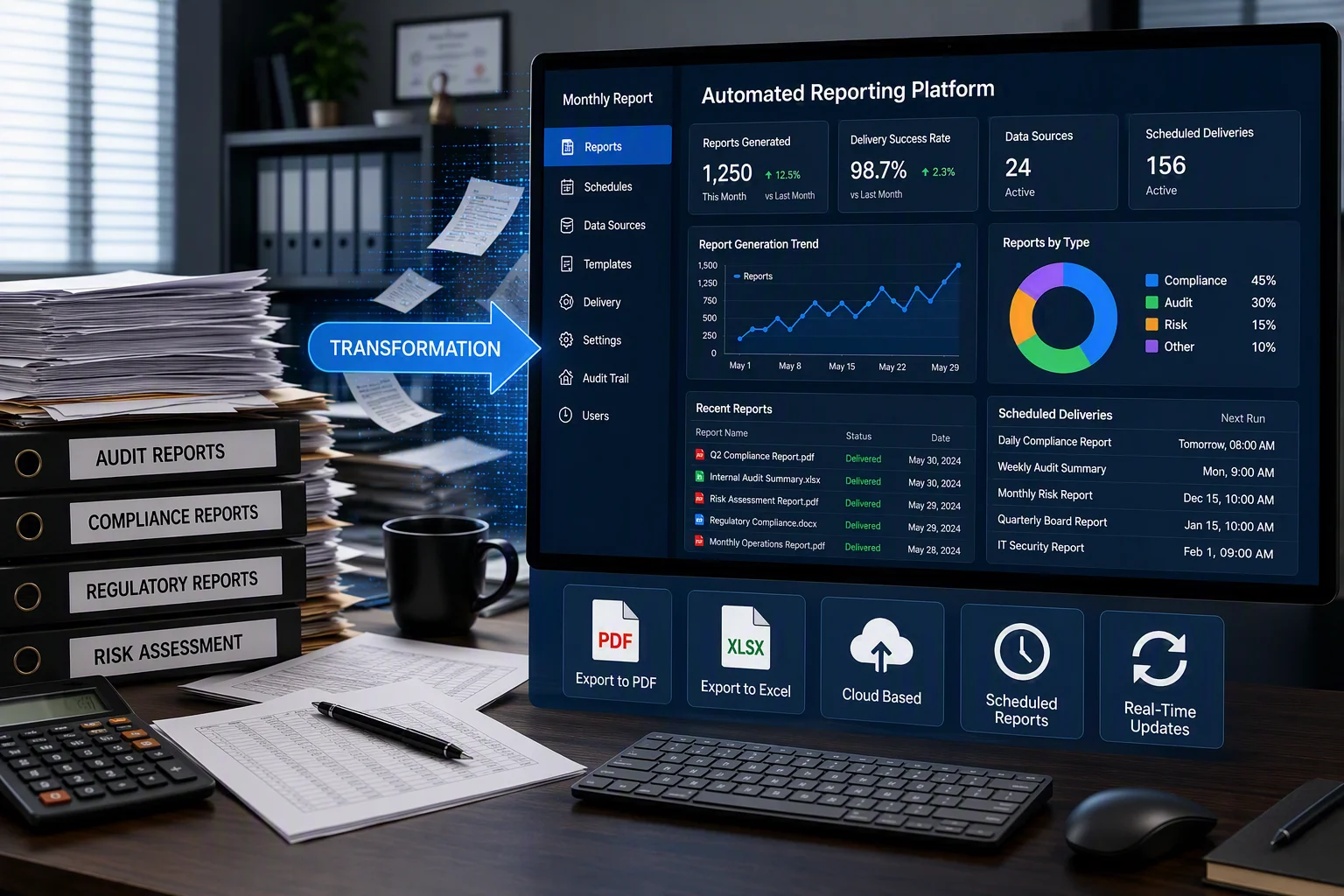
As data volumes grow, manual reporting becomes inefficient and difficult to manage. These are the biggest drains on productivity when organizations stick with manual reporting:
-
- Repetitive report preparation
Teams frequently spend hours collecting data, applying filters, updating spreadsheets, formatting reports, and preparing exports. These recurring tasks reduce productivity and leave less time for analysis and decision-making. - Managing multiple export formats
Different stakeholders often require reports in different formats, such as PDF, Excel, Word, or CSV. Generating and maintaining multiple versions manually increases workload and the risk of inconsistencies. - Version control and consistency challenges
When reports are shared through spreadsheets, email attachments, or local files, it becomes difficult to track the latest version and ensure users are working with accurate information. - Compliance and documentation requirements
Organizations in regulated industries must maintain consistent reporting processes and audit-ready documentation. Manual workflows can make it difficult to ensure accuracy, traceability, and compliance.
- Repetitive report preparation
Manual reporting vs. automated reporting
The following table highlights the key differences between manual and automated reporting.
| Factor | Manual reporting | Automated reporting |
| Time | Takes hours or days to collect, analyze, and format data. | Generates reports automatically in minutes or on a recurring schedule. |
| Accuracy | Prone to human errors from manual data entry and spreadsheets. | Reduces errors by pulling data directly from source systems. |
| Scalability | Becomes difficult to manage as data and reporting needs grow. | Easily handles growing datasets and increasing report volumes. |
| Data freshness | Often based on outdated point-in-time information or distributed with a delay. | Provides real-time or regularly refreshed data insights. |
| Report distribution | Requires manual sharing via email or other channels. | Automatically delivers reports to stakeholders on schedule. |
| Operational cost | Higher due to repetitive manual effort. | Lower by automating repetitive reporting tasks. |
Benefits of automated reporting
Automated reporting helps organizations create scalable, repeatable reporting processes that ensure stakeholders receive accurate, standardized information when they need it. Its most significant benefits are:
1. Eliminates repetitive report preparation
Teams no longer need to manually export data, update spreadsheets, format reports, generate PDFs, or distribute reports. Automation handles these recurring tasks, allowing users to focus on analysis and decision-making.
2. Ensures consistency across reports and teams
By using centralized templates and data sources, organizations can standardize KPIs, calculations, layouts, and branding. This reduces discrepancies and helps establish a single source of truth.
3. Automates report delivery at scale
As reporting requirements grow, automated reporting solutions can schedule report generation and distribute reports to hundreds or thousands of users through email, shared portals, or exported files without additional administrative effort.
4. Improves operational reliability
Automated reporting reduces dependence on manual processes and individual contributors. Reports continue running on schedule, even during staff absences or periods of business growth.
5. Strengthens governance and compliance
Automation creates repeatable reporting processes with consistent data sources, report definitions, and delivery mechanisms. This helps organizations maintain reporting standards, improve traceability, and simplify audit and compliance requirements.
Automated reporting vs. real-time reporting
Although automated reporting and real-time reporting are often discussed together, they serve different purposes and solve different business challenges.
| Feature | Automated reporting | Real-time reporting |
| Data refresh rate | Scheduled intervals (hourly, daily, weekly, or monthly) | Continuous updates with live or real-time data |
| Primary focus | Automating report generation and distribution | Monitoring current operations and business activity |
| Infrastructure cost | Low to moderate, using standard reporting and data integration processes | Typically higher due to streaming and real-time processing requirements |
| Best used for | Executive reporting, financial reporting, compliance reporting, and recurring business reports | Fraud detection, operational monitoring, system performance, and inventory tracking |
| Main benefit | Reduces manual effort and scales report delivery | Enables immediate visibility and faster response to events |
Common business use cases for automated reporting
1. Financial reporting
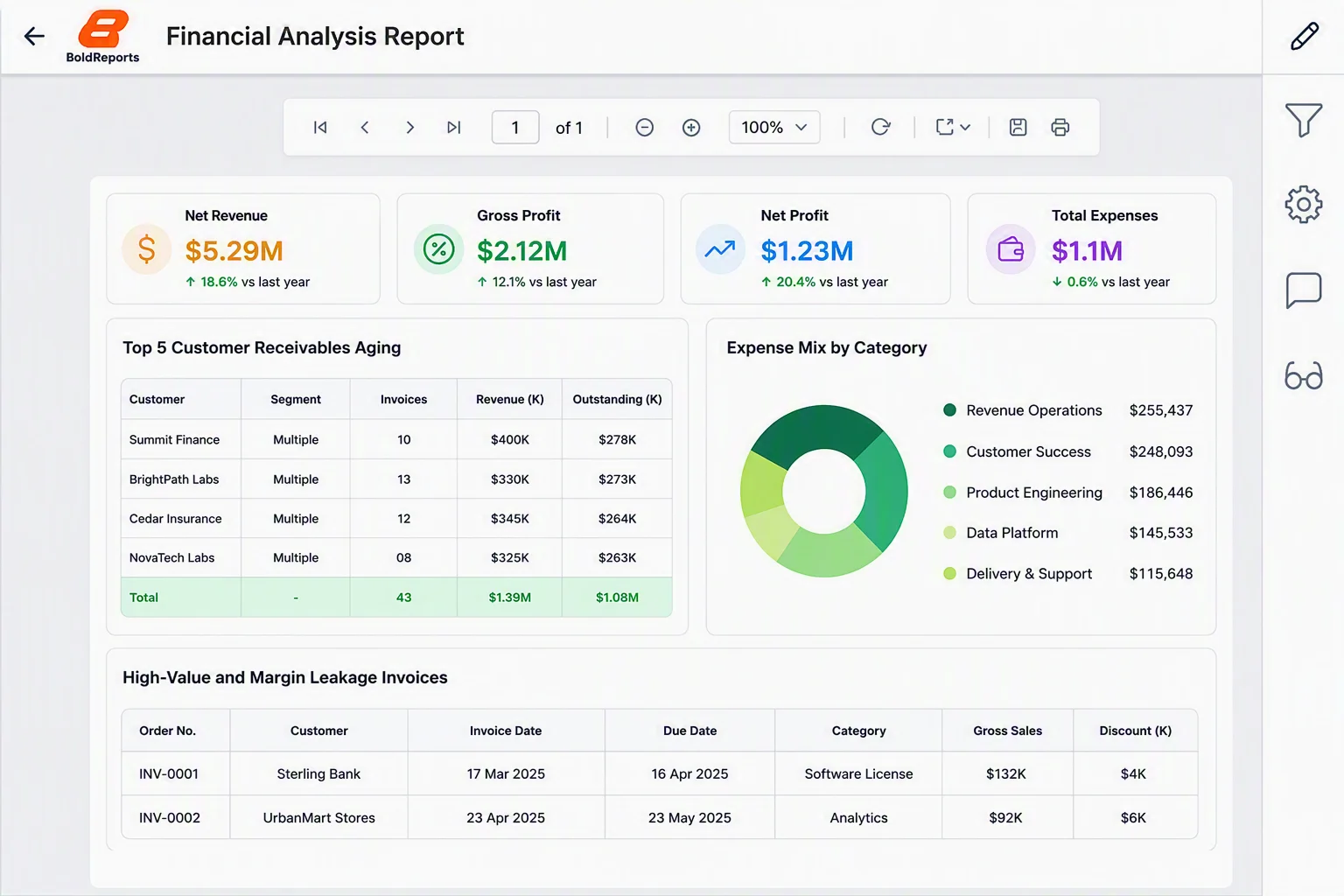
Financial reporting provides visibility into an organization’s revenue, profitability, and overall financial performance. Automated financial reporting helps teams generate accurate insights from connected data sources, ensuring stakeholders receive timely and consistent information.
With automated financial reporting, finance teams can:
-
- Generate financial reports automatically.
- Maintain audit-ready records with consistent formatting.
- Adhere to compliance and regulatory requirements.
It improves reporting accuracy, strengthens compliance, and enables more confident financial decision-making.
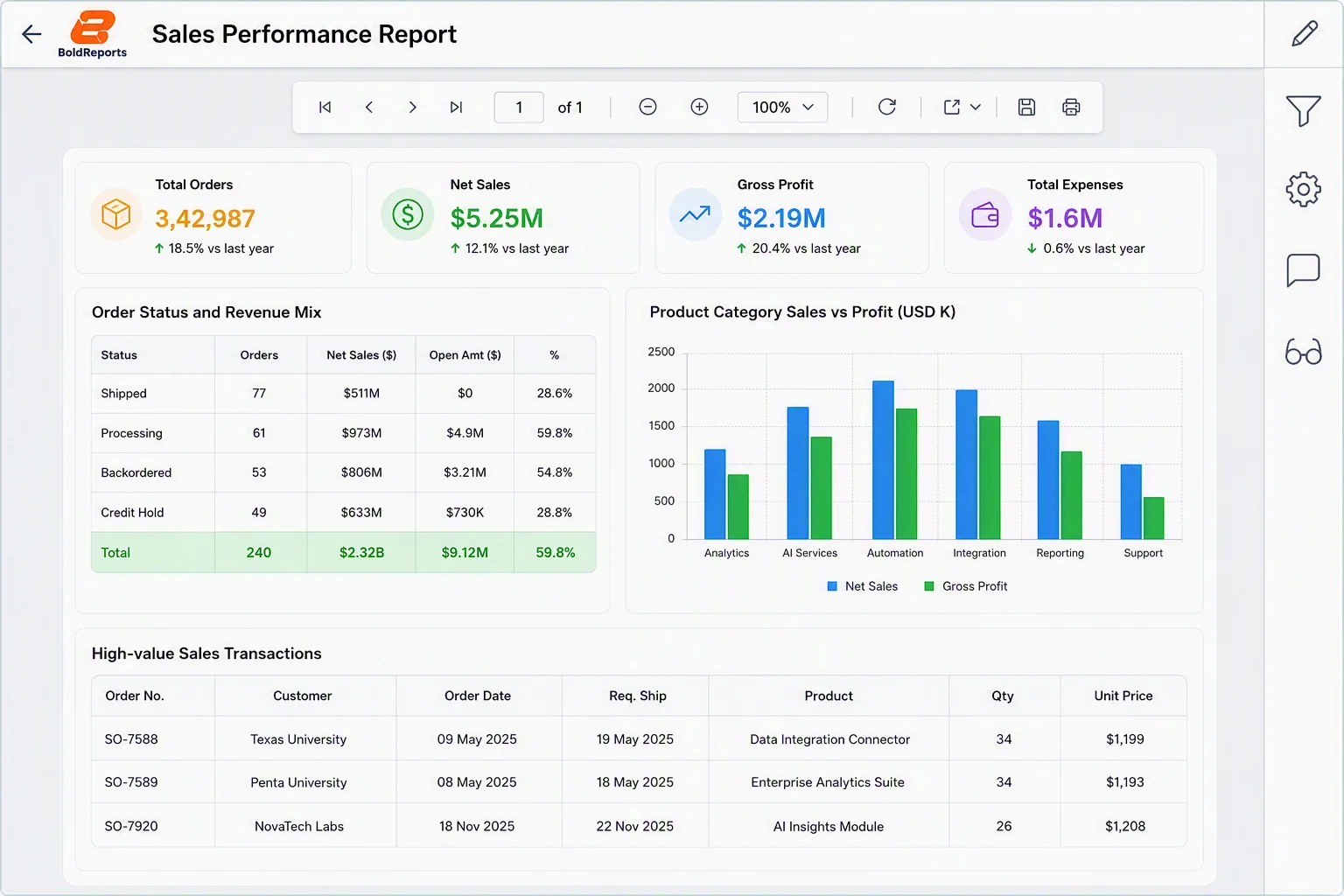
2. Sales reporting
Sales teams rely on timely and accurate data to track performance and identify growth opportunities. Manual reporting can slow decision-making and make it difficult to monitor key sales metrics across multiple regions or teams.
With automated sales reporting, organizations can:
-
- Monitor revenue, pipeline performance, and conversion rates in real time.
- Track sales goals and forecasts automatically.
- Deliver scheduled reports to sales leaders and stakeholders.
This helps sales teams make faster decisions and improve overall revenue performance.
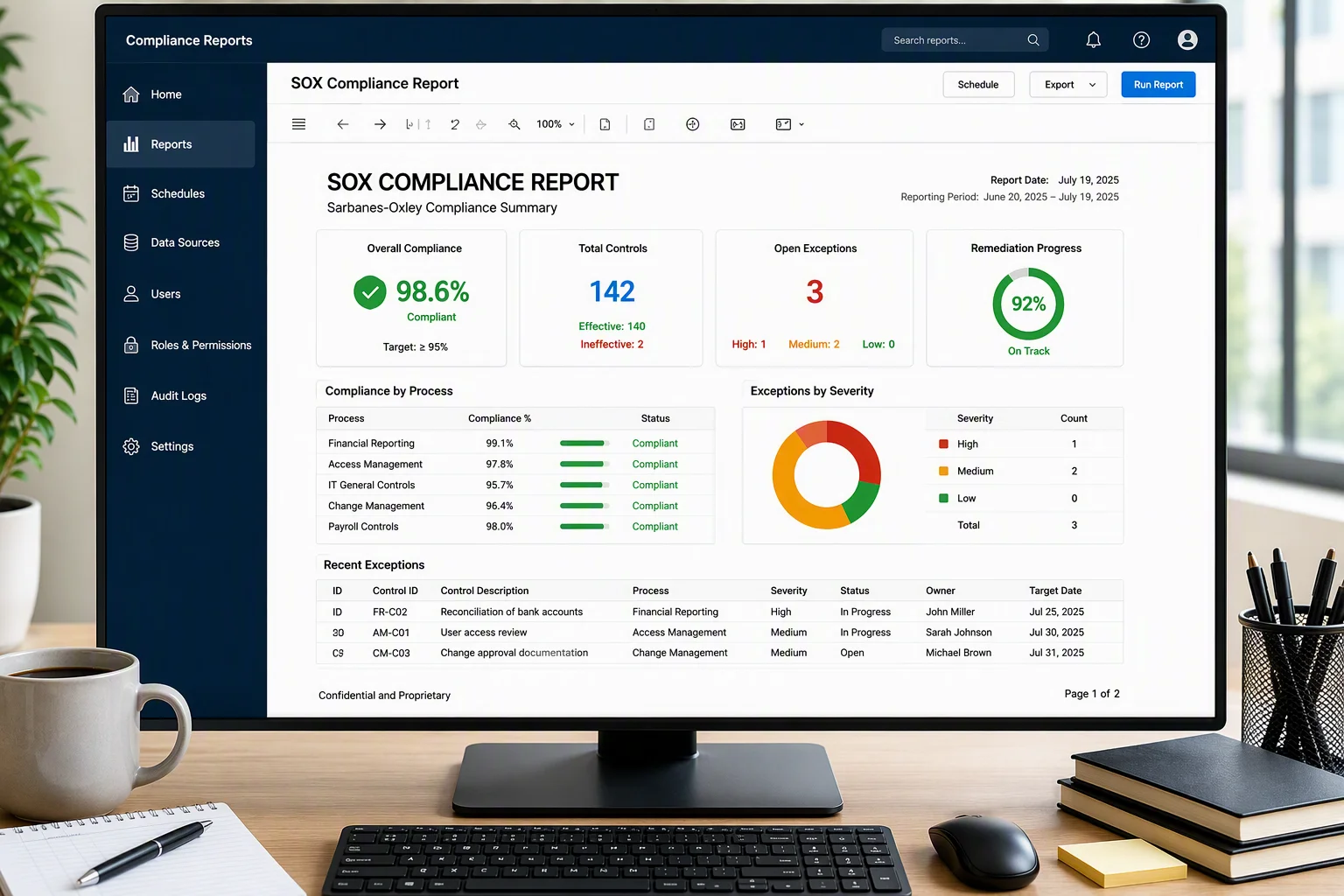
3. Compliance and regulatory reporting
Organizations in regulated industries must consistently generate reports to meet compliance requirements and support audits. Managing these reports manually can be time-consuming and increase the risk of errors, inconsistencies, and missed deadlines.
With automated compliance reporting, organizations can:
-
- Generate audit-ready reports automatically.
- Improve data accuracy and traceability.
- Reduce the administrative burden of compliance reporting.
This strengthens governance, reduces compliance risks, and simplifies audit preparation.
How to create automated reports with Bold Reports, step by step
In the Bold Report Report Server, you can create a schedule by:
-
- Clicking the + (Create) icon and selecting Schedule.
- Choosing Create Schedule from a report’s context menu.
- Opening the Schedules page and clicking Create Schedule.
In this example, we are going to create a schedule by using the first option, which provides an easy-to-follow wizard for creating schedules.
Step 1: Create a new report schedule
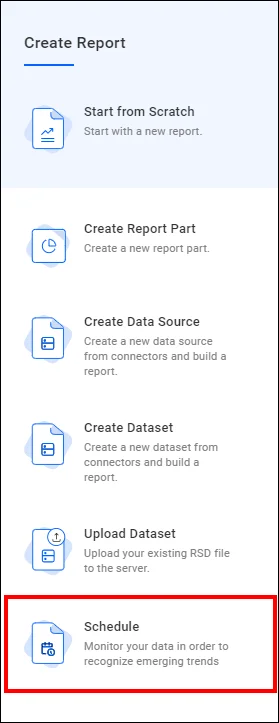
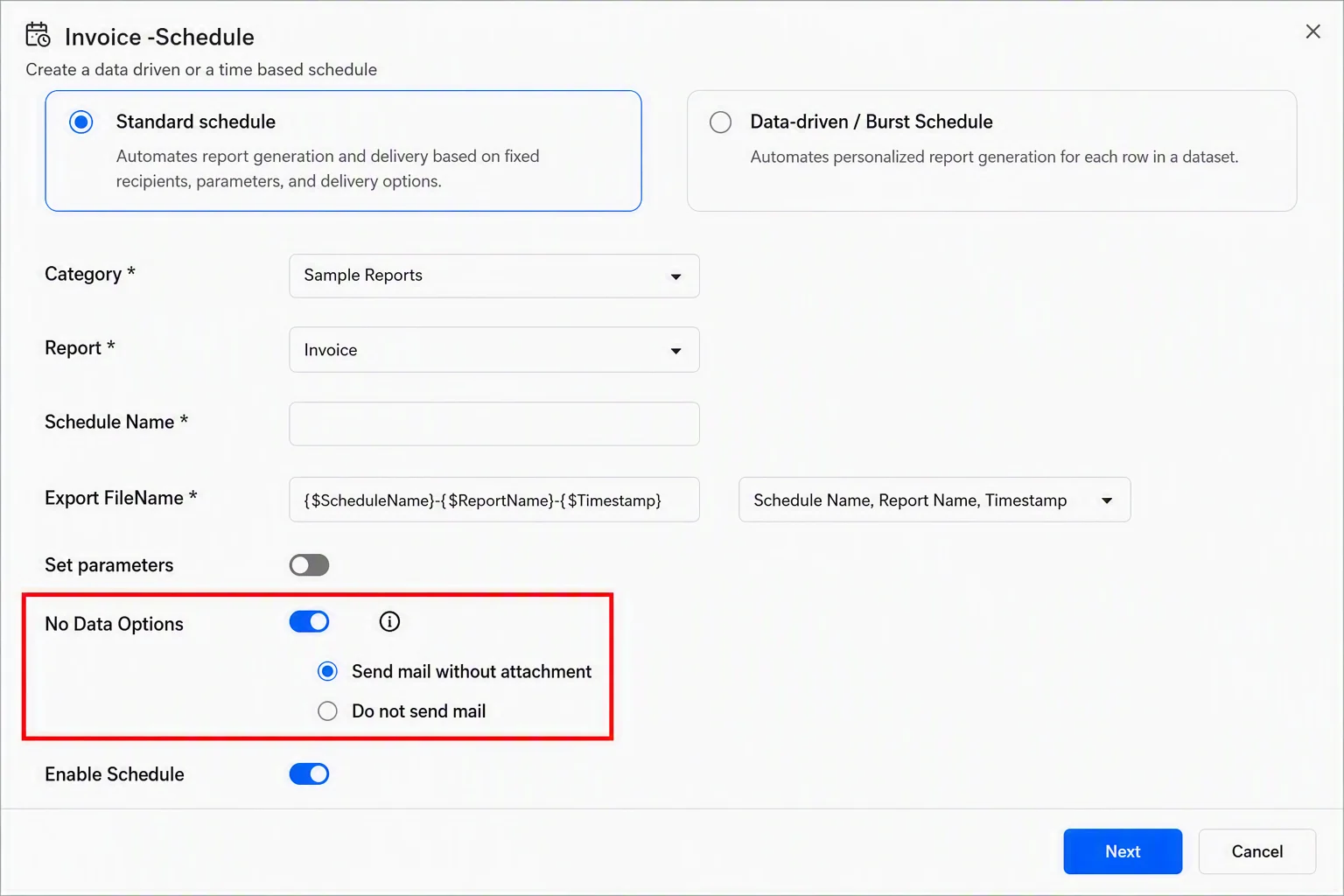
a. Click the + icon in the left-side menu and choose Schedule to create a new schedule.
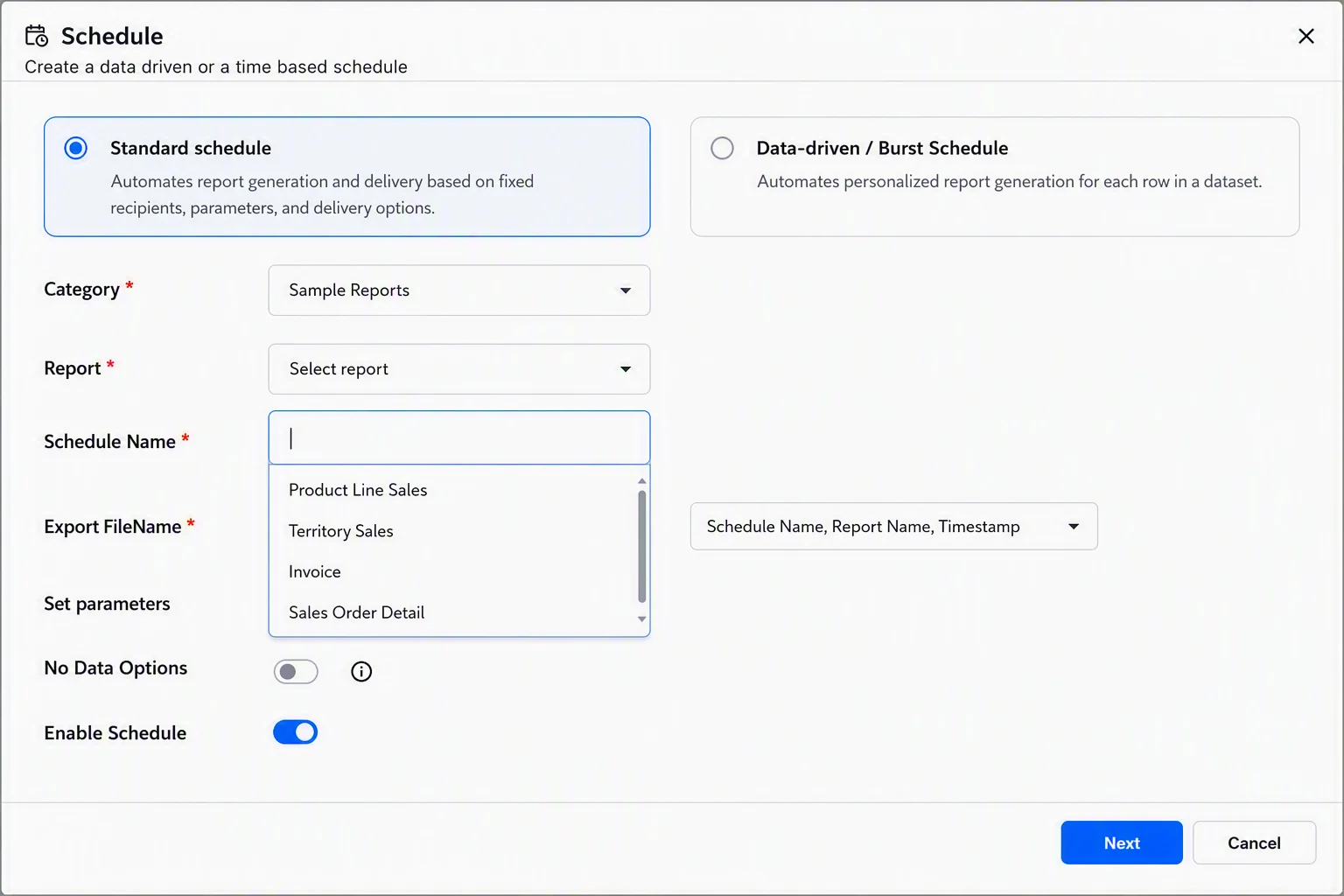
b. Choose the category of the report you’re scheduling from the Category. The reports in that category will be displayed in the Report dropdown menu.
c. Select the report you want to schedule from the Report dropdown and then enter a name for the schedule in the Schedule Name field.
Step 2: Configure report parameters
If your report has parameter values, select the Set parameters option to define the values used when the schedule runs. This allows reports to be generated automatically based on filters such as date ranges, regions, or departments.

Step 3: Set the no-data options
Enable No Data Options to define what happens when a scheduled report contains no data. Choose one of the following:
-
- Send Mail Without Attachment: Sends an email notification without attaching the report.
- Do Not Send Mail: Does not send an email when the report contains no data.
After selecting the desired option, click Next to continue.
Step 4: Configure recurrence intervals
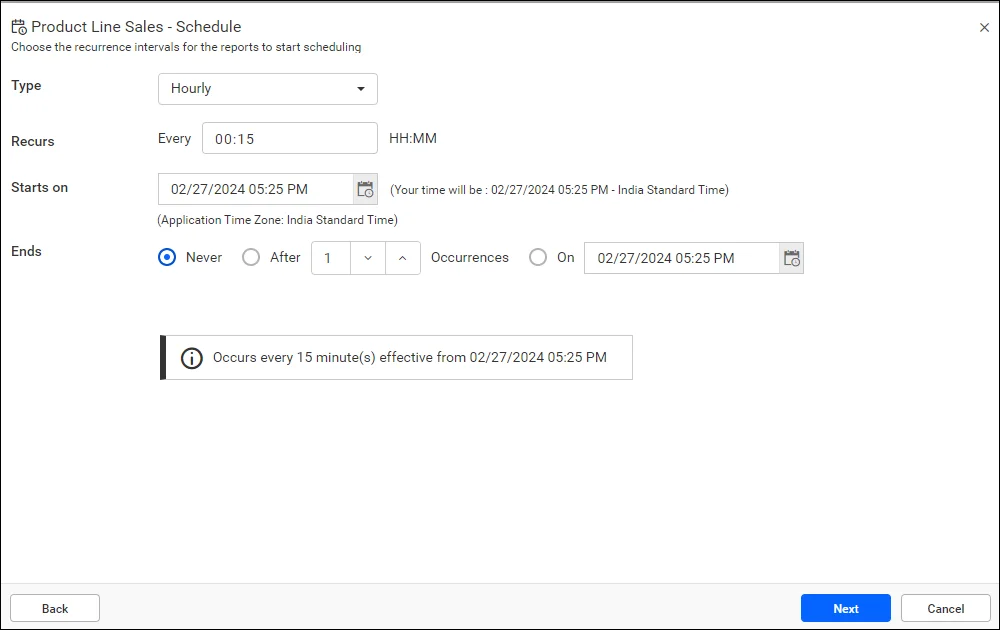
Select the recurrence type, recurrence interval, start date, and end date. Reports can be scheduled to run hourly, daily, weekly, monthly, or yearly. The application’s time zone is displayed below the Starts On picker. For convenience, the schedule start time is converted to the client’s time zone and displayed to the right of the picker. Click Next to continue.
Step 5: Compress files to export and configure security options
-
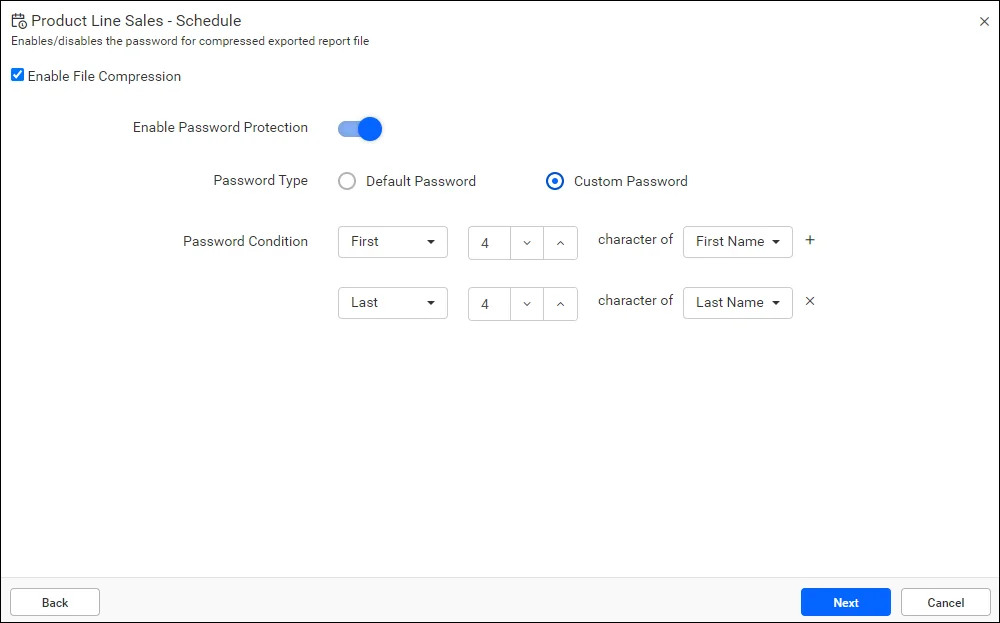
- You can compress the exported reports into a zip file by selecting the Enable File Compression. This is not mandatory, and you can clear this option at any time.
- Exported reports can be made more secure with password protection by selecting the Enable Password Protection. The Default Password option is selected by default.
- You can customize the password protection rules for exporting reports by choosing the Custom Password option.
After setting the options relevant to your scenario, click Next.
Step 6: Customize the email template
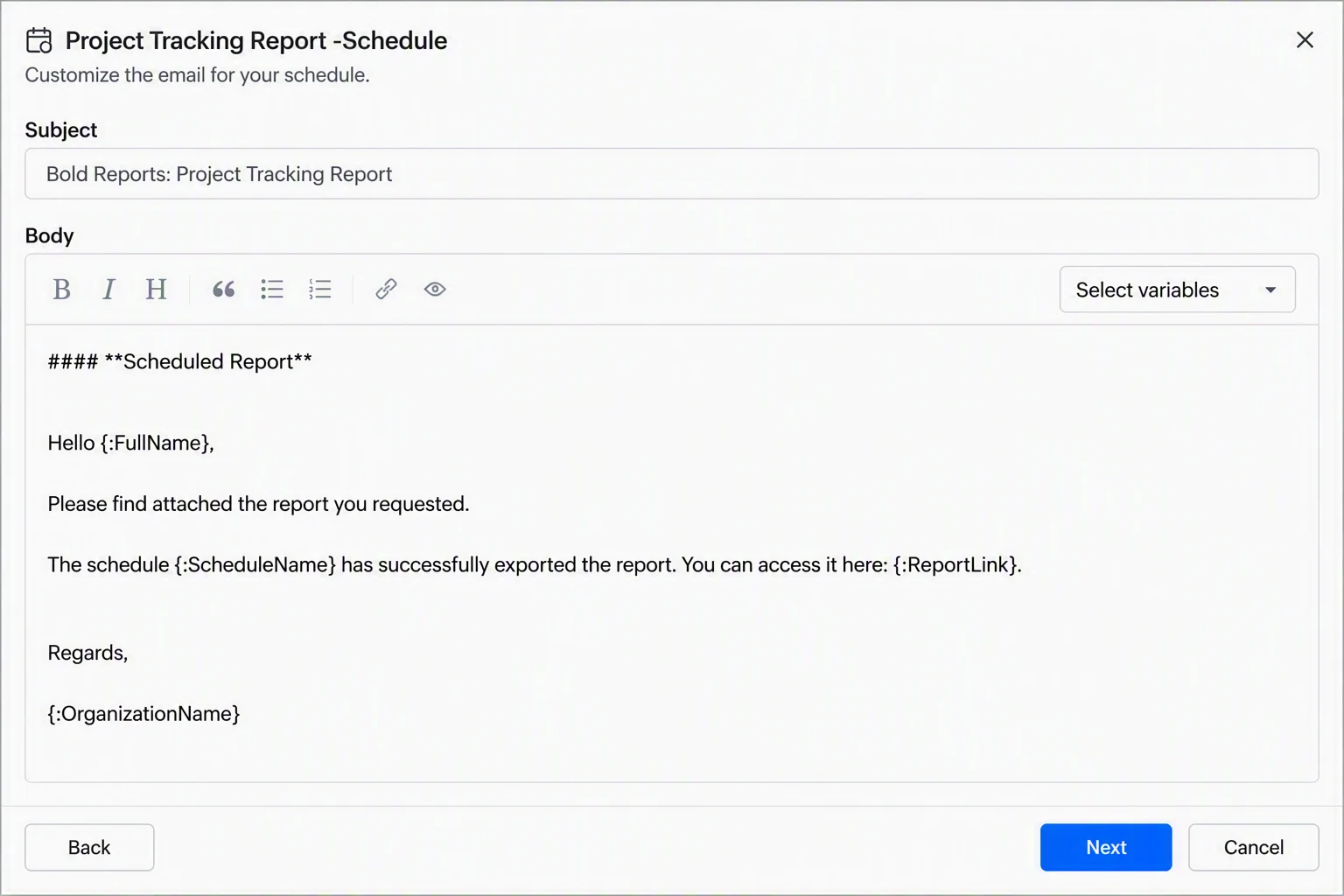
Use the default email template or create a custom email template to suit your requirements. After customizing the email template, click Next.
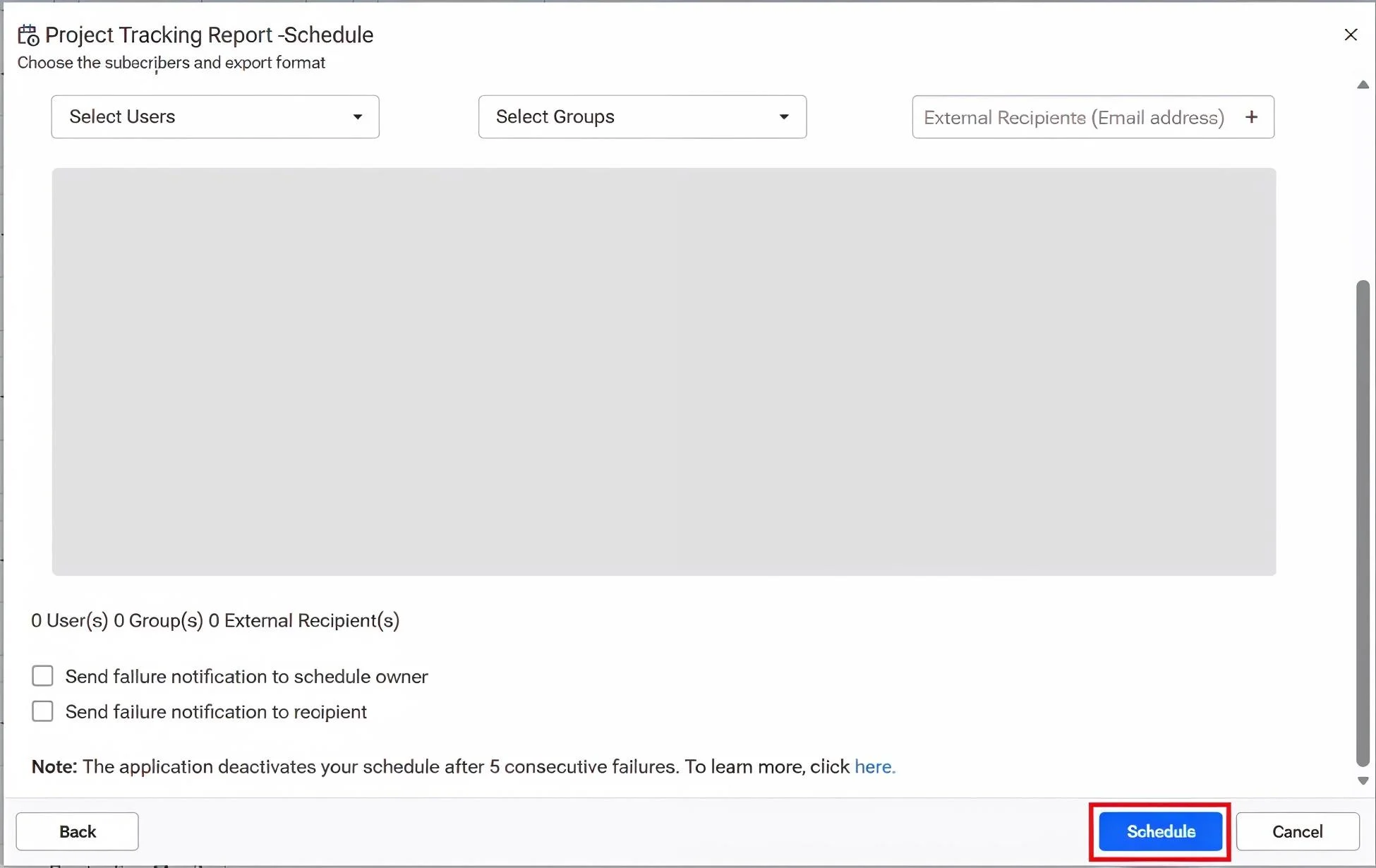
Step 7: Share reports with a user, a group of users, or an external recipient
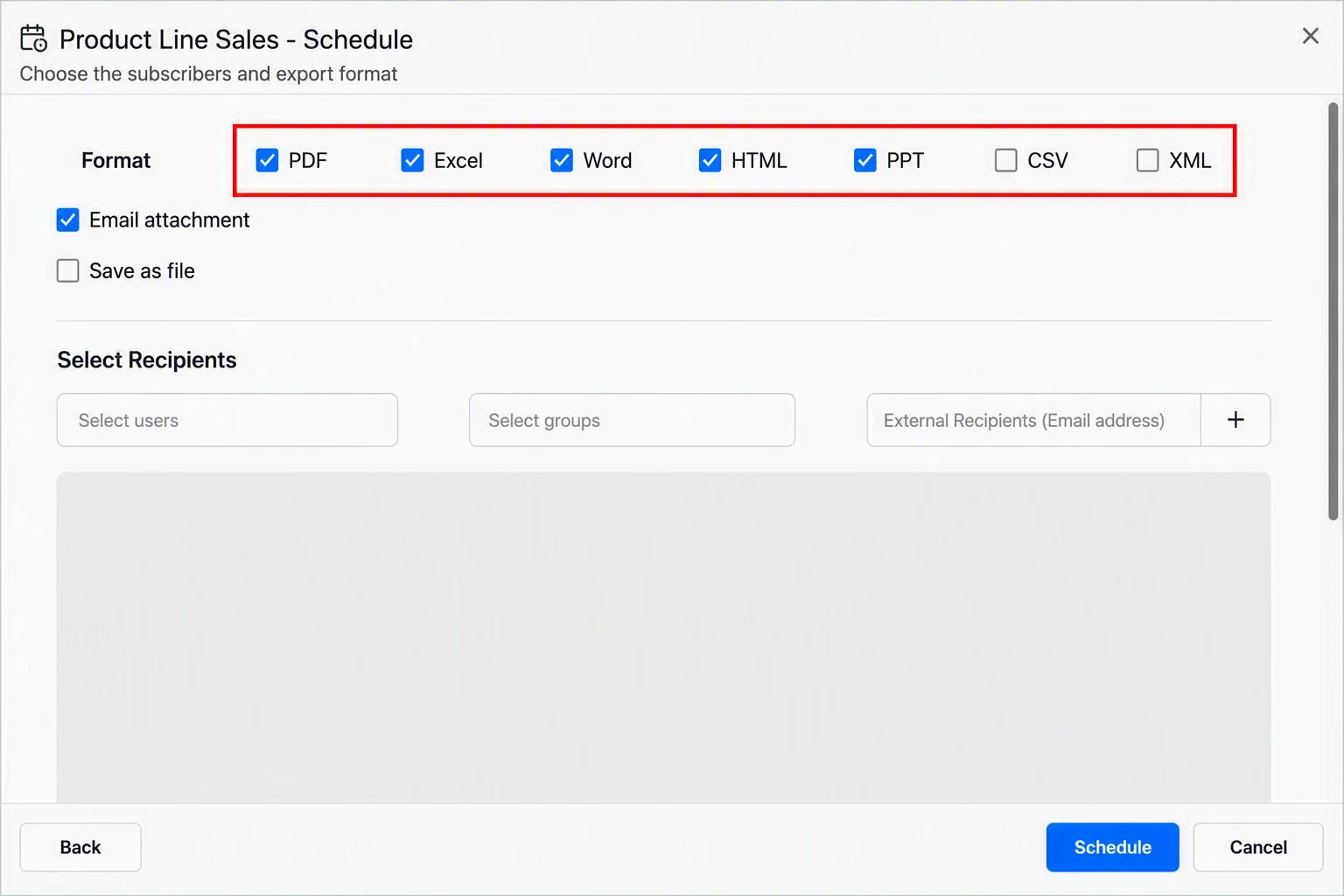
a. Reports can be exported to popular file formats like PDF, Excel, Word, HTML, PPT, and CSV, and then shared with a person or group by selecting the Email attachment. You can also share the report with an external recipient by adding their email address via the External Recipients text box.
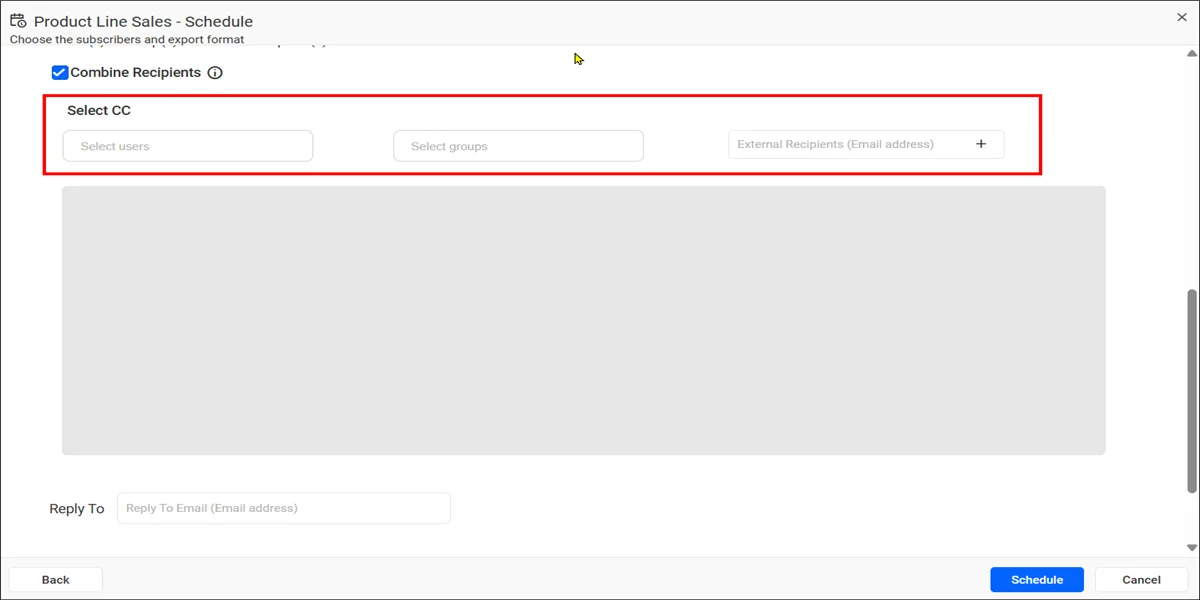
b. Select the Combine Recipients option to send a single email to all selected recipients instead of multiple individual emails.
Step 8: Save the scheduled report as a file
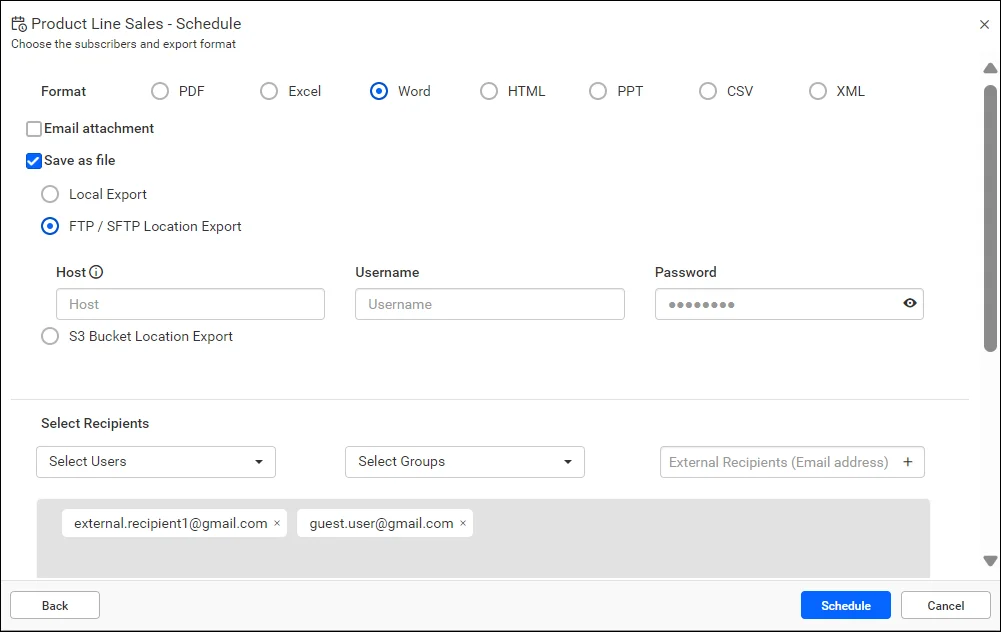
Exported reports can be saved to any location by selecting the Save as file option.
Step 9: Send a schedule failure notification
a. You can automatically notify both yourself and recipients when a scheduled report fails by using the Send failure notification to schedule owner and Send failure notification to recipient options, respectively. If a scheduled export fails, an email notification with the failure details is sent to the selected users to help identify and resolve the issue.
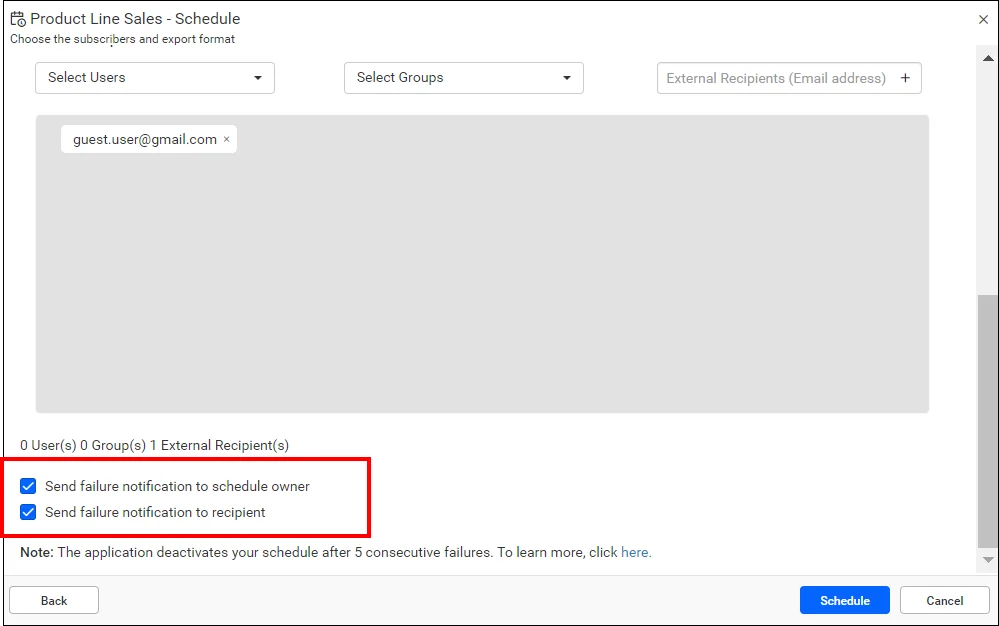
b. After configuring the notification settings, click Schedule to create the schedule. The schedule is added to the Schedules page and becomes active immediately.
After configuring a schedule
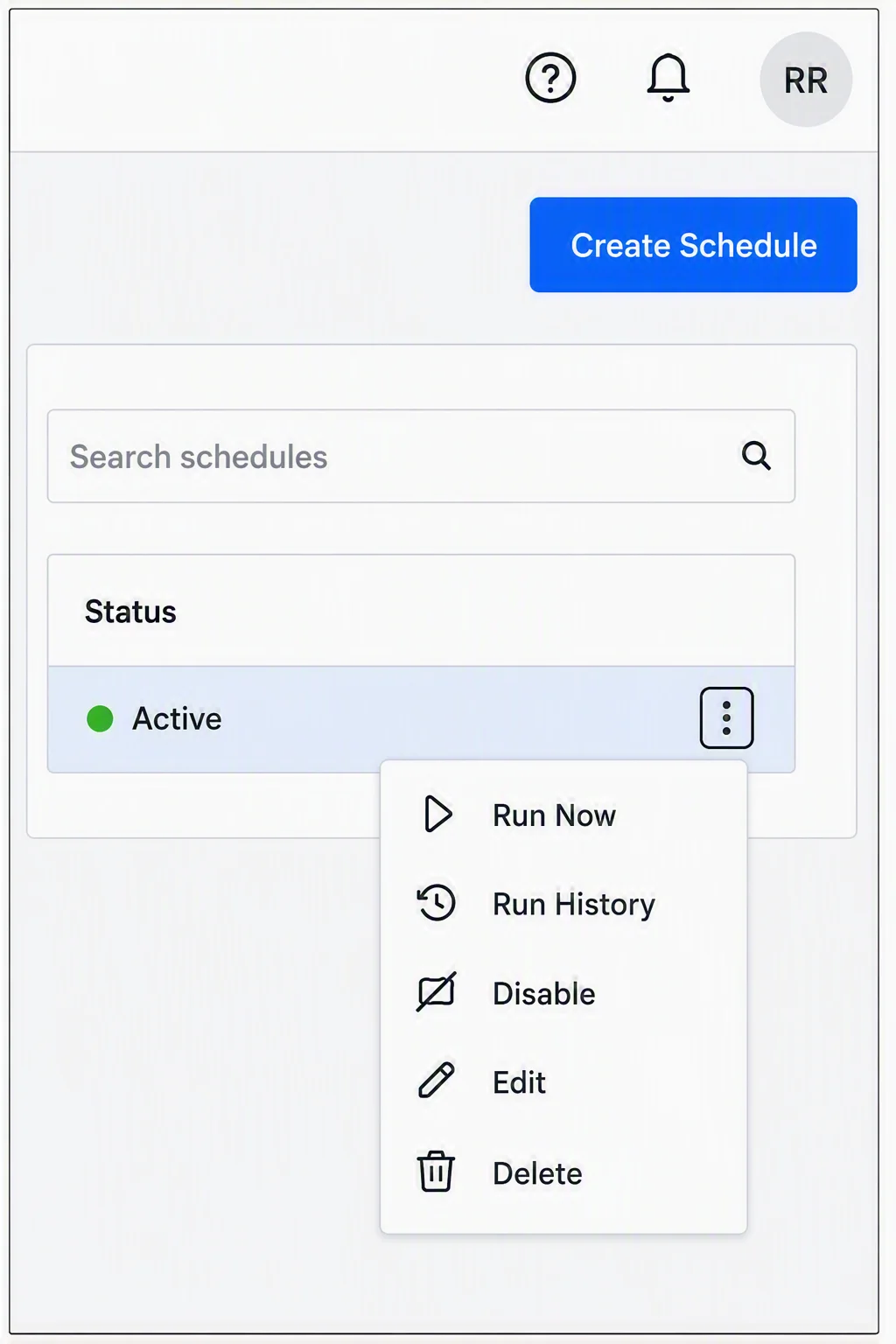
After a schedule is created, you can manage it from the Schedules page using the Actions menu to the right of the Status column value.
-
- Select Run History to view the schedule’s execution history.
- Select Run Now to run the scheduled report immediately.
- Select Disable to stop the schedule from running.
- Select Edit to modify the schedule settings.
- Select Delete to remove a schedule that is no longer needed.
Best practices for implementing automated reporting
Following these best practices can help you streamline reporting processes and maximize the value of your reporting solution:
-
- Define clear reporting goals and KPIs: Start by identifying the metrics that matter most to your business. Clear objectives help ensure your automated reports deliver actionable insights that support better decision-making.
- Use reliable and accurate data sources: The success of automated reporting depends on data quality. Connect reports to trusted data sources and regularly validate data to ensure accurate and consistent reporting.
- Standardize report templates: Create reusable report templates to maintain consistency across teams and departments. Standardized reports make it easier to track performance, compare results, and communicate insights.
- Automate report scheduling and distribution: Schedule reports to run automatically and deliver them to stakeholders through email, shared portals, or downloadable formats. This eliminates manual reporting tasks and ensures timely access to information.
- Personalize reports with parameters and filters: Use dynamic filters and parameters to generate custom reports for different users, teams, locations, or reporting periods without creating multiple versions of a report.
- Focus on actionable insights: Avoid cluttering reports with unnecessary data. Highlight key trends, performance indicators, and exceptions that help stakeholders quickly identify opportunities and make informed decisions.
- Continuously monitor and optimize the reporting process: Monitor report usage, gather stakeholder feedback, and refine reporting workflows regularly. Continuous optimization helps improve report effectiveness and supports evolving business needs.
The evolution of automated reporting
As business data grows in volume and complexity, automated reporting is evolving beyond simple scheduled report delivery. Modern reporting solutions are becoming more intelligent, personalized, and accessible, enabling faster and more informed decision-making.
-
- AI-assisted reporting: Artificial intelligence helps users identify trends, uncover insights, recommend visualizations, and automate repetitive reporting tasks.
- Personalized report delivery: Reporting solutions can deliver customized reports based on user roles, preferences, and business needs, ensuring stakeholders receive relevant information without information overload.
- Automated anomaly detection: Reporting platforms can automatically identify unusual patterns, performance changes, and potential business risks, helping organizations respond more quickly.
- Greater self-service capabilities: Business users can create, customize, and share reports independently, reducing reliance on technical teams and accelerating access to information.
Why choose Bold Reports for automated reporting
Bold Reports provides a complete automated reporting solution that helps organizations automate report generation, streamline report delivery, and create professional reports from multiple data sources. Customer feedback on G2 highlights the impact of Bold Reports’ report automation capabilities. Jonathan K., a Senior Clinical Presales Consultant at a small business, shared his experience after adopting Bold Reports as the replacement for a legacy reporting platform:
“One of the biggest benefits has been the scheduling and automation features, which reduce the manual effort required to generate and distribute reports. Instead of spending hours preparing reports, we can automate recurring tasks and focus on more valuable activities.”
Bold Reports empowers organizations of all sizes with the following:
-
- Automate report scheduling and delivery: Allows users to schedule reports to run automatically on daily, weekly, monthly, or custom schedules and distribute them through email, exported files, shared locations, or web-based report portals. This reduces manual reporting effort and ensures stakeholders receive reports on time.
- Connect to multiple data sources: Create reports from SQL Server, PostgreSQL, MySQL, cloud databases, and business applications to eliminate data silos and simplify data consolidation.
- Create pixel-perfect reports: Design highly formatted, pixel-perfect reports with precise layouts, custom branding, and consistent formatting. Bold Reports makes it easy to deliver professional reports that meet business requirements.
- Enterprise-grade security: Protect sensitive business data with role-based access control, authentication, and centralized report management to support governance, security, and compliance requirements.
- Scale with your business: Scale enterprise reporting effortlessly. Whether you’re generating dozens or thousands of reports, Bold Reports supports growing data volumes, users, and reporting workloads while maintaining performance and reliability.
Final thoughts
As reporting demands grow, organizations can no longer rely on manual processes to generate and distribute reports efficiently. What begins as a simple reporting task can quickly become a time-consuming burden as report volumes, the number of stakeholders, and compliance requirements increase.
Automated reporting helps streamline the entire reporting workflow by automating report generation, scheduling, and delivery. In addition to reducing manual effort, it improves consistency, strengthens governance, and ensures stakeholders receive accurate information when they need it. Whether you’re delivering financial, sales, compliance, or client reports, automation helps scale reporting without increasing administrative overhead.
With features such as report scheduling, automated distribution, multisource data connectivity, pixel-perfect report design, and enterprise-grade security, Bold Reports enables organizations to automate reporting at scale while maintaining accuracy and control.
To learn more about automating report scheduling and delivery, refer to our guide on how to create and manage schedules or watch our YouTube video tutorial.
Ready to eliminate manual reporting? Start a 30-day free trial or request a demo to start automating your reporting workflows today and turn data into actionable insights faster.
Frequently asked questions
- 1.
What is automated reporting?
Automated reporting is the process of automatically collecting data, generating reports, and delivering insights without manual intervention.
- 2.
How secure is automated reporting?
Most automated reporting software includes security features such as role-based access, authentication, encryption, and audit trails to protect sensitive data.
- 3.
How is automated reporting different from manual reporting?
Manual reporting relies on spreadsheets and manual data entry, while automated reporting generates and distributes reports automatically using connected data sources.
- 4.
What features should I look for in automated reporting software?
Look for automated scheduling, multisource data connectivity, flexible export options, security controls, scalability, and pixel-perfect reporting capabilities.
- 5.
How does automated reporting improve a reporting solution’s ROI?
Automated reporting improves your reporting solution’s ROI by reducing manual effort, minimizing reporting errors, accelerating decision-making, and allowing employees to focus on higher-value tasks.
- 6.
Is automated reporting suitable for small businesses?
Absolutely. Automated reporting helps businesses of all sizes reduce manual work, improve reporting accuracy, and scale reporting efficiently.
- 7.
Can automated reporting help reduce operational costs?
Yes. By eliminating repetitive reporting tasks, organizations free up employees to do work that moves the company forward, not overhead tasks that keep operations idle.