5 Jaspersoft Alternatives for Embedded Reporting

TL;DR:
The best Jaspersoft alternatives for embedded, pixel-perfect (paginated) reporting in 2026 are Bold Reports, Telerik Reporting, ActiveReports, SAP Crystal Reports, and SQL Server Reporting Services (SSRS) or its successor, Power BI Report Server. They differ most in report format, embedding approach, tenant isolation, scheduling, and vendor lifecycle. Two carry dated caveats: SAP lists mainstream maintenance for Crystal Reports 2020 ending December 31, 2026, and SQL Server 2025 ships Power BI Report Server as its default reporting solution instead of SSRS.
Introduction
The best Jaspersoft alternatives for embedded reporting depend on what you are replacing. If your application ships invoices, statements, audit packets, or compliance documents, you need paginated, pixel-perfect output inside your own product, not an exploratory analytics tool. This guide compares five options on the criteria that decide an embedded rollout, then covers migration and a proof-of-concept checklist.
Bold Reports® publishes this blog and lists itself first, so it holds every tool below to the same criteria, including its limits.
Why do teams replace Jaspersoft for embedded reporting?
Teams rarely leave over missing features. They leave over the cost of embedding, securing, and maintaining the reporting tier. Common triggers include:
- Runtime mismatch: JasperReports is a Java-based engine, so a .NET product ends up deploying, patching, and monitoring a second runtime just for reporting.
- Embedding friction: hard-to-customize viewers, limited APIs, or brittle integration patterns.
- Tenant and access gaps: unclear tenant isolation, RBAC limits, or awkward SSO and token flows.
- Version churn: in January 2024, Jaspersoft announced end of support for the 8.0.x and 8.2.x lines and recommended 9.0.0 as its Long Term Support release, so staying supported means planned upgrades.
- Export fidelity: inconsistent PDF and Excel output for customer-facing documents.
- Platform standardization: cloud, hybrid, or container mandates.
- Community edition changes: since January 25, 2024, Jaspersoft no longer offers JasperReports Server Community Edition as a free download (Jaspersoft FAQ).
For a vendor-level view, see the Bold Reports vs. Jaspersoft comparison.
Jaspersoft alternatives compared: 2026 shortlist
The table below compares the five tools on the attributes that most affect a Jaspersoft migration, starting with report format.
| Tool | Best for | Report format | Authoring | Deployment |
|---|---|---|---|---|
| Bold Reports | SaaS products, customer portals, operational reporting | RDL-compatible | Browser-based designer | Cloud, on-premises, and hybrid |
| Telerik Reporting | .NET applications and ISV products | Telerik report definitions | Standalone, Visual Studio, and web designers | Self-managed, inside your .NET application |
| ActiveReports | Web and desktop applications needing several report models | Page, RDL, and Section reports | Designers for each report model | Self-managed, with .NET and JavaScript viewers |
| SAP Crystal Reports | Print-ready, document-centric reporting | Crystal (.rpt) | Desktop designer | Primarily self-managed, on-premises |
| SSRS / Power BI Report Server | Microsoft-centric operational reporting | RDL | Report Builder and Visual Studio tooling | On-premises, SQL Server-centric |
The 5 best Jaspersoft alternatives for embedded reporting in 2026
1. Bold Reports
Bold Reports is an embedded, paginated reporting platform for SaaS applications, internal portals, and customer-facing reports. Its reports use an RDL-compatible format, so existing SSRS report definitions can be carried forward.
Best for
- SaaS products that embed operational reports in customer portals
- Teams producing financial, compliance, and operational documents
- Teams modernizing legacy paginated reporting (Jaspersoft, SSRS, Crystal Reports)
Key strengths
- Embedding APIs and viewers with customization options
- RDL-compatible, paginated output for document-style reports
- Scheduling, subscriptions, and delivery workflows
- Cloud, on-premises, and hybrid deployment
Considerations
- Bold Reports does not include a JRXML converter. Jaspersoft reports are defined in JRXML, a different format from RDL, so you must rebuild each report in the designer. Budget rebuild time by report count and complexity, and validate layout parity, security mapping, and custom report components on a sample first.
- Bold Reports is primarily optimized for operational, embedded, and pixel-perfect reporting. Teams with extensive self-service BI or advanced analytics requirements should evaluate those capabilities against their specific use cases during the proof-of-concept phase.
2. Telerik Reporting
Telerik Reporting is often shortlisted by .NET teams that want a developer-oriented workflow with configurable viewers.
Best for
- .NET application teams and ISVs
- Teams already standardized on Telerik components
Key strengths
- Strong alignment with Microsoft and .NET stacks
- Embedded viewing and customization options
Considerations
- If your platform is not .NET-centric, integration effort is higher.
- Reports use Telerik's own definition format, so verify import paths for any existing report files and confirm edition fit.
3. ActiveReports
ActiveReports is commonly shortlisted when teams want flexible report models and embedded reporting across web and desktop.
Best for
- .NET teams embedding reports into products
- Organizations needing layout flexibility across environments
Key strengths
- Embedded viewers and integration patterns
- Multiple report models (Page, RDL, and Section reports)
- Broad export support and integration with common .NET frameworks
Considerations
- If you do not need multiple report models or deep customization, confirm the added tooling choices fit your team's workflow.
4. SAP Crystal Reports
SAP Crystal Reports remains a known option for document-centric, print-ready reporting where layout control is critical.
Best for
- Invoices, statements, and regulatory documents
- Print-ready operational reporting
Key strengths
- Mature pixel-perfect formatting patterns
- Strong structured document output
Considerations
- SAP's downloads portal lists end of mainstream maintenance as December 31, 2026 for Crystal Reports 2020 and December 31, 2027 for Crystal Reports 2025. Treat it as a bridge unless that horizon works for you.
- If you need browser-first authoring or cloud-first deployment, confirm current support before committing.
For the dates and your options, see the Crystal Reports end-of-life guide and Top 5 SAP Crystal Reports Alternatives.
5. SSRS and Power BI Report Server
SQL Server Reporting Services (SSRS) is widely used in Microsoft environments for paginated operational reporting and subscriptions. Microsoft announced on June 19, 2025, that Power BI Report Server is the default reporting solution for SQL Server 2025, and its Power BI Report Server release notes state that Microsoft will not release new versions of SSRS. Plan around Power BI Report Server for new SQL Server 2025 deployments.
Best for
- Microsoft-centric organizations standardized on SQL Server
- Internal operational reporting and scheduled distribution
Key strengths
- Mature RDL-based paginated reporting
- Subscriptions and scheduling support
Considerations
- For customer-facing SaaS embedding and multi-tenancy, you design tenant isolation, viewer customization, and authentication yourself.
- SSRS 2022 is supported until January 11, 2033, according to Microsoft's Reporting Services consolidation FAQ. Check the support dates of your installed SSRS version in Microsoft's lifecycle documentation. Teams evaluating long-term modernization strategies can also review our SSRS alternatives guide for migration and replacement considerations.
Which option is right for you?
- Choose Bold Reports if you need embedded, pixel-perfect reporting with delivery workflows and flexible deployment for SaaS and enterprise use.
- Choose Telerik Reporting if you are .NET-first and want tight ecosystem alignment.
- Choose ActiveReports if you need flexible report models across web and desktop.
- Choose SAP Crystal Reports if print-ready formatting is the top priority and a 2027 maintenance horizon is acceptable.
- Choose SSRS or Power BI Report Server if you are standardized on Microsoft SQL Server and mainly deliver internal paginated reports.
How to choose a Jaspersoft alternative
Feature lists rarely reveal migration problems. Apply the same criteria to every shortlisted tool, then confirm them in a proof of concept (POC).
- Embedding architecture: APIs, SDKs, viewer customization, and portal integration patterns
- Pixel-perfect output: consistent pagination and export fidelity
- Authoring: browser-based or desktop tooling, and developer-friendly workflows
- Delivery: scheduling, subscriptions, automation, and the export formats your users need (PDF, Excel, Word, CSV, HTML)
- Security and governance: RBAC, SSO or token authentication, auditing, and admin controls
- Multi-tenancy: tenant isolation and scalable access management
- Deployment: cloud, on-premises, and hybrid options that fit your compliance requirements
- Licensing: whether cost scales per developer, server, core, or user, and what production and non-production rights are included
A practical POC uses a real application instead of vendor demo data. Validate that you can:
- Embed a report in an application page or customer portal.
- Authenticate with single sign-on or tokens.
- Enforce role-based access with your actual user roles.
- Isolate data between at least two tenants.
- Produce accurate PDF and Excel exports.
- Run a scheduled delivery, including what happens when it fails.
- Render with production-sized datasets.
How to migrate from Jaspersoft to an embedded reporting platform
Selecting a replacement is the first step. The larger task is moving reports, security models, delivery workflows, and embedded experiences without disrupting users.
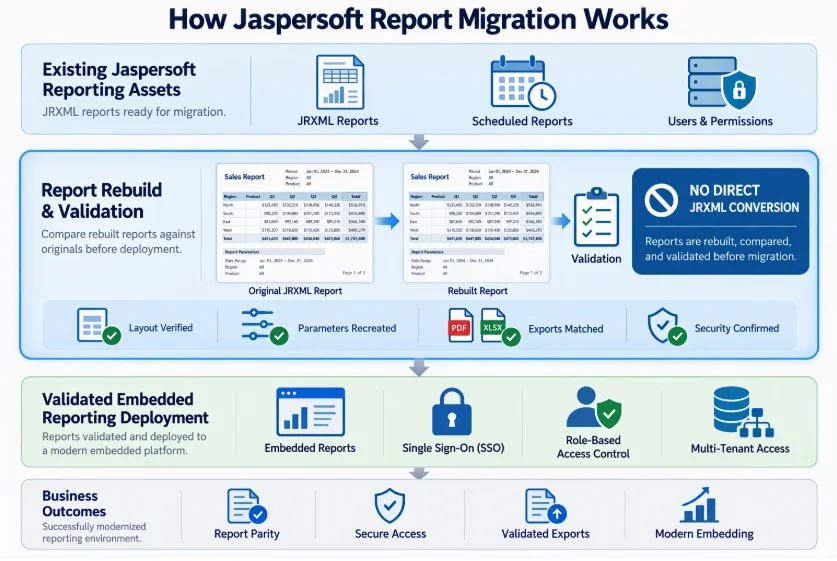
Start with the file format. Jaspersoft reports are defined in JRXML, JasperReports’ XML format. RDL, RDLC, and each vendor’s format use different schemas, so you can’t replace them with JRXML unchanged. Ask every vendor whether it ships a converter. Bold Reports does not, so plan to rebuild each report in the designer, using the original output as the visual reference, and test layout on representative reports before you commit.
- Inventory business-critical reports, scheduled jobs, subscriptions, user roles, and tenants, and flag unused reports to retire instead of rebuild.
- Prioritize customer-facing reports such as invoices, statements, and compliance documents.
- Rebuild reports in the new designer, then compare layout, parameters, expressions, and export output against the originals.
- Map existing authentication, RBAC, and tenant-access rules to the target platform.
- Rebuild the embedded viewers inside your application.
- Run both systems in parallel before retiring Jaspersoft.
Test security rules, export formatting, and scheduled delivery early. They are the areas where mismatches are hardest to fix late.
JasperReports vs. Jaspersoft: why the distinction matters
The two names are often used interchangeably, but Jaspersoft’s own support notices list them as separate products: the JasperReports library, JasperReports Server, Jaspersoft Studio, and JasperReports IO. In practice, JasperReports is the reporting engine and library, while Jaspersoft is the broader commercial platform that adds report management, security, scheduling, and distribution.
That distinction shapes your replacement scope. Some teams only need a new engine for generating documents. Others are replacing the whole platform, including the server, scheduling, and embedded viewers.
Reporting platforms vs. BI tools: what is the difference?
Searches for Jaspersoft alternatives often return BI tools such as Power BI, Tableau, Qlik, Looker, and ThoughtSpot. They are valuable for analytics, but they solve a different problem. According to Microsoft, paginated reports suit viewing as pages, printing to PDF, exporting to Excel, and generating business documents, while interactive reports are optimized for exploration and analysis.
| Evaluation area | Reporting platforms (embedded, paginated) | BI platforms (analytics, exploration) |
|---|---|---|
| Primary focus | Operational reporting and document generation | Dashboards, analytics, data exploration |
| Typical outputs | Invoices, statements, compliance reports | Interactive visual analysis |
| App integration | Embed reports in apps and portals with access control | Embed dashboards and insights |
| Distribution | Schedules, subscriptions, automated delivery | Usually interactive access; scheduled extracts vary |
| Typical buyers | ISVs, SaaS teams, developers, reporting teams | Analysts, data teams, business users |
Final thoughts
Shortlist two or three tools and test each the same way: embed one real report with your real authentication, export it to the formats your customers use, and schedule it with failure alerts. The tool that clears all three with the least operational work is usually the right long-term fit.
Start a free 30-day Bold Reports trial and run that test with one real report, one real user role, and one scheduled delivery. If you’d like to evaluate licensing options alongside your technical assessment, review the Bold Reports pricing plans.
Frequently asked questions
- 1.
What are the best Jaspersoft alternatives for embedded reporting in 2026?
The most shortlisted options are Bold Reports, Telerik Reporting, ActiveReports, SAP Crystal Reports, and SSRS or Power BI Report Server. The right choice depends on your stack, report format, authentication and RBAC needs, PDF and Excel export fidelity, scheduling requirements, and whether you deploy in the cloud, on-premises, or in a hybrid environment.
- 2.
Which Jaspersoft alternative is best for embedded reporting in SaaS applications?
For SaaS, prioritize secure embedding with tokens or SSO, role-based access control, tenant isolation, and viewer customization. Bold Reports, Telerik Reporting, and ActiveReports are often evaluated for SaaS portals. Confirm fit by embedding one real report in your application and testing permissions across at least two tenants.
- 3.
Which tools are best for pixel-perfect invoices and compliance documents?
Compare tools built for paginated output and export fidelity, such as Bold Reports, SAP Crystal Reports, and SSRS or Power BI Report Server. Validate one real template end to end, checking fonts, spacing, page breaks, and PDF and Excel output. Also confirm localization behavior and performance with large parameter sets.
- 4.
Which Jaspersoft alternative is best for .NET applications?
For .NET applications, common embedded reporting choices include Telerik Reporting, ActiveReports, Bold Reports, and SSRS or Power BI Report Server. Compare how each viewer embeds into your web framework, how authentication and RBAC are implemented, and how scheduling and exports are automated. A short proof of concept usually reveals the most maintainable option.
- 5.
Is Jaspersoft still a viable platform in 2026?
It can be, particularly for stable environments with an established report library. Jaspersoft retires version lines on a published schedule and designates Long Term Support releases, so confirm your version's support dates in its support policy notices. Teams usually switch over embedding effort, runtime fit, or licensing, not because paginated output stops working.
- 6.
How do I choose the right embedded reporting tool?
Document your must-haves first: embedding approach, authentication and RBAC, tenant isolation, export formats, scheduling, and deployment constraints. Then run a short proof of concept using one real report, one real user role, and one scheduled export. Choose the platform that proves secure, consistent in exporting, and manageable for administrators.