
Crystal Reports Alternative: A Framework for Choosing One

TL;DR:
With SAP Crystal Reports 2020 mainstream maintenance ending December 31, 2026, most Crystal Reports estates now face a real Crystal Reports alternative decision. Five things decide which one fits: report logic, data connectivity, expression/parameter needs, delivery surface, and licensing. BrainTree used this exact reasoning to move more than 4,000 Crystal reports to Bold Reports.
Introduction
Mainstream maintenance for SAP Crystal Reports 2020 ends December 31, 2026 (Crystal Reports 2025 follows on December 31, 2027). That date is why “Crystal Reports alternative” has become one of the most-searched terms related to enterprise reporting this year.
The short answer: for most Crystal Reports estates, the right alternative is a platform built on RDL, the XML-based format behind SQL Server Reporting Services (SSRS) and its modern successors. Which specific RDL-based platform fits best depends on five things: your report logic, your data sources, your parameter and expression needs, where the reports need to live, and how you want to license it. Get those five right, and the appropriate solution usually picks itself.
This guide walks through this criteria framework, compares Crystal Reports alternative available in 2026, and includes a real story from a company that migrated more than 4,000 Crystal reports.
Why a Crystal Reports alternative is suddenly urgent
Crystal Reports isn’t disappearing overnight, but the runway is shortening on a fixed schedule:
- December 31, 2026: mainstream maintenance ends for Crystal Reports 2020. After that, organizations move to paid extended support: no new features, slower security patches, and a shrinking pool of Crystal-skilled developers.
- December 31, 2027: the same happens to Crystal Reports 2025.
- SQL Server 2025 shipped without SSRS: SSRS 2022 is the final standalone version, with security-only support running through January 2033. So SSRS isn’t going away, but it isn’t getting new capabilities, either. Microsoft’s on-premises paginated-reporting default is now Power BI Report Server (PBIRS), which renders the same RDL format.
None of these forces an overnight migration. It does mean the planning window is calendar-bound rather than open-ended, and that the wait-and-see option gets more expensive every quarter it’s left unaddressed.
The four categories of Crystal Reports alternatives
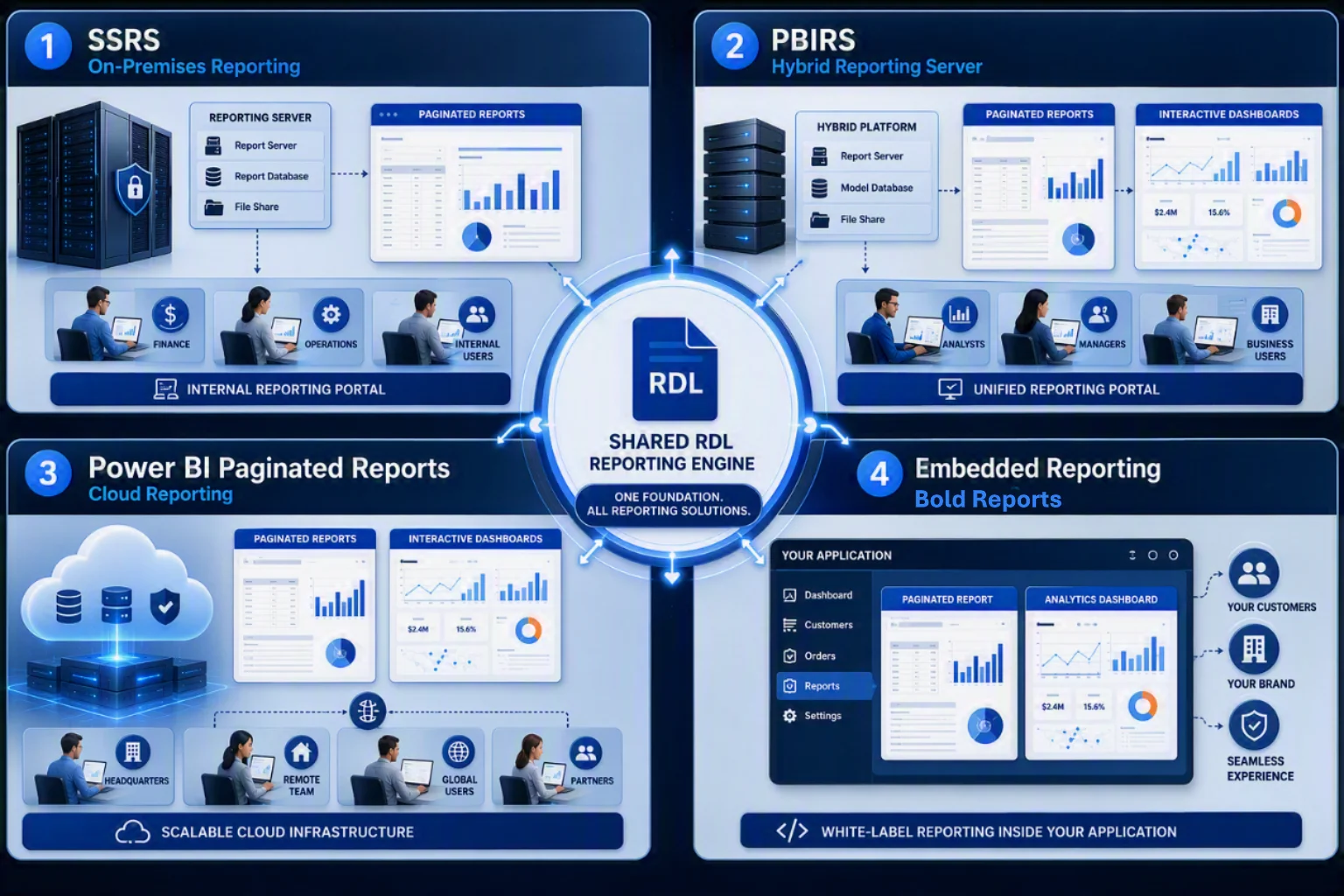
Almost every credible Crystal Reports alternative today falls into one of four categories, and they’re built around the same underlying format (RDL), so switching between them later is far less painful than the original move away from Crystal’s binary .rpt format.
| Alternative | What it is | Best fit | Trade-off |
| SQL Server Reporting Services (SSRS) | The original on-premises, server-based RDL engine, still shipped with SQL Server. | Internal portal for finance or operations, already on SQL Server, no new features needed. | No longer actively evolving; SQL Server 2025 no longer bundles it. |
| Power BI Report Server (PBIRS) | On-premises successor hosting both paginated RDL reports and interactive Power BI reports in one portal. | Teams that want paginated and interactive reporting on-premises. | Requires Power BI Premium or Report Server licensing. |
| Power BI Paginated Reports (Power BI service) | Cloud-hosted version of the same RDL engine, metered through Power BI Premium or Fabric capacity. | Cloud-first Microsoft shops already standardized on Power BI or Fabric. | Cost is tied to Premium or Fabric capacity, not per-report. |
| SSRS-compatible embedded engine (e.g., Bold Reports) | Third-party platforms that consume RDL/RDLC and render reports inside your own application or customer portal. | ISVs and product teams embedding reports behind their own authentication and branding. | Per-server or per-developer licensing model to evaluate against your report volume. |
If your reports live inside a portal for internal staff, the first two options usually win. If your reports live inside a product your customers log into, an embedded engine is almost always the better fit: SSRS and PBIRS are built around their own portal, authentication, and navigation, not around living inside someone else’s application.
The 5-factor framework for choosing among them
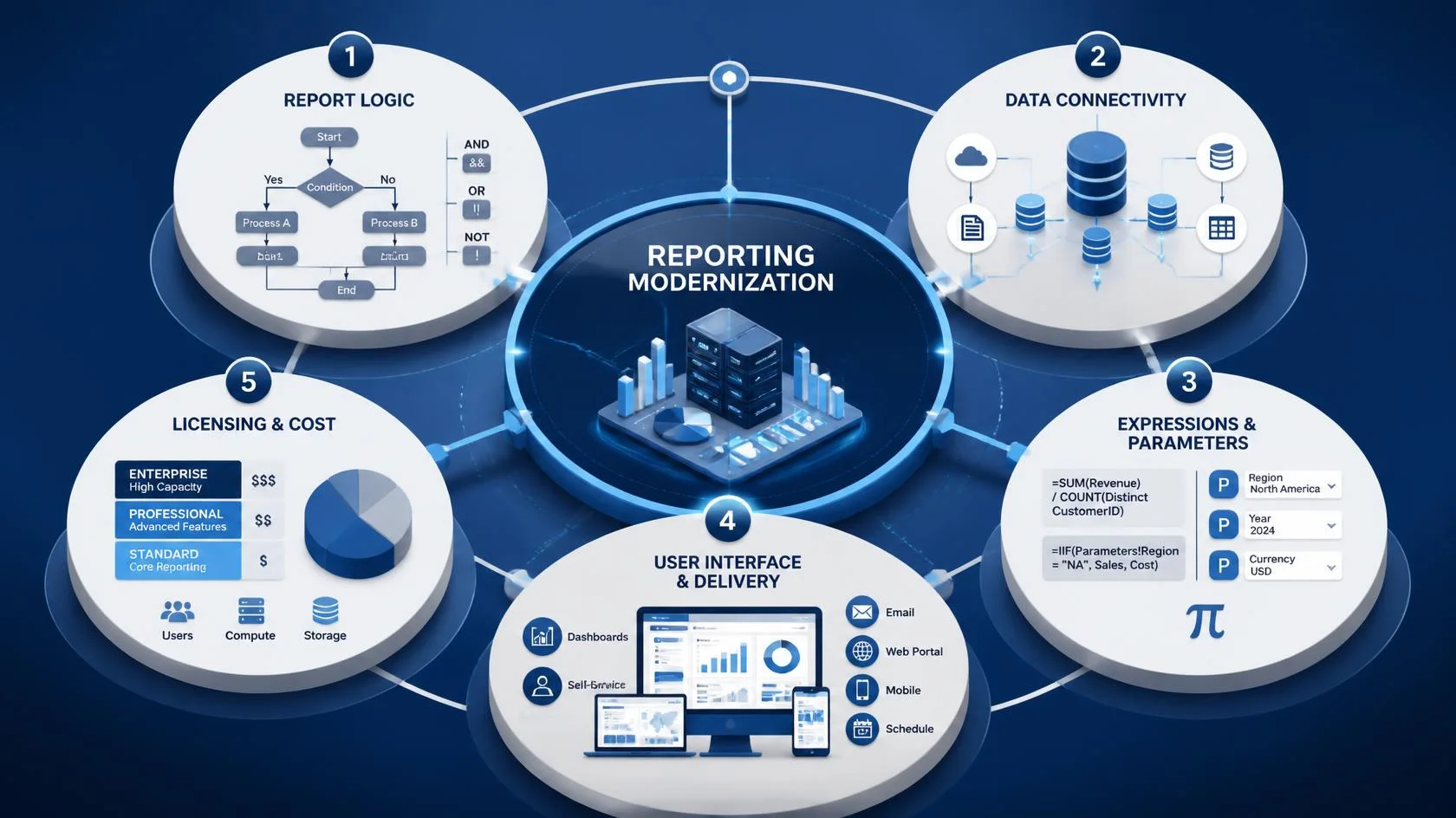
Enterprise reporting is deeply tied to daily business operations, so moving off Crystal Reports is rarely the clean, single-step swap vendor comparison pages suggest. Once you know which category fits your delivery model, these five considerations help you determine which specific platform, and how much real migration effort, you’re signing up for.
1. Report logic and expression parity
Crystal’s formula language has no direct equivalent in RDL, so replatforming a complex report usually means:
-
- Translating formulas and shared variables into report-scoped expressions.
- Redesigning conditional formatting for a different evaluation model.
- Rebuilding crosstabs and matrix layouts by hand.
- Refactoring subreports into explicit parameters or a single combined dataset.
Even one overlooked shared variable can turn what looked like a five-minute port into a multiday rebuild. That’s why timing your five most complex Crystal reports, not just eyeballing them, is the most honest input into your total project timeline.
2. Data source and connectivity
Crystal’s connectivity layer rarely survives a straight port. Moving to an RDL-based platform usually means:
-
- Replacing hard-coded credentials and legacy ODBC bridges.
- Rebuilding row-level security and per-user data filters.
- Consolidating cross-database joins into a single primary data source.
- Auditing every connection string, driver, and credential store still in use.
Even a single unsupported driver can block an entire category of reports from going live. That’s why mapping your full connectivity footprint up front is a data project, not an afterthought.
3. Expression language and parameters
RDL’s parameter model is more capable than Crystal’s, but that means real rework, not a free upgrade:
-
- Rebuilding cascading and multivalue parameters.
- Rewriting date, string, and number formatting logic by hand.
- Testing expression-driven default values against the original report.
- Fine-tuning layouts to match the Crystal baseline, pixel by pixel.
Users notice parameter and formatting differences immediately, even when the underlying numbers are correct. That’s why a dedicated formatting-and-parameter pass belongs in every report’s timeline, not just the complex ones.
4. Interfaces and audience
This is the aspect that decides the category, not just the platform, so getting it wrong is costly:
-
- Rebuilding the authentication and navigation layer around a new portal.
- Rerouting scheduled deliveries and email bursts to the new engine.
- Reworking embedded contexts inside your own application, if you have any.
- Tracing which of your top reports are portal-based versus embedded.
Getting the interfaces wrong doesn’t just produce an ugly report; it means users can’t find, open, or trust it. That’s why tracing the actual delivery path for your top 20 reports should happen before any platform is chosen, not after.
5. Licensing and total cost of ownership
The licensing model rarely maps cleanly from Crystal, so plan for:
-
- Comparing cost per user, per capacity, and per server across candidates.
- Budgeting for migration tooling, consulting, and parallel-run infrastructure.
- Modeling total cost over three years, not just the first invoice.
- Scheduling the decommission of the old Crystal Server itself.
The cheapest license in year one is rarely the cheapest platform by year three. That’s why a full 3-year TCO model, not a per-seat quote, should be considered in the final call.
Even small differences in these five dimensions can create real operational problems after switching. That’s why many teams face a kind of migration paralysis: staying on Crystal feels increasingly risky as the 2026 deadline approaches, but rebuilding everything at once feels riskier still. The five-dimension test exists to break that stalemate: it turns a vague “we should modernize” into a scoped, sequenced project.
A real Crystal Reports alternative decision: how BrainTree moved 4,000+ reports
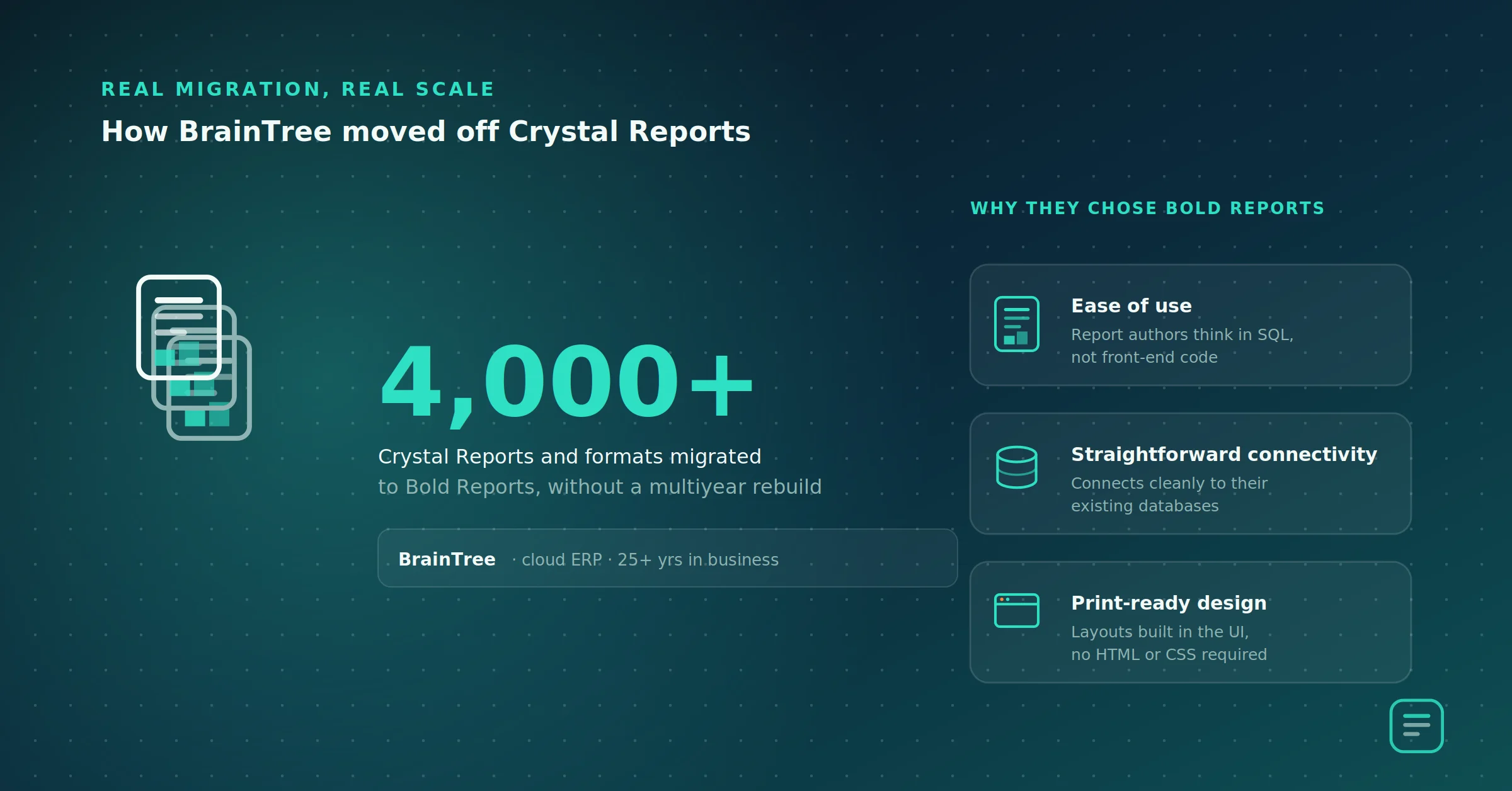
Frameworks are useful, but they’re easier to trust knowing they’ve worked in a real migration. BrainTree, a software company with more than 25 years of experience building tools for cloud-based ERP deployments, ran into the scenario a lot of readers of this article are living through right now: SAP Crystal Reports had become too limited for their cloud ERP platform, and they needed an alternative that could handle a large estate (more than 4,000 reports and formats) without a multiyear rebuild.
According to Milind Awade, director of technology at BrainTree, the team chose Bold Reports for three concrete reasons: ease of use, straightforward connectivity to their existing databases, and the ability to design print-ready formats directly in the interface without writing HTML or CSS. Just as important, the new platform’s interface resembled Crystal Reports closely enough that the learning curve stayed manageable for a team that already thought in SQL, not front-end code.
“With DB and SQL skills, anyone can design the reports. We are using very complex ERP reports, but Bold Reports makes it easy,” said Awade.
BrainTree’s team also pointed to vendor support as a deciding factor in a migration of that size, noting it was what got them through the initial technical hiccups of moving thousands of reports off Crystal. The takeaways generalize well beyond this one case:
-
- Report volume alone shouldn’t rule out a migration. A 4,000-report estate is squarely in “this feels impossible” territory for most teams, and it’s exactly the kind of estate the five-dimension framework is built to triage.
- Interface familiarity measurably shortens the learning curve. If your report authors are SQL-literate but not front-end developers, an alternative that mirrors Crystal’s design metaphor is worth weighting heavily.
- Support responsiveness is a real migration-risk factor, not a soft consideration. Treat vendor support quality as part of your evaluation, the same way you’d evaluate a data platform vendor.
Read the full BrainTree case study.
A quick decision framework
Choose SSRS or Power BI Report Server if your reports are internal, paginated, and audit-driven; SQL Server or Azure SQL is your primary data source; and you don’t need to embed reports inside a product or customer-facing portal.
Choose Power BI Paginated Reports if your organization is already standardized on Power BI Premium or Microsoft Fabric, and you want paginated reports alongside interactive dashboards in the same service.
Choose an SSRS-compatible embedded engine (like Bold Reports) if reports need to live inside your own application, be authenticated through your own identity provider, or match your product’s branding.
Getting started: a practical plan
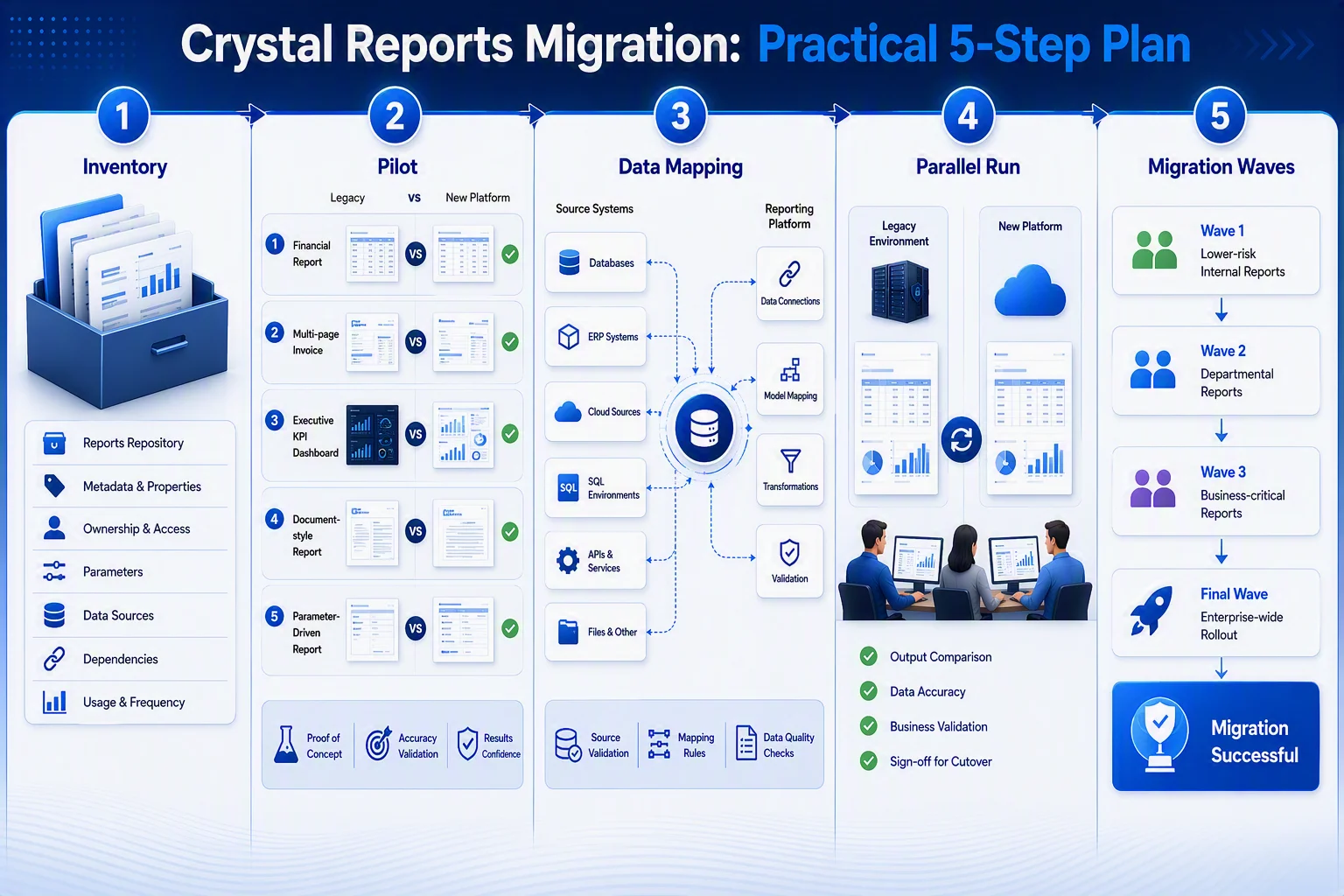
A successful migration starts with careful planning and validation. The following steps can help you reduce risks, maintain report accuracy, and ensure a smooth transition:
- Take inventory of every Crystal report: Path, owner, last run date, parameters, data source, delivery channel, and any custom Crystal-syntax functions. This becomes your source of truth for scoping the rest of the project.
- Pilot five reports: A financial statement with crosstabs, a multipage invoice, an executive KPI report, a document-style report, and a heavily parameterized report. Compare the output row-for-row against the Crystal original.
- Map your data sources: Decide what becomes a direct connection, what moves into a stored procedure or view, and what needs a real data-pipeline fix regardless of destination platform.
- Run in parallel for at least one full business-close cycle (typically 4–6 weeks) before decommissioning anything.
- Migrate in waves: Low-risk internal reports first, financial-close and regulatory reports last.
Common pitfalls to avoid
Many migration projects face avoidable challenges that can impact timelines, costs, and report accuracy. Understanding these common pitfalls can help ensure a smoother transition:
-
- Assuming a tool converts .rpt to your new format automatically: Simple reports convert cleanly; anything with subreports, shared variables, or custom Crystal functions almost always needs manual rework.
- Underestimating the data-source work: Connection strings, credentials, and legacy ODBC bridges are where a lot of unplanned effort hides.
- Skipping the parallel run: Migrating without a full close cycle running side-by-side is the most common cause of post-migration incidents.
- Choosing by feature checklist alone: The right alternative is decided by the UI, audience, and licensing, not just by which comparison page looks most complete.
Final thoughts
Choosing a Crystal Reports alternative isn’t a single-product decision. It’s a structured call across five aspects: report logic, data connectivity, expressions and parameters, interfaces, and licensing. The four RDL-based categories that answer it (SSRS, Power BI Report Server, Power BI Paginated Reports, and SSRS-compatible embedded engines) share a common foundation, but they’re built for different audiences, and the wrong pick shows up fast in support tickets and rework, not just in a comparison spreadsheet.
The teams that get through this cleanly do three things in order: they inventory their Crystal estate honestly, they pick the category that matches their actual platforms, and they run a full parallel close cycle before migrating. That’s the same discipline that let BrainTree move more than 4,000 reports without a multiyear rebuild. The teams that struggle skip the inventory, choose by feature checklist, and go straight to a big-bang migration.
With mainstream maintenance for Crystal Reports 2020 ending December 31, 2026, the planning window is now calendar-bound. Starting the inventory and a five-report pilot now is what turns migration paralysis into a manageable, staged project instead of a forced scramble in the last quarter of 2026.
If your reports are internal and stay inside the Microsoft stack, start by piloting five reports in SSRS or Power BI Report Server using the previously described framework. If your reports live inside your own product, an embedded, RDL-compatible engine is worth evaluating directly:
-
- See how Bold Reports compares as a Crystal Reports alternative.
- Read the step-by-step Crystal Reports migration plan.
- Schedule a migration call to scope your own report estate against this framework.
- Try Bold Reports for free, no credit card required.
Frequently asked questions
- 1.
What is the best Crystal Reports alternative in 2026?
There isn’t a single best answer. It depends on where your reports need to live. For internal, portal-based reporting on the Microsoft stack, SSRS or Power BI Report Server is usually the most direct successor. For reports embedded inside your own product or customer portal, an SSRS-compatible embedded engine like Bold Reports is typically the better fit, since SSRS and Power BI are built around their own portal rather than someone else’s application.
- 2.
Why are companies looking for a Crystal Reports alternative right now?
Mainstream maintenance for SAP Crystal Reports 2020 ends December 31, 2026, with Crystal Reports 2025 following on December 31, 2027. After mainstream maintenance ends, organizations move to paid extended support with no new features and slower security patches, which is pushing many teams to plan their next platform now rather than after the deadline passes.
- 3.
Can I convert my Crystal Reports (.rpt files) directly to a new platform?
Simple, single-data-source reports can often be ported with light manual cleanup. Reports with subreports, shared variables, custom Crystal-syntax functions, or complex conditional formatting typically need manual rework or a partial redesign, regardless of which conversion tool you use.
- 4.
What are the differences among SSRS, Power BI Report Server, Power BI Paginated Reports, and an embedded engine like Bold Reports?
All of them render the same underlying RDL format, but they’re deployed differently. SSRS is the original on-premises engine shipped with SQL Server. Power BI Report Server hosts both paginated RDL reports and interactive Power BI reports on-premises. Power BI Paginated Reports is the cloud-hosted version, metered through Power BI Premium or Fabric capacity. An embedded engine like Bold Reports renders the same RDL/RDLC reports but lives inside your own application, behind your own authentication and branding, instead of as a separate reporting portal.
- 5.
Is SSRS still supported in 2026?
Yes. SSRS 2022 continues to receive security updates, with support running through January 2033. However, SQL Server 2025 no longer bundles SSRS. Power BI Report Server is now Microsoft’s default on-premises paginated-reporting engine, so new deployments increasingly start there rather than with standalone SSRS.
- 6.
How long does it take to migrate from Crystal Reports to a new platform?
It depends heavily on the number and complexity of your reports. A mid-size estate of 1,000–3,000 reports typically takes several months end to end, with the pilot phase running 6–8 weeks and each cutover wave adding another few weeks.
- 7.
Do I need to rebuild every report from scratch?
No, but expect a mix. Straightforward, single-source reports often port with modest cleanup. Reports built around Crystal-specific formula logic, shared variables, or complex crosstabs are the ones that typically need a genuine redesign rather than a straight conversion. Plan your timeline around the hardest 20% of your estate, not the easiest 80%.






