
What’s New in Bold Reports v14.1 for Self-Service & Embedded Reporting

TL;DR:
The Bold Reports® 14.1 release introduces custom email templates, Report Part version history, Presto and Trino support in Bold Data Hub, OCI storage integration, AWS KMS encryption for scheduled S3 exports, multiformat exports, OpenTelemetry, enhanced security and authentication controls, and a wide range of Report Viewer, Report Designer, and Bold Data Hub improvements.
Introduction
Every release is a response to the realities our customers face, and 14.1 is no exception. This update was shaped by the conversations we’ve had with the people who build, schedule, and consume reports every day, and it focuses on the friction points they care about most: trust, transparency, and time.
In version 14.1, you’ll find a deeper reporting experience that’s more secure, easier to govern, and more aware of the systems around it. New capabilities include OpenTelemetry, AWS KMS encryption for scheduled exports, and OCI Object Storage. Improvements to custom email templates, report part version history, and SSO default-group provisioning make day-to-day operations smoother. And the underlying Report Viewer, Report Designer, and Bold Data Hub keep getting better, with richer charts and expanded localization.
Experience the latest features and improvements today! Try Bold Reports in our free cloud tier with zero setup or download this new release to get started.
Report Server enhancements
Bold Reports v14.1 introduces several Report Server enhancements focused on governance, automation, scheduling, and security.
Better report governance with report part version history
Managing reusable reporting assets is now easier with report part version history. Users can view previous versions, track modifications, and restore earlier versions whenever needed.
This enhancement provides greater visibility into report changes while helping teams maintain consistency across reporting projects.
Personalized notifications with custom email templates
Organizations can now create and customize email templates for different notification categories.
With custom email templates, administrators can tailor email communications to match branding requirements and provide a more customized experience for report consumers.
Improved schedule monitoring and management
To provide better visibility into report delivery operations, Bold Reports now includes APIs for:
-
- Schedule activity logs.
- Schedule execution history.
- Schedule failure history.
- Additional schedule details, including last run time, next scheduled run, status, file location, and schedule parameters.
These enhancements make it easier to monitor scheduled reports, investigate failures, and simplify administration.
Multiple export formats for schedules
Users can now configure reports to be exported in multiple formats through both scheduled exports and context menu actions. This simplifies report distribution by allowing different output formats to be generated from a single workflow.
AWS KMS encryption for scheduled S3 exports
Scheduled exports now support AWS Key Management Service (KMS) encryption for files stored in Amazon S3, helping organizations meet security and compliance requirements.
Custom password support
Administrators can now define custom password values for scheduled exports instead of relying only on predefined user attributes such as first name, last name, or email address.
Additionally, password-protection support has been added to the Export API, helping organizations secure exported documents through automated workflows.
Streamlined report migration across tenants
Managing reports across environments is now more efficient. New APIs support copying multiple reports to multiple internal and external tenants in a single operation. The release also introduces overwrite support for cross-tenant report copying, ensuring target reports remain synchronized with source report definitions.
Embed security for reports
The new embedded security option allows report access to be restricted based on configured IP addresses and domains, providing an additional layer of protection for embedded reporting solutions.
Automatic group assignment for SSO users
Authenticated users from Windows AD, OpenID, and OAuth providers can now be automatically added to a configured default group during sign-in, simplifying user onboarding and access management.
Enhanced permission and user management APIs
The release adds support for retrieving permissions for multiple users in a single request, reducing API calls and simplifying permission management. Additional access-control settings provide greater flexibility when managing user visibility and profile management capabilities.
OpenTelemetry support for observability
Bold Reports now supports OpenTelemetry for back-end workflows, enabling telemetry data to be exported alongside existing Log4Net logs, with optional Sentry integration.
This enhancement helps organizations improve monitoring, diagnostics, and operational visibility across reporting environments.
x64 support for Azure deployments
Azure-hosted deployments can now utilize x64 architecture, enabling improved memory utilization, scalability, and application performance.
Oracle Cloud Infrastructure Object Storage support
Organizations can now configure Bold Reports to use OCI Object Storage, providing additional flexibility for cloud-based storage and report data management.
Bold Data Hub enhancements
Connect to more enterprise data sources
The Bold Data Hub now supports Presto and Trino, expanding connectivity options for organizations working with distributed query engines and large-scale analytics environments. This enhancement enables teams to integrate more data sources into their reporting and analytics workflows.
Improved destination management
The Bold Data Hub also introduces:
-
- Primary key support for Redshift destinations.
- StarRocks connectivity migration to the MySQL protocol.
These improvements help streamline destination management and improve overall data integration reliability.
Report Viewer improvements
The Report Viewer receives several enhancements focused on export quality, rendering accuracy, and report performance.
Better export fidelity with preserved list styles
PDF and PowerPoint exports now support list styles, preserving bullet and numbered formatting more accurately and helping exported documents maintain their intended appearance.
Faster report processing with constant evaluation mode
Support for EvaluationMode=”Constant” has been added, allowing expressions to be evaluated only once during report initialization rather than during every interaction or parameter update. This helps improve report execution efficiency in applicable scenarios.
Additional Report Viewer enhancements
This release also includes:
-
- Support for rendering ReportIDs using global expressions.
-
- Improved chart maximum-value rendering aligned with SSRS behavior.
- Enhanced data label rendering for 100% stacked column charts.
- Better multistripline support.
- Improved HTML entity rendering.
- Support for vertical and Rotate270 writing modes.
- Custom query execution messages.
- HIDEDROPDOWNSELECTALL custom property support.
These enhancements improve report rendering consistency and provide greater flexibility for report developers.
Report Designer enhancements
Both Embedded Reporting and Standalone Report Designer now support the features and improvements listed below:
Map link properties
-
- Add interactive links for the Map report items using the direct options like URLs, reports, and bookmarks from the Map properties.
- Configure all link actions from a single property panel.
- Improve report navigation and user engagement.
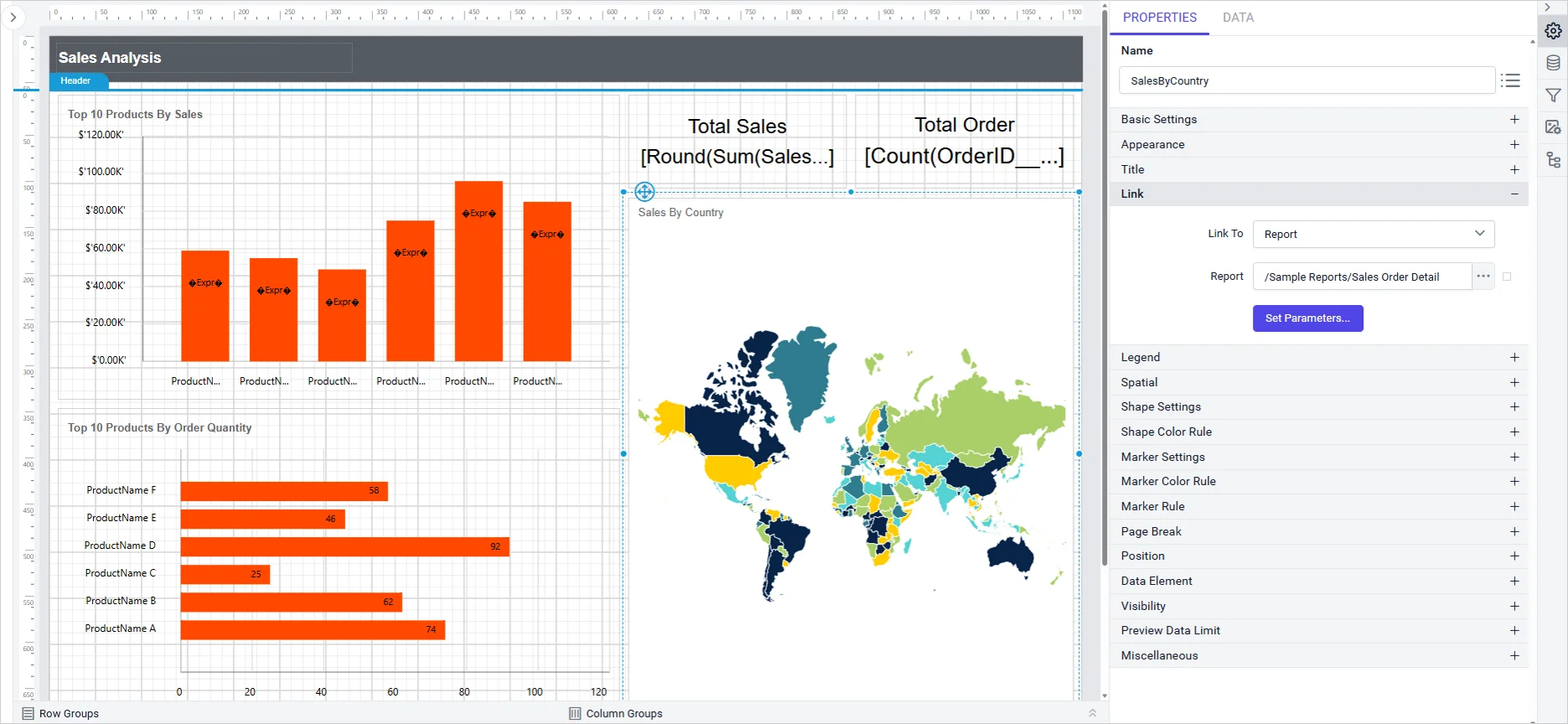
Chart striplines
-
- Highlight important ranges and thresholds on category and value axes.
- Support flexible configuration for primary and secondary axis.
- Easily add, edit, show or hide, and delete strip lines from chart properties.
- Ensure consistent rendering across themes and cultures.
Enhanced tablix wizard
-
- Search fields for faster configuration in large datasets.
- Select multiple fields at once.
- Clear all fields from the Row, Column, and Value containers with a single action.
Report explorer improvements
-
- Get faster access to report item management using Edit and delete icons.
- Simplify report maintenance and rapid design updates.
- Protect top-level report sections like header, footer, body and report from accidental deletion.
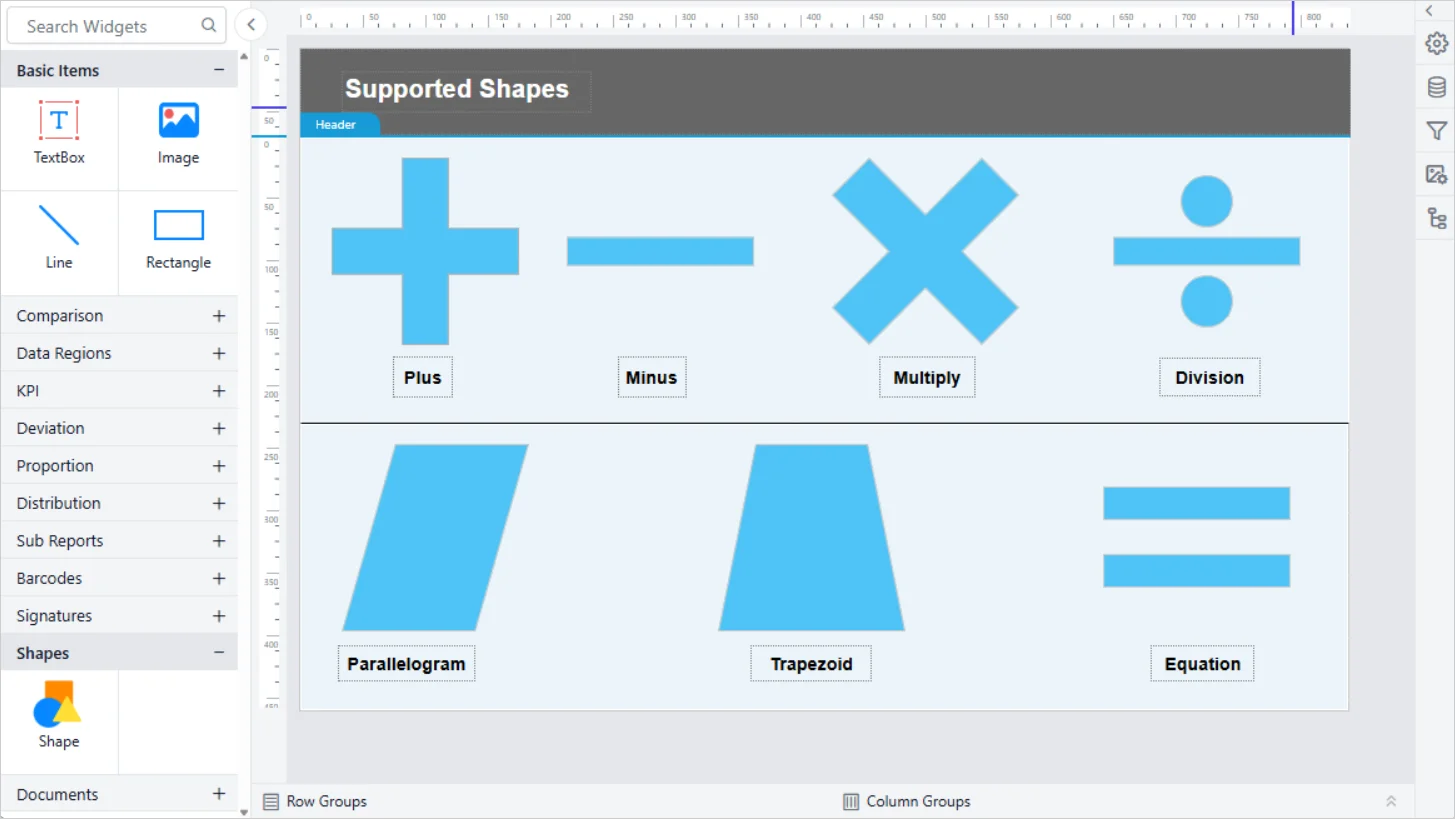
Expanded shape library
The shape library now includes plus, minus, multiply, divide, equation, parallelogram, and trapezoid shapes, offering more options for visual storytelling, process diagrams, and data highlighting. Customize the shapes with fill, stroke, and background settings.
Additional enhancements
-
- Additional localization support.
- Bootstrap 5.3 theme support for the embedded Report Designer.
These updates help report authors create and manage reports more efficiently.
IDP enhancements
Authentication configuration APIs
New APIs have been added to retrieve and update default authentication settings, enabling easier administration and configuration management.
Enhanced authentication workflows
Additional improvements include:
-
- Automatic default-group assignment for authenticated users.
- GET and POST request support for JWT embedding scenarios.
- Enhanced audit logging with login IP address tracking.
- Improved access-control customization through new user-management configuration options.
These updates simplify authentication management while improving visibility and control.
Key bug fixes and quality improvements
Along with the major enhancements, Bold Reports 14.1 includes important fixes that improve stability, authentication reliability, data processing, and the overall user experience.:
-
- Performance and stability: Resolved Bold Data Hub issues related to pipeline execution, transformation workflows, schedule processing, destination synchronization, incremental refresh operations, and data extraction reliability.
- Security and authentication: Fixed issues affecting site-level JWT authentication, JWT persistence in shared MS SQL environments, PostgreSQL site creation workflows, and proxy domain synchronization.
- Bug fixes: Addressed multiple Report Designer and platform issues, including with Data Matrix barcode rendering, Content Security Policy handling, parameter visibility persistence, nullable parameter serialization, HubSpot connectivity, file path restrictions, destination extraction failures, pagination behavior, and several data transformation and scheduling issues in the Bold Data Hub.
Important note
The version 1 Theme Studio application for the Report Viewer and Report Designer has been discontinued. Organizations are encouraged to use the version 2 Theme Studio experience, which provides support for multiple themes and future enhancements.
Real-world use cases enabled by Bold Reports 14.1
The enhancements in Bold Reports 14.1 are designed to solve everyday reporting challenges in deployment, automation, and report delivery. Here’s how these features translate into real impact.
Explore the Bold Reports 14.1 release
Bold Reports 14.1 brings meaningful upgrades for deployment, report delivery, rendering, scheduling, APIs, and reliability. Whether you are running enterprise reporting operations, embedding reporting into applications, or improving the day-to-day experience for report consumers, this release helps you do it with more confidence and less friction.
Ready to get started? Upgrade to Bold Reports® 14.1 and explore the latest enhancements designed to make reporting smarter, more flexible, and easier to manage. If you are new to Bold Reports, you can sign up for a free trial or request a personalized demo.
Want to explore more? Check out our release history to see what’s new in Bold Reports or reach out to our support team for help tailoring it to your needs.






