Report Server vs. Report Viewer SDK: Which Fits Your ISV?

 15 mins
TL;DR:
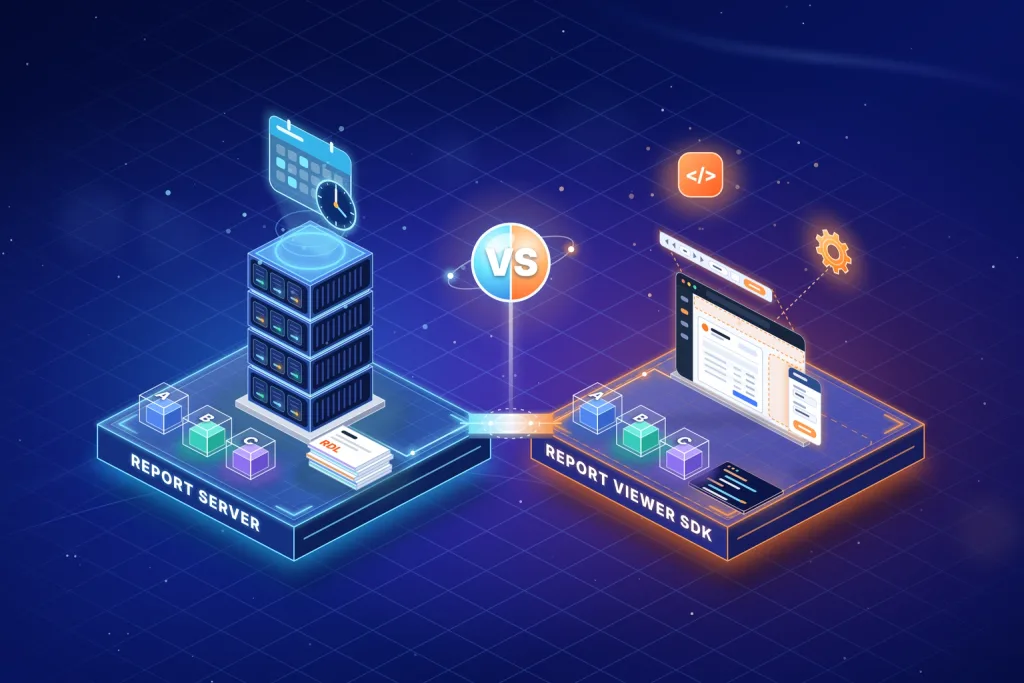
Report Server vs Report Viewer SDK comes down to who owns reporting after launch. Choose a report server when administrators need to publish, schedule, and version reports without a release. Choose a Report Viewer SDK when developers own report changes, and your application manages security, tenant isolation, and the user experience. If business users and developers share ownership, a hybrid approach is often the best fit.
Introduction
Adding embedded reporting to a SaaS product often starts as a feature request and ends as an architecture decision. The choice between a report server and a report viewer SDK determines who owns report management, where reporting workloads run, and how reporting evolves after launch.
A report server is a separate service that stores, schedules, secures, and manages reports, while a report viewer SDK places the viewer and report service inside your application. Both can deliver pixel-perfect RDL reports, but they differ in who can modify reports after launch, where heavy exports run, and which capabilities your team must build and maintain.
For ISVs and SaaS companies, this decision has long-term consequences. Report definitions, tenant permissions, deployment processes, and customer workflows evolve around the reporting model you choose. Changing direction later can mean reworking integrations, governance processes, and operational responsibilities.
This guide helps you decide with a three-question ownership test, a comparison of key differences, implementation examples for both approaches, and a vendor-neutral proof-of-concept checklist.
Although Bold Reports supports both models, this guide's decision framework and evaluation criteria apply regardless of vendor.
How Do You Apply the Report Ownership Test?
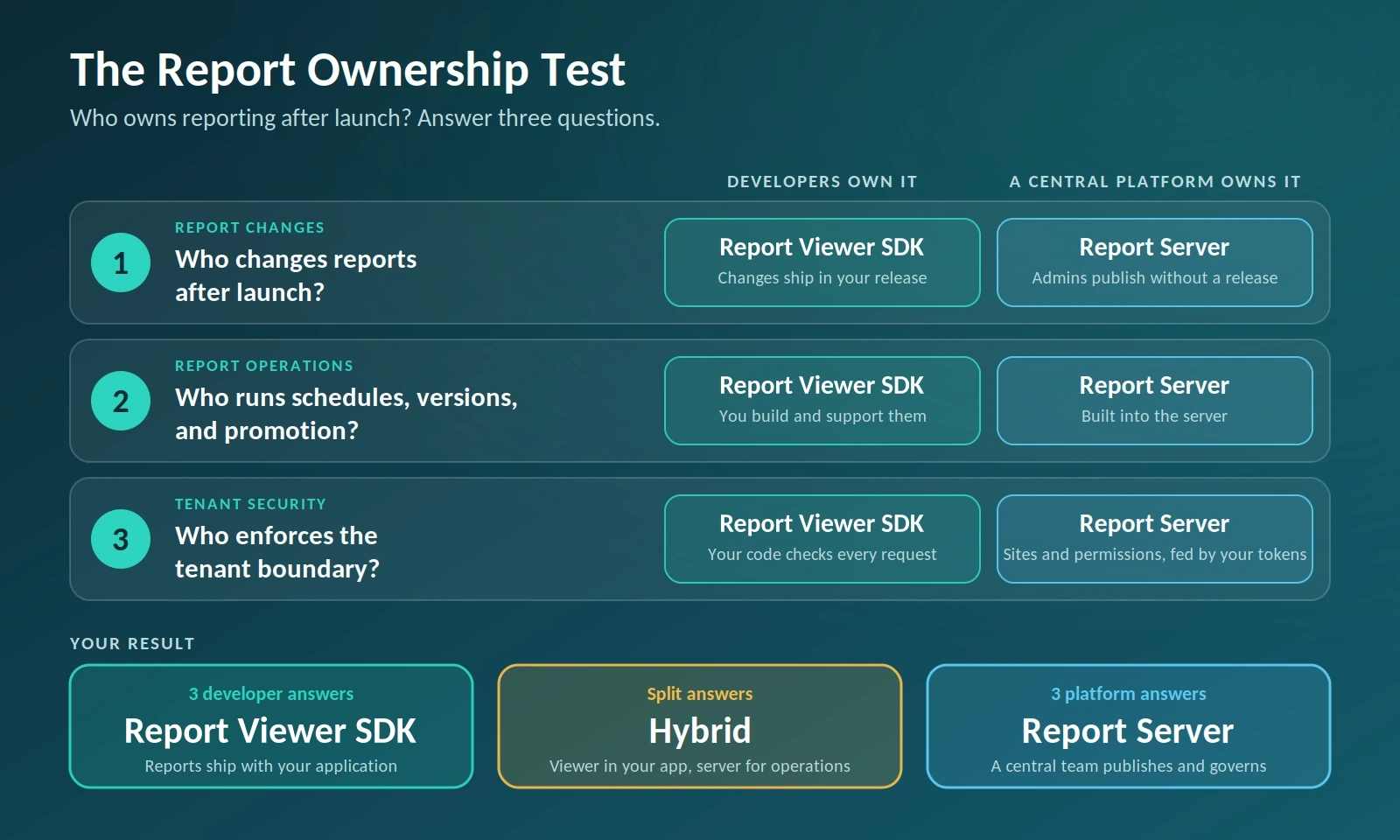
Answer three questions about who owns reporting after launch. Each answer points to a model.
| Ownership question | Developers own it | A central platform owns it |
|---|---|---|
| Who changes reports after launch? | Report Viewer SDK. Changes ship in your release. | Report server. Admins publish without a release. |
| Who runs schedules, versions, and promotion? | Report Viewer SDK. You build and support them. | Report server. They are built in. |
| Who enforces the tenant boundary? | Report Viewer SDK. Your code checks every request. | Report server. Sites and permissions enforce it, fed by your tokens. |
Three developer answers point to a Report Viewer SDK, and three platform answers point to a report server. A split points to a hybrid, and the split shows who owns what. For example, your application embeds the viewer and enforces tenants while a report server handles publishing and scheduling.
What Is a Report Server?
A report server is a standalone service that stores report definitions, runs them against data sources, renders the output, and manages access, schedules, and versions. Your application reaches it over HTTP, through a REST API or a viewer component. The defining trait is location: report storage and processing live outside your application process.
SQL Server Reporting Services (SSRS), Telerik Report Server, and the Bold Reports Report Server all fit this shape. SSRS receives no new releases beyond SQL Server 2022, and Microsoft’s on-premises successor is Power BI Report Server. SQL Server 2022 stays in extended support until January 11, 2033, which sets the window for any SSRS-based design. If you are weighing a move, see Bold Reports vs. SSRS guide.
The Bold Reports Report Server runs in Cloud, Managed Private Cloud, or On-Premises editions. The platform is the same in each; infrastructure ownership, data residency, and operational responsibility differ.
What Is a Report Viewer SDK?
A Report Viewer SDK is a set of client components and server-side libraries that you install in your own application. The viewer renders the toolbar, parameters, and report pages in your UI, and a report service that you host processes each report.
A report writer library exports to PDF, Excel, or Word with no viewer at all, and an embeddable web report designer lets users author reports inside your product. An SDK is not a hosted service, and it includes no report management by default.
In this guide, “Report Viewer SDK” describes the pattern: components plus a report service that you host. In Bold Reports, the Web Report Viewer, Report Writer, and Web Report Designer implement it, and Bold’s documentation calls the viewer package the Report Viewer SDK.
In Bold Reports, the viewer’s processingMode setting supports two models. Remote mode renders RDL reports through a report service. Local mode renders RDLC reports from data your application supplies. Depending on your architecture, the report service can live in your application or come from a Bold Report Server.
Report Server vs Report Viewer SDK: Key Differences
The table compares both models on the factors that drive switching costs.
| Dimension | Report Server | Report Viewer SDK |
|---|---|---|
| Architecture | A separate service stores, processes, renders, and administers reports. | The viewer and report service run inside or beside your application, and your code owns the workflow. |
| Deployment | A separate service tier or managed environment to host and monitor. | Ships as part of your application, with no additional reporting tier. |
| Who changes reports | Administrators or support staff publish and change reports without a release. | Developers ship changes through your release process, unless you embed a designer and store report files outside the build. |
| End-user report authoring | Browser-based designer and portal on the server. | An embeddable web designer in your own UI; you provide storage and permissions. |
| Scheduling and delivery | Built into the server, with report scheduling for delivery. | Usually not included. You build it or add a server. |
| UI and branding | Branding and theming apply to the server portal and viewer; report management stays on the server. | Full control over branding, navigation, and user experience in your own UI. |
| Security | Permissions and governance are enforced centrally, and your application passes user or tenant context. | Uses your application’s existing authentication and authorization model. |
| Multi-tenancy | Tenant sites, users, groups, and permissions are managed inside the server. | Tenant isolation, permissions, and report routing live in your application. |
| Automation | REST APIs automate tenant onboarding, content, and users. | You build provisioning and content management yourself. |
| Scaling | Reporting load can run on its own tier, apart from the application. | Reporting scales with the application unless you host the report service separately. |
| Maintenance and upgrades | Server, viewer, and report catalog upgrades, plus monitoring and backups. | Fewer components, but you must test SDK upgrades against saved reports and integrations. |
| Where the cost lands | Infrastructure and operations for a second service. | Engineering time to build and support report management features. |
How Does a Report Request Flow in Each Model?
Both models can deliver embedded reporting inside your application. The difference is where reports are stored, processed, and managed.
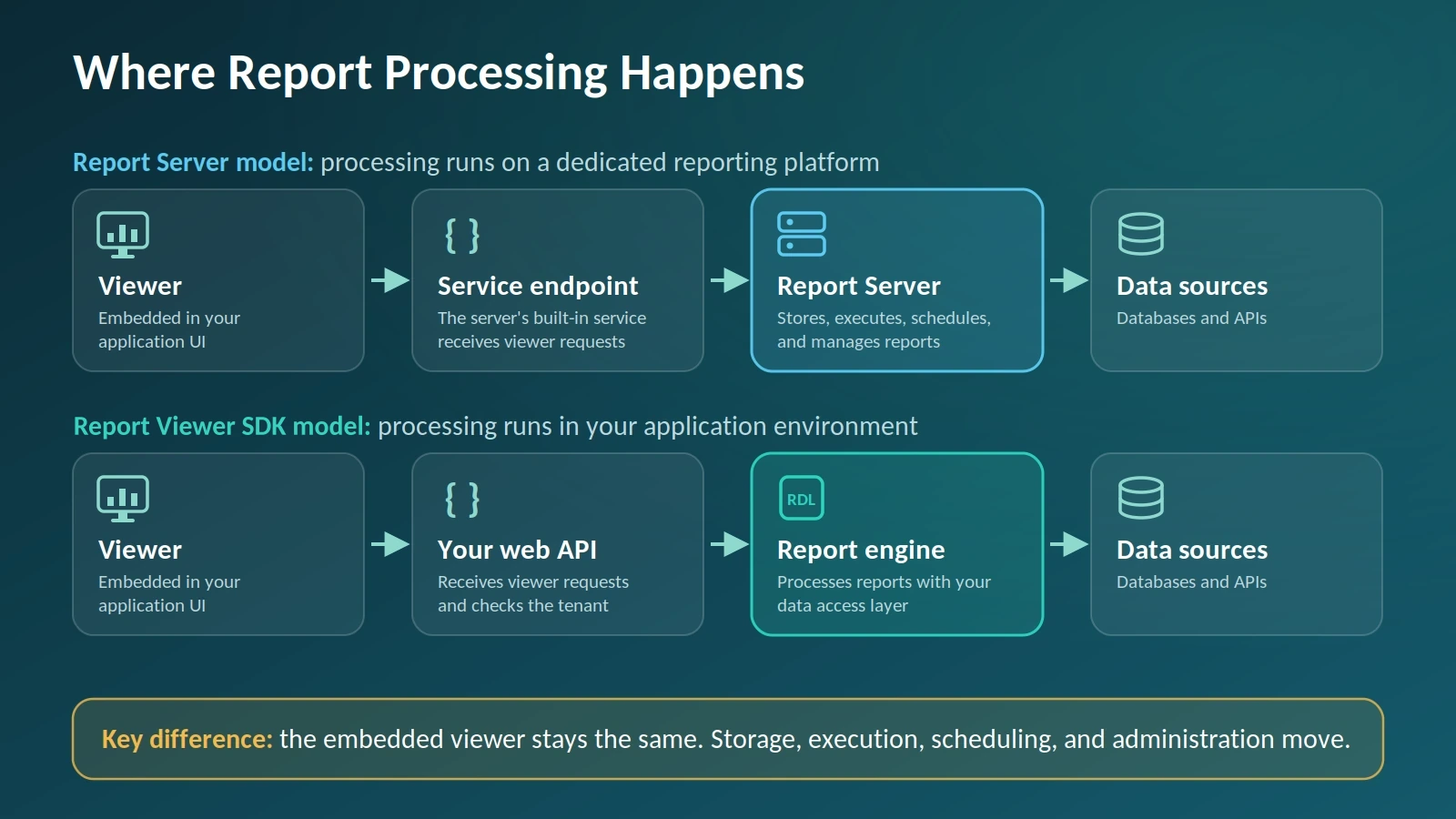
With a report server, report definitions live on a central service. When a user opens a report, the viewer sends a request to the server, which applies security and scheduling rules, retrieves data, and returns the rendered output. Your application typically handles authentication and passes the user or tenant context.
With a Report Viewer SDK, processing happens in your application environment. Requests go through your own web API, where the reporting engine runs the report definition, retrieves data, and renders the output under your security rules and data access logic.
In code, the difference is where the viewer sends its requests. With an application-hosted report service, reportServiceUrl points to a Web API route in your own application. With a Report Server, it points to the server’s built-in service, and you also supply reportServerUrl, reportPath, and a serviceAuthorizationToken. The snippets are illustrative. Bold’s docs explain the difference between the service URL and the server URL and show how to load Report Server reports in the viewer.
Report Viewer SDK: report service hosted in your application
$("#viewer").boldReportViewer({
  reportServiceUrl: "/api/ReportViewer",
  reportPath: "SalesReport.rdl"
});
Viewer connected to a Report Server
$("#viewer").boldReportViewer({
  reportServiceUrl: "https://your-domain.com/reporting/reportservice/api/Viewer",
  reportServerUrl: "https://your-domain.com/reporting/api/site/site1",
  reportPath: "/Sample Reports/Company Sales",
  serviceAuthorizationToken: "bearer YOUR_SERVER_TOKEN"
});
Only the service URL, server URL, and token change, so the viewer integration stays stable. The same viewer can also read reports from an SSRS server, which lets a team start in one model and move to another without rewriting the front end.
Can You Embed Reports Without a Report Server?
Yes. Bold Reports offers four ways to embed reports, each mapping to the two models differently. The viewer and designer components work with either model, the writer library follows the SDK pattern, and iframe embedding runs on the server.
- Viewer component: embeds an interactive viewer in your application, with control over branding, navigation, and user experience. It works with either model, because the report service can be your own or a Report Server’s.
- Designer component: embeds the web designer so users can create, edit, preview, and save RDL and RDLC reports inside your product. With an application-hosted service, your Web API browses, opens, and saves the reports. With a Report Server, the designer can create, edit, and publish reports through the server’s built-in service.
- Report Writer library: generates PDF, Excel, Word, and other outputs with no viewer, which suits invoices, statements, scheduled reports, and automated document delivery. It follows the SDK pattern, because processing runs inside your application.
- Embedded Report Server reports (iframe): embeds server reports through iframe-based embed URLs with standard authentication, external SSO, embed-secret-key SSO, or public embedding. This approach simplifies implementation but offers less UI customization than the viewer.
Treat the iframe option as a Report Server variant: it keeps all processing on the server and trades UI control for the fastest integration.
When Is a Report Server the Better Choice?
Choose a report server when the number of people who change reports is larger than the number of developers who can ship code. That single condition tips most of the decision.
It also fits when:
- Customers or support staff need scheduling, subscriptions, or delivery by email.
- Several tenants share a common report library with tenant-specific variations.
- Report authors, such as customer administrators or solution engineers, must publish without a release.
- You deploy into customer environments and need an administrator console that ships with the product.
- You need versioning and lifecycle management for reports in one place.
- You want to onboard tenants through REST APIs instead of custom admin code.
The cost is operational: you take on another service, another upgrade cadence, and another system to monitor.
When Is a Report Viewer SDK the Better Choice?
Choose a Report Viewer SDK when reports are a fixed product feature that developers own, and your release train can absorb a report change as a normal code change.
It also fits when:
- Report pages must match your product’s navigation and visual design exactly.
- Your application already owns identity, roles, and tenant routing, and you want one security model.
- You ship a single deployable unit and cannot justify a second service tier.
- The main output is generated documents, such as invoices and statements, which a writer library can produce without any viewer.
- Requirements are predictable: viewing and exporting, with no need for central report management.
The cost is engineering time: you build and then support scheduling, versioning, report promotion between environments, and tenant provisioning.
How Do Multi-Tenancy, Security, and Scaling Differ?
How does multi-tenancy differ?
With a Report Viewer SDK, your application routes every request to the correct tenant, data source, and report. With a Report Server, you also decide how you organize tenant content. One site per tenant provides strong isolation and independent administration, while a single master site simplifies onboarding and centralized management. For most embedded SaaS applications, Bold recommends the single-site model with application-managed access.
Your application can remain the source of truth for tenant access. It generates an embed token using a dedicated Report Server user and the Embed Secret Key, allowing application users to access reports without server accounts. Custom attributes can securely pass tenant values for row-level filtering or database routing. The webinar notes on embedding reports in React explain token generation and row-level security.
Tenant onboarding can also be automated. Bold’s REST APIs support onboarding, content organization, user provisioning, database configuration, and report management. For more guidance, see our guide to multi-tenant reporting for SaaS apps, and Bold’s documentation on Sites, Users and Groups, and Permissions.
Which model is easier to secure and keep compliant?
Where tenant checks run matters more than which model you pick. In both architectures, enforce authorization on the server for every report path, parameter, and data source. Also review:
- Audit logs: where report-access and export activity are stored and retained.
- Identity and roles: whether your application or the reporting platform owns SSO, users, and permissions. Review Bold Reports’ SSO documentation and role and permission management documentation when evaluating authentication and access control requirements.
- Token flow: how user identity and tenant context reach the report service.
- Data residency: where report processing occurs and where data is stored.
In a Report Viewer SDK, the report service handles the tenant check. This ASP.NET Core excerpt rejects any report path outside the caller’s tenant folder before processing starts. It assumes your sign-in issues a tenant_id claim, stores each tenant’s reports in its own folder, and replaces the file-loading step in the OnInitReportOptions method of Bold’s report controller.
ASP.NET Core: tenant check in your report service (excerpt)
// Excerpt for your IReportController implementation.
// Needs: using System.Text.RegularExpressions;
[NonAction]
public void OnInitReportOptions(ReportViewerOptions reportOption)
{
    var tenantId = User.FindFirst("tenant_id")?.Value;
    if (tenantId is null || !Regex.IsMatch(tenantId, "^[A-Za-z0-9_-]+$"))
        throw new UnauthorizedAccessException("Invalid tenant.");
var tenantRoot = Path.GetFullPath(
    Path.Combine(_hostingEnvironment.WebRootPath, "Resources", tenantId));
var requested = reportOption.ReportModel.ReportPath ?? string.Empty;
var reportFile = Path.GetFullPath(Path.Combine(tenantRoot, requested));

// Reject traversal and absolute paths that leave the tenant folder.
var prefix = tenantRoot + Path.DirectorySeparatorChar;
if (!reportFile.StartsWith(prefix, StringComparison.Ordinal))
    throw new UnauthorizedAccessException("Outside the tenant folder.");

var bytes = System.IO.File.ReadAllBytes(reportFile);
reportOption.ReportModel.Stream = new MemoryStream(bytes);

}
A Report Server enforces the equivalent through sites, permissions, and embed tokens, so your application validates the tenant each time it issues a token.
How do they scale?
Large exports, scheduled jobs, and heavy queries spike CPU, memory, and database load. With a report server, that load runs on its own tier, so you can size it apart from the application. With a Report Viewer SDK, it shares your application’s resources unless you host the report service separately, so queue long exports and set per-tenant limits.
Check where report processing state lives before you add a second instance. By default, a Bold Report Server caches report state in memory on each instance. To load balance without sticky sessions, switch to the file cache provider and keep the AppData folder on shared storage. In both models, load test your largest tenant’s worst-case report with concurrent exports before you decide.
Can You Use Both? A Hybrid Approach
Yes. A hybrid reporting architecture combines a Report Server and a Report Viewer SDK. Customer-facing reporting can use an embedded viewer for branding and navigation, while administrators use a Report Server to publish reports, schedule delivery, and manage versions. Bold's documentation explains loading Report Server reports in the viewer without a separate Web API service.
A hybrid approach works best when reporting ownership is shared. To avoid technical debt, define clear ownership for report definitions, identity, and branding from the start. The Report Ownership Test helps identify who owns each responsibility.
How Does Bold Reports Licensing Affect This Choice?
Licensing usually does not affect the architectural choice because Bold Reports pricing is deployment-based rather than user- or developer-based. The Cloud, Managed Private Cloud, and On-Premises editions include the full platform, including the Report Server, report designer, embedding capabilities, multi-tenancy, white-labeling, and scheduling features. There are no per-user or per-developer fees.
However, redistribution rights, permitted installations, and requirements for development, test, and production environments may vary by licensing agreement. Review these details during the quoting process, especially if you plan to deploy reporting solutions into customer-managed environments.
| Factor | Cloud | Managed Private Cloud | On-Premises |
|---|---|---|---|
| Who operates it | Bold Reports | Bold Reports | You |
| Infrastructure | Shared, managed | Dedicated | Yours |
| Data location | Managed regions | Customer-selected region | Your data center |
| Air-gapped or offline operation | No | No | Yes |
| Customer-held encryption keys | No | On request | Yes |
Choose the edition based on who should run the infrastructure and where your data must live, not on features. Pricing is by custom quote, so review the latest Bold Reports pricing information before you decide.
Common Mistakes When Choosing an Embedded Reporting Architecture
Avoid these mistakes when you evaluate a report server or a Report Viewer SDK:
- Choosing based on demo quality alone. A polished demo doesn't show how a solution handles multi-tenant reporting, large exports, security requirements, or peak workloads. Evaluate candidates with your own reports, data volumes, identity provider, and tenant scenarios.
- Treating the report viewer as a security boundary. Hiding reports in the user interface does not prevent direct access to reporting endpoints, so tenant validation must run on the server for every request.
- Creating separate report copies for each tenant. Updating hundreds of nearly identical reports is hard. Parameterized reports with tenant-aware filtering usually scale better.
- Building a scheduler by accident. The first request for emailed reports grows into a scheduler, retry logic, and delivery logs. Decide up front whether scheduling is in scope, and if so, price it against a report server.
- Adopting a hybrid without a clear ownership model. Define who owns report definitions, identity, and branding before you combine a report server and a Report Viewer SDK.
How Do You Run a Proof of Concept?
Run the same proof of concept against every candidate, using your real tenants, identity provider, and reports, with no vendor engineer driving.
- Run your largest tenant’s worst-case report end to end and record render time and memory.
- Wire in your real identity provider and the full token or session flow.
- Attempt deliberate cross-tenant access by changing a parameter and a report path, and confirm it fails.
- Apply your actual theme, fonts, and logo, and check what vendor branding remains visible.
- Export one report to PDF and Excel and compare the layout with the on-screen version.
- Put the report service behind your load balancer without session affinity and confirm paging and export still work.
- Upgrade to the next version in a staging copy and replay saved reports.
- Price both implementation and operational costs at your current and projected tenant counts, including licensing, infrastructure, and engineering effort.
- Confirm that report and data source definitions export in a standard format such as RDL, so you can leave if you need to.
Next Step
Ready to evaluate your reporting architecture? Run the proof-of-concept checklist against your largest tenant's most demanding report using a 30-day free trial, with no credit card required. For a guided evaluation, request a demo and bring your tenant model, reporting requirements, and security considerations.
Frequently Asked Questions
- 1.
What is the difference between a report server and a Report Viewer SDK?
A report server is a standalone service that stores, executes, renders, and manages reports for your application to call. A Report Viewer SDK is a set of components and libraries that runs inside your application, so you own hosting, security, and report management.
- 2.
Which is better for a multi-tenant SaaS application?
Neither wins outright. A server suits products where many people author or schedule reports and tenants share a report library. An SDK suits products where developers own fixed reports and the application already handles tenant routing. A hybrid, with SDK-embedded viewing for customers and a server for administration, is a common third option.
- 3.
Do I need a separate report server for a multi-tenant app?
Not always. If your application owns tenant routing and developers own the reports, in-app processing with an SDK can work. You will likely want a server when tenants share a report library, when non-developers publish reports, or when you need scheduling and delivery.
- 4.
Can I use a Report Viewer SDK and a report server together?
Yes. The same viewer can render reports from a report service in your application or from a Report Server, so customer-facing screens keep your branding while administrators schedule and manage reports on the server. Assign one owner for report definitions so the two paths do not drift apart.
- 5.
Can users edit reports without a release if I use a Report Viewer SDK?
Yes, if you embed a report designer in your application and keep report files outside the release build. You then own report storage, permissions, versioning, and scheduling. If non-developers must publish, version, and schedule reports regularly, a report server is usually less work.
- 6.
How does my application pass tenant context to a Bold Reports server?
Your application generates an embed token with a dedicated Report Server user and the Embed Secret Key, then passes tenant values as custom attributes. Application users do not need accounts on the server. Validate the tenant on your own server before issuing each token.
- 7.
How does white-labeling differ between the two?
With an SDK, branding lives in your interface code, so you control every visible element, but you build the surrounding chrome yourself. With a server, you also theme its portal and any other pages it serves to users. Check which vendor branding remains visible.
- 8.
Do you need a report server for pixel-perfect or paginated output?
No. Pixel-perfect output depends on the rendering engine, not on a server. A writer library can render RDL or RDLC reports to PDF, Excel, and Word inside your application, and a viewer with a processing library can show them on screen.