TL;DR:
Headless reporting separates report design from report delivery: you define a report once, and a report engine renders it on demand through an API as HTML, PDF, or Excel. Choose it when one report must reach several channels, and your team can own the delivery layer. Choose an embedded viewer when you have a single channel. The cost of going headless is building the interface and enforcing multi-tenant security on the server.
Introduction
A customer statement in a portal, an emailed PDF, and a partner’s ERP export should show the same numbers. In tightly coupled reporting, they often don’t, because each channel gets its own copy of the report, and every layout change waits for an application release.
Headless reporting fixes that by keeping one report definition behind reporting APIs and rendering services, so each channel decides how to present the result.
This guide explains how headless reporting works, how it differs from headless BI, headless CMS tools, embedded reporting, and HTML-to-PDF with headless Chrome, and how to evaluate platforms. It includes a sample export API call, a decision guide, and a six-step implementation plan.
What is headless reporting?
Headless reporting separates report design, processing, and delivery through APIs. Report authors create reusable report definitions, while a report engine renders them on demand for applications, portals, mobile apps, emails, and other delivery channels, without tying the report to a specific viewer.
“Headless” means the reporting backend is decoupled from the presentation layer. The same report can be delivered as HTML, PDF, Excel, or API-driven data, which suits customer-facing reporting, embedded reporting, and API-first architectures.
Headless vs. decoupled reporting
Decoupled reporting separates the designer, the engine, and the viewer, but usually still ships a viewer you can use out of the box. Headless is the stricter form: the engine exposes APIs and requires no viewer, so your team builds or chooses every interface.
Headless reporting vs. headless BI and headless CMS
A headless CMS serves web content through an API; headless reporting serves formatted documents such as invoices, statements, and compliance reports.
Headless BI is different again. It focuses on a semantic or metrics layer that gives dashboards and analytics tools consistent business definitions. Headless reporting focuses on generating and delivering formatted, parameterized reports through APIs. Some organizations use both, but this guide covers headless reporting only.
Why do teams move away from portal-bound reporting?
Traditional reporting architectures were built for a single portal, but modern applications require seamless delivery across multiple platforms and customer touchpoints.
- Reports have become customer-facing. Modern SaaS and digital products are expected to provide reporting directly within the user experience. A separate reporting portal often creates a disconnected experience and limits branding and customization.
- Organizations need to support multiple delivery channels. The same report may need to appear in a web application, mobile app, scheduled email, partner system, or API response. Traditional reporting architectures were not designed for this level of flexibility.
- Development teams need greater agility. When report layouts, rendering, and presentation are tightly coupled, even small report changes can require development, testing, and deployment cycles. An API-first architecture lets front-end and reporting teams evolve independently.
- Reporting workloads need to scale independently. Large exports, scheduled reports, and peak reporting periods can create significant processing demands. Separating report rendering from the application layer improves scalability and performance.
How does a headless reporting architecture work?
A headless architecture splits report design, data processing, rendering, and delivery into independent layers connected through APIs. Each layer can change without breaking the others. When report definitions are published to the report server rather than bundled with the app, a reviewed change reaches every channel serving that report without an application deployment.
- Report design (layouts, formatting, parameters, grouping): owned by report authors and analysts; changes when business requirements change.
- Data logic (queries, data sources, calculations): owned by data engineers; changes when schemas or sources change.
- Rendering (converting reports to PDF, Excel, HTML, and other formats): owned by the reporting platform; changes when new formats or scale requirements arrive.
- Delivery (web apps, mobile apps, emails, APIs): owned by product and application teams; changes when new channels or experiences are introduced.
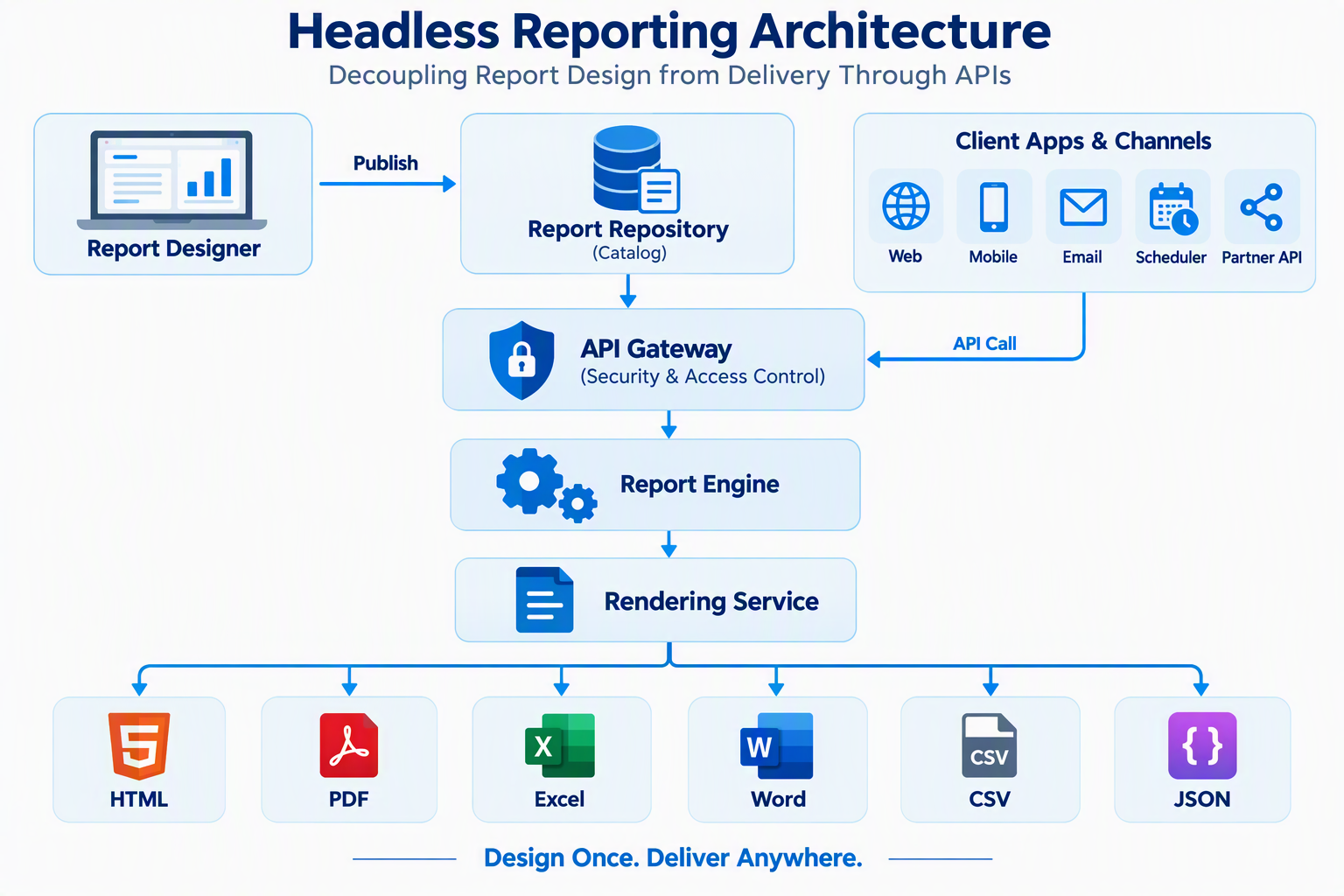
Core components of a headless reporting architecture
- Report designer. The report designer is where authors create and maintain reports. Authors define layouts, datasets, parameters, and business logic, typically in a portable format such as RDL. Web-based designers also support embedded report authoring.
- Report engine. The engine processes report definitions at runtime. It runs queries, applies calculations and formatting, handles parameters, and produces the content for rendering.
- Reporting APIs. APIs are the foundation of the architecture. They expose report execution, exports, scheduling, metadata retrieval, and permission management so applications can reach reports programmatically.
- Rendering services. These convert reports into HTML, PDF, Excel, Word, and CSV. Rendering large reports uses significant CPU and memory, so platforms that separate rendering let you scale it independently.
- Security layer. This manages authentication, authorization, and data access: single sign-on (e.g., Microsoft Entra ID SSO), OAuth 2.0 and OpenID Connect, role-based permissions, tenant access control, and row-level security, so users can only access the reports and data they are authorized to view.
- Delivery channels. These are where users consume reports: web applications, mobile apps, customer portals, emailed reports, file exports, and API integrations. One report definition serves all of them.
Request flow
- A user, application, or external system requests a report through an API and passes any required parameters.
- The security layer authenticates the request, applies permissions, and enforces tenant or row-level security policies.
- The report engine retrieves the report definition and runs queries against the right data source.
- Rendering services generate the requested output, such as HTML, PDF, Excel, Word, or CSV.
- The finished report returns to the application or goes out through email, an API, a customer portal, file storage, or an automated workflow.
What are the benefits of headless reporting?
The benefits follow from splitting design from delivery. One report definition serves every channel, changes are reviewed and reach users without an application release, and rendering capacity scales independently. Each benefit below also has a cost, covered in the comparison and challenges sections.
Omnichannel delivery
Create a report once and deliver it through web applications, mobile apps, emails, PDFs, APIs, and customer portals. For example, a logistics SaaS platform can use the same shipment report in its portal, in carrier emails, and in ERP integrations. New channels no longer mean rebuilding reports.
Faster development
Because report design is decoupled from the application, teams can update reports without waiting for a product release. With definitions on the report server, an analyst can publish a reviewed change without an application deployment, shrinking the reporting backlog and freeing developers for core product work.
Better user experiences
Reports can appear inside existing workflows and branded interfaces instead of a separate portal, so users never leave your product to read a report.
Lower maintenance
A single report definition serves every channel and application. Update once, and it shows up wherever the report is delivered, reducing duplication and keeping numbers consistent across channels.
Independent scaling
Report rendering can scale separately from the application. During high-demand periods such as month-end, you can add rendering capacity without affecting application performance.
Headless reporting vs. traditional reporting
Traditional reporting platforms combine design, processing, and delivery in one system. Headless reporting separates them and delivers reports through APIs. The trade-off is flexibility for effort.
| Dimension | Traditional (portal-based) reporting | Headless reporting |
|---|---|---|
| Architecture | Designer, engine, and viewer are tightly coupled in one system | Components are decoupled and communicate through APIs |
| Report delivery | Commonly delivered through a reporting portal or tightly coupled viewer | Web apps, mobile apps, emails, APIs, PDFs, and other channels |
| User experience | Customization and branding depend on the platform | Full control over the interface and branding |
| Change management | Depending on the platform, report updates may require additional deployment or release processes | Report definitions can be updated and published independently |
| Multi-tenancy | Varies by platform; some require separate instances or custom configuration per tenant | Tenant isolation is still your responsibility; the API enforces it only when every request carries tenant claims |
| Integration | Depends on the platform; often portals, embedded viewers, links, or exports | REST APIs and SDKs, with the integration code written by your team |
| Effort to adopt | Lower: one product to install and use | Higher: you build and operate the delivery layer |
| Best fit | Internal reporting with a single delivery channel | Customer-facing, embedded, and multi-channel reporting |
Headless reporting vs. embedded reporting
The two terms overlap, but they answer different questions. For a broader look at the embedded side, see our embedded reporting guide. Both approaches deliver reports inside the user experience instead of sending users to a separate reporting tool, depend on a report engine and rendering services, and require tenant-aware security, access controls, and white-labeling.
| Feature | Embedded reporting | Headless reporting |
|---|---|---|
| Primary focus | Embedding reports inside applications | Decoupling report delivery from the user interface |
| Delivery model | Prebuilt viewers and designers embedded in an application | APIs and services deliver reports to any channel |
| Time to value | Faster, with ready-made components | Slower: more development effort and UI work |
| UX flexibility | Customization within the component’s capabilities | Complete control over the user experience |
| Delivery channels | Primarily in-app reporting | Web apps, mobile apps, emails, APIs, file exports, and more |
When to use each
- Choose embedded reporting when you need interactive reporting and self-service report design inside your application, using prebuilt components.
- Choose headless reporting when reports must reach multiple channels, need extensive customization, or must be reachable through APIs, emails, exports, and automated workflows.
- Use both when the same report must be embedded in your application and distributed by email, portal, export, or partner integration.
Embedded reporting platforms often combine report viewers, report designers, and REST APIs to support automated reporting workflows. For example, Bold Reports® Report Server provides a REST API for report management and automation, exports reports in multiple formats, and embeds reports in web applications via the Report Viewer.
Headless reporting vs. HTML-to-PDF with headless Chrome
A headless browser turns HTML into PDF, so pagination, grouping, and data binding stay in your code. A report engine takes them from the report definition.
Many teams start with an HTML template and a headless browser because it needs no extra product. That works for a one-page receipt. It gets harder when reports span multiple pages, group data, repeat headers and footers on every page, and must match a printed layout. The table shows where each approach asks more of your team.
| Dimension | HTML-to-PDF with headless Chrome | Report engine with report definitions |
|---|---|---|
| Layout authoring | HTML and CSS written by developers | A report designer; authors do not need front-end code |
| Pagination and page breaks | Print CSS plus your own code | Page size, breaks, and repeating headers and footers set in the report definition |
| Data binding and grouping | Your code queries data and fills the template | Datasets, grouping, and parameters live in the report definition |
| Output formats | PDF and images from the browser | Several formats from one definition, such as PDF, Excel, Word, and HTML |
| Setup effort | Low for simple documents | Higher up front: you adopt and host an engine |
| Control over exact look | Full CSS control | Limited to what the engine and designer support |
| Who changes a report | Developers, through a code release | Report authors, through a designer and publishing workflow |
| Best fit | Short, simple, template-driven documents | Multi-page, data-heavy, repeatable reports |
For a wider comparison of ways to generate reports in .NET applications, see our guide to report generation approaches in ASP.NET Core.
Which approach fits your reports?
Pick by how many channels the report serves and how complex the layout is. A one-page receipt suits HTML-to-PDF. A multi-page report for one channel suits an embedded viewer. A report that must reach the app, email, and an API suits headless reporting, usually with a viewer added for in-app use.
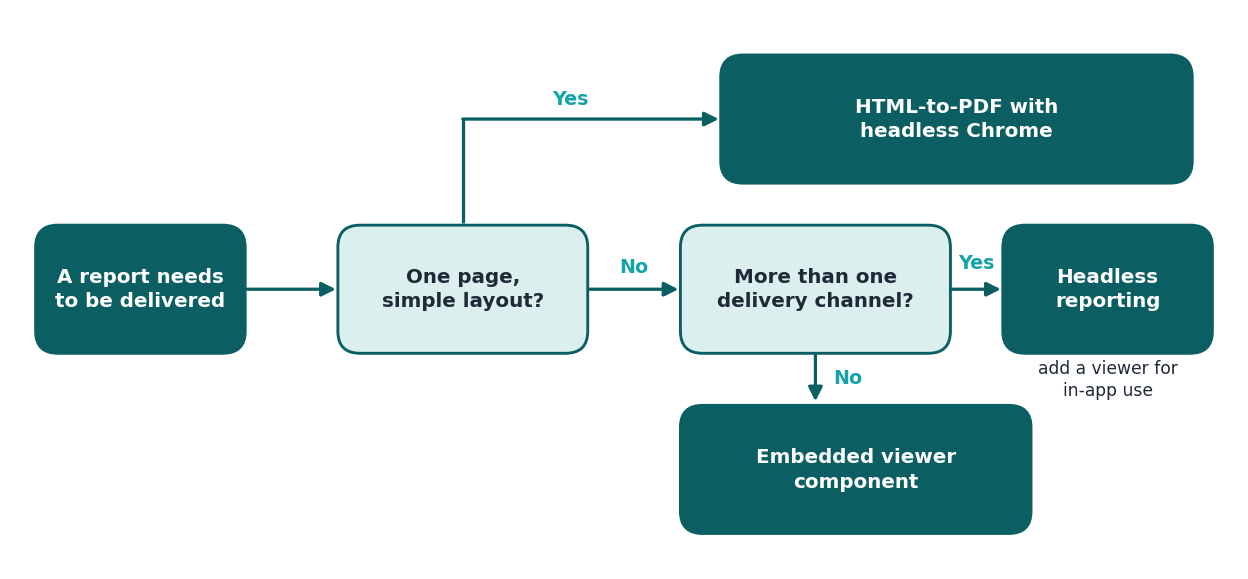
| Approach | Pick it for | What your team owns |
|---|---|---|
| HTML-to-PDF with headless Chrome | One short, template-driven document such as a receipt | HTML and CSS templates, pagination, data binding, browser hosting |
| Embedded viewer component | One channel, interactive viewing inside your app, fastest launch | Viewer integration and customization within the component’s limits |
| Headless reporting | Several channels, a custom interface, API access, scheduled or batch delivery | Delivery code, the interface, tenant security, rendering capacity |
| Headless reporting plus a viewer | The same report appears in the app and in email, exports, or partner feeds | All of the above, with the viewer handling in-app display |
When headless reporting is the wrong choice
Skip headless reporting when one channel and one audience cover your needs. You would take on delivery code, security enforcement, and rendering operations for flexibility you will not use. Start with a viewer, and move to headless reporting when a second channel arrives.
How do you evaluate a headless reporting platform?
When you compare vendors, focus on these capabilities:
- API-first architecture: APIs for report execution, exports, scheduling, report management, and integration, so reports can reach applications, portals, mobile apps, and external systems.
- High-fidelity rendering: Pixel-perfect PDF, Excel, Word, and HTML output that preserves layout, pagination, headers, footers, and page breaks.
- Portable report definitions: A standard format such as RDL keeps reports reusable if you change engines or hosting.
- Scalable rendering: Asynchronous processing, container and cloud-native deployment, and horizontal scaling for high-volume workloads.
- Multi-tenant security: Tenant isolation, row-level security, and role-based access control for SaaS applications. Explore the Bold Reports security overview.
- Deployment flexibility: On-premises, private cloud, public cloud, and SaaS options to meet compliance and data residency requirements.
- Developer experience: Documentation, SDKs, and support for frameworks such as React, Angular, Blazor, and ASP.NET Core. See how to embed the Report Designer in a React app.
What are the common challenges, and how do you solve them?
Headless delivery moves performance, security, and governance work to your team. Plan for these six challenges early.
- Rendering bottlenecks on large exports. Move rendering to asynchronous, queue-based workers, cache repeat renders, and paginate on demand for viewing.
- Security gaps from trusting the front end. Enforce permissions and row-level filters on the server, based on signed token claims. Never trust a client-sent tenant ID.
- Report sprawl from easy publishing. Keep a catalog with ownership, naming standards, and usage tracking, and set a retirement rule for unused reports.
- Inconsistent numbers across reports. Use shared datasets and centralized calculations, and pair them with a semantic layer if you have one.
- Front-end effort to build viewers. Use the platform’s embeddable viewer where it fits, and go fully custom only where the experience demands it.
- Version drift between environments. Store definitions in source control and promote them through CI/CD like code.
How do you implement headless reporting?
Step 1: Assess report requirements
List every report and record its audience (internal or customer), channels, formats, data sources, volume, and change frequency. Sort them into interactive, scheduled or batch, and API-consumed groups.
Output: A prioritized report inventory and a target channel matrix.
Step 2: Separate report authoring from the UI
Pull report logic out of application code and into portable definitions built in a dedicated designer. First, set up shared datasets and templates.
Output: A versioned report repository that the application does not compile.
Step 3: Build API-based delivery
Integrate your apps with reporting APIs for catalog access, parameters, rendering, and exports. Start with one high-value channel, usually the in-app viewer, then add scheduled delivery and external integrations. Bold Reports Report Server provides a REST API to manage reports and schedules, plus an Export Report API that renders reports to PDF, Excel, Word, PowerPoint, HTML, CSV, or XML. For jobs that run without a report viewer, such as nightly batch exports, Report Writer exports reports from your own code.
For a .NET example, explore Running Bold Reports and Integrating It with a .NET API Website; for in-app report viewing, see the ASP.NET Core Report Viewer documentation.
Output: One report working end to end in at least two channels.
How do you generate a PDF report from an API?
A headless reporting API call against a Bold Reports Report Server renders a report with two requests and writes a file. The caller needs Read permission on the report.
First, request an access token from the Authentication API and send it in the Authorization header of every later request. Second, POST to /reporting/api/site/{site name}/v1.0/reports/export with the report ID, the report’s server path, and an ExportType value (PDF, Excel, Word, PPT, HTML, CSV, or XML). Third, read FileContent from the response and save it or stream it to the user.
The C# version, with the token already obtained:
using System.Net.Http.Headers;
using System.Net.Http.Json;
using System.Text.Json;

var request = new ExportRequest(reportId, serverPath, "PDF");

using var http = new HttpClient();
http.DefaultRequestHeaders.Authorization =
    new AuthenticationHeaderValue("Bearer", accessToken);

// Keep PascalCase property names, as the export endpoint expects
var options = new JsonSerializerOptions { PropertyNamingPolicy = null };

var response = await http.PostAsJsonAsync(
    $"{boldReportsUrl}/reporting/api/site/{siteName}/v1.0/reports/export",
    request, options);
response.EnsureSuccessStatusCode();

var result = await response.Content.ReadFromJsonAsync<ExportResponse>();
await File.WriteAllBytesAsync("report.pdf", result!.FileContent);

public record ExportRequest(Guid ReportId, string ServerPath, string ExportType);
public record ExportResponse(bool Status, byte[] FileContent,
                             string StatusMessage, string ApiStatus);
The same request with curl:
curl -X POST "https://<your-server>/reporting/api/site/<site-name>/v1.0/reports/export" \
  -H "Authorization: Bearer <access-token>" \
  -H "Content-Type: application/json" \
  -d '{"ReportId":"<report-id>","ServerPath":"<report-server-path>","ExportType":"PDF"}'
The response is JSON, and FileContent holds the rendered file. For the full request and response reference, see the Export Report API documentation and the Authentication API reference. Check the Export Report API page for the endpoint and payload that match your installed version.
Step 4: Implement security
Connect your identity provider. Issue short-lived embed tokens from your back end using an embed secret, and pass user context to the report. Map roles to report permissions, and enforce tenant and row-level filters at the data layer. For tenant layout options, see how Bold Reports organizes multi-tenant content with sites and categories.
Output: A documented security model, reviewed against your tenant-isolation test cases.
Step 5: Optimize rendering
Load-test realistic peaks such as month-end batches. Separate synchronous viewing from asynchronous exports, and add caching and horizontal scaling for rendering workers.
Output: Agreed targets for p95 render time and export throughput, and evidence they are met.
Step 6: Scale and govern
Set up publishing workflows, ownership, usage reporting, and CI/CD promotion of definitions. Extend self-service reporting to trusted business users with guardrails.
Output: A reporting platform that grows without growing the engineering backlog.
Signs your organization needs headless reporting
If several of these apply, it may be time to adopt a headless architecture:
- The same report is built more than once for different channels.
- Report changes wait for an application release.
- Month-end or batch runs slow down your main application.
- You serve multiple tenants and handle report isolation with custom code.
- Partners or customers want report data through an API.
- A front-end rewrite would force you to rebuild your reports.
- Numbers in emailed reports do not match numbers in the app.
Conclusion
Start with one report in two channels. If it works end to end, with tenant isolation enforced on the server, move the rest of your report inventory in priority order. If you have one channel and one audience, a viewer component is the cheaper path, and you can adopt headless reporting when a second channel arrives.
Run your first export call. Start a 30-day free trial or request a demo to learn how Bold Reports renders and delivers reports from a single definition.
Frequently asked questions
- 1.
What is headless reporting in simple terms?
Headless reporting is an architecture in which report design, processing, and delivery run as separate, API-connected layers. Authors build a report definition once, and a report engine renders it on demand as HTML, PDF, or Excel for any app, portal, email, or integration, without a dedicated viewer.
- 2.
Is headless reporting the same as embedded reporting?
No. Embedded reporting places prebuilt viewer and designer components inside your application, which is faster to ship. Headless reporting exposes the report engine through APIs, so your team builds the interface and controls every delivery channel. Many platforms support both, and teams often combine them.
- 3.
What is the difference between headless reporting and headless BI?
Headless BI is a semantic layer that serves governed metrics to dashboards and analytics tools through an API. Headless reporting generates formatted, parameterized, often paginated documents, such as invoices, statements, and compliance reports, via an API. One standardizes metric definitions; the other standardizes how finished reports are rendered and delivered.
- 4.
How is headless reporting different from generating PDFs with headless Chrome?
Headless Chrome converts HTML to PDF, so your team owns layout, pagination, and data binding. A headless reporting engine renders from a report definition that already handles grouping, parameters, repeating headers, and page breaks. Chrome works for simple documents; an engine works for multi-page, data-heavy reports.
- 5.
How do I generate a PDF report from an API?
Send an authenticated POST request to the Report Server export endpoint with the report ID, server path, and export type. The response carries the file content, which your code saves or streams to the user. The caller needs report permissions, and the token comes from the Authentication API.
- 6.
Do I need developers to use headless reporting?
Yes, for the initial integration. Developers connect the reporting API, wire authentication, and enforce tenant security. After that, authors can usually update and publish report definitions through a designer without an application release, provided your team has a review and promotion process for report changes.
- 7.
Is headless reporting secure for multi-tenant SaaS?
Yes, if the server enforces it. Resolve the tenant from a signed, short-lived token, never from a client-supplied ID, and apply tenant filters and row-level security in the data layer before rendering. A front end that only hides other tenants' data is not isolation.
- 8.
Can I migrate existing reports to a headless architecture?
Often, yes. Bold Reports supports both RDL and RDLC report definitions, including reports created with SSRS, Report Builder, and the Visual Studio RDLC Designer. You can often reuse existing reports directly, but you should validate data sources, expressions, and custom logic during migration.